Connect with us

How To

iPhone 15 Camera Specs Leaked: Report Reveals Major Upgrades Across the Lineup

Published

on

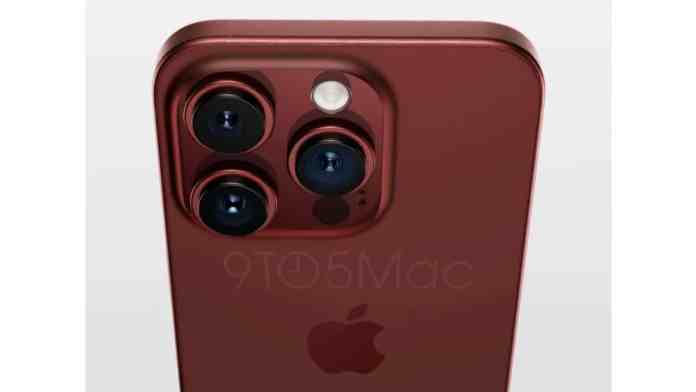
iPhone 15 Camera Specs Leaked: What the Rumors Tell Us

Just a week before the official unveiling, the iPhone 15 camera specs have surfaced online, thanks to a report from MacRumors. The leak details significant improvements across the entire lineup, marking one of the biggest camera overhauls in recent years. From a base model with a 48MP sensor to enhanced telephoto capabilities on the Pro, Apple seems ready to elevate mobile photography once again.

48MP Main Camera for iPhone 15 and 15 Plus

The standard iPhone 15 and iPhone 15 Plus are reportedly ditching the long-standing 12MP primary camera. Instead, they will feature a 48MP main sensor from Sony, though the exact model remains undisclosed. This is a substantial leap forward for the non-Pro models.

As a result, users can expect sharper, more detailed images with better dynamic range. Low-light performance should also see a noticeable boost, thanks to pixel-binning technology that combines multiple pixels into one for brighter shots. This move brings the base models closer to the Pro lineup in terms of raw camera hardware.

For those who love capturing everyday moments, this upgrade means clearer photos even in challenging lighting conditions. It’s a welcome change that bridges the gap between standard and premium iPhones.

Dynamic Island Expands Across the iPhone 15 Series

Another key takeaway from the iPhone 15 camera specs leak is the integration of Dynamic Island across all models. Introduced last year on the iPhone 14 Pro, this feature is now standard on the entire iPhone 15 lineup. It replaces the traditional notch, offering a more interactive way to manage notifications, music, and live activities.

This change not only modernises the design but also enhances the user experience. For photographers, Dynamic Island can display camera controls or status indicators without cluttering the screen. It’s a subtle yet meaningful improvement that complements the camera upgrades.

iPhone 15 Pro: Advanced Camera Hardware

The iPhone 15 Pro takes things further with a refined camera system. According to the leak, it retains the 48MP main camera but uses the Sony IMX803 sensor, which is known for its excellent light capture and colour accuracy. This sensor is paired with an upgraded 12.7MP telephoto lens and a 13.4MP ultra-wide lens.

While these numbers might seem like small increments, they translate to tangible benefits. The telephoto lens, for instance, will offer better optical zoom capabilities, allowing users to get closer to subjects without losing detail. The ultra-wide lens, meanwhile, promises wider, more immersive landscapes with reduced distortion.

Building on this, the Pro model is also expected to support improved computational photography features. This includes enhanced Smart HDR, better portrait mode with depth control, and potentially even ProRes video recording at higher resolutions. For content creators, these upgrades could make the iPhone 15 Pro a powerful tool for on-the-go production.

What These Leaks Mean for Photography Enthusiasts

The iPhone 15 camera specs suggest that Apple is prioritising versatility and quality across all price points. The shift to 48MP on standard models democratises high-resolution photography, while the Pro refinements cater to professionals and hobbyists alike.

However, it’s worth noting that leaks should always be taken with a pinch of salt. Until Apple makes the official announcement, these details remain speculative. That said, the consistency of these rumours across multiple sources lends them credibility.

If you’re considering an upgrade, the iPhone 15 series looks set to offer compelling reasons—especially for those who value camera performance. For more insights, check out our guide on the best camera phones of 2024 or learn how to transfer photos from iPhone to PC efficiently.

Final Thoughts on the iPhone 15 Camera Leak

As the launch date approaches, anticipation continues to build. The leaked iPhone 15 camera specs paint a picture of a device that’s serious about photography. From the 48MP sensor to the Dynamic Island integration, every change seems designed to enhance the user experience.

What are your thoughts on these leaks? Are you excited about the camera upgrades, or do you feel they’re incremental? Share your opinions in the comments below. Stay tuned for more updates as we get closer to the official reveal.

Continue Reading
Click to comment

Leave a Reply

Your email address will not be published. Required fields are marked *

How To

Auto Clicker App: How to Automate Repetitive Tasks on Your Android Device

Published

on

Auto Clicker App: How to Automate Repetitive Tasks on Your Android Device

Are you tired of performing the same taps over and over on your Android phone? The auto clicker app is a powerful Android automation software that handles repetitive touches and keystrokes for you. It simulates mouse clicks on your screen, making it ideal for personal projects, research, or gaming. In this guide, we explore how this automatic tap app works and how to use it effectively.

What Is the Auto Clicker App?

The Auto clicker – automatic tap app is designed to automate repetitive tasks on Android devices. It allows you to perform repeated taps at specific locations with a time interval you set. Importantly, it does not require root access, keeping your device secure.

This Android automation software includes a floating control panel, so you can start or stop the automatic taps easily. Whether you need to automate taps in games or other apps that demand constant input, this tool simplifies the process.

Key Features of the Auto Clicker – Automatic Tap App

This auto clicker app comes with a user-friendly interface and clear labels for all functions. It supports multiple tapping targets, swipes, and high customization levels. You can set tap frequency in hours, minutes, seconds, or even milliseconds.

Smart Click and Automation Options

The app includes smart click features that automate commands from recorded actions. It also has a global timer to run for a specific duration. Additionally, you can import and export scripts to save your settings.

Another practical aspect: the automatic clicks stop if you lock the screen or receive a call. This prevents accidental actions during important moments.

How to Use the Auto Clicker App for Android Automation

To start using this automatic tap app, download and install it from the Google Play Store. The app will ask for necessary permissions, including Accessibility Service API access, which is used to implement core features.

After granting permissions, you can set up your tap targets and intervals. The floating panel lets you control the automation on the fly. The required operating system is Android 7.0 and up.

For more tips on improving your device experience, check out our guide on How to auto-reply to anyone with your WhatsApp.

Why Choose This Auto Clicker App for Repetitive Tasks?

This Android automation software stands out because of its simplicity and depth. It does not require root access, and its interface is accessible for beginners. The app also supports multiple gestures and scripts, making it versatile for various use cases.

Furthermore, the auto clicker app is lightweight and works without draining your battery excessively. It is a reliable tool for anyone looking to automate repetitive tasks on their Android device.

If you are interested in other automation tools, read our article on Call Recorder – Automatic Call Recorder: The Best Android App.

Tips for Effective Use

Start with simple tap sequences to test the app. Use the global timer to limit automation sessions. Always check permissions to ensure your data remains safe.

In conclusion, the auto clicker app is a practical solution for automating repetitive tasks on Android. Its combination of features, ease of use, and no-root requirement makes it a valuable addition to your toolkit.

Continue Reading

How To

Motorola Edge 50 Ultra Discounts Make It the Ideal Holiday Gift

Published

on

Motorola Edge 50 Ultra Discounts Make It the Ideal Holiday Gift

Searching for a standout present this wedding or holiday season? A premium smartphone often tops the list, and the Motorola Edge 50 Ultra discount currently available on Flipkart makes this device an unbeatable option. With flagship-tier features now at a significantly lower price, it is a gift that combines style, power, and value.

Unbeatable Motorola Edge 50 Ultra Price During Flipkart Sale

The biggest draw is the dramatic price cut. Originally launched at ₹64,999 for the 12GB RAM and 512GB storage variant, the Motorola Edge 50 Ultra is now listed at just ₹49,999 during the Flipkart Big Shopping Days event. That represents a massive 23% saving.

But the savings do not stop there. Buyers using Axis Bank credit or debit cards can claim an additional ₹1,000 discount. Meanwhile, Flipkart credit card holders are eligible for a 5% cashback on the transaction. For those who prefer spreading the cost, EMI options start from as low as ₹5,556 per month. It is important to note, however, that no exchange offers are being applied to this particular deal.

Display and Performance: A Flagship Experience

This device is not just about the price tag. The Motorola Edge 50 Ultra features a stunning 6.7-inch HD+ LCD display. With a smooth 144Hz refresh rate and a sharp resolution of 1220×2712 pixels, scrolling and gaming feel incredibly fluid. The screen is protected by Gorilla Glass and reaches an impressive peak brightness of 2500 nits, making it easy to use even under direct sunlight.

Under the hood, the phone is powered by the Snapdragon 8s Gen 3 chipset. This processor handles demanding apps and multitasking with ease. Paired with 12GB of RAM and 512GB of internal storage, users will have plenty of space for apps, photos, and videos without worrying about slowdowns.

Camera, Durability, and Battery Life

Photography enthusiasts will appreciate the versatile camera setup. The rear houses a 50MP primary sensor with an LED flash, while the front also features a 50MP camera for high-quality selfies and video calls. The phone also boasts an IP68 rating, meaning it is fully protected against dust and water immersion, adding a layer of durability for everyday use.

Battery life is another strong point. The device packs a 4500mAh battery that supports a blistering 125W fast charging technology. This means you can top up the battery from zero to full in a remarkably short time, ensuring the phone is always ready to go.

Why This Is the Perfect Gift

Given the combination of a premium design, top-tier performance, and a significant Motorola Edge 50 Ultra discount, this smartphone offers exceptional value. It is an ideal choice for anyone looking for a powerful device without paying the full flagship price. Whether it is for a wedding, a birthday, or a holiday celebration, the Edge 50 Ultra delivers a complete package.

For more great deals, check out our guide on the best smartphone deals on Flipkart and Amazon. You can also explore other options like the Realme P1 Speed 5G if you are considering alternatives.

Final Verdict on the Motorola Edge 50 Ultra Deal

In summary, the current sale on Flipkart makes the Motorola Edge 50 Ultra one of the most compelling smartphone purchases of the season. The ₹15,000 price cut, combined with extra card discounts, brings flagship features within reach of a much wider audience. If you are in the market for a high-performance gift that looks and feels premium, this deal is hard to beat.

Continue Reading

How To

Truecaller Launches AI Assistant to Answer Calls and Avoid Spam

Published

on

Truecaller AI Assistant: Your New Ally Against Spam Calls

In a world where unwanted calls interrupt our daily flow, Truecaller AI Assistant arrives as a welcome solution. Launched recently in India, this smart feature redefines how you handle incoming calls. Instead of screening each ring yourself, the assistant uses artificial intelligence to answer, filter, or reject calls on your behalf. For anyone tired of spam or simply too busy to pick up, this tool promises a calmer, more productive phone experience.

What Is the Truecaller AI Assistant?

The Truecaller AI Assistant is an intelligent call-answering system built directly into the popular Truecaller app. It acts like a virtual secretary, deciding which calls deserve your attention and which ones should be blocked. By analyzing caller identity and context in real time, the assistant automatically rejects spam or suspicious numbers. This means you never have to waste a second on telemarketers or scam callers again.

Building on Truecaller’s trusted Truecaller platform, the assistant integrates seamlessly with the existing caller ID database. As a result, it becomes even smarter at identifying who is calling and why. Whether it is a client, a family member, or a robocall, the AI makes the right call.

How the AI Call Assistant Works

When an incoming call arrives, the Truecaller AI Assistant springs into action. It uses advanced algorithms to check the number against millions of known spam and legitimate contacts. If the call appears safe, the assistant can answer politely and even take a message. If it detects spam, it hangs up instantly. All of this happens in seconds, without you lifting a finger.

One key advantage is that the entire process runs locally on your device. No data is sent to external servers, which keeps your conversations private. This on-device processing also means the assistant works offline, making it reliable even without an internet connection. For users concerned about privacy, this is a major plus.

Privacy and Customization: You Stay in Control

Privacy lies at the heart of the Truecaller AI Assistant. The AI never stores or transmits your call data to the cloud. Everything stays on your phone, so sensitive information remains secure. This approach aligns with growing demands for data protection in mobile apps.

Moreover, the assistant offers customizable settings. You can decide which contacts the AI should answer automatically, which ones to block, and when to let calls ring through. For instance, you might set it to reject all unknown numbers during work hours but allow family calls. This level of personalization ensures the tool adapts to your lifestyle, not the other way around.

Boosting Productivity with Smart Call Management

For professionals, entrepreneurs, and anyone juggling a busy schedule, the Truecaller AI Assistant is a productivity booster. By handling routine calls, it frees you to focus on important tasks. During meetings, you can let the assistant take messages without distraction. Afterward, you can review who called and decide whether to call back.

Similarly, the assistant integrates with Truecaller’s caller ID to provide rich context. You see not just the number but also the caller’s name, location, and even social profiles. Armed with this information, the AI makes smarter decisions. The result is fewer interruptions and more meaningful conversations.

To get the most out of this tool, pair it with other Truecaller tips and tricks for optimal call management.

Why India Is the First Market

India faces a massive spam call problem, with millions of unwanted calls daily. That is why Truecaller chose the country for its initial launch. The AI assistant directly addresses this pain point, offering a practical solution. Given Truecaller’s massive user base in India, the feature is expected to gain rapid adoption.

As the assistant learns from user behavior, it will only get better at distinguishing between important calls and junk. Over time, this could set a new standard for how smartphones handle incoming calls globally.

The Future of Call Answering

The Truecaller AI Assistant marks a shift from reactive call screening to proactive call management. Instead of waiting to see who called, you now have an AI that acts on your behalf. This innovation could pave the way for more intelligent communication tools in the future.

For now, users in India can download or update the Truecaller app to try the assistant. If you are tired of spam and value your time, this feature is worth exploring. It might just change how you think about answering the phone.

Learn more about AI-powered voice assistants and how they are transforming daily tasks.

Continue Reading

Trending