iPhone 15 Pro Action Button: The Customizable Side Switch Explained
For sixteen years, the physical mute switch was a signature iPhone feature. With the iPhone 15 Pro and Pro Max, Apple has replaced it with something more versatile. The new Action Button isn’t just for silencing your phone—it’s a gateway to shortcuts, tools, and personalized controls.
This small hardware change represents a significant shift in how we interact with our devices. Gone is the simple mechanical toggle. In its place sits a programmable, multifunction key that adapts to your needs.
What Exactly Is the Action Button?
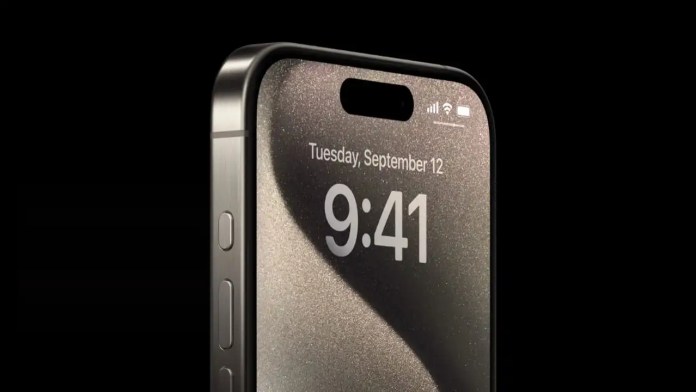
The Action Button occupies the same spot on the left side where the ring/silent switch used to live. It’s a solid-state button, meaning it doesn’t physically move like the old switch. Instead, it provides haptic feedback when pressed.
Visually, it blends seamlessly with the phone’s titanium frame, colored to match your specific iPhone 15 Pro model. The design is subtle but intentional—a clean, flush button that maintains the phone’s elegant lines.
Apple first introduced this concept on the Apple Watch Ultra, where a bright orange button offered quick access to workouts and other functions. Bringing it to the iPhone was a logical next step, transforming a single-purpose switch into a multipurpose tool.
Core Functionality and Daily Use
At its most basic, the Action Button handles the familiar mute function. A long press toggles between ring and silent modes. You’ll feel a satisfying haptic tap and see a visual confirmation in the Dynamic Island—a small mute icon or sound waves appear briefly.
This maintains the muscle memory many users developed over years of iPhone ownership. You can still silence your phone without looking at it, relying on touch and feedback rather than a physical slider.
But the real magic happens when you explore beyond the default setting. Apple has built in several predefined actions you can assign with just a few taps in Settings.
Built-In Action Options
The Action Button can become your quick-launch tool for numerous functions. Need to capture a spontaneous moment? Set it to open the Camera app instantly. Walking in the dark? Make it toggle your flashlight.
Other built-in options include launching Voice Memos for quick recording, activating the Magnifier tool for reading small text, or starting a translation session. You can even toggle Focus modes, helping you shift between work and personal contexts faster.
Two options offer particularly powerful customization: Accessibility features and Shortcuts. The first provides quick access to tools like VoiceOver, AssistiveTouch, or color filters. The second unlocks nearly limitless possibilities through Apple’s Shortcuts app.
Unlocking Advanced Customization
Assigning the Shortcuts function to your Action Button is where things get interesting. This connects the physical button to Apple’s automation platform, letting you create complex sequences triggered by a single press.
Want to start a specific playlist, send a pre-written message to your partner, and turn on Do Not Disturb all at once? Create a shortcut for that. Need to log your morning coffee order or start a home automation routine? The button can handle it.
Third-party apps don’t need direct access to the hardware. Instead, developers can create rich shortcuts that users assign to the button. This could mean opening your favorite note-taking app directly to a new page, or launching a navigation app with your home address pre-loaded.
The potential is constrained only by what you can build in Shortcuts—and that’s quite a lot. From simple app launches to multi-step automations involving data, calculations, and connected devices, the Action Button becomes your personal command center.
A Subtle But Significant Evolution
Some will miss the tactile click of the traditional switch. That’s understandable—it was a defining iPhone characteristic. Apple acknowledges this by keeping the physical switch on the standard iPhone 15 models.
For Pro users, however, the trade-off brings greater functionality. The Action Button represents Apple’s continued push toward context-aware, personalized interaction. It’s a hardware feature designed to become more useful the more you tailor it to your life.
The iPhone 15 Pro and Pro Max, complete with their new customizable button, became available for pre-order on September 15, 2023, with in-store availability starting September 22. This small change on the phone’s side might just change how you use your iPhone every day.











 CyberSecurity2 weeks ago
 CyberSecurity2 weeks ago
 How To2 days ago
 CyberSecurity2 weeks ago
 CyberSecurity2 weeks ago