Connect with us

How To

Airtel Xstream Fiber Lite Plan Launches: India’s Most Affordable Broadband at Rs 219

Published

on

Airtel’s New Budget Broadband: The Xstream Fiber Lite Plan

Bharti Airtel has quietly rolled out a new entry point for home internet. The Airtel Xstream Fiber broadband Lite plan, priced at just Rs 219 per month, now stands as the company’s most affordable offering. This move directly targets budget-conscious users and appears to be a strategic response to competitive pressures in the market.

What do you get for that price? The plan promises unlimited data with speeds capped at 10 Mbps. Airtel also throws in a free router, eliminating the upfront hardware cost that often deters new subscribers. It’s a bare-bones package designed for basic browsing, messaging, and standard-definition video streaming.

Key Details and Regional Availability

There’s a significant catch, however. This enticing offer isn’t available nationwide. Currently, the Airtel Xstream Fiber Lite plan is live in only three telecom circles: Bihar, Andhra Pradesh, and Uttar Pradesh. Airtel has not provided a timeline for a broader pan-India rollout, leaving customers in other states waiting.

The subscription model is another point to consider. You can’t opt for a flexible monthly payment. The plan is sold exclusively as an annual subscription, requiring a one-time payment of Rs 3,101 for the full year. This locks users in for twelve months, which could be a drawback for those needing short-term or temporary connectivity.

Industry observers suggest this plan could serve as a reliable backup internet connection for homes or small businesses. In areas with frequent power outages or unstable primary connections, having a low-cost secondary line can be a lifesaver.

How It Stacks Up Against the Competition

Airtel’s launch follows Reliance Jio’s introduction of its own budget-friendly Jio Fiber Backup plan at Rs 198. The competitive landscape for affordable broadband is heating up. Jio’s offering also provides 10 Mbps speeds and includes landline calling benefits.

For users willing to pay more, Jio allows speed upgrades to 30 Mbps or 100 Mbps with added OTT subscriptions and live TV channels. Airtel’s strategy with the Lite plan seems focused on capturing the absolute bottom of the market, offering a no-frills alternative.

Beyond the Lite Plan: Airtel’s Broader Fiber Portfolio

The Rs 219 plan is just the entry point to Airtel’s Xstream Fiber ecosystem. The company offers several tiered plans with progressively more features. Plans start at Rs 499 and go up to Rs 3,999 per month.

These higher-tier plans unlock significant benefits. Subscribers get access to the Xstream Premium content pack, which bundles subscriptions to Disney+ Hotstar, Amazon Prime, and Netflix. Internet speeds also scale dramatically, reaching up to 1 Gbps on the top-tier plans, catering to heavy-duty gaming, 4K streaming, and large household usage.

The new Lite plan fills a specific gap. It’s for the user who values basic, always-on connectivity over high speeds or entertainment bundles. It represents a democratization of fiber broadband, making the infrastructure accessible to a wider economic segment.

Choosing between Airtel’s Lite plan and Jio’s Backup plan ultimately depends on individual needs, local network quality, and whether the annual commitment works for you. For users in the three available states, it presents a compelling new option for affordable internet access.

Continue Reading
Click to comment

Leave a Reply

Your email address will not be published. Required fields are marked *

How To

How to Turn Off Voicemail on Android: 9 Working Methods for 2025

Published

on

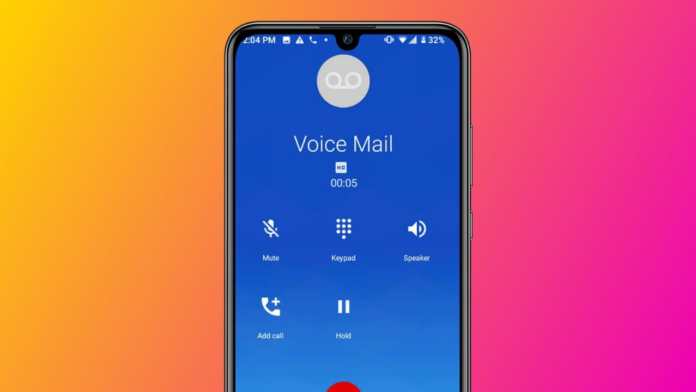
How to Turn Off Voicemail on Android: 9 Working Methods for 2025

Ever missed a call only to find your voicemail box clogged with messages you’ll never listen to? You’re not alone. Many Android users find the traditional voicemail system outdated and intrusive. The frustration is real when you realize Android doesn’t have a simple “disable voicemail” toggle in settings.

Why would someone want to turn it off? Maybe you prefer text messages. Perhaps you’re tired of telemarketers filling your inbox. Or maybe you just want callers to try again later instead of leaving a message. Whatever your reason, disabling voicemail requires some workaround thinking.

Here’s the reality: voicemail isn’t really an Android feature—it’s a service provided by your mobile carrier. That’s why you can’t simply switch it off in your phone settings. But don’t worry, there are several effective methods to achieve the same result.

The Most Reliable Method: Contact Your Carrier

This is your best shot at a permanent solution. Since carriers control the voicemail service, they’re the only ones who can truly disable it at the network level. The process is straightforward but requires a bit of patience.

Grab your phone and open the dialer. Call your carrier’s customer service number—for Indian users, that’s 198 for Jio, 121 for Airtel, 199 for Vi, or 1503 for BSNL. Navigate through the automated menu until you reach a live representative.

Be clear about your request: “I’d like to permanently disable voicemail service on my number.” Some carriers might push back, citing “essential service” policies. If you encounter resistance, try calling again later—you might get a more accommodating agent. Remember to ask for a confirmation once the change is processed.

Technical Workarounds That Often Work

If your carrier won’t cooperate, these technical approaches can effectively block voicemail functionality.

Disable Call Forwarding Settings

Voicemail works through call forwarding—when you don’t answer, your carrier forwards the call to their voicemail server. Break that chain, and you break voicemail.

Open your Phone app and tap the three-dot menu. Select Settings, then look for “Call forwarding” or “Supplementary services.” You’ll typically find three options: “Forward when busy,” “Forward when unanswered,” and “Forward when unreachable.” Disable all three. Some phones have a handy “Disable all call forwarding” button—use it if available.

Not every Android device shows these options in the same place. Manufacturers like Samsung, Xiaomi, and OnePlus sometimes bury them under “Advanced calling” or “SIM card settings.” If you can’t find them, don’t worry—there are other approaches.

Use Special Carrier Codes

Remember the old days of dialing *# codes to check your balance? Similar codes exist for call forwarding. Try dialing ##002# and pressing call. This should disable all conditional call forwarding, including voicemail forwarding.

Another code to attempt is ##004#. Wait for a confirmation message after dialing. Then test it by calling your own number from another phone—let it ring until it should go to voicemail. If you hear a continuous ring or get disconnected instead of the voicemail greeting, you’ve succeeded.

A word of caution: these codes don’t work with all carriers or in all regions. They’re worth trying but aren’t guaranteed solutions.

Creative Solutions When Technical Ones Fail

Sometimes you need to think outside the settings menu. These creative approaches can effectively make voicemail unusable without actually disabling it.

Fill Your Voicemail Box to Capacity

This is a clever hack that takes advantage of system limitations. Most carriers allocate limited storage for voicemails—usually 20 to 30 messages. Fill that space, and new callers can’t leave messages.

Here’s how to do it: First, enable Airplane Mode on your Android device. This ensures any test calls will immediately go to voicemail. Using another phone, call your own number repeatedly. Each time you reach voicemail, leave a short message (even a second of silence works). Repeat this 25-30 times.

Eventually, callers will hear “The mailbox is full” instead of the greeting. The drawback? Most carriers automatically delete old messages after 30 days, so you’ll need to repeat this process monthly.

Redirect Calls Elsewhere

If you can’t stop calls from forwarding to voicemail, forward them somewhere else instead. In your call forwarding settings, enable “Always forward” and enter a different number—perhaps a landline you rarely use, or a secondary mobile that doesn’t have voicemail set up.

All incoming calls will route to that number. If that destination doesn’t have voicemail enabled, problem solved. Just be aware that you’ll need access to that other phone to receive any calls.

Third-Party Apps and Psychological Tricks

When system-level changes aren’t possible, apps and psychology can come to your rescue.

Voicemail-Blocking Applications

The Google Play Store hosts several apps designed to manage or block voicemail. “No More Voicemail” works by forwarding calls to a disconnected or non-working number, effectively creating a dead end. “YouMail” offers more sophisticated call management, including voicemail blocking and visual voicemail alternatives.

Download one of these apps, follow the setup instructions, and test if it works with your carrier. Compatibility varies, so you might need to try a few options. These apps don’t actually disable voicemail at the carrier level—they just intercept calls before they reach it.

The Fake Greeting Strategy

Can’t disable the mailbox? Change what callers hear when they reach it. Record a new voicemail greeting that says “This number does not accept voice messages. Please send a text instead” or “The person you’re calling is not available. Please try your call again later.”

Most people will hang up upon hearing this, assuming voicemail is disabled. It’s not a technical solution, but it’s remarkably effective at reducing unwanted messages. Access your voicemail settings through your Phone app or a dedicated Voicemail app to change your greeting.

Alternative Approaches for Specific Situations

Sometimes you don’t need to disable voicemail entirely—just manage it better.

Enable Do Not Disturb mode when you don’t want to be interrupted. Customize it to allow calls from important contacts while silencing others. Calls from blocked numbers won’t go to voicemail either—use your phone’s blocking feature for persistent telemarketers.

Consider whether you really need to disable voicemail completely. For many people, simply changing notification settings or regularly clearing old messages solves the annoyance. But if you’re determined to shut it down permanently, contacting your carrier remains the most reliable method.

Choosing Your Best Approach

Different methods work for different people. If you want a permanent, clean solution, start with your carrier. For a quick technical fix, try disabling call forwarding or using special codes. Need something temporary? Fill your voicemail box. Prefer an app-based solution? Explore the Play Store options.

The truth is, Android’s flexibility means there’s usually a way to achieve what you want—even when there’s no official setting for it. Try these methods in order of preference, and you’ll likely find one that makes those unwanted “You have a new voicemail” notifications a thing of the past.

Continue Reading

How To

Vivo X Fold 5 Specs Leak: Big Battery, Snapdragon 8 Gen 3, and Triple 50MP Cameras

Published

on

Vivo X Fold 5: The Leaked Details

Foldable phones are about to get a serious power upgrade. A wave of leaks has painted a detailed picture of Vivo’s upcoming flagship, the X Fold 5. Skipping the number four entirely—a nod to cultural superstitions in China—Vivo appears ready to launch a device packed with headline-grabbing specs aimed squarely at the premium market.

What can you expect? Think a colossal battery, a top-tier processor, and a camera system that doesn’t compromise. This isn’t just an incremental update; it’s a statement of intent for the foldable segment.

Display and Design: Slimmer, Sleeker, Smoother

Foldables often face a trade-off between screen size and portability. The X Fold 5 seems determined to break that mold. When unfolded, you get a spacious 8.03-inch AMOLED inner display with a crisp 2K resolution. It promises buttery-smooth visuals thanks to a 120Hz refresh rate, perfect for immersive gaming or movie marathons.

Need to use it one-handed? The 6.53-inch outer cover screen, also a 120Hz LTPO OLED panel, provides a premium smartphone experience without unfolding. The real engineering feat is in the dimensions. Unfolded, it’s whisper-thin at just 4.3mm. Folded, it measures a still-manageable 9.3mm. This suggests a device that’s powerful without being a brick in your pocket.

Powerhouse Performance and Battery Life

Under the hood, the Vivo X Fold 5 is rumored to run on the Qualcomm Snapdragon 8 Gen 3 processor. This is the same chip powering many of 2024’s top-tier flagship phones, ensuring blistering speed for everything from multitasking to graphics-intensive games. It’s expected to be paired with a generous 16GB of RAM and 512GB of storage, leaving plenty of room for apps, photos, and 4K video.

But the standout feature might be the battery. Leaks point to a massive 6000mAh capacity, which would be one of the largest ever seen in a foldable phone. Pair that with 90W wired fast charging and 30W wireless charging, and you have a device built to last through the busiest days without constantly hunting for an outlet.

Camera System and Key Features

Vivo isn’t cutting corners on photography. The rear camera array is said to feature a triple 50MP setup. The primary sensor is tipped to be a Sony IMX921, joined by a 50MP ultra-wide lens with autofocus and a 50MP Sony IMX882 telephoto lens offering 3x optical zoom. This configuration promises versatility, from expansive landscapes to detailed portraits.

For selfies and video calls, you get dual 32MP cameras—one on the outer cover display and one on the inner folding screen. Other practical features include a side-mounted fingerprint scanner for quick unlocking and a three-stage alert slider for instantly managing notifications. While an IP rating for water resistance is confirmed, the exact level remains a mystery for now.

Reports also indicate Vivo will launch only a standard X Fold 5 model this cycle, with no Pro variant planned. For Indian consumers and foldable enthusiasts globally, the wait for an official announcement may soon be over. Based on these leaks, Vivo is crafting a device that aims to be both a technological powerhouse and a genuinely practical daily driver.

Continue Reading

How To

WhatsApp’s 3 Major Call Upgrades: Screen Sharing, 32-Person Calls & Better Audio

Published

on

WhatsApp is Supercharging Your Calls

Think about your last important WhatsApp call. Was the audio crackly? Did you wish you could show someone your screen? For millions, WhatsApp calls are a daily lifeline to family, friends, and colleagues. Now, Meta is addressing those pain points head-on with a substantial upgrade. The platform is set to release three powerful new features designed to make your audio and video calls clearer, more collaborative, and capable of handling bigger groups. This isn’t just a minor tweak—it’s a deliberate move to make WhatsApp a serious contender for all your communication needs.

1. Share Your Screen, Complete with Sound

Remember scrambling to explain something over a call, wishing you could just show the other person your phone? That frustration is about to end. WhatsApp is introducing full screen sharing, a feature previously reserved for beta testers. During any video or audio call, you’ll find a new button to broadcast your mobile or desktop screen to everyone on the call.

This has immediate, practical uses. Helping a parent navigate a new app becomes a visual walkthrough. Collaborating on a document with a teammate turns into a live editing session. The killer feature? It shares system audio. Play a video, a song, or a presentation, and the sound transmits directly through the call. Suddenly, impromptu watch parties or remote troubleshooting just got a whole lot easier.

Beyond Personal Use

While perfect for personal moments, this feature blurs the line into professional territory. Small teams can now hold quick stand-up meetings or review designs without switching to another app. Educators can conduct mini-tutorials. The need for a separate conferencing app like Zoom for simple tasks is rapidly diminishing.

2. The Party Just Got Bigger: Calls for 32

WhatsApp’s previous eight-person call limit often felt restrictive. Planning a virtual family gathering? A brainstorming session with a medium-sized team? You’d quickly hit a wall. That wall has been demolished. WhatsApp now supports voice and video calls with up to 32 participants.

This expansion is a game-changer for community groups, extended families, and small businesses. Hosting a virtual book club, coordinating a volunteer group, or conducting a team check-in can all happen within the familiar WhatsApp interface. To manage the potential chaos, WhatsApp will visually highlight the current speaker, making it easier to follow conversations in a crowded virtual room.

3. Crystal Clear Calls, Even on Spotty Networks

We’ve all been there. You’re in the middle of an important conversation when the audio cuts in and out, becoming robotic and unintelligible. Network fluctuations have long been the Achilles’ heel of VoIP calls. WhatsApp’s engineers have been working on a solution.

The upcoming update will integrate a new audio codec called MLow. In simple terms, this technology is smarter at handling imperfect internet conditions. It prioritizes voice clarity, actively suppresses background noise and echo, and optimizes bandwidth use. The result? More stable, intelligible calls even when your signal isn’t perfect. Pair this with a strong connection, and you should experience a noticeable jump in overall call quality, making those long-distance chats feel much closer.

When Can You Get These Features?

Mark your calendar. These three features are slated for a global rollout starting in the third week of June. They won’t magically appear; you’ll need to update your WhatsApp application through your device’s app store. It’s always a good idea to enable automatic updates or manually check for the latest version to access the improvements immediately.

What does this mean for you? WhatsApp is no longer just a texting app with call capabilities. With screen sharing, large group calls, and enhanced audio, it’s positioning itself as a unified communications hub. Whether you’re planning a movie night with a friend, leading a project team, or catching up with your entire family abroad, your go-to app just became significantly more powerful. The distance between people, it seems, is about to get a little smaller.

Continue Reading

Trending