Connect with us

How To

How to Send Photos Without Losing Quality on WhatsApp: The 2025 Complete Guide

Published

on

How to Send Photos Without Losing Quality on WhatsApp: The 2025 Complete Guide
Have you ever shared a stunning photo on WhatsApp only to see it arrive looking pixelated and dull? You are not alone. WhatsApp compresses images by default to save bandwidth and storage. However, there is a reliable workaround that lets you send photos without losing quality on both Android and iPhone. In this guide, we will walk you through the simple method that bypasses compression entirely.

Why Does WhatsApp Compress Your Photos?

WhatsApp is designed for speed and efficiency. When you send a photo using the standard attachment icon, the app automatically reduces its resolution and file size. This process, known as compression, ensures quick delivery even on slower networks. But the trade-off is clear: you lose fine details, especially in high-resolution images.

Fortunately, the developers included a hidden feature—the document-sharing option—that treats your image as a file rather than a media item. This is the key to maintaining original quality.

The Only Method That Works: Send as a Document

To send photos without losing quality, you must use the document attachment feature. This trick works identically on Android and iOS. Follow these steps carefully:

Step-by-Step Instructions for Android and iPhone

  1. Open the WhatsApp chat with the person or group you want to send the photo to.
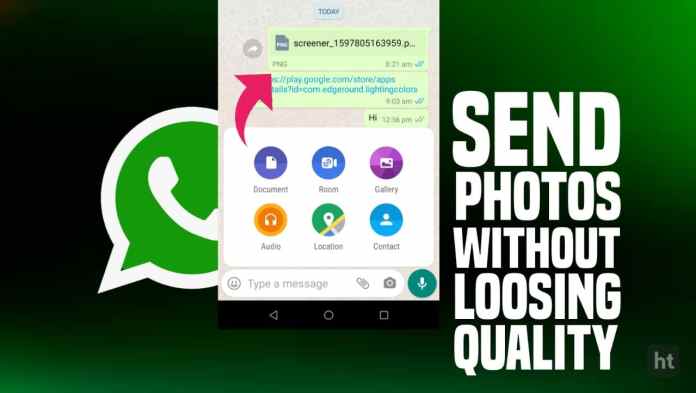
  2. Tap the attachment icon (paperclip) located in the text input area.
  3. Select Document from the menu that appears.
  4. On Android, choose Browse other docs; on iPhone, tap Choose Document or navigate to your photo library.
  5. Locate and select the image you want to share. It will appear as a file preview, not a thumbnail.
  6. Tap the Send button. The recipient will receive the photo as a downloadable file, preserving its original resolution and metadata.

That is all there is to it. The recipient can then save the image to their device without any quality loss. This method works for JPEG, PNG, and even RAW files if your phone supports them.

Alternative Approach: Change the File Extension

Another clever trick involves renaming the image file. By changing the extension from .jpg to .pdf (or another format), WhatsApp treats it as a document. However, this requires a file manager app and is less convenient than the direct document method. For most users, the document attachment route is far simpler.

For more WhatsApp tips, check out our guide on how to hide WhatsApp blue ticks.

What About Sending Videos?

The same principle applies to videos. If you want to send photos without losing quality and also keep your video clips crisp, use the document option for video files as well. WhatsApp will not compress the video, so the recipient gets the original file size and resolution.

Frequently Asked Questions

Does this method work for group chats?

Yes, absolutely. You can use the document trick in any WhatsApp conversation, including groups. The photo will be sent as a file to all participants.

Will the recipient need a special app to open the file?

No. WhatsApp displays the file with a preview icon, and tapping it opens the image in the device’s default photo viewer or file manager. It works seamlessly.

Is there any limit on file size?

WhatsApp allows documents up to 2GB in size. This is more than enough for even the highest-resolution photos.

Final Thoughts

Sharing high-quality images on WhatsApp does not have to be a compromise. By using the document attachment method, you can send photos without losing quality every time. This simple trick ensures your memories stay sharp, whether you are sharing holiday snaps, professional work, or family portraits.

Have you tried this method? Let us know in the comments below. And if you found this helpful, share it with your friends on social media. For more WhatsApp secrets, explore our complete guide to downloading WhatsApp status.

Continue Reading
Click to comment

Leave a Reply

Your email address will not be published. Required fields are marked *

How To

JioBook 2 Launch: What to Expect from Jio’s Affordable Laptop

Published

on

JioBook 2 Launch: A New Chapter in Affordable Computing

Reliance Jio is gearing up to expand its hardware lineup with the upcoming JioBook 2 launch. Following the positive reception of the original JioBook, which brought 4G connectivity to budget laptops in India, the second-generation model aims to raise the bar. Set to be unveiled on July 31, the device is generating considerable buzz among students, professionals, and tech enthusiasts. But what exactly does Jio have in store this time around?

Lightweight Design and Portability

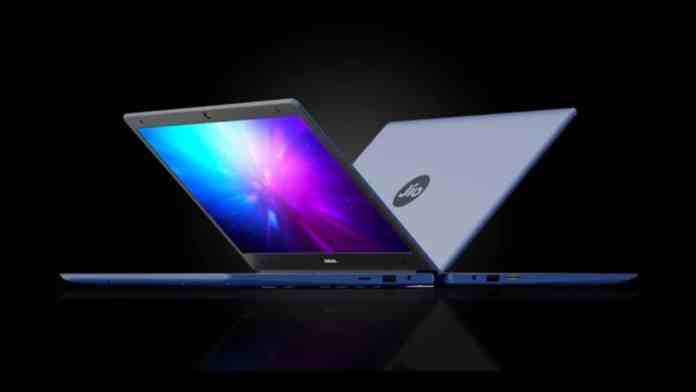
One of the most striking upgrades in the JioBook 2 launch is its reduced weight. The new laptop tips the scales at just 990 grams, making it significantly lighter than its predecessor, which weighed 1.2 kilograms. This fan-less design not only contributes to the slim profile but also ensures silent operation.

The device sports a sleek blue finish with a minimalist aesthetic. Only the Jio branding appears on the lid, giving it a clean, professional look. For users who need a laptop that can slip easily into a backpack, this model is a compelling option.

Display and Visual Experience

While Jio has not yet disclosed full display specifications, early images suggest the JioBook 2 retains noticeable bezels around the screen. This design choice likely helps keep costs down while providing a comfortable viewing area. Users can expect vibrant colors and crisp visuals suitable for both productivity tasks and media consumption.

For students attending online classes or professionals reviewing documents, the display should prove adequate. However, those seeking ultra-thin bezels may need to look elsewhere.

Performance Under the Hood

The JioBook 2 launch confirms the inclusion of an octa-core processor, widely believed to be a Snapdragon chipset. Although official confirmation is pending, this processor promises smooth multitasking and responsive performance. Whether you are browsing the web, streaming video, or working on spreadsheets, the laptop should handle everyday tasks with ease.

Jio may offer multiple RAM and storage configurations, allowing buyers to choose a variant that fits their budget and usage needs. This flexibility is a smart move in the competitive budget laptop segment.

Connectivity: 4G as a Core Feature

Staying true to its roots, the JioBook 2 will support 4G connectivity. This feature remains a key differentiator in the Indian market, where reliable Wi-Fi is not always available. With built-in 4G, users can stay online for virtual classes, remote work, and communication without relying on external hotspots.

This always-on connectivity makes the laptop particularly appealing for students in smaller towns and rural areas. It also reduces the need for dongles or mobile tethering.

JioOS: Android-Based Simplicity

The laptop will run on JioOS, a custom operating system built on Android. This choice offers several advantages. First, users gain access to a vast library of Android apps from the Google Play Store. Second, the interface is designed to be intuitive, making it easy for first-time laptop users to navigate.

JioOS includes pre-installed apps tailored for productivity and entertainment. The system is expected to receive updates that improve stability and introduce new features over time.

Battery Life and Expected Pricing

Jio promises long battery life for the JioBook 2, though exact figures have not been announced. Given the efficient processor and Android-based OS, users can likely expect a full day of moderate use on a single charge.

As for pricing, industry analysts predict the JioBook 2 will follow its predecessor’s strategy and launch at a sub-Rs 20,000 price point. This aggressive pricing could make it one of the most affordable 4G laptops in India. For comparison, the original JioBook was priced around Rs 15,000, so a slight increase is possible given the upgraded hardware.

Check out our guide on best budget laptops in India for more options. Also, read about Jio’s new plans with Jiosaavn Pro subscription.

Conclusion: Is the JioBook 2 Worth Waiting For?

The JioBook 2 launch represents Jio’s continued commitment to affordable, connected computing. With its lightweight design, 4G support, and expected low price, it is well-positioned to attract students and budget-conscious professionals. While it may not compete with premium laptops in raw power, its focus on accessibility and ease of use fills an important gap in the market.

As the launch date approaches, keep an eye out for official specifications and availability details. For anyone seeking a no-frills laptop that keeps them connected, the JioBook 2 could be the answer.

Continue Reading

How To

WhatsApp Arrives on Wear OS Smartwatches: What You Need to Know

Published

on

WhatsApp Arrives on Wear OS Smartwatches: What You Need to Know

For years, smartwatch users have waited for a seamless way to stay connected without reaching for their phones. That wait is finally over. WhatsApp Wear OS integration has officially launched, bringing the world’s most popular messaging app to your wrist. This means you can now read messages, send quick replies, and even record voice notes directly from your Wear OS smartwatch. In this guide, we break down everything you need to know about this update, how to set it up, and why it matters for your daily routine.

Why the WhatsApp Wear OS Integration Matters

Wear OS, Google’s operating system for smartwatches, has steadily improved over the years. However, the lack of native WhatsApp support was a notable gap. With this new update, that gap is closed. The Wear OS smartwatch now acts as a true extension of your smartphone, allowing you to handle messages hands-free.

This is particularly useful for those who are always on the move. Whether you’re driving, cooking, or in a meeting, you can glance at your wrist to see who messaged you. No more fumbling for your phone in your pocket or bag. The integration is designed to be intuitive, keeping you connected without interrupting your flow.

Key Features of WhatsApp on Wear OS

The update isn’t just about receiving notifications. It brings several core features that make the experience genuinely useful.

Real-Time Notifications and Quick Replies

You will receive every WhatsApp notification directly on your watch. More importantly, you can respond instantly. Pre-set quick replies allow you to send common responses like “On my way” or “Call you later” with a single tap. Voice dictation is also supported, letting you dictate longer replies naturally.

Voice Messages and Emoji Access

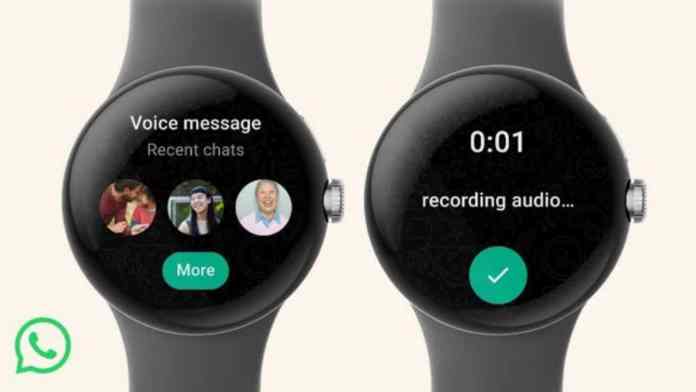
Voice messages have become a staple of WhatsApp communication. On your Wear OS smartwatch, you can record and send voice messages directly. Just tap the microphone icon and speak. Additionally, a full emoji picker is available, so your responses can still be expressive and fun.

Media Sharing Made Simple

Sharing photos or other files is also streamlined. You can quickly send recent photos from your phone’s gallery or even capture a new photo using your watch’s camera remote feature. This makes sharing moments effortless, especially when your phone isn’t in hand.

How to Set Up WhatsApp on Your Wear OS Smartwatch

Setting up the WhatsApp smartwatch setup is straightforward. Follow these steps to get started in minutes.

Step 1: Check Compatibility

First, ensure your smartwatch runs Wear OS 3 or later. Most modern models from Samsung, Google, and Fossil are compatible. Check for any system updates on both your watch and phone.

Step 2: Update Your Apps

Update the WhatsApp app on your smartphone to the latest version. Also, update the Wear OS app on your watch. This ensures all new features are available.

Step 3: Enable Notifications

On your phone, go to Settings > Notifications > WhatsApp. Make sure notifications are enabled. This is crucial for the watch to receive messages.

Step 4: Pair and Sync

Pair your smartwatch with your phone via Bluetooth if you haven’t already. Then, open the Wear OS app on your phone. Navigate to the ‘Apps on your phone’ section and find WhatsApp. Toggle the switch to enable it on your watch.

Step 5: Customise Your Experience

In the Wear OS app, you can choose which WhatsApp notifications appear on your watch. You can select ‘All notifications’, ‘Priority only’, or ‘None’. This helps you stay focused on what matters most.

Practical Tips for Getting the Most Out of WhatsApp on Wear OS

To truly benefit from this integration, consider a few practical tips. First, customise your quick replies in WhatsApp settings to match your most common responses. This saves even more time. Second, use voice dictation for longer messages—it works surprisingly well on most Wear OS devices. Finally, keep your watch charged, as active notifications can drain the battery faster than usual.

For more ways to optimise your messaging experience, check out our guide on how to text an unsaved number on WhatsApp. You might also find our article on WhatsApp’s flash calls feature useful for enhancing account security.

The Bottom Line

The arrival of WhatsApp Wear OS support is a significant step forward for wearable technology. It transforms your smartwatch from a simple notification mirror into an active communication tool. With quick replies, voice messages, and media sharing, staying connected has never been more convenient. If you own a Wear OS smartwatch, this is an update you won’t want to miss. Set it up today and experience the freedom of messaging from your wrist.

Continue Reading

How To

Fire-Boltt Collide Smartwatch Now Available in India: Check Price, Features, and More

Published

on

Fire-Boltt Collide Smartwatch Now Available in India: Check Price, Features, and More

The Indian wearable market has a new contender. The Fire-Boltt Collide smartwatch has officially launched in the country, bringing a fresh design and a host of practical features to budget-conscious buyers. Following the release of the Fire-Boltt Pristine for women, the homegrown brand is now targeting a broader audience with this latest model. It blends a round dial with a square body, creating what the company calls a “quadrangle” metallic frame. This article covers everything you need to know about the Fire-Boltt Collide, including its price, specifications, and availability.

Fire-Boltt Collide Smartwatch: Design and Display

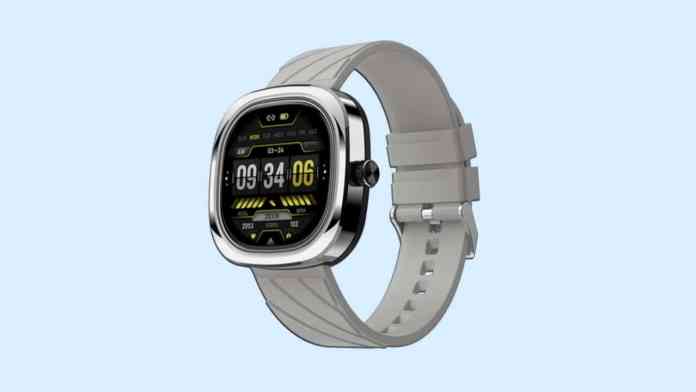
One of the first things you notice about the Fire-Boltt Collide is its unconventional look. The watch features a 1.32-inch HD circular screen housed inside a metallic body that combines round and square elements. According to the co-founders, Asyushi Kishore and Arnav Kishore, this design was intentional — a true testament to the company’s commitment to meeting the needs of all categories of smartwatch lovers.

The display supports 500 nits of peak brightness and offers a resolution of 360×360 pixels. This ensures decent visibility even under direct sunlight. The watch also comes with a rotating crown for easier navigation through menus and apps. Despite its sturdy build, the device maintains a slim profile with a 10.7mm ultra-thin chassis. Buyers can choose from five colour options: Brown, Matte Black, Green, Silver Black, and Grey Black.

Key Specifications and Performance

Connectivity and Calling Features

The Fire-Boltt Collide smartwatch supports Bluetooth 5.2, which offers improved range and lower power consumption. It also includes a 2-in-1 chip designed to enhance connectivity while reducing battery drain. A built-in microphone and speaker setup allow users to make and receive calls directly from their wrist. Additional calling features include a quick dial pad, call history, contact sync, and support for AI voice assistants like Siri.

Battery Life and Durability

Powering the device is a 300 mAh battery. The company claims it can last up to 7 days on a single charge under typical usage. For those concerned about durability, the watch carries an IP68 rating, making it resistant to dust and water. This means it can handle splashes, rain, and brief submersion without issue.

Health and Fitness Tracking

Fitness enthusiasts will appreciate the inclusion of more than 70 sports modes. These cover activities such as walking, running, cycling, and many more. On the health side, the smartwatch offers a heart rate sensor, a SpO2 monitor for blood oxygen levels, and a sleep tracker. These tools help users monitor their wellness throughout the day.

Additional Smart Features

Beyond health and fitness, the Fire-Boltt Collide packs several smart conveniences. Users receive smart notifications for calls, messages, and apps directly on the watch. There are also in-built games, a calculator, music and camera control, and a weather forecast feature. The device supports Find My Phone, alarm clocks, and health reminders to keep you on track. With over 100 customizable watch faces, personalization options are plentiful.

Fire-Boltt Collide Price and Availability in India

The Fire-Boltt Collide smartwatch is priced at an introductory offer of Rs 2,999. This aggressive pricing positions it as a direct competitor to models like the Noise Icon 2 and the boAt Lunar Connect Pro. The watch is available for purchase through Amazon and the official Fire-Boltt website. For those looking for a budget-friendly smartwatch with Bluetooth calling and a unique design, this model presents a compelling option.

Interested buyers should note that stock may vary by platform. As always, checking the latest deals on Amazon can help secure the best price. If you have any questions about the Fire-Boltt Collide, feel free to leave a comment below. Sharing this article with friends on social media also helps others discover this new wearable.

Continue Reading

Trending