Connect with us

How To

Samsung Galaxy S25 Launch Date Leaked: January 22 Event Rumored

Published

on

Samsung Galaxy S25 Launch Date Leaked: January 22 Event Rumored
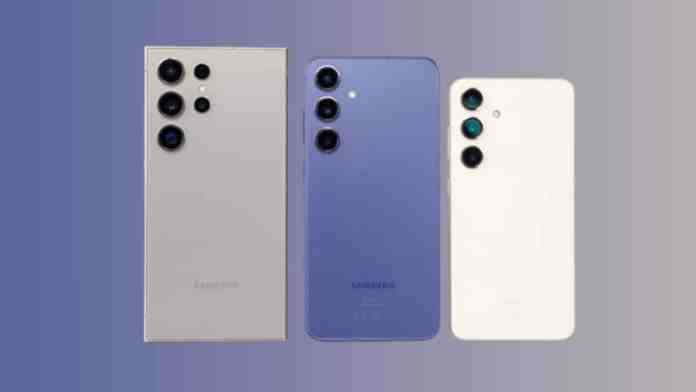
The annual tech calendar has a new potential highlight. According to fresh leaks, Samsung is gearing up to unveil its next-generation flagship smartphones earlier than some might have expected. The Galaxy S25 series appears to be on a fast track to the spotlight.

The Leaked Launch Timeline

Mark your calendars for late January. Prominent tipster Abhishek Yadav has pointed to January 22 as the likely date for Samsung’s official Galaxy S25 series launch event. This timing aligns closely with the company’s recent release patterns.

Last year’s Galaxy S24 series debuted on January 17. A January 22 launch would place the S25 announcement just a few days later, suggesting Samsung is sticking to its early-year flagship strategy. Some whispers even mention January 23 as a possible alternative date, adding credibility to the late-January window.

What happens after the announcement? History suggests a short wait. Samsung typically begins global sales approximately two weeks following the launch event. This means eager customers in key markets, including India, could have their hands on the new devices by early to mid-February.

Meet the Galaxy S25 Lineup

Samsung’s flagship strategy remains consistent. The Galaxy S25 series is expected to comprise three distinct models: the standard Galaxy S25, the larger Galaxy S25+, and the top-tier Galaxy S25 Ultra. This trio caters to different user preferences and budgets.

The Ultra model, as always, is generating the most intense speculation. Early leaks suggest it could be a powerhouse for demanding users. Rumors point to a configuration boasting up to a massive 1TB of internal storage paired with 16GB of RAM. For multitaskers, content creators, and mobile power users, that’s a tantalizing prospect.

Design and Color Choices

Beyond raw power, Samsung seems focused on style. The company is reportedly preparing a vibrant palette for its new phones, with different color stories for the standard and Ultra models.

The Galaxy S25 and S25+ might arrive in a spectrum of eye-catching finishes. Leaked color names include Midnight Black, Sparkling Green, Moon Night Blue, Sparkling Blue, and Silver Shadow. These suggest a mix of classic elegance and modern flair.

The premium Galaxy S25 Ultra, however, is rumored to take a more sophisticated path. Its color options are expected to carry the “Titanium” moniker, echoing premium build materials. Think Titanium Black, Titanium Blue, Titanium Grey, and Titanium Silver. This distinction reinforces the Ultra’s position as the luxury offering in the range.

A Word of Caution

While the leaked January 22 date seems plausible, it’s crucial to remember this isn’t official. Tech leaks can be accurate, but they can also be educated guesses or outright mistakes. The only confirmation that matters will come directly from Samsung.

Until the company sends out official invitations or makes a statement, treat all dates and specifications as highly informed rumors. The wait for concrete details won’t be long if the January timeline holds true. The stage is being set for Samsung’s next big reveal.

Continue Reading
Click to comment

Leave a Reply

Your email address will not be published. Required fields are marked *

How To

Android Dating App Review: What Makes This Platform So Popular?

Published

on

Android Dating App Review: What Makes This Platform So Popular?

Remember when meeting someone new meant awkward introductions at social gatherings? Technology has rewritten those rules completely. Dating apps have transformed how people connect, and one Android platform in particular has captured significant attention. What exactly makes this app stand out in a crowded marketplace?

The shift toward digital connections isn’t just a trend—it’s become a fundamental part of modern social interaction. With countless options available, users gravitate toward platforms that offer simplicity, security, and genuine opportunities to meet others.

Key Features That Drive Popularity

This Android dating app succeeds by focusing on user-friendly design. The interface feels intuitive rather than overwhelming. You won’t find complicated menus or confusing navigation here.

Video calling functionality represents a major advantage. Connecting through video adds a personal touch that text messages simply can’t match. It bridges the gap between digital introduction and real-world connection.

Integration with existing social media accounts streamlines the setup process. Why reinvent your profile when you can build upon what already represents you authentically?

Getting Started: Account Creation Made Simple

Setting up your profile takes minutes rather than hours. The process follows three straightforward steps that anyone can complete.

First, download and install the application from the official source. The file size remains reasonable, ensuring quick installation even on devices with limited storage.

Next, open the app and choose your registration method. While creating a new account manually remains an option, most users prefer connecting their Facebook profile. This single-step verification imports your basic information automatically.

Finally, review the imported details. The app pulls your name, age, and profile picture from Facebook, creating an instant foundation for your dating profile. You can always customize these elements later, but having a starting point eliminates that initial blank-page anxiety.

Why Users Keep Coming Back

Beyond the technical features, this app understands human connection. The matching algorithm prioritizes compatibility over random pairings. You’re more likely to encounter people who share your interests and values.

Privacy controls give users confidence. You decide what information to share and when to share it. The platform doesn’t pressure you into revealing more than you’re comfortable with.

Regular updates keep the experience fresh. Developers actively respond to user feedback, implementing requested features and fixing reported issues promptly. This ongoing improvement cycle demonstrates commitment to user satisfaction.

Accessibility and Availability

Downloading the app requires just a few taps. The free version provides substantial functionality without hidden costs or surprise subscriptions. Premium features exist for those who want enhanced capabilities, but the core experience remains completely accessible.

Compatibility spans a wide range of Android devices. Whether you’re using a recent flagship model or an older smartphone, the app adapts to your hardware specifications. This inclusive approach welcomes users who might feel excluded by more demanding applications.

The disclaimer included with the app deserves attention. Developers position it clearly as entertainment software, emphasizing responsible use. This transparency helps set appropriate expectations about what the platform can and cannot provide.

The Future of Digital Connection

As dating continues evolving alongside technology, apps that prioritize genuine human interaction will likely maintain their appeal. This particular Android platform demonstrates how digital tools can facilitate rather than replace meaningful connections.

Its popularity stems from understanding what users truly want: simplicity, security, and authentic opportunities to meet others. The app removes technological barriers so people can focus on what matters—connecting with each other.

Will this remain the dominant dating app? Only time will tell. But its current success offers valuable insights into what modern daters prioritize when choosing their digital matchmaking tools.

Continue Reading

How To

Transfer Google Authenticator to a New Phone: A Complete 2024 Guide

Published

on

Transfer Google Authenticator to a New Phone: A Complete 2024 Guide

Getting a new phone is exciting. But that excitement can quickly turn to dread when you remember your two-factor authentication app is tied to the old device. Locked out of your email, bank, or social media? That’s a modern nightmare.

Thankfully, Google has made the transfer process surprisingly straightforward. With a few taps, you can move all your authentication codes securely. Let’s walk through exactly how to do it.

Step 1: Export Accounts from Your Old Phone

Start with the device that currently has Google Authenticator installed. You’ll need both phones handy for a moment.

Open the Authenticator app on your old phone. Tap the three-line menu icon in the top-left corner—often called the hamburger menu. From the list that appears, select “Transfer accounts.”

You’ll see two options: “Export accounts” and “Import accounts.” Choose export. The app will ask you to verify this action, as it’s a security-sensitive step. Once confirmed, you can select which specific accounts you want to move. Select them all if you’re doing a full migration.

A QR code will appear on your screen. Don’t close this screen yet. This barcode contains the encrypted data for all your selected accounts.

Step 2: Import Accounts to Your New Device

Now grab your new phone. If you haven’t already, download and install Google Authenticator from the App Store or Google Play Store.

Open the app on the new device. Go through the same menu: tap the three-line icon and select “Transfer accounts.” This time, choose “Import accounts.”

Your phone’s camera will activate. Point it at the QR code displayed on your old phone’s screen. Hold steady until the camera recognizes and scans the code.

That’s it. The app will process the data, and all your time-based one-time passwords (TOTP) will appear on your new device. The codes will continue to work on both phones temporarily. You can now safely remove the app from your old phone, or keep it as a backup—the choice is yours.

What If You’ve Already Lost Your Old Phone?

Accidents happen. Phones get lost, stolen, or break before you can transfer your authenticator. Don’t panic. There’s a recovery path, but it requires some legwork.

You’ll need to log into each service individually and reset your two-factor authentication. Start with your most critical accounts: primary email, password manager, and financial services.

For your Google account specifically, you can use a computer. Go to your Google Account security page. Under “2-Step Verification,” you’ll find an option to remove your old authenticator. You can then set it up fresh on your new phone by scanning a new QR code.

This process highlights why backup codes are essential. When you first set up 2FA on any service, they usually provide a set of one-time backup codes. Store these in a safe place—like a password manager or a printed sheet in a locked drawer.

Pro Tips for a Smooth Transition

Timing is everything. Perform the transfer when you have uninterrupted access to both devices and a stable internet connection. Rushing leads to mistakes.

Test immediately. After the transfer, try logging into one or two non-critical services with the codes from your new phone. Verify they work before you wipe the old device.

Consider a more robust solution. While Google Authenticator’s transfer feature is great, other apps like Authy or 1Password have built-in cloud sync. This means your 2FA seeds are backed up and can be restored to any device automatically. It’s a trade-off between convenience and having your authentication data stored by a third party.

Transferring your digital keys doesn’t have to be stressful. With Google’s updated tool, it’s a five-minute job that protects your digital life. Your accounts stay secure, and you get to enjoy your new phone without any login headaches.

Continue Reading

How To

PUBG New State Pre-Registration: How to Sign Up on Android & iOS

Published

on

PUBG New State Pre-Registration: How to Sign Up on Android & iOS

The wait is finally over for battle royale enthusiasts. Krafton has officially opened pre-registrations for PUBG New State, the next evolution in the PUBG universe. Whether you’re on Android or iOS, securing your spot is straightforward—if you know where to look.

Remember the excitement when PUBG Mobile first launched? This feels similar, but with promises of enhanced graphics, new mechanics, and futuristic combat. The pre-registration process ensures you’ll be among the first to dive in when the servers go live.

Why Pre-Register for PUBG New State?

Pre-registration isn’t just about reserving a username. It guarantees you’ll receive a notification the moment the game becomes available for download. No refreshing app stores, no missing the launch window.

For Indian players, this announcement carries extra significance. After the ban on PUBG Mobile Lite and the subsequent launch of Battlegrounds Mobile India (BGMI), PUBG New State represents a global release that’s accessible from day one. It’s a fresh start with new maps like Troi and advanced features like drone calls and ballistic shields.

Think of pre-registration as your VIP pass. You’re telling the developers you’re ready, and they’ll make sure you don’t get left behind.

Step-by-Step Pre-Registration Guide

The process is nearly identical across both platforms. Here’s exactly what you need to do.

For Android Users

Open your Google Play Store app. Tap the search bar at the top and type “PUBG: New State.” The official listing should appear immediately. If it doesn’t, you can use this direct link to find it.

Instead of an “Install” button, you’ll see “Pre-register.” Tap it. A confirmation pop-up will appear, stating you’ll be notified when the game is ready. That’s it—you’re on the list.

For iOS Users

Launch the App Store on your iPhone or iPad. Use the search function to look for “PUBG: New State.” The game should show up in the results. Can’t find it? This direct link will take you right to the page.

Just like on Android, you’ll see a “Pre-order” or “Get” button that indicates pre-registration. Tap it, confirm with Face ID or your password, and you’re done. Your device will automatically download the game upon release.

What Happens After You Pre-Register?

Nothing changes on your phone immediately. The game isn’t installed yet. But behind the scenes, your place in line is secured.

When Krafton flips the switch, you’ll receive a push notification from your app store. The download will begin automatically if you have those settings enabled. Otherwise, just open the store and hit install.

Some games offer pre-registration rewards—cosmetic items, currency, or exclusive tags. While Krafton hasn’t announced specific bonuses yet, it’s common practice. Checking the game’s official social media channels might reveal upcoming incentives.

Common Questions Answered

What if the game doesn’t appear in my app store? This usually means it hasn’t launched in your region yet. Try using the direct links provided above, or check again in a few hours. Regional rollouts sometimes happen in phases.

Is there a difference between pre-registering and pre-ordering? For free games like PUBG New State, they’re essentially the same. You’re expressing interest, not paying money. The term “pre-order” typically applies to paid apps.

Can I pre-register on multiple devices? Absolutely. Use the same method on your tablet and phone if you want access on both. Your progress will likely sync through your Krafton or social media account once you start playing.

The battle royale landscape keeps evolving. PUBG New State represents Krafton’s vision for the future of mobile shooting games. By pre-registering today, you ensure you’re part of that future from the very first match.

Continue Reading

Trending