Connect with us

Video

7 High-Paying Online Jobs You Can Do at Night: Turn Your Off-Hours into Income

Published

on

Imagine clocking in while the rest of the world is winding down. The quiet hours after midnight aren’t just for insomniacs—they’re a goldmine for anyone seeking flexible, high-paying online work. In his latest video, Shane Hummus breaks down seven online jobs at night that can transform your earning potential. Whether you’re a night owl by nature or just need a side hustle that fits your schedule, this list might surprise you.

Shane doesn’t just list jobs; he reveals the hidden pattern behind each one. It’s not about grinding harder—it’s about leveraging skills and niches most people overlook. As a result, even beginners can find a path that pays well without a traditional 9-to-5.

Why Night Work Is a Hidden Advantage

Most job seekers compete during the day, but the night shift offers a different dynamic. Shane points out that many roles are naturally suited for off-hours, especially those that require focus and minimal interruptions. This is particularly true for jobs that serve global clients or handle time-sensitive tasks.

Building on this, he highlights that employers often struggle to fill night positions, which means less competition and sometimes higher pay. For instance, healthcare’s quiet remote role—like medical coding—is rarely discussed but offers stable income. In addition, these roles often come with flexible schedules, allowing you to balance other commitments.

The Inbox Skill Businesses Can’t Run Without

One of the most intriguing roles Shane covers is email management. It’s an inbox skill that businesses desperately need, but few people consider. As a result, virtual assistants who specialize in this can command impressive rates. He explains that this work often happens while everyone sleeps because it involves sorting, responding, and prioritizing messages for clients in different time zones.

Therefore, if you’re organized and detail-oriented, this could be your entry point. Shane also shares a portfolio hack for those with zero experience: create mock email templates or offer free trials to local businesses. This practical advice makes the barrier to entry surprisingly low.

The No-Boss Version and Unlikely Paths

For those who crave independence, Shane discusses the no-boss version of the same strategy—freelancing your skills directly. He also shares a story about a semi-retired chess player who found a niche in online tutoring. This example underscores that your existing knowledge can be monetized, even if it seems unrelated.

In addition, he covers a field with no interview and no resume: online transcription. It’s a straightforward way to start earning quickly, though Shane honestly notes the pay can vary. He doesn’t shy away from the honest statistic nobody shows you—that success requires consistency and effort, not just signing up.

The AI Role Hiding Behind a Screening Test

One of the most forward-looking roles is AI data annotation. Shane reveals that many companies hire remote workers to train AI models, and the pay can be substantial. However, the catch is a screening test that filters out many applicants. He advises viewers to prepare thoroughly and not to overlook the one detail people often leave off their application—a tailored cover letter or portfolio.

Furthermore, he touches on building websites without touching code using platforms like WordPress and page builders. This is a high-demand skill that can be learned quickly. He also explains the design psychology most people get backwards: it’s not about flashy visuals but about user experience and conversion. This insight can set you apart in a crowded market.

The Quarter-Second Window and Final Thoughts

Shane concludes with a powerful metaphor: the quarter-second window you’re competing for in job applications. Recruiters spend mere seconds scanning resumes, so your application must stand out instantly. This advice applies to all the online jobs at night he discusses.

Therefore, if you’re ready to take control of your schedule and income, this video is a must-watch. Shane’s practical, no-nonsense approach cuts through the noise and gives you actionable steps. Watch the full video above to get the complete breakdown and start your journey toward high-paying night work today.

Continue Reading
Click to comment

Leave a Reply

Your email address will not be published. Required fields are marked *

Video

Take Charge of Your Wi-Fi: How to Limit Speed on Router and Control Bandwidth on Tenda

Published

on

limit speed on router

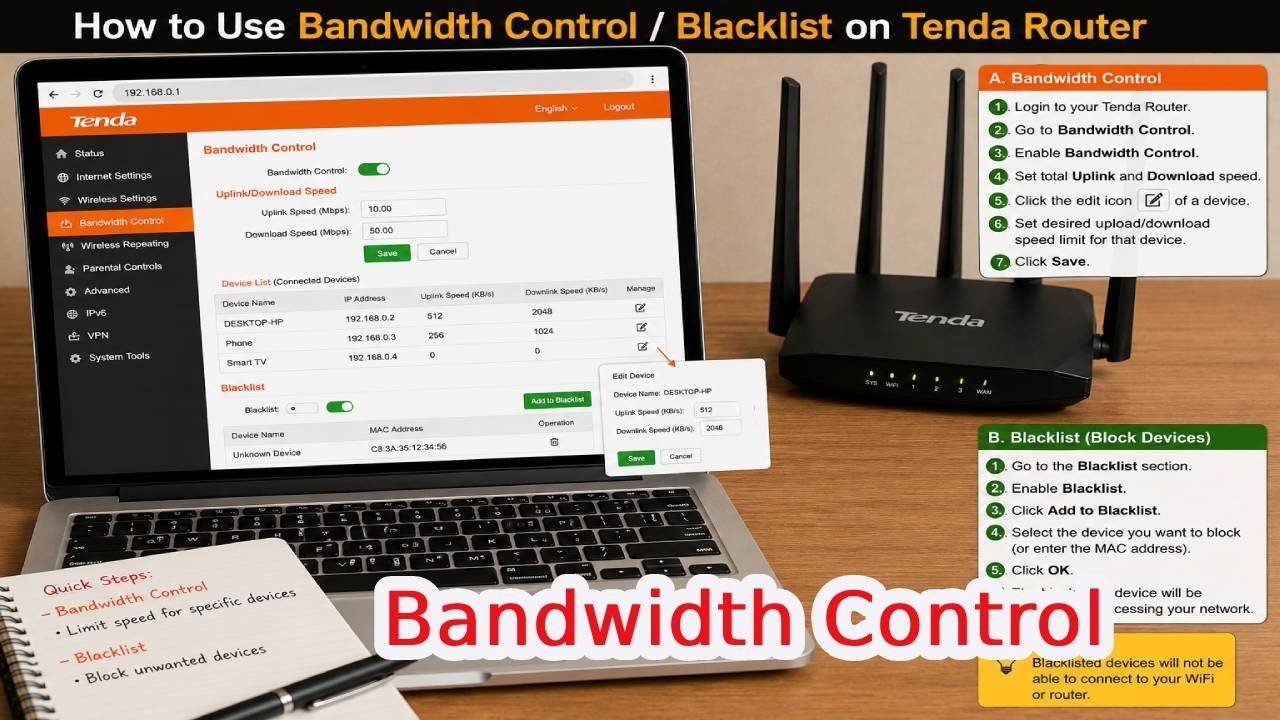
Is your home Wi-Fi crawling because one device is hogging all the bandwidth? You’re not alone. Whether it’s a roommate streaming 4K movies or a guest downloading massive files, a single connection can disrupt everyone’s online experience. Fortunately, there’s a straightforward fix that doesn’t require advanced networking skills. In a recent tutorial, we explore exactly how to limit speed on router settings using a Tenda router, giving you the power to allocate bandwidth fairly and even block unwanted devices entirely.

This guide walks you through the entire process, from accessing your router’s admin panel to setting precise upload and download caps. You’ll also discover how to blacklist persistent bandwidth hogs, ensuring your network stays fast and secure. Let’s dive into the practical steps and why this control matters for your daily connectivity.

Why You Should Limit Speed on Router?

Before we get into the technicalities, it’s worth understanding the “why” behind bandwidth limiting. Internet service providers often deliver a fixed amount of speed, and every connected device competes for that slice. Without management, a single device—like a smart TV or a gaming console—can consume most of the bandwidth, leaving your video calls choppy and web pages loading slowly.

By learning how to limit speed on router, you can set maximum speeds for each device. This ensures that no single user can monopolize the connection. For families or shared offices, this is a game-changer. You can prioritize work-related tasks, keep streaming smooth, and avoid frustrating lag spikes. Plus, limiting speeds can prevent overheating or excessive data usage on certain devices, extending their lifespan.

Step-by-Step: Tenda Bandwidth Control in Action

The tutorial breaks down the process into simple, actionable steps. First, connect your phone or computer to your Tenda Wi-Fi network, or plug an Ethernet cable into one of the LAN ports. Then, open a web browser and type 192.168.0.1 into the address bar. This is the default gateway for most Tenda routers. Log in with your administrator password—if you haven’t changed it, check the router’s label or manual.

Once you’re in the dashboard, look for a menu option labeled “Bandwidth Control” on the left side. This is where the magic happens. You’ll see a list of connected devices, each with its name, IP address, and MAC address. Find the device you want to manage, then click on the Download Limit and Upload Limit fields for that entry. You can either choose a preset speed limit or select “Manual” to type in your preferred numbers. After entering the desired speeds, click OK to apply the changes. It’s that simple.

Building on this, the video also demonstrates how to handle devices that shouldn’t be on your network at all. If someone is repeatedly using excessive bandwidth or you simply want to secure your network, you can use the “Blacklist” feature. Locate the target device in the list of online clients, then turn off the internet access switch next to it, or select “Add to Blacklist” / “MAC Address Filter.” This permanently blocks that device from connecting, unless you remove it later. Click OK or Save to finalize the action.

Practical Tips for Tenda Bandwidth Control Success

As with any router setting, a little finesse goes a long way. Start by identifying which devices truly need limits—gaming consoles, streaming boxes, and smart home hubs are common candidates. Set realistic limits based on your internet plan; for example, if you have a 100 Mbps connection, you might cap a streaming device at 20 Mbps to leave room for others.

In addition, remember that bandwidth control isn’t just about slowing things down. It’s about creating a balanced network environment. You can also use these settings to boost priority for your own work laptop or phone by setting higher limits for them. The video emphasizes testing the changes after applying them—open a speed test on the affected device to confirm the new limits are active. If something goes wrong, you can always revert to “No Limit” or adjust the numbers.

Another pro tip: keep your router’s firmware updated. Tenda regularly releases updates that improve bandwidth control features and security. Check the admin panel for any available updates before you start tweaking settings. This ensures you’re using the most stable version of the software.

Why This Matters for Your Network’s Health

Beyond just speed, controlling bandwidth protects your network from abuse. When you blacklist a device, you’re not just stopping it from hogging data—you’re also preventing unauthorized access. This is crucial in shared spaces like dorm rooms or small offices where strangers might connect to your Wi-Fi without permission. By using the MAC address filter, you create a whitelist of trusted devices, which is a robust security measure.

Moreover, managing bandwidth can save you money. If your internet plan has a data cap, limiting heavy downloaders prevents you from hitting that cap and incurring overage fees. It also reduces strain on your router, which can improve its overall performance and stability. In short, taking control of your network isn’t just about convenience—it’s about smart resource management.

Ready to Take Control?

Now that you know how to limit speed on router with Tenda bandwidth control, you can say goodbye to laggy video calls and endless buffering. The process takes less than five minutes, and the benefits are immediate. Watch the full tutorial to see every click and menu option in real time—it’s a visual guide that leaves no room for confusion. Whether you’re a tech novice or a seasoned pro, this method will help you create a faster, fairer Wi-Fi for everyone.

Don’t let bandwidth hogs ruin your online experience. Grab your phone or computer, log into your Tenda router, and start setting those limits today. Your future self—and everyone else on your network—will thank you.

Continue Reading

Video

Why August 13, 2026 Matters More Than You Think

Published

on

August 13, 2026

Mark your calendars. August 13, 2026, isn’t just another Thursday. It’s a date that has quietly started to capture attention across online communities, tech forums, and speculative circles. But why? What’s so special about this particular day? In this article, we’ll unpack the mystery, the speculation, and the real-world implications of this upcoming date—and why you should care.

The Buzz Around August 13, 2026

First, let’s address the elephant in the room: why is everyone talking about August 13, 2026? The date has appeared in viral videos, cryptic social media posts, and even some tech releases. Some say it’s tied to a major product launch. Others whisper about astronomical alignments or geopolitical shifts. While no official confirmation exists, the sheer volume of chatter suggests something big is brewing.

Building on this, the date falls in the middle of a year packed with milestones. By 2026, we’ll be deep into the next wave of AI integration, quantum computing experiments, and possibly the first crewed Mars mission preparations. So, it’s no surprise that a specific day might become a focal point for collective anticipation.

What Could Happen on This Date?

Let’s break down the most plausible scenarios. The tech world loves a good launch date. Companies like Apple, Google, and Microsoft often pick dates that align with their product cycles. August 13, 2026, could mark the release of a groundbreaking device or a major software update. In fact, industry insiders have hinted at a “revolutionary” announcement slated for that week.

However, it’s not just about gadgets. Some historians and futurists point to the date’s numerological significance—8/13/26 adds up to a sequence that has appeared in predictive models. While that sounds like pseudoscience, it’s worth noting that human beings have always sought meaning in numbers. The date could also coincide with a significant celestial event, like a meteor shower or a rare planetary alignment, which would explain the astronomical buzz.

Why This Date Could Affect You

Even if you’re not a tech enthusiast or a stargazer, August 13, 2026, might have practical implications. For instance, if it’s a product launch, you could see new standards in how we work, communicate, or travel. If it’s a geopolitical summit, the outcomes could ripple through global markets. In addition, the date is a Thursday—a day often chosen for major announcements because it allows news cycles to build over the weekend.

As a result, savvy consumers and investors are already watching their calendars. Some are even adjusting their plans, booking time off, or preparing to pre-order. The uncertainty itself is a kind of event, driving conversations and speculation that can influence everything from stock prices to social media trends.

How to Prepare for the Big Day

So, what should you do? First, stay informed. Follow reliable news sources and official channels from the organizations most likely to be involved. Second, keep an open mind. The date could bring surprises—both good and bad. Finally, don’t let the hype overwhelm you. Whether August 13, 2026, turns out to be a turning point or just another day, your preparedness and adaptability will matter most.

In conclusion, August 13, 2026, is a date that deserves your attention. Whether it’s a tech milestone, a cultural moment, or simply a catalyst for conversations, it’s a reminder that the future is always closer than we think. Watch the video above for a deeper dive into the theories and predictions surrounding this mysterious date. And who knows? You might just be part of history in the making.

Continue Reading

Video

How to Change Admin Password in Tenda Router: A Step-by-Step Guide

Published

on

change admin password

When was the last time you updated your router’s admin password? If you’re like most people, the answer is probably “never.” That’s a risky habit. Your router is the gateway to your entire home network, and a weak or default password is an open invitation for unwanted guests. Fortunately, securing your Tenda router is a quick task you can do right now—no technical degree required. In this guide, we’ll walk you through how to change admin password in Tenda router, step by step, so you can lock down your network in under five minutes.

Why Changing Your Tenda Router Password Matters

Your router’s admin password is the master key to your network settings. With it, someone could hijack your DNS, spy on your traffic, or even lock you out of your own device. Default passwords like “admin” or “password” are widely known and often left unchanged. Therefore, changing this credential is one of the simplest yet most effective security upgrades you can make.

Moreover, a strong password also protects your Wi-Fi from freeloaders. If someone guesses your admin credentials, they might also gain access to your wireless settings and share your bandwidth. By regularly updating your login password, you keep control firmly in your hands. This is especially important if you’ve recently shared your password with a guest or a technician—they might still have access unless you change it.

What You’ll Need Before You Start

Before you dive into the Tenda router settings, gather a few basics. First, make sure your device—whether it’s a smartphone, tablet, or computer—is connected to your Tenda network. You can do this via Wi-Fi or by plugging an Ethernet cable into one of the LAN ports on the router. A wired connection is more stable, but Wi-Fi works just fine for this task.

Next, you’ll need your current admin password. If you’ve never changed it, this is usually printed on a sticker on the router itself. In case you’ve forgotten it, you may need to reset the router to factory defaults—but that’s a last resort. Keep this guide handy, and you’ll breeze through the process.

Step-by-Step: How to Change Admin Password in Tenda Router

Now, let’s get to the heart of the matter. The entire process takes less than a minute, but we’ll break it down so you don’t miss a single click.

Step 1: Access the Router’s Admin Panel

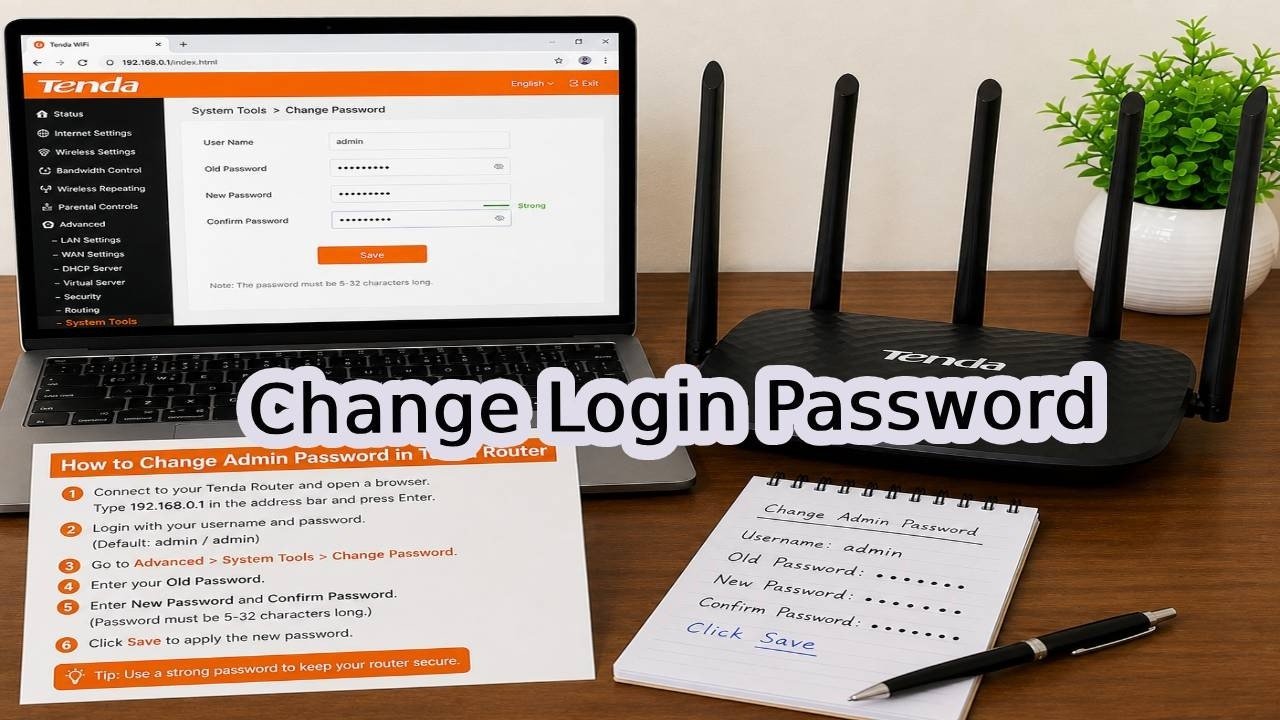
Open your web browser and type **192.168.0.1** into the address bar. This is the default IP address for most Tenda routers. Press Enter, and you’ll see a login page. Enter your current administrator password to proceed. If you’re unsure, check the router’s label—it often lists the default credentials.

Step 2: Navigate to the Password Settings

Once logged in, look for the **Administration** option in the left-hand menu. Click it to expand the settings. From there, you’ll see a top menu—select **Tools**. On the side menu that appears, choose **Change Password**. This is where you’ll make the magic happen.

Step 3: Set Your New Password

You’ll be prompted to enter your current password, then your new password, and finally confirm the new one. Choose something strong—a mix of uppercase and lowercase letters, numbers, and symbols. Avoid obvious choices like your name or birthdate. Once you’ve entered everything, click **OK** or **Save**. That’s it! Your Tenda router login password is now updated.

What to Do After Changing Your Password

After you save the new password, your router may log you out. This is normal. Re-login with your new credentials to ensure everything works. Also, if you have other devices connected to the network, they won’t be affected—only the admin access changes, not your Wi-Fi password. However, if you ever forget this admin password, you’ll need to perform a factory reset, which wipes all your settings. Therefore, store your new password in a secure password manager.

In addition, consider changing your Wi-Fi network password as well. While the admin password controls router settings, the Wi-Fi password protects your actual internet connection. Both should be strong and unique. Building on this, you might also enable WPA3 encryption if your Tenda router supports it—this adds an extra layer of security for your wireless traffic.

Final Thoughts: Take Control of Your Network Security

Changing your Tenda router admin password is a small step that yields big peace of mind. It’s a straightforward process that anyone can do, and it significantly reduces the risk of unauthorized access. As a result, you’ll enjoy a safer, more private online experience at home.

If you found this guide helpful, we’d love to hear from you. Drop a comment below if the steps worked for you, and don’t forget to subscribe for more tech tutorials. For additional tips and updates, visit our Facebook page or check out our other YouTube channel. Now, go ahead and secure your network—you’ll be glad you did!

Continue Reading

Trending