Connect with us

How To

7 Tech Hobbies That Are So Much Better When You Self-Host Them

Published

on

self-hosted tech hobbies

Why Self-Hosting Changes the Game

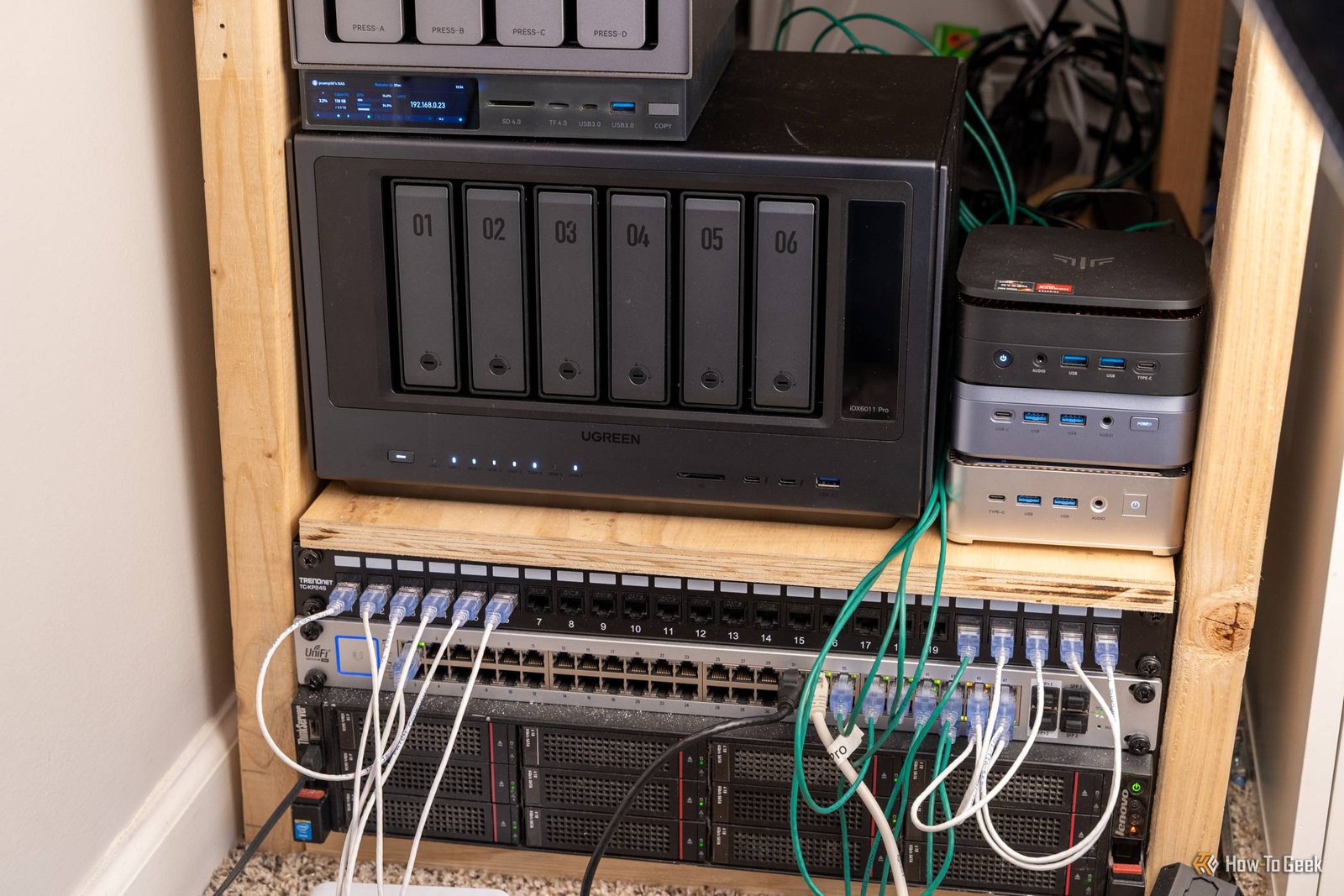
There’s a quiet thrill in owning your own digital infrastructure. You stop renting space on someone else’s server and start building something that’s truly yours. For anyone who loves tinkering, self-hosting isn’t just a practical choice — it’s a mindset shift.

When you self-host, you’re not just a user. You’re the admin, the sysadmin, and the architect of your own little digital kingdom. And for certain hobbies, that shift makes all the difference.

1. Media Streaming: Ditch the Subscriptions

Streaming services are convenient, but they’re also fragmented. You pay for Netflix, Hulu, Disney+, and still can’t find the movie you want. Self-hosting a media server like Plex or Jellyfin flips that script.

You rip your own DVDs, download your own files, and organize everything with cover art and metadata. The result? A personal library that never rotates out of the catalog. No more “title unavailable in your region” messages.

What You’ll Need

  • A decent NAS or an old PC with enough storage
  • A media organizer like Sonarr or Radarr
  • Hardware transcoding support for smooth playback on multiple devices

Once it’s running, you’ll wonder why you ever paid for three separate streaming services.

2. Smart Home Automation: Your House, Your Rules

Most smart home hubs are cloud-dependent. That means when the internet goes down, your lights won’t turn on. Self-hosting a hub like Home Assistant puts the brain of your home right on your own hardware.

You get local control, faster response times, and total privacy. Your motion sensors talk to your lights directly, not through a server in another country. And the automation possibilities are virtually endless — from sunrise-simulating alarms to geofenced climate control.

It’s more work upfront, but the payoff is a home that actually follows your rules, not a corporation’s.

3. Password Management: Security You Control

Password managers are a no-brainer for security, but most store your vault on someone else’s servers. Self-hosting a tool like Bitwarden gives you the same convenience with total data sovereignty.

Your encrypted vault lives on your own hardware. No third party can access it, even if they wanted to. It’s a subtle but profound difference — you’re not trusting a company with your digital keys; you’re trusting yourself.

For the privacy-conscious, this alone justifies the setup cost.

4. Cloud Storage: Your Own Dropbox

Dropbox and Google Drive are easy, but they come with privacy trade-offs and storage limits. Self-hosted solutions like Nextcloud give you the same file-syncing experience without the middleman.

You get full control over your data, unlimited storage (depending on your hardware), and the ability to add collaboration features like document editing and calendar sharing. It’s like running your own private Google Workspace.

The trade-off? You’re responsible for backups and uptime. But for many, that’s a fair price for ownership.

5. Blogging and Website Hosting: Your Own Corner of the Web

Platforms like Medium and Substack are great for reach, but they’re also rented land. Self-hosting your blog with a tool like WordPress or Ghost means you own everything — the content, the design, the data.

You can customize every pixel, install any plugin, and never worry about a platform changing its algorithm. It’s a more hands-on experience, but for writers and creators who value independence, it’s the only way to go.

Plus, there’s a certain pride in saying “I run this on my own server.”

6. Home Security Cameras: Privacy-First Monitoring

Most consumer security cameras stream footage to the cloud by default. That’s convenient, but it also means your home’s video is sitting on a company’s server. Self-hosted camera systems like Frigate keep everything local.

You can set up motion detection, object recognition, and even face detection — all without sending a single frame to the cloud. The footage stays on your hard drive, and you decide who gets access.

It’s a smarter, more private way to keep an eye on things.

7. Ad-Blocking and DNS Filtering: Clean the Whole Network

Browser ad-blockers are fine, but they only protect one device. Self-hosting a network-wide ad blocker like Pi-hole cleans up every device on your Wi-Fi — phones, smart TVs, even that old tablet you forgot about.

It works by acting as your DNS server, blocking requests to known ad and tracker domains before they even load. The result? Faster page loads, less data usage, and a quieter internet experience.

It’s one of the simplest self-hosted projects to start with, and the instant gratification is real.

Getting Started With Self-Hosting

If you’re new to self-hosting, start small. A Raspberry Pi or an old laptop can handle most of these projects. Pick one hobby that resonates with you and build from there.

You’ll learn about networking, storage, and system administration along the way. And once you get the hang of it, you’ll never want to go back to renting your digital life.

Self-hosted tech hobbies aren’t just about saving money or gaining features. They’re about taking control — and that’s a hobby in itself.

Continue Reading
Click to comment

Leave a Reply

Your email address will not be published. Required fields are marked *

Social Media

Stop Chasing Views: A Real Instagram Strategy That Builds Revenue

Published

on

Instagram strategy for business growth

Why Your Instagram Content Isn’t Converting Anymore

You post every day. You use the right hashtags. You even jump on every trending audio the moment it drops. Yet the sales aren’t following. Sound familiar?

Here’s the uncomfortable truth: the Instagram game shifted. What worked in 2023 — polished grids, perfectly timed Reels, and chasing viral moments — now feels like shouting into a void. The algorithm rewards something different now, and most accounts haven’t caught up.

The accounts that consistently drive revenue aren’t the ones with the most views. They’re the ones with a proven Instagram strategy for business growth that prioritizes connection over spectacle. And that strategy comes down to three pillars: authentic content, a sustainable posting system, and a radically simplified approach to Meta paid ads.

Pillar One: Authentic Content That Builds Trust

Let’s be blunt: polished is out. Raw is in. The content that converts in 2026 looks less like a commercial and more like a conversation with a smart friend.

Authenticity doesn’t mean sloppy. It means showing the process, the struggles, and the real outcomes. Think behind-the-scenes clips, unfiltered client wins, and honest takes on industry problems. This type of content builds trust faster than any perfectly lit tutorial ever could.

What Authentic Content Actually Looks Like

  • Real customer stories told in their own words (with permission, obviously)
  • Quick, unscripted videos answering common objections your sales team hears
  • Photos of your workspace, your team, or your product mid-creation
  • Honest breakdowns of a mistake you made and what you learned

This isn’t about being unprofessional. It’s about being human. People buy from people, not from faceless brands.

Pillar Two: A Sustainable Posting System

Consistency matters, but burnout kills more accounts than inconsistency ever will. The trick is building a sustainable posting system that you can actually maintain for months, not weeks.

Forget posting five times a day. That’s a sprint. Instead, aim for a rhythm that feels almost boring in its reliability — maybe three Reels a week and two static posts. The algorithm rewards consistency, but it also rewards dwell time. A few strong posts that keep people on the app beat a dozen forgettable ones.

Batch-create your content on Monday. Schedule everything by Tuesday. Then spend the rest of the week actually engaging — replying to comments, sliding into DMs, and starting conversations. That engagement is the fuel the algorithm craves.

Pillar Three: Simplified Meta Ads That Actually Pay Off

Organic reach is great, but paid ads are the accelerator. The problem? Most small businesses overcomplicate their Meta ads strategy and burn cash on overly complex funnels.

The 2026 approach is simpler. Run fewer ads. Target broader. Let the algorithm do the heavy lifting.

How to Simplify Your Paid Approach

  1. Start with one campaign. Don’t split your budget across ten ad sets. Pick your best-performing organic post and boost it to a lookalike audience.
  2. Use one clear call-to-action. “DM us for a quote” works better than a landing page for most service businesses. Conversations convert.
  3. Let the algorithm optimize. Give Meta’s AI room to find your people. That means fewer restrictions on placement and audience targeting.

This stripped-down approach reduces wasted spend and gets you results faster. You can always scale up once you’ve found a winning combination.

Bringing It All Together: Your Revenue-Focused Roadmap

Here’s how these three pillars work as one system. You create authentic content that builds trust. You post it on a schedule you can sustain without losing your mind. Then you amplify your best posts with simple, targeted ads that drive DMs and sales.

It’s not glamorous. It’s not a hack. But it’s a proven Instagram strategy for business growth that works because it’s built on what the platform actually rewards: genuine connection and consistent value.

Start small. Pick one pillar this week and execute it. Next week, add the second. Within a month, you’ll have a system that doesn’t just chase views — it builds revenue.

For more insights on social media marketing that actually moves the needle, check out our guide on social media marketing trends or dive into Instagram Reels best practices to sharpen your content game.

Continue Reading

Social Media

Bumble Bets Big on IRL Meetups: What Replaces the Swipe?

Published

on

swipe-free future

The Swipe Is Dying, and Bumble Is Ready

For over a decade, the swipe has been the universal gesture of online dating. A flick of the thumb. A match. A maybe. But that era is ending, and Bumble just made it official.

On Wednesday’s second-quarter earnings call, CEO Whitney Wolfe Herd didn’t just talk numbers. She talked about a future where the swipe doesn’t exist at all. And she teased that something new is already in the works.

“What will replace the swipe? I will be keeping under wraps a bit longer for competitive purposes,” she told analysts. “But it is designed to generate more immediate interactions and, most importantly, better outcomes, mimicking real life.”

That’s a big statement. And it lands right as Tinder announces its own pivot toward in-person events. The message from the industry’s two biggest players is clear: the swipe-free future is coming.

Plans: Bumble’s Bet on Group Socializing

The centerpiece of Bumble’s strategy is its newest app, Plans. Launched quietly last month, it’s designed to help people meet “IRL” in low-pressure group settings. Think small dinners, drinks at local spots, and shared interests — not one-on-one coffee dates with a stranger.

Wolfe Herd said the app showed “promising results” in early testing. The company is now leaning hard into what she calls “real-life experiences.”

The logic is simple. Gen Z is tired of endless swiping. They’re tired of superficial matches and ghosting. What they want, according to Bumble’s data, is organic connection.

“Group socializing is a real part of how Gen Z prefers to meet,” Wolfe Herd said. “And we believe Bumble represents a natural bridge from meeting to socializing to then dating.”

Why Groups Beat One-on-One

There’s a psychological comfort in groups. The pressure is lower. The stakes feel smaller. You can test chemistry without the awkwardness of a formal date.

Bumble saw this play out with Bumble BFF, its friend-making app, which gained real traction with young women. Plans takes that same concept and expands it — with the option for romance to develop naturally later.

Users on Plans can chat on Bumble’s platform without ever swiping or sharing a phone number. That’s a deliberate design choice. Bumble is marketing “no swiping” as a feature, not a limitation.

What Actually Replaces the Swipe?

Here’s where it gets interesting. Wolfe Herd didn’t reveal the new interaction model. But she gave hints.

“The core idea is a shift away from optimizing for swipe speed and velocity towards something more intentional,” she said. “Fewer, better, more considered signals.”

That language matters. The swipe was built for volume. It gamified dating, turning human connection into a slot machine. The replacement, according to Wolfe Herd, will be more deliberate. It will eliminate “the friction and delay” of current apps.

She promised the transition would be gradual, so as not to disrupt Bumble’s existing ecosystem. But the direction is unmistakable.

The Numbers Behind the Pivot

Bumble beat earnings expectations in Q2, but the company is still in turnaround mode. Revenue fell 15.2% year-over-year to $210.5 million. The Q3 forecast showed a decline in paying customers, and the stock took a hit.

These are not the numbers of a company resting on its laurels. They’re the numbers of a company that knows it needs to change — fast.

AI is part of the plan too. Bumble says it will deploy more AI tools under the hood to improve match quality. But Wolfe Herd was quick to clarify: this doesn’t mean Bumble becomes an “AI-driven experience.” The human element stays central.

A Generational Shift in Dating

This isn’t just a Bumble story. It’s a story about how young people date in 2025.

Gen Z grew up with swiping. They’re also the generation most vocal about hating it. Surveys consistently show rising fatigue with dating apps. The desire for authenticity is real, and it’s reshaping the entire industry.

Bumble’s bet is that the future belongs to IRL dating events and group experiences. Tinder’s recent moves suggest it agrees. The two biggest names in online dating are racing toward the same conclusion.

The swipe had a good run. It changed how millions of people met. But every era ends, and this one is winding down. What comes next is still under wraps — but it’s coming.

For now, Bumble is asking users to trust that the next iteration will feel more human. More intentional. More like real life.

That’s a promise, not a product. But it’s the most interesting promise in dating tech right now.

Continue Reading

How To

Your Phone Can Text Without a Cell Tower — and You May Already Have the Feature

Published

on

text without cell tower

The Surprising Truth About Offline Texting

You’d be hard-pressed to find someone who doesn’t own a cell phone nowadays. Even if they don’t use it as most of society does — for social media, as cameras, gaming devices, and basically everything but voice communications — a phone is still one of your most essential communication tools. To make calls and send texts outside of instant messaging and Wi-Fi calling apps like FaceTime and WhatsApp, you need a cellular connection. Or do you?

Here’s the kicker: your phone might already have a feature that lets you text without a cell tower. No bars. No signal. No problem. It’s called mesh messaging, and it’s been quietly sitting in your settings menu for years.

What Is Mesh Messaging and How Does It Work?

Mesh messaging is a peer-to-peer communication method. Instead of bouncing your message off a cell tower, it hops directly from one phone to another using Bluetooth or Wi-Fi radio waves. Think of it like a digital game of telephone — each device passes the message along until it reaches the intended recipient.

This isn’t science fiction. Apple built it into iOS with the Messages via Satellite feature, but more importantly, there’s a lesser-known tool called Offline Messaging on Android. Google’s implementation, rolled out in 2023, lets Pixel phones send texts to other Pixel devices even when both are completely offline.

How to Check If Your Phone Has It

  • iPhone users: Go to Settings → Messages → look for “Satellite” or “Offline” options. iOS 17 and later include satellite-based emergency texting, but true peer-to-peer mesh isn’t native yet.
  • Android users: Open Settings → Connected Devices → Connection Preferences. If you have a Pixel 6 or newer, you’ll find an “Offline Messaging” toggle.
  • Third-party apps: Bridgefy and Signal (in beta) offer mesh features that work across brands.

Real-World Scenarios Where This Saves Lives

Imagine a natural disaster knocks out cell towers. Or you’re hiking in a remote canyon where coverage never existed. In those moments, a mesh network could be the difference between rescue and a very bad night.

In 2023, during the Maui wildfires, residents used Bluetooth-based mesh apps to coordinate evacuations when cellular networks collapsed. It wasn’t perfect — messages sometimes took minutes to deliver — but it worked when nothing else did.

Limitations You Should Know Before Relying on It

Let’s be honest: this feature has real constraints. Range is the big one. Bluetooth maxes out at about 30 feet (10 meters) under ideal conditions. Wi-Fi Direct stretches that to 200 feet, but both require line-of-sight and no heavy interference.

Battery drain is another factor. Running continuous Bluetooth or Wi-Fi scanning eats power faster than normal standby. And here’s the kicker: both phones need the same app or OS version. You can’t message an iPhone from a Pixel using native tools — they don’t speak the same mesh language.

How to Set Up Offline Texting Right Now

Ready to test it? Here’s a quick setup guide:

  1. On Android (Pixel 6+): Enable Offline Messaging in Settings, then open Messages → tap your profile → select “Offline” mode. Both phones must have Bluetooth on.
  2. On iOS: Install Bridgefy from the App Store. Create an account, allow Bluetooth permissions, and you’re ready to broadcast messages within range.
  3. For cross-platform: Download Briar — it’s an open-source mesh messenger that works on both Android and iOS, though setup is a bit technical.

Test it with a friend. Turn on airplane mode, then try sending a message. You’ll be surprised how well it works in a coffee shop or office building.

The Future of Offline Communication

Tech giants are betting big on this. Apple’s satellite SOS feature (launched with iPhone 14) is a one-way emergency call, but the company has patents for true peer-to-peer mesh. Google’s Nearby Share is evolving into a full mesh protocol. Even Qualcomm is working on chips that can switch between cellular and mesh automatically.

So while you might not need to text without a cell tower tomorrow, knowing how to do it could be the smartest tech skill you learn this year. Check your settings — the feature might already be waiting for you.

Continue Reading

Trending