Connect with us

How To

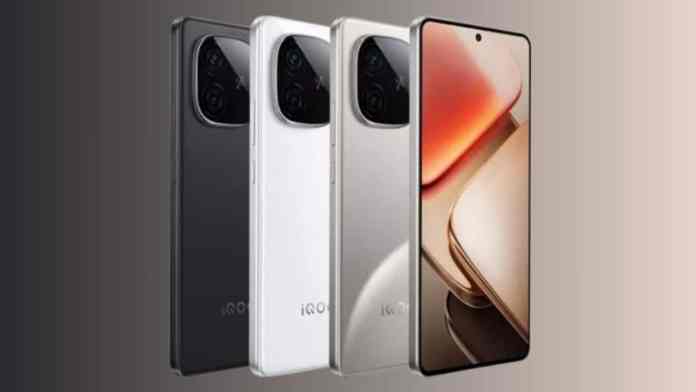
iQOO Z9 Turbo Long Battery Life Version Set to Revolutionize Mobile Endurance in January 2025

Published

on

Revolutionary Battery Technology Arrives with iQOO Z9 Turbo Enhanced Edition

Therefore, smartphone enthusiasts can expect a significant leap in mobile endurance as iQOO prepares to unveil its enhanced Z9 Turbo variant. The iQOO Z9 Turbo Long Battery Life Version promises to address one of the most persistent challenges in modern smartphone usage: battery anxiety.

Building on the success of the original model, this upgraded device targets users who demand exceptional performance without compromising on battery longevity. The January 2025 launch window positions this device strategically in the competitive smartphone market.

Enhanced Specifications Transform the iQOO Z9 Turbo Experience

However, the most striking upgrade comes in the form of a substantial 6,400mAh battery capacity. This represents a notable 400mAh increase over the standard model’s 6,000mAh power source, translating to extended usage periods and reduced charging frequency.

In addition, the device maintains the powerful Snapdragon 8s Gen 3 processor that ensures flagship-level performance. This chipset combination with enhanced battery technology creates an optimal balance between power efficiency and computational capability.

As a result, users can expect seamless multitasking, intensive gaming sessions, and professional productivity workflows without constant battery monitoring. The integration of up to 16GB LPDDR5X RAM further enhances this performance profile.

Display and Visual Excellence Maintained

Furthermore, the Long Battery Life Version retains the impressive 6.78-inch AMOLED display with full-HD+ resolution. The 144Hz refresh rate ensures smooth visual experiences, particularly beneficial for gaming enthusiasts and content creators.

This means that users won’t sacrifice visual quality for battery performance, maintaining the premium experience expected from the iQOO Z9 Turbo series.

Camera System Delivers Professional Photography Capabilities

On the other hand, the photography department remains unchanged but impressive. The dual rear camera setup features a 50-megapixel Sony LYT-600 primary sensor paired with an 8-megapixel ultra-wide lens, ensuring versatility across different shooting scenarios.

Additionally, the 16-megapixel front-facing camera provides high-quality selfies and video calls, making this device suitable for social media enthusiasts and professional communication needs.

The camera system’s computational photography features leverage the Snapdragon 8s Gen 3’s image processing capabilities, delivering enhanced low-light performance and advanced scene recognition.

Design Innovation and Color Options Expand Appeal

Nevertheless, iQOO introduces fresh aesthetic choices with the new “Flying Blue” color variant. Industry sources suggest additional black and white options may accompany the launch, providing consumers with diverse personalization opportunities.

Consequently, the device maintains premium build quality while accommodating the larger battery without significant thickness increases. This engineering achievement demonstrates iQOO’s commitment to balancing form and function.

Market Positioning and Availability Strategy

In contrast to many flagship releases, the iQOO Z9 Turbo Long Battery Life Version targets the performance-conscious mid-premium segment. Pre-reservations through Vivo China e-store and authorized retailers indicate strong market anticipation.

As a result, this strategic positioning allows iQOO to compete effectively against established brands while offering distinctive value propositions in battery technology.

Performance Optimization and User Experience Enhancements

Therefore, the combination of enhanced battery capacity and efficient processor architecture creates opportunities for extended usage scenarios. Gaming sessions, video streaming, and productivity applications benefit significantly from this improved power management.

The device’s thermal management system works in conjunction with the larger battery to maintain consistent performance during intensive tasks. This ensures that users experience reliable functionality across various demanding applications.

Building on this foundation, the software optimization further enhances battery efficiency through intelligent power management algorithms and adaptive performance scaling.

Competitive Advantages in the Smartphone Market

However, the iQOO Z9 Turbo Long Battery Life Version distinguishes itself through its focus on practical user needs rather than purely technical specifications. The substantial battery upgrade addresses real-world usage patterns while maintaining competitive pricing strategies.

This approach positions the device favorably against competitors who may offer similar processing power but compromise on battery endurance. The January 2025 launch timing allows iQOO to capture early-year upgrade cycles and establish market presence before major competitor releases.

In conclusion, this enhanced variant represents iQOO’s understanding of evolving consumer priorities, where battery life increasingly influences purchasing decisions alongside traditional performance metrics.

Continue Reading
Click to comment

Leave a Reply

Your email address will not be published. Required fields are marked *

How To

Transform Your Android Typing Experience with Wave Keyboard Background App Features

Published

on

Revolutionizing Android Keyboards with Wave Keyboard Background

Android users seeking to personalize their typing experience now have access to groundbreaking customization options. The Wave Keyboard Background app represents a significant leap forward in keyboard personalization technology. This innovative application allows users to transform their standard keyboard interface into a dynamic, visually striking typing platform.

Unlike traditional keyboard applications that offer limited styling options, this platform introduces animated themes that breathe life into everyday communication. The app’s core functionality centers around providing users with unprecedented control over their keyboard’s appearance and behavior.

Advanced Personalization Features in Wave Keyboard Background

The application delivers an impressive array of customization options that extend far beyond basic color schemes. Users can incorporate their personal photographs directly onto their keyboard interface, creating a truly unique typing environment. This functionality transforms the mundane task of texting into an engaging visual experience.

Additionally, the platform supports video integration, allowing users to set animated backgrounds that play continuously while typing. This feature particularly appeals to users who want their device to reflect their personality and creative preferences. The app maintains smooth performance despite these advanced visual elements.

The extensive emoji library includes over 800 different expressions, ensuring users can communicate with precision and flair. These emojis integrate seamlessly with the animated backgrounds, creating cohesive visual themes throughout the typing experience.

Technical Excellence and User Experience

Wave Keyboard Background prioritizes both aesthetics and functionality in its design philosophy. The application incorporates smart auto-correction technology that adapts to individual typing patterns while maintaining the visual appeal of animated themes. This balance between form and function sets it apart from competitors in the keyboard customization market.

Furthermore, the platform supports more than 20 languages and regional keyboard layouts, making it accessible to a global user base. The multilingual support extends to both the interface elements and the predictive text functionality, ensuring consistent performance across different languages.

The app’s sound customization options allow users to personalize their typing audio feedback. Custom fonts and visual effects complement the animated backgrounds, creating a comprehensive personalization package that addresses every aspect of the keyboard experience.

Installation and Setup Process

Setting up Wave Keyboard Background requires minimal technical expertise, making it accessible to users of all skill levels. The installation process involves three straightforward steps: opening the application, selecting preferred live wallpapers, and downloading necessary graphical resources.

However, users must grant appropriate permissions for the app to function correctly as their default keyboard. The setup wizard guides users through each permission request, explaining why each access level is necessary for optimal performance.

Once configured, the application runs efficiently in the background without significantly impacting device performance. The optimization algorithms ensure that animated themes display smoothly across various Android device specifications and performance levels.

Privacy and Performance Considerations

In addition to its visual capabilities, the application emphasizes user privacy protection. The developers explicitly state that they do not monitor or store typing activity, addressing common concerns about keyboard applications and data security.

The voice input feature provides an alternative to manual typing when hands-free operation is preferred. This accessibility feature works in conjunction with the animated themes, maintaining visual consistency even when using voice commands.

Performance optimization remains a priority throughout the app’s operation. Despite the resource-intensive nature of animated backgrounds, the application maintains responsive typing speeds and minimal battery drain through efficient coding practices.

Therefore, users seeking comprehensive keyboard customization without compromising functionality or privacy will find Wave Keyboard Background an excellent solution. The combination of visual innovation and practical features creates a typing experience that is both aesthetically pleasing and highly functional for daily communication needs.

Continue Reading

How To

Complete Guide: Moving WhatsApp Messages from Android to iPhone Seamlessly

Published

on

Why WhatsApp Chat Transfer Matters During Phone Switching

Switching from Android to iPhone brings excitement, but losing precious WhatsApp conversations can dampen the experience. Your chat history contains memories, important documents, and years of communication that deserve preservation during this transition.

Fortunately, WhatsApp now supports cross-platform data migration through Apple’s official Move to iOS application. This WhatsApp chat transfer process ensures your messages, media files, and group conversations move safely to your new device.

Essential Prerequisites for WhatsApp Chat Transfer Success

Before initiating the WhatsApp chat transfer process, several critical conditions must be met. Your iPhone needs to be either factory-fresh or completely reset to factory settings – this cannot be bypassed.

Additionally, both devices require stable power connections throughout the transfer. Connect your Android phone and iPhone to their respective chargers to prevent interruptions during the migration process.

Network connectivity plays a crucial role in successful data migration. Both devices must connect to identical Wi-Fi networks, or alternatively, you can create a hotspot connection from your iPhone for your Android device to join.

Step-by-Step WhatsApp Chat Transfer Process

The actual migration begins with downloading Move to iOS from the Google Play Store on your Android device. This official Apple application facilitates the entire WhatsApp chat transfer operation.

Launch the Move to iOS app and follow the initial setup prompts. Your iPhone will generate a unique code during its setup process – enter this code exactly as displayed on your Android device.

When the data selection screen appears, specifically choose WhatsApp from the available options. This selection triggers the export process on your Android device, preparing your chat history for migration.

On the other hand, your Android WhatsApp will begin exporting conversations, media files, and settings. This process automatically signs you out of WhatsApp on your old device – this behavior is completely normal and expected.

After data preparation completes, return to the Move to iOS interface and tap Continue. The actual transfer begins at this point, moving your entire WhatsApp history to the new iPhone.

Completing Setup on Your New iPhone

Once the WhatsApp chat transfer concludes, open WhatsApp on your iPhone and begin the verification process. Use the same phone number registered on your previous Android device.

WhatsApp will detect the transferred data and prompt you to restore your chat history. Tap Start to begin the restoration process, which recreates your conversation threads, media galleries, and group memberships.

However, patience remains essential during this final phase. Large chat histories with extensive media collections require additional time for complete restoration on your new device.

Important Limitations and Considerations

While the WhatsApp chat transfer process handles most data effectively, certain limitations exist. Call history logs cannot migrate between platforms – only text messages, voice messages, photos, videos, and documents transfer successfully.

Furthermore, your original Android WhatsApp data remains intact after the transfer. The migration process creates copies rather than moving files, meaning your old device retains all conversations until manually deleted.

As a result, you maintain access to your chat history on both devices temporarily. This redundancy provides peace of mind during the transition period, allowing verification that all important conversations transferred correctly.

Troubleshooting Common Transfer Issues

Sometimes, the WhatsApp chat transfer process encounters obstacles. Network interruptions represent the most common problem – ensure both devices maintain stable connections throughout the entire procedure.

In addition, insufficient storage space on your iPhone can halt the transfer midway. Check available storage before beginning, especially if your Android device contains years of WhatsApp media files.

If the transfer fails completely, restart both devices and attempt the process again. The Move to iOS app sometimes requires multiple attempts for successful migration, particularly with large data sets.

Building on this foundation, creating regular WhatsApp backups prevents future data loss scenarios. Additionally, understanding iPhone setup best practices ensures smoother transitions when upgrading devices.

Finally, this WhatsApp chat transfer method represents the most reliable approach for cross-platform migration. While third-party solutions exist, Apple’s official Move to iOS app provides the safest and most comprehensive data transfer experience available today.

Continue Reading

How To

Realme 15 5G Series Launch Date Officially Announced for India: July 24 Event Details

Published

on

The wait is finally over for smartphone enthusiasts across India. Realme has officially announced the launch timeline for its highly anticipated Realme 15 5G Series, setting the stage for an exciting July unveiling that promises cutting-edge technology and innovative features.

Official Launch Timeline and Event Details for Realme 15 5G Series

On July 24, Realme will introduce two groundbreaking devices to the Indian market. The evening event, scheduled to commence at 7 PM IST, will showcase both the standard Realme 15 5G and the premium Realme 15 Pro 5G variant. This strategic timing allows working professionals and tech enthusiasts to witness the unveiling without scheduling conflicts.

However, the announcement brings more than just device specifications. The company has chosen popular Bollywood actor Vicky Kaushal as the official brand ambassador for this series, signaling their commitment to reaching mainstream audiences beyond traditional tech circles.

In addition, viewers can participate in an exclusive launch contest hosted on Realme’s official website. Lucky participants stand a chance to win a complimentary Realme 15 Pro 5G device, adding excitement to the already anticipated event.

Revolutionary AI-Powered Photography in Realme 15 5G Series

What sets these devices apart from competitors? The Pro model positions itself as the ultimate “AI party phone,” targeting users who prioritize social photography and content creation. Advanced artificial intelligence capabilities will enhance camera performance automatically, adapting to various lighting conditions and scenarios.

The AI Edit Genie represents a breakthrough in mobile photography, allowing users to modify images through voice commands. This hands-free approach eliminates the need for complex editing interfaces, making professional-grade photo enhancement accessible to everyone.

Similarly, the AI Party mode revolutionizes group photography by automatically adjusting brightness, contrast, and color saturation. These intelligent adjustments ensure optimal image quality during parties, gatherings, and social events where lighting conditions frequently change.

Design Philosophy and Color Variants

Both models showcase premium aesthetics through carefully crafted design elements. The devices feature glossy finishes that catch light beautifully, while the triple camera arrangement sits elegantly in circular cutouts at the rear panel’s corner.

Nevertheless, there’s an interesting design distinction between variants. While the Pro model boasts three functional cameras, the standard version might include only two active sensors, with the third opening serving purely aesthetic purposes.

The color portfolio offers four distinct options: Flowing Silver, Velvet Green, Silk Purple, and Silk Pink. Notably, the Silk Pink shade appears exclusive to the base model, providing unique personalization opportunities for style-conscious consumers.

Technical Specifications and Performance Expectations

Under the hood, the Realme 15 Pro 5G promises impressive hardware configurations. Early reports suggest a 50-megapixel primary camera sensor, complemented by an in-display fingerprint reader for secure authentication. Memory options could extend up to 12GB RAM, while storage capacity might reach 512GB for power users.

As a result, multitasking performance should remain smooth even with demanding applications running simultaneously. The generous storage allocation ensures ample space for photos, videos, apps, and games without constant file management concerns.

Furthermore, both devices will support 5G connectivity, future-proofing purchases as network infrastructure continues expanding across Indian cities and towns.

Pricing Strategy and Market Positioning

Market analysts predict competitive pricing for the Realme 15 5G Series. The standard model might launch between ₹18,000 and ₹20,000, targeting budget-conscious consumers seeking 5G capabilities without premium pricing.

Meanwhile, the Pro variant could command approximately ₹30,000, positioning it against established mid-range competitors. This pricing strategy maintains Realme’s reputation for delivering exceptional value while introducing advanced features typically reserved for flagship devices.

Distribution will occur through Flipkart, ensuring widespread availability and convenient purchasing options. The exclusive partnership should facilitate smooth launch day sales and ongoing availability management.

On the other hand, this collaboration provides customers access to Flipkart’s established customer service network, extended warranty options, and financing solutions for easier device acquisition.

The Realme 15 5G Series represents a significant step forward in affordable smartphone innovation. With AI-driven photography, stylish design choices, and competitive pricing, these devices could reshape consumer expectations in the mid-range segment. As July 24 approaches, smartphone enthusiasts have compelling reasons to mark their calendars for what promises to be an exciting product revelation.

Continue Reading

Trending