Connect with us

How To

POCO M7 Pro 5G and POCO C75 5G Set for December 17 Launch in India

Published

on

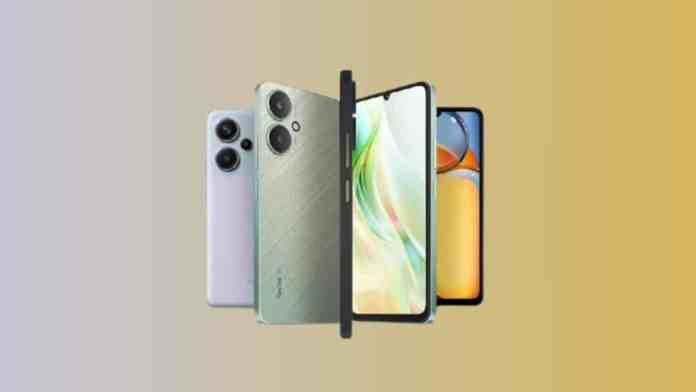
The Indian smartphone market is about to witness an exciting dual launch as POCO prepares to unveil two new 5G devices. The POCO M7 Pro 5G and POCO C75 5G are officially scheduled for launch on December 17, 2024, at 12 PM, marking a significant milestone for the brand’s 5G portfolio expansion in the country.

Official Launch Confirmation for POCO M7 Pro 5G

The confirmation comes directly from POCO India’s leadership, with Himanshu Tandon generating considerable buzz through cryptic social media posts. His messages featuring “Double the Madness” and “#DoubleTheMystery” hashtags have been decoded by industry watchers as references to the simultaneous device launch strategy.

Furthermore, Flipkart has already created dedicated microsites for both smartphones, indicating the e-commerce giant’s role as the primary retail partner. This strategic partnership positions the platform as the go-to destination for early adopters seeking these new 5G offerings.

POCO M7 Pro 5G Specifications and Design Details

Based on certification filings with the FCC and IMDA, the POCO M7 Pro 5G appears to be a rebranded version of the Redmi Note 14 5G. However, the device features distinctive design elements that set it apart from its predecessor and source model.

The most notable change involves the rear panel aesthetics. Unlike the M6 Pro 5G’s simple single-tone finish, this new model sports a dual-tone back design with a prominent square-shaped camera island. This design evolution suggests POCO’s commitment to visual differentiation within its product lineup.

In addition, the device is expected to run HyperOS based on Android 14, providing users with the latest software experience. The base storage configuration will reportedly start at 128GB, catering to mainstream user requirements.

Camera System and Hardware Expectations

The certification documents reveal a dual-camera setup, which aligns with current market trends for mid-range 5G smartphones. This configuration should provide users with versatile photography options while maintaining cost-effectiveness.

POCO C75 5G Features and Market Positioning

Meanwhile, the POCO C75 5G represents the brand’s entry into the budget 5G segment with impressive specifications for its price category. The device is expected to feature the Snapdragon 4s Gen 2 SoC, ensuring reliable 5G connectivity and performance.

Display specifications include a large 6.88-inch HD+ screen with 120Hz refresh rate, providing smooth scrolling and enhanced visual experience. This combination of size and refresh rate positions the device competitively against similarly priced alternatives.

Battery life appears to be a key selling point, with a substantial 5,160mAh capacity supported by 18W charging technology. This configuration should easily provide full-day usage for most consumers.

Camera Configuration and Photography Capabilities

The camera setup includes a 50MP primary sensor, complemented by 2MP macro and 5MP ultrawide lenses. This triple-camera arrangement mirrors the Redmi A4 5G’s configuration but offers enhanced versatility compared to standard budget offerings.

Market Strategy and Consumer Impact

This dual launch strategy demonstrates POCO’s commitment to covering multiple price segments simultaneously. By introducing both the POCO M7 Pro 5G and POCO C75 5G together, the brand creates comprehensive 5G options for different consumer needs and budgets.

The December timing is particularly strategic, capitalizing on year-end shopping momentum and positioning both devices for the upcoming festival season. This approach could potentially drive higher initial sales volumes across both product lines.

Industry observers note that this launch pattern reflects broader market trends toward 5G democratization, making advanced connectivity accessible across various price points. The move also strengthens POCO’s position against competitors like Realme and Samsung in the rapidly expanding Indian 5G market.

As we approach the December 17 launch date, consumer anticipation continues building around pricing strategies and final specifications. Both devices promise to deliver compelling value propositions in their respective segments, potentially reshaping competitive dynamics in India’s 5G smartphone landscape.

Continue Reading
Click to comment

Leave a Reply

Your email address will not be published. Required fields are marked *

How To

Samsung Galaxy Watch 6 and Watch 6 Classic Renders Leaked: What to Expect from the Next-Gen Smartwatches

Published

on

Samsung Galaxy Watch 6 and Watch 6 Classic Renders Leaked: What to Expect from the Next-Gen Smartwatches

The excitement around Samsung’s next wearable lineup is reaching a fever pitch. Freshly leaked renders of the Samsung Galaxy Watch 6 and Watch 6 Classic have surfaced online, giving us a clear look at what the company has in store. These images, shared by reliable tipsters, reveal a refined design language and hint at significant upgrades under the hood. For anyone tracking the Samsung Galaxy Watch 6 renders, this is the most detailed glimpse yet.

Design and Display: A Tale of Two Styles

The leaked renders show two distinct aesthetics. The standard Galaxy Watch 6 opts for a sporty, lightweight build, likely using aluminum to keep it comfortable for all-day wear. In contrast, the Watch 6 Classic embraces a premium stainless steel finish, complete with a rotating bezel—a fan-favorite feature that Samsung wisely retained.

Both models feature a circular AMOLED display with noticeably slimmer bezels. This change provides a more immersive screen experience without enlarging the overall case size. The always-on display support should also receive a brightness boost for better outdoor visibility.

What the Renders Reveal About the Rotating Bezel

The Classic variant’s bezel appears slightly thinner than previous generations, yet it still offers the tactile feedback that users love. This design choice balances tradition with modernity, making the Samsung Galaxy Watch 6 renders especially appealing to those who missed the physical bezel on the Watch 5 series.

Additionally, the button layout remains familiar: two side buttons for navigation and quick access to Samsung Pay or recent apps. Color options from the leaks include Phantom Black, Silver, and a new Graphite shade for the Classic model.

Health and Fitness Tracking: Smarter Sensors Ahead

Samsung has consistently pushed the envelope in wearable health tech, and the Galaxy Watch 6 series appears to continue that trend. Based on the renders and accompanying leaks, the watches will pack an upgraded BioActive sensor array.

Expect improvements in heart rate monitoring accuracy, especially during high-intensity workouts. The blood oxygen saturation (SpO2) sensor should also see enhancements, providing more reliable readings for sleep apnea detection. Sleep tracking is set to get a major overhaul, with deeper analysis of sleep stages and personalized coaching tips.

Furthermore, the inclusion of a temperature sensor—first introduced with the Galaxy Watch 5—will likely return, possibly with better algorithms for cycle tracking and fever detection. These features position the Galaxy Watch 6 as a serious contender for health-conscious users.

Performance and Software: One UI Watch Takes Center Stage

Under the hood, the leaked Samsung Galaxy Watch 6 renders suggest a new Exynos processor, likely the W930 chip. This should deliver snappier app launches and smoother animations compared to the previous generation. RAM is expected to jump to 2GB, while storage could hit 16GB or even 32GB for music and apps.

On the software front, the watches will ship with One UI Watch based on Wear OS 4. This collaboration with Google ensures seamless integration with Android phones and access to the full Play Store. Key software improvements include better notification management, enhanced gesture controls, and deeper third-party app support.

Battery life remains a question mark, but early rumors point to larger cells—around 300mAh for the 40mm model and 425mAh for the 44mm version. Fast charging via the familiar WPC-based wireless charger should reduce downtime significantly.

Connectivity and Pricing: What the Leaks Hint At

The renders confirm the presence of LTE and Bluetooth 5.3 variants, along with dual-band Wi-Fi and NFC for contactless payments. Samsung’s SmartThings Find network integration will also help locate misplaced watches.

Pricing is expected to remain competitive, starting around $300 for the base model and climbing to $450 for the Classic with LTE. Pre-orders could begin shortly after the official Unpacked event, rumored for late July 2023.

Looking Ahead: The Verdict on the Galaxy Watch 6 Series

These leaked Samsung Galaxy Watch 6 renders paint a picture of a mature, well-rounded smartwatch lineup. Samsung has listened to feedback by keeping the rotating bezel alive while modernizing the display and internals. For anyone in the market for a new wearable, the Galaxy Watch 6 and Watch 6 Classic look set to deliver meaningful upgrades across the board.

Stay tuned for more details as the launch approaches. In the meantime, check out our guide on how to maximize Samsung Watch battery life or compare the Galaxy Watch 5 vs Watch 6 to see if an upgrade is worth it.

Continue Reading

How To

WhatsApp Extends Delete for Everyone Time Limit to 48 Hours for iOS Users

Published

on

WhatsApp Extends Delete for Everyone Time Limit to 48 Hours for iOS Users

In a move that gives users more breathing room, WhatsApp is now rolling out a significantly extended Delete for Everyone time limit to all iOS users. Instead of the previous short window, you now have up to 48 hours to retract a message after sending it. This update, submitted through the App Store, brings the app to version 22.18.75.

Have you ever sent a message and instantly regretted it? Perhaps a typo, a wrong recipient, or something you wished you could take back. Until now, the standard Delete for Everyone feature only gave you about an hour to act. That window has just grown dramatically.

What Is the New WhatsApp Delete for Everyone Time Limit?

With this latest update, WhatsApp has officially increased the time limit for deleting messages for everyone to over 48 hours. In practical terms, users can now unsend messages sent within the last 2 days and 12 hours. This is a massive leap from the previous limit, which hovered around 68 minutes.

The feature works exactly as before. You long-press a sent message, select “Delete for Everyone,” and the message is removed from both your chat and the recipient’s chat. The only difference is the extended grace period.

Why Did WhatsApp Extend the Time Limit?

WhatsApp has been testing this extended limit with beta users for some time. It was first spotted in the WhatsApp beta for iOS version 22.15.0.73. Now, the company has made it official in the changelog for the public release. The goal is simple: give users more control over their conversations.

People often need more than an hour to realize they want to delete a message. Maybe you sent a sensitive file, a private photo, or a message to the wrong group. A 2-day window provides a safety net that many users have requested.

Additional Updates in WhatsApp iOS Version 22.18.75

Beyond the headline feature, this update includes several visual improvements. WhatsApp has redesigned certain interface elements, including images within Media, Links, and Docs sections. The Starred Messages section has also received a fresh look.

Importantly, these redesigned images are fully compatible with Dark Mode. If you use WhatsApp in dark mode, the updated icons and visuals will blend seamlessly with the interface. This attention to detail enhances the overall user experience.

How to Get the New Delete for Everyone Time Limit

To take advantage of the WhatsApp Delete for Everyone time limit, you need to be running the latest version of the app. Here’s how to update:

  • Open the App Store on your iPhone.
  • Tap your profile icon in the top right corner.
  • Scroll down to see pending updates. Find WhatsApp.
  • Tap “Update” next to WhatsApp to install version 22.18.75.

Once updated, the new 48-hour delete window is automatically active. You don’t need to toggle any settings. Simply long-press any message you sent within the last 2 days and 12 hours, and choose “Delete for Everyone.”

What About Android Users?

As of now, this extended time limit is exclusive to iOS users. WhatsApp has not announced a specific rollout date for Android. However, given the pattern of feature parity between platforms, Android users can likely expect a similar update in the coming weeks or months.

In the meantime, Android users can still use the standard Delete for Everyone feature, which allows unsending messages within about an hour. For more details on message management, check out our guide on how to delete WhatsApp messages for everyone.

Why This Matters for Privacy and Control

This update is part of WhatsApp’s broader effort to give users more control over their data. In an era where digital footprints matter, the ability to retract a message after two days is a powerful privacy tool.

Building on this, WhatsApp has also introduced other features to enhance user autonomy, such as disappearing messages and end-to-end encryption for backups. The extended delete window complements these tools nicely.

For those who frequently share sensitive information or simply want the freedom to correct mistakes, this is a welcome change. It reduces the pressure of immediate regret and offers a realistic second chance.

Final Thoughts

The WhatsApp Delete for Everyone time limit extension to 48 hours is a significant quality-of-life improvement for iOS users. It gives you more time to reconsider your sent messages without the anxiety of a ticking clock. Combined with the redesigned visuals and Dark Mode compatibility, version 22.18.75 is a worthwhile update.

If you haven’t updated yet, head to the App Store now. And if you have any questions about using this feature, feel free to ask in the comments below. Share this article with friends who might benefit from knowing their messages have a longer shelf life for deletion.

For more WhatsApp tips and updates, explore our articles on WhatsApp tips and tricks and latest WhatsApp features.

Continue Reading

How To

How to Read WhatsApp Deleted Messages: Best WhatsApp New Tricks & Apps in 2025

Published

on

How to Read WhatsApp Deleted Messages: Best WhatsApp New Tricks & Apps in 2025

Have you ever received a notification from WhatsApp, only to open the app and find the message has vanished? It’s a frustrating experience that millions of users face daily. Whether a friend deleted a message before you could read it, or you accidentally removed an important text yourself, the need to read WhatsApp deleted messages is more common than you think. Fortunately, there are reliable methods and apps that can help you recover that lost content. In this guide, we’ll explore the best tools and tricks to recover deleted WhatsApp messages, photos, and videos.

Why Messages Get Deleted on WhatsApp

Messages disappear from your chat for several reasons. The most common scenario is when a sender uses the ‘Delete for Everyone’ feature, which removes the message from both sides of the conversation within a limited time window. Additionally, you might accidentally delete a conversation or individual messages while cleaning up your chat list. Understanding these causes is the first step toward finding a solution to read WhatsApp deleted messages.

Common Scenarios for Deleted Messages

  • Sender deletes for everyone: The other person decides to retract their message.
  • Accidental deletion: You mistakenly remove a message or entire chat.
  • App glitches: Rarely, syncing issues cause messages to disappear temporarily.

Regardless of the cause, the good news is that you can often recover these messages using the right approach.

Best App to Recover Deleted WhatsApp Messages: WhatsDeleted

One of the most effective tools for this purpose is WhatsDeleted: Recover Deleted messages. This Android utility works by scanning your device’s notification log. Whenever a new message arrives, it triggers a notification. Even if the sender deletes the message later, the notification record often remains. WhatsDeleted captures these notifications, allowing you to view the deleted content.

Key Features of WhatsDeleted

  • Recover text messages: Read any deleted text, even if the sender used ‘Delete for Everyone’.
  • Recover media files: Retrieve deleted photos, videos, voice notes, and animated GIFs.
  • User-friendly interface: The app is designed for simplicity, making it accessible for everyone.

Moreover, the app works silently in the background, so you don’t need to manually save every message. It automatically logs everything for later review.

How to Use WhatsDeleted to Read Deleted WhatsApp Messages

Using this app is straightforward. Follow these simple steps to start recovering lost WhatsApp content:

  1. Download and install: Get the WhatsDeleted app from a trusted source like the Google Play Store.
  2. Open the app: Launch it on your phone after installation.
  3. Grant permissions: The app requires notification access to function. Allow it to read your notifications.
  4. Start recovery: Once permissions are granted, the app will begin scanning. You’ll see a list of deleted messages and media that were captured from notifications.

That’s it! You can now browse through recovered messages and even restore media files to your gallery.

Important Considerations When Using Deleted Message Recovery Apps

While WhatsDeleted is a powerful tool, it has limitations. First, it only works with messages that triggered a notification. If your phone’s notifications for WhatsApp are turned off, the app cannot capture anything. Therefore, ensure your notification settings are enabled for WhatsApp.

Additionally, the app is free but may contain advertisements. If you prefer an ad-free experience, you might explore premium alternatives or donate versions. Always download such apps from official stores to avoid security risks.

For more tips on managing your WhatsApp account, check out our guide on how to use fingerprint lock in WhatsApp.

Alternative Methods to Recover Deleted WhatsApp Messages

Besides third-party apps, there are other ways to read WhatsApp deleted messages. One method involves using WhatsApp’s built-in chat backup feature. If you have enabled automatic backups to Google Drive or iCloud, you can restore an older backup that contains the deleted messages. However, this method will replace your current chat data, so use it with caution.

Another approach is to check your phone’s notification history. Some Android devices have a built-in notification log that stores recent alerts. You can access this log via system settings or a shortcut, though it varies by device manufacturer.

If you’re looking for more advanced tricks, explore our article on WhatsApp’s upcoming features in 2021 for additional insights.

Final Thoughts on Recovering Deleted WhatsApp Messages

Losing an important message can be stressful, but with tools like WhatsDeleted, you don’t have to miss out. The ability to read WhatsApp deleted messages gives you peace of mind, knowing you can always retrieve crucial information. Remember to keep your notifications active and regularly back up your chats for maximum protection.

Have you tried any of these methods? Share your experience in the comments below. If you found this guide helpful, don’t forget to share it on social media with your friends who might also benefit from these tricks!

Continue Reading

Trending