Connect with us

How To

WhatsApp’s New Screen-Sharing Feature Transforms Video Calls

Published

on

WhatsApp’s New Screen-Sharing Feature Transforms Video Calls

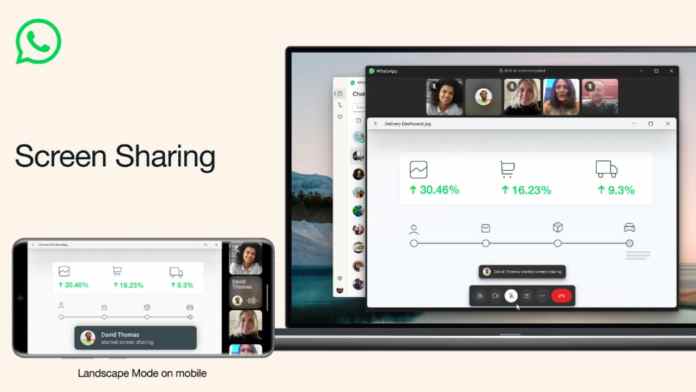
In a significant update, WhatsApp has introduced a screen-sharing capability directly within its video calling function. This WhatsApp screen sharing feature marks a strategic expansion for the platform, moving it beyond simple messaging into more complex, collaborative spaces. For millions of users, it eliminates the need to juggle multiple apps during important conversations.

This means that whether you’re walking a relative through a phone setting, brainstorming a presentation with a colleague, or planning a trip with friends, you can now do it all without leaving the WhatsApp interface. The feature represents a clear shift in how the app positions itself in the competitive communication landscape.

How WhatsApp Screen Sharing Works in Practice

Activating the feature is designed to be intuitive. During any video call, users will find a new “Share” icon. Tapping it presents the option to broadcast either the entire phone screen or a single, specific application window. This level of control is crucial for privacy, allowing users to share only what’s necessary.

For instance, you could share just a photo gallery to review vacation pictures, or a specific document in a PDF reader without revealing your notifications or other sensitive information. The integration is seamless, requiring no extra downloads or complicated setup procedures, which has always been a hallmark of WhatsApp’s user-friendly design.

Professional and Personal Use Cases

Consequently, the applications for this tool are vast. Professionally, freelancers and remote teams can use it for quick reviews, designers can get instant feedback on visuals, and tutors can guide students through problems in real time. It provides a lightweight alternative to more formal meeting software for impromptu discussions.

On a personal level, the utility is just as pronounced. Imagine helping a parent troubleshoot a banking app, collaborating on a shared shopping list, or even choosing a movie together by browsing a streaming service. This feature turns WhatsApp video calls into interactive, shared experiences rather than passive conversations.

The Competitive Edge in Communication Apps

By embedding screen sharing, WhatsApp directly challenges dedicated platforms like Zoom, Google Meet, and Microsoft Teams for casual and semi-professional use. The advantage for WhatsApp is its ubiquitous install base; people are already there. There’s no need to schedule a meeting or send a link—you simply start a call with a contact who is already in your phone.

This move is part of a broader trend of “super app” development, where platforms strive to keep users within their ecosystem for as many tasks as possible. Adding robust calling and sharing tools makes WhatsApp a more compelling one-stop shop for daily communication needs, from quick texts to full collaborative sessions.

Enhancing the Overall Video Call Experience

Alongside screen sharing, WhatsApp is reportedly refining the core video call interface. Updates like a landscape mode for iOS, and presumably later for Android, indicate a focus on improving visual fidelity and usability. A better viewing experience makes screen sharing more effective, especially when presenting detailed information or media.

These incremental improvements show a platform that is listening to user behavior. As video calls became a staple of modern life, the demand for richer features within trusted apps grew. WhatsApp’s development pipeline seems focused on meeting that demand head-on.

What This Means for Users and Future Updates

The rollout of WhatsApp screen sharing is typically gradual, reaching Android, iOS, and eventually desktop users over time. It’s a feature that was tested extensively in beta, suggesting a strong focus on stability and performance before a wide release. Users should keep their apps updated to access the feature as it becomes available in their region.

Looking ahead, this development signals WhatsApp’s ambition. It’s no longer just an alternative to SMS. With features like screen sharing, voice chats for large groups, and advanced privacy controls, it is building a comprehensive communication suite. For small businesses, families, and friend groups deeply embedded in its network, this reduces friction and complexity in digital interaction.

Ultimately, the introduction of screen sharing is a logical and powerful step. It leverages WhatsApp’s greatest strength—its massive, connected user base—and gives them more reasons to communicate visually and collaboratively within the app. As these features solidify, the way we use WhatsApp for both work and play will continue to evolve in more integrated and dynamic ways.

Continue Reading

How To

FliFlik Voice Changer Honest Review: A Soundboard That Levels Up Your Gaming and Discord Sessions

Published

on

FliFlik Voice Changer review

Imagine this: you’re clutching a 1v4 in Valorant, your heart is pounding, and you land a perfect ace. Your teammates are screaming in voice chat. But instead of just yelling, you hit a keybind and a deep, robotic voice booms: “Enemy down. Good job, team.” That’s the power of a great soundboard—and it’s exactly what the FliFlik Voice Changer promises to deliver. In this honest FliFlik Voice Changer review, we’ll break down whether it’s the best soundboard for gaming and Discord, or just another overhyped tool.

As a gamer and content creator, I’ve tested my fair share of voice tools. Most are either too complicated or sound like a robot from the 90s. FliFlik, however, takes a different approach. It’s not just a voice changer; it’s a complete audio toolkit. The video I watched walks through every feature, from setup to advanced soundboard customization. But does it live up to the hype? Let’s dive in.

FliFlik Voice Changer Review: Setup and Core Features

First things first: the setup. The video shows a surprisingly clean interface. You select your input device (your mic) and output device (headphones or speakers). It’s straightforward, even for beginners. The denoise option is a godsend—it filters out keyboard clicks and background hum, which is essential for clear communication in team games.

The voice changer itself offers a variety of presets, from chipmunk to deep demon. You can tweak pitch, speed, and even add reverb. While the presets aren’t revolutionary, they sound natural enough for casual use. However, the real star here is the soundboard. This is where FliFlik shines.

Best Soundboard for Gaming: Pre-Built Lines and Instant Keybinds

The video demonstrates how FliFlik includes pre-added voice lines specifically for games like Valorant. Think callouts like “B site rushing!” or “I’m flashed!”—perfect for quick communication. But the magic lies in the keybind system. You can assign any sound to a hotkey, allowing you to trigger it instantly mid-game. No clicking through menus. Just press F1 and your character says something epic.

This feature transforms your gaming experience. Instead of typing or speaking, you can use sound effects to coordinate with teammates or just troll your friends. The video shows a live demo where the creator triggers a voice line during a match, and it works flawlessly. For Discord users, this is a game-changer. You can play sounds for reactions, memes, or even a dramatic “Omae wa mou shindeiru” before a clutch play.

Custom Soundboard with ChatGPT and ElevenLabs: A Creative Powerhouse

Building on the pre-built options, the video reveals a killer workflow: creating your own custom soundboard using ChatGPT and ElevenLabs. You can generate unique voice lines with ChatGPT—like “Nice try, noob!”—then use ElevenLabs, a leading AI voice generator, to produce natural-sounding clips. ElevenLabs offers realistic voices that mimic human emotion, so your custom lines won’t sound robotic.

The process is simple: copy the text from ChatGPT, paste it into ElevenLabs, download the audio, and import it into FliFlik. The video shows how to map these clips to keybinds, giving you an endless library of personalized sounds. This integration is brilliant for streamers and content creators who want to build a unique audio brand. It’s also a huge time-saver—no more recording your own voice or scouring the internet for sound files.

FliFlik vs Clownfish: Is the Paid Tool Worth It?

The video doesn’t shy away from comparisons. It pits FliFlik against Clownfish, a popular free voice changer. Clownfish offers basic voice effects and is fine for simple needs. However, it lacks a modern soundboard, has a clunky interface, and can be unstable with certain games. FliFlik, on the other hand, is polished, reliable, and offers the soundboard feature that Clownfish simply doesn’t.

That said, FliFlik isn’t perfect. The video highlights a few downsides: the free version limits you to a handful of sounds, and the premium license costs money. For casual users who just want to change their voice occasionally, Clownfish might be enough. But if you’re serious about gaming or streaming, the investment in FliFlik pays off. The soundboard alone justifies the price, especially when you consider the time saved and the fun factor.

In conclusion, this FliFlik Voice Changer review shows that it’s more than just a gimmick. It’s a robust tool that enhances communication and adds a layer of entertainment to your gaming sessions. Whether you’re a Valorant try-hard or a Discord meme lord, the soundboard and custom AI integration make it a top contender. If you’re on the fence, watch the video to see the full demo—it’s worth your time. And hey, even if you stick with Clownfish, at least now you know what you’re missing.

Continue Reading

How To

Never seen a Marvel movie? Start here — the only 6 you truly need

Published

on

Marvel movies for beginners

You don’t need to watch 30+ movies. Honest.

So you’ve never seen a single Marvel movie. Maybe you’ve been living under a rock, or maybe you just never got around to it. Either way, the pressure to catch up can feel crushing. The Marvel Cinematic Universe (MCU) has been running since 2008 and now spans over 30 films, plus a dozen Disney+ shows. That’s a lot of homework.

Here’s the secret: you don’t need all of it. A handful of films do the heavy lifting, introducing the core heroes and the big bad villain in ways that make everything else click. I’ve picked six that give you the best return on your time — no prior knowledge required.

Why these six? A quick logic check

Before we dive in, a quick note on the picks. This isn’t a ranking of the ‘best’ Marvel movies by critical score. It’s a curated entry point. Each film on this list introduces a major hero, establishes the cosmic or political stakes, and connects to the larger story in a way that matters. You’ll finish them with a solid grasp of who’s who and why the Infinity Stones are such a big deal.

The Iron Man principle

Start with the one that started it all. Marvel‘s Iron Man (2008) isn’t just a great movie — it’s the foundation of the entire MCU. Robert Downey Jr.’s Tony Stark is witty, flawed, and instantly likable. This film teaches you the tone: grounded, tech-driven, with a wink to the audience. No cosmic nonsense here, just a genius in a cave building a suit.

The essential six for a Marvel beginner

  • Iron Man (2008) — The origin story that started the MCU. You’ll meet Tony Stark and get a feel for the franchise’s signature mix of action and humor.
  • The Avengers (2012) — The first team-up. This is where you see how individual heroes mesh, and it introduces the Chitauri invasion, a major event.
  • Captain America: The Winter Soldier (2014) — A political thriller disguised as a superhero movie. It introduces the Winter Soldier and reshapes S.H.I.E.L.D., which matters later.
  • Guardians of the Galaxy (2014) — This one expands the universe to space. You meet the Guardians, learn about the Infinity Stones, and get a dose of the MCU’s weirder, funnier side.
  • Avengers: Infinity War (2018) — The big crossover. Thanos arrives, and the stakes go cosmic. It’s the payoff for everything you’ve watched so far.
  • Avengers: Endgame (2019) — The conclusion of the Infinity Saga. It’s a long film, but it delivers emotional closure and sets up the future.

How to watch them: Order matters (sort of)

You could watch these in release order and be fine. But for a beginner, a slightly different sequence works better. Start with Iron Man, then jump to The Avengers to see the team form. Then take a detour to Guardians of the Galaxy to understand the cosmic side. After that, Winter Soldier grounds you in the espionage angle. Finally, watch Infinity War and Endgame back-to-back for the epic finale.

This order builds context naturally. You’ll meet the core heroes, understand the Infinity Stones, and then watch them clash with Thanos. It’s efficient and emotionally satisfying.

What about the other 25+ movies?

You might be wondering: what about Thor, Black Panther, or Spider-Man? Good question. Those are excellent films, but they’re not essential for a beginner. Thor introduces Asgard, but Infinity War gives you enough context. Black Panther is a standalone masterpiece, but it doesn’t drive the central Infinity Stone plot. Spider-Man: Homecoming is fun, but it’s a side quest.

If you finish the six and want more, you can branch out. But don’t feel obligated to watch everything to enjoy the MCU. The franchise is designed to be accessible, even if you’ve missed entries.

Final verdict: Start with these, thank me later

The MCU can be intimidating, but it doesn’t have to be. These six films give you the essential heroes, the cosmic stakes, and the emotional payoff. You’ll walk away understanding why people have been obsessed for over a decade.

And if you’re still hungry for more, check out our guide to the best Marvel movies ranked by critics or the MCU timeline explained simply. Happy watching.

Continue Reading

Social Media

Buried in Meta’s $18B Settlement Is a Legal Pass on Kids’ Data

Published

on

kids' data legal pass

A Curious Clause in a Landmark Deal

Meta’s massive $18 billion settlement with attorneys general from 29 states made headlines for its record-breaking fine and promised child safety upgrades. But tucked inside the fine print is a provision that has privacy experts raising eyebrows: the states have agreed not to sue Meta under existing child safety laws over its retention and use of children’s data.

Yes, you read that right. In a case centered on protecting kids, the settlement grants Meta a legal shield. The carve-out is limited to training and testing Meta’s age-assurance model, and it comes with guardrails. Still, it’s a curious policy decision — and one that could prove difficult to enforce.

What Meta Must Build (and How Fast)

Under the agreement, Meta has one year from the effective date to develop, train, and start testing a model that detects users under 13 on its platforms. The settlement doesn’t explicitly require AI, but Meta’s current age-detection tools already lean on artificial intelligence.

Here’s where it gets legally messy. The Children’s Online Privacy Protection Act (COPPA) generally forces websites to limit how much children’s personal information they collect and hold. The settlement says Meta shouldn’t have to break COPPA to train its age-assurance models. But it also says the state AGs agree “fully, finally, and forever” not to bring any past, present, or future COPPA claims — or similar state-law claims — tied to Meta’s use of children’s data.

The agreement does make one thing clear: Meta can’t use data from kids under 13 for ad targeting, marketing, or algorithmic optimization.

Is This Actually Reasonable?

Philip N. Yannella, a partner at Blank Rome who co-chairs its Privacy, Security & Data Protection practice, doesn’t think the request is unreasonable on its face. “These kinds of data minimization guardrails are pretty typical for privacy compliance: e.g., verifying compliance with deletion requests,” he said.

But he flagged a critical caveat. COPPA is a federal law primarily enforced by the FTC, not the states. The FTC isn’t a party to this settlement, so it’s unclear whether the agency has separately agreed to the same compromise. That leaves a big open question.

The Enforcement Nightmare

Keeping data technically and organizationally isolated from the rest of a company’s systems is notoriously hard. Meta is being asked to do exactly that — wall off its understanding of children’s behavioral signals and use it solely for detecting and removing under-13 users.

Fortunately, an independent auditor will monitor Meta’s compliance. So we don’t just have to take the company’s word for it.

Still, policing this limitation could get complicated. Data could hypothetically bleed into other Meta systems over time. Questions loom about whether signals or insights derived from children’s data are being used elsewhere inside the company. The agreement doesn’t specify:

  • What data Meta will retain for training the model
  • How much behavioral information that might include
  • How long the data will be kept
  • How the models will evolve as Meta meets the settlement’s terms

What This Means for Future Lawsuits

Barring state AGs from raising COPPA or similar state-law claims over this specific use of children’s data could complicate the legal avenues states can pursue if questions arise later.

Joshua Wurtzel, a partner at Schlam Stone & Dolan LLP, points out the release isn’t a blank check. “If Meta uses the data outside those lines, the release and covenant not to sue don’t apply,” he said. But any dispute would hinge on whether Meta’s use fell within the settlement’s terms — a fact-intensive fight that could drag on.

Peter Jackson, a Data & IP attorney at Greenberg Glusker LLP, sees a bigger problem. The carve-out could “disincentivize future enforcement actions.” He describes the age-assurance measures as bearing “all the hallmarks of a heavy, and perhaps hasty, negotiation.”

The Bigger AI Data Question

This deal touches on a broader tension rippling through the AI industry. As more AI agents are built to help consumers with everyday tasks, these systems need significant access to personal data to work well. Meta’s situation is no different — to identify which accounts belong to young people, the company may need deep insight into how children use social media.

The settlement is essentially an experiment in whether that kind of data access can be responsibly contained. The guardrails exist on paper. Whether they hold up in practice is another story entirely.

For now, parents and privacy advocates will be watching closely. So will the FTC. And if Meta stumbles, the states that signed this deal might find themselves wishing they hadn’t given up their legal ammunition so easily.

Continue Reading

Trending