Connect with us

How To

Realme P4 Series India Launch: Full Specs, Gaming Power & Pricing Revealed

Published

on

Realme P4 Series India Launch: Full Specs, Gaming Power & Pricing Revealed

The wait is nearly over for Indian smartphone enthusiasts. Realme has officially confirmed the key specifications for its upcoming P4 Series, set to launch on August 20, 2025. This new lineup, comprising the Realme P4 5G and the more advanced Realme P4 Pro 5G, is poised to shake up the mid-range segment with a strong emphasis on gaming performance and battery endurance. Both models will be available for purchase on Flipkart and the official Realme India website following a noon launch event.

Realme P4 5G: A Balanced Powerhouse

Kicking off the series, the standard Realme P4 5G is built around a robust hardware foundation. At its core lies the MediaTek Dimensity 7400 Ultra chipset, which is complemented by a dedicated Pixelworks visual processor. This dual-chip design aims to deliver smooth visuals and efficient performance.

Display and Visual Experience

Users are treated to a large 6.77-inch HyperGlow AMOLED screen. This display isn’t just big; it’s fast and bright, supporting a 144Hz refresh rate for fluid scrolling and gameplay, along with HDR10+ for vibrant colors. Impressively, it can hit a peak brightness of 4,500 nits in specific scenarios. For user comfort, Realme has incorporated 3,840Hz PWM dimming and blue light reduction technology.

Unmatched Battery Life and Design

Perhaps the most staggering feature is the massive 7,000mAh Titan battery. Supporting 80W fast charging, Realme claims it can reach a 50% charge in just 25 minutes. The phone also supports reverse charging to power other devices. This capacity translates to real-world usage, with the company touting up to 11 hours of continuous BGMI gameplay. Managing the heat from such extended sessions is a substantial 7,000 sq mm AirFlow VC cooling system. Aesthetically, the “Metal Heart Design” with visible metallic lines and exposed screw elements offers a distinct look in Steel Grey, Engine Blue, and Forge Red.

Realme P4 Pro 5G: The Premium Gaming Contender

For those seeking even more power, the Realme P4 Pro 5G steps things up significantly. It is powered by the Qualcomm Snapdragon 7 Gen 4, fabricated on a 4nm TSMC process, and has reportedly scored over 1.1 million points on AnTuTu benchmarks. This is paired with a HyperVision AI chip featuring the Pixelworks X7 Gen 2, a setup engineered to enable stable 144fps gameplay in over 100 titles.

A Next-Level Curved Display

The Pro model features a HyperGlow AMOLED 4D Curve+ display, also with a 144Hz refresh rate and HDR10+ support. It pushes brightness even further, achieving a local peak of 6,500 nits, and uses 4,320Hz high-frequency dimming. Its eye-care credentials are backed by TÜV Rheinland certification, promising protection during long viewing sessions.

Luxury Build and Sustained Performance

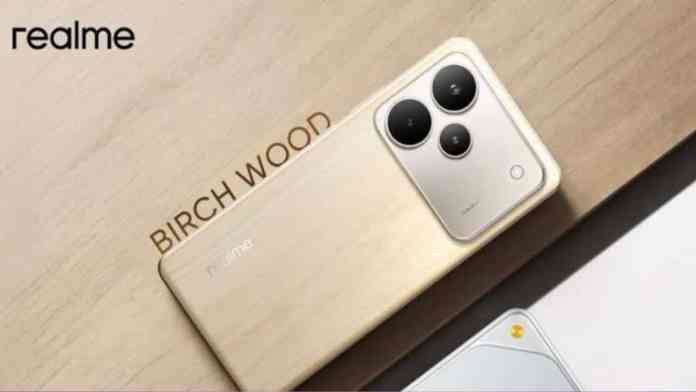
Despite its premium specs, it shares the formidable 7,000mAh battery with 80W fast charging (and 10W reverse charging), delivering over eight hours of BGMI gameplay at 90fps. Where it truly diverges is in its design philosophy. The “Living Nature Design” utilizes premium tech-wood materials, available in finishes like Birch Wood, Dark Oak Wood, and Midnight Ivy, offering a unique tactile and visual experience.

Shared Gaming and Performance DNA

Both phones in the Realme P4 Series share a suite of software-enhanced features designed for gamers and power users. This includes AI Hyper Clarity, AI Hyper Motion, and AI Always-On HDR, all working to optimize visual fidelity. The GT Performance Engine 3.0 works behind the scenes to manage thermals and resource allocation during intensive tasks.

In a notable partnership, Realme has collaborated with PerfDog to integrate a Frame Generation Index. This tool provides real-time, tangible data on the performance benefits delivered by the dedicated Pixelworks hardware, offering transparency to performance-focused buyers.

Regarding cost, Realme’s Francis Wong has confirmed that pricing for the series will be under the key psychological barrier of Rs. 30,000. In a strategic move to simplify choices for consumers, the company has decided to forgo an “Ultra” variant this time around. This streamlined approach means the P4 5G will cater to users seeking exceptional value and balanced performance, while the P4 Pro 5G will target those who demand top-tier gaming capabilities and a luxury design.

With their confirmed specifications and aggressive pricing, the Realme P4 and P4 Pro are shaping up to be formidable contenders in India’s fiercely competitive smartphone market. For more on upcoming device launches, check out our article on the latest from Vivo or the evolving 5G landscape in India.

Continue Reading
Click to comment

Leave a Reply

Your email address will not be published. Required fields are marked *

How To

Fantasy Wallpaper Call Flash App: Transform Your Phone’s Call Screen with Stunning Visuals

Published

on

Fantasy Wallpaper Call Flash App: Transform Your Phone’s Call Screen with Stunning Visuals

Is your phone’s call screen looking dull and uninspired? The Fantasy Wallpaper Call Flash app offers a creative solution for Android users seeking to inject personality into their devices. This application moves beyond standard home screen wallpapers, focusing specifically on transforming the visual experience during incoming calls. Let’s explore what makes this tool stand out in the crowded customization market.

What is the Fantasy Wallpaper Call Flash App?

Essentially, this is a specialized Android application designed for visual personalization. Unlike generic wallpaper apps, it targets the call screen—the interface you see when someone is calling you. The core promise is simple: replace the default, often bland, call screen with dynamic, eye-catching visuals. This means every time your phone rings, you’re greeted with a mini art display instead of a simple contact name.

Building on this, the app provides a library of pre-designed “call flash” themes and live wallpapers. Users can browse categories, select a visual style they enjoy, and apply it with a single tap. The process requires no technical knowledge, making advanced phone customization accessible to everyone.

Key Features and Functionality

The app packs several features aimed at enhancing both aesthetics and utility. First, it offers a wide variety of live wallpapers specifically formatted for the call screen. These aren’t static images; they are often animations or visuals that react when you receive a call, creating a more engaging experience.

LED Flash Alert and Notification

One of the more practical features is the LED call flash alert. This function uses your phone’s camera flash or screen to pulse with colored lights for incoming calls. Why is this useful? In situations where your phone is on silent or the environment is too loud to hear a ringtone, this visual alert ensures you never miss an important call. It adds a layer of functionality alongside the visual flair.

Clock Wallpapers and Call Screen Themes

Furthermore, the app includes clock wallpapers that integrate the time display into the artwork on your call screen. This merges utility with design. Additionally, the “Color Phone Flash” feature, as referenced in the app’s description, provides numerous themed packages. These range from colorful, abstract patterns to more stylized, artistic designs, allowing users to match the call screen to their personal taste or mood.

How to Use the App Effectively

Getting started is straightforward. After installing the Fantasy Wallpaper Call Flash app from the Google Play Store, you open it to access the main gallery. Here, you can preview different themes and live wallpapers. Selecting one usually involves a confirmation prompt to set it as your default call screen. The app handles the system permissions required to overlay its design on top of the standard calling interface.

For those concerned about battery life, it’s worth noting that live wallpapers and flash effects do consume more power than static images. However, the impact is typically minimal and only active during the brief period of an incoming call. Managing your theme collection and avoiding overly complex, constant animations can help optimize performance.

Who is This App For?

This app clearly targets users who view their smartphone as an extension of their personality. It’s popular among younger audiences who enjoy constantly refreshing their device’s look. It’s also a great fit for anyone who finds standard phone interfaces monotonous and seeks a simple way to add a “wow” factor to a routine action like answering a call.

On the other hand, users who prefer a minimalist, distraction-free interface might find the effects overwhelming. The key is to explore the library and find a theme that enhances rather than clutters the call screen’s primary function: displaying caller information clearly.

Final Verdict and Considerations

In summary, the Fantasy Wallpaper Call Flash app successfully fills a niche in phone customization. It is easy to use, offers a broad selection of visuals, and adds both style and a practical notification feature with its flash alerts. For a free app, it provides significant value to those looking to personalize their device.

Before downloading, ensure your Android version is compatible, and be prepared to grant the necessary permissions for the app to function. As with any customization tool, exploring different themes is part of the fun. You can discover more about personalizing your device’s interface in our guide on Android customization tips or learn about other visual tools in our review of live wallpaper apps.

Therefore, if your goal is to make every phone call a more visually interesting event, this app is certainly worth a try. It demonstrates how small software tweaks can significantly alter our daily digital interactions.

Continue Reading

How To

App Volume Controller: The Ultimate Guide to Managing Individual App Sound on Android

Published

on

App Volume Controller: The Ultimate Guide to Managing Individual App Sound on Android

Have you ever been frustrated by your phone’s audio? Perhaps a loud video on Facebook blasts out, or a gentle podcast is drowned by a noisy game notification. This common Android annoyance has a powerful solution: the App Volume Controller. This tool provides precise, per-application audio management, transforming how you interact with your device’s soundscape.

What is the App Volume Controller App?

In essence, the App Volume Controller is a utility application for Android that grants users granular control over audio output. Instead of a single master volume slider affecting everything, this app allows you to set a unique volume level for each installed application. Consequently, you can tailor your audio experience to match your daily activities perfectly.

For instance, you might set your messaging apps to a low volume, your music player to 80%, and your navigation app to a clear, mid-level tone. Once configured, these settings are remembered. Therefore, every time you open WhatsApp, it will automatically use the volume level you assigned, eliminating the need for constant manual adjustments.

Key Features and Practical Benefits

This application shines through its simplicity and powerful feature set. Building on this, its design focuses on user convenience without requiring complex permissions or internet access.

Direct Notification Panel Control

A standout feature is the ability to adjust volumes directly from the notification shade. This means you can change an app’s sound level or switch your ringer profile without ever leaving the app you’re currently using. It integrates seamlessly into the Android ecosystem, acting as a virtual extension of your phone’s physical buttons.

Set-It-and-Forget-It Functionality

The core promise of the App Volume Controller is permanent customization. After you define the preferred volume for YouTube, that setting persists indefinitely. This is ideal for creating personalized audio environments for work, commuting, or relaxation. You can learn more about optimizing your Android experience in our guide on essential Android customization tips.

Installation and Performance

Available on the Google Play Store, the app boasts impressive credentials. With over 500,000 downloads and a 3.9-star rating, it has proven its reliability to a large user base. Remarkably, it achieves all this while being incredibly lightweight, requiring a mere 1.7 MB of storage space. This efficiency ensures it runs smoothly in the background without draining battery life.

On the other hand, its minimal footprint is a significant advantage for users with older devices or limited storage. Installation is straightforward, and no special permissions are needed, which enhances privacy and security. For those concerned about ads, the developers offer an ad-free experience, allowing for uninterrupted use.

Who Should Use This App?

This tool is incredibly versatile. Primarily, it’s a boon for multitaskers. Imagine listening to a calm audiobook while browsing the web; you can lower your browser’s sound effects to a whisper while keeping the narration clear. Similarly, content creators and professionals who frequently switch between communication, media, and utility apps will find it indispensable.

Furthermore, it’s perfect for parents who want to limit the maximum volume of games on their child’s device, or for anyone sharing a space who needs to keep certain notifications discreet. The utility extends to improving accessibility by allowing users to amplify sounds from specific essential apps.

How It Compares to Built-in Android Features

While newer versions of Android have introduced some basic per-app volume controls within the system settings, they often lack the immediacy and permanence offered by a dedicated App Volume Controller. The dedicated app provides a centralized, intuitive interface and the crucial “set for always” functionality that system settings sometimes reset. Discover other powerful utility apps in our review of the best Android productivity tools.

This means that the app fills a genuine gap in the Android user experience. It doesn’t just offer control; it offers consistent, automated control that adapts to your lifestyle rather than forcing you to adapt to the device’s limitations.

Final Verdict and Getting Started

In summary, the App Volume Controller app is a elegantly simple solution to a widespread audio management problem on Android. It empowers users with precise, permanent control over their device’s sound output on an app-by-app basis. The combination of a lightweight design, an ad-free environment, and seamless notification panel integration makes it a highly recommended utility for almost any Android user.

To get started, simply search for “App Volume Controller” on the Google Play Store, download the app, and begin customizing your audio profiles. The process is intuitive, and the payoff—a perfectly calibrated audio environment that works automatically—is immediate. Have you tried managing your app volumes individually? Share your experience or questions in the comments below.

Continue Reading

How To

Para Me App Review: Is This Live Video Chat Platform Safe for Making Friends?

Published

on

Para Me App Review: Is This Live Video Chat Platform Safe for Making Friends?

In today’s digital landscape, the quest for genuine connection often leads us to social discovery platforms. Among these, the Para Me app has emerged as a contender, promising spontaneous video chats with strangers. This platform positions itself as a bridge for those looking to expand their social circles through live, face-to-face interactions. But how does it truly function, and what should users know before diving in?

What is the Para Me Live Video Chat App?

Essentially, Para Me operates as a social discovery tool. It connects users via random live video chat, similar to other platforms in this niche. The core appeal lies in its immediacy—you can start a video conversation with someone new in moments. This format aims to replicate the spontaneity of meeting someone at a social event, but from the comfort of your phone. For individuals seeking to break the ice with new acquaintances, this direct approach can be less intimidating than text-based messaging.

Key Features of the Para Me Platform

Building on this concept, the app’s functionality is designed for simplicity and speed. Users typically download the app, create a basic profile, and are then connected to another user for a live video call. The pairing is often random, which is part of the excitement for many. Furthermore, the service is advertised as free for basic video calling, removing a significant barrier to entry for new users. This model has proven popular for those who prefer visual communication over traditional texting.

Navigating the User Experience

Therefore, the interface prioritizes the video chat window. Controls for ending a call, switching users, or reporting inappropriate behavior are usually accessible. The success of any conversation, however, hinges on mutual interest and respect between the two parties. While the technology facilitates the connection, the human element defines the interaction.

Critical Safety Considerations for Online Socializing

However, the anonymous and random nature of such platforms demands heightened awareness. Safety should never be an afterthought. Before engaging in live video chat on any app, including Para Me, verifying the authenticity of the person on the other end is crucial. Are their social media profiles private, inconsistent, or non-existent? This could be a red flag. Similarly, if someone consistently avoids meeting in person or making any verifiable connection outside the app after establishing rapport, proceed with caution.

In addition, trust your instincts. If a conversation feels manipulative, pressured, or simply “off,” you have every right to disconnect immediately. Reputable platforms provide easy-to-use reporting tools for a reason. For a broader understanding of digital safety, consider reading our guide on essential online dating safety tips.

Who is the Para Me App Best Suited For?

Consequently, this app may appeal to extroverted individuals who enjoy meeting a wide variety of people and thrive in spontaneous social settings. It can be a tool for practicing social skills, learning about different cultures, or simply killing time with interesting conversations. It is less suited for those seeking serious, long-term relationships from the outset, as the environment is geared toward casual, initial contact.

How Does Para Me Compare to Other Social Apps?

On the other hand, it’s important to contextualize this platform within a crowded market. Unlike curated dating apps or interest-based social networks, Para Me’s value proposition is randomness and real-time video. This sets it apart from text-first platforms. For users interested in a different approach to social discovery, exploring options like other top video calling apps might provide useful alternatives.

Final Verdict and Practical Advice

This means that the Para Me app is a specific tool for a specific social need. If your goal is to have unscripted video conversations with strangers across the globe, it offers a direct channel. As with any social platform, managing expectations is key. Not every call will lead to a lasting friendship, and that’s okay. The experience is in the interaction itself.

To summarize, approach Para Me with a blend of open-mindedness and prudent caution. Use the platform’s features as intended, but always prioritize your personal security and emotional well-being. The digital world offers incredible opportunities for connection, but navigating it wisely is the user’s most important responsibility.

Continue Reading

Trending