Connect with us

How To

Phone ID Faker App: How to Make Fake Voice Calls with a Spoofed Number on Android

Published

on

Phone ID Faker App: How to Make Fake Voice Calls with a Spoofed Number on Android

Have you ever wanted to call someone without revealing your real number? Or maybe you just want to have a little fun by changing your voice during a conversation. The Phone ID Faker app makes both of these tricks possible right from your Android device. This lightweight tool lets you mask your caller ID and apply voice effects in real time. In this guide, we will walk you through everything you need to know about using this app for fake voice calls.

What Is the Phone ID Faker App?

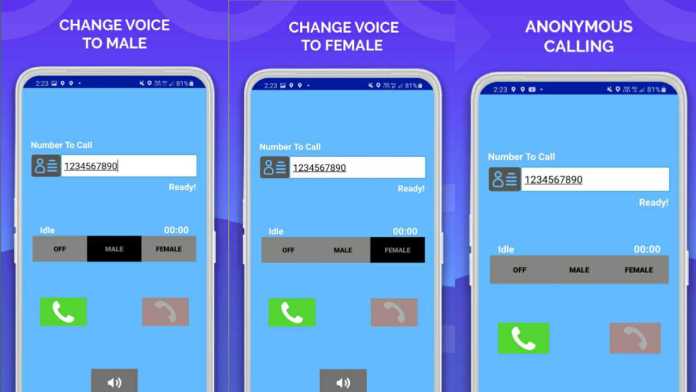
Phone ID Faker is a utility application designed for Android smartphones. It allows users to display a different phone number on the recipient’s screen when making a call. Additionally, the app offers built-in voice modulation features. That means you can sound like a different person entirely. Whether you are planning a harmless prank or testing a service that requires anonymity, this app gives you control over your caller identity.

Many people search for a reliable spoof caller ID app that does not require root access. Phone ID Faker works on most standard Android devices without complicated setup. It is available on the Google Play Store and can be installed in seconds.

How to Use Phone ID Faker for Fake Voice Calls

Getting started with this app is straightforward. Follow these steps to make your first spoofed call with an altered voice.

Step 1: Install the App

Open the Google Play Store on your Android phone. Search for “Phone ID Faker” and tap the install button. The file size is small, so the download finishes quickly. Once installed, locate the app icon in your app drawer.

Step 2: Grant Required Permissions

When you launch the app for the first time, it will request access to your contacts and phone settings. These permissions are necessary for the app to modify the outgoing caller ID and apply voice changes. Accept all prompts to proceed.

Step 3: Enter the Fake Number

Inside the app, you will see a field labeled “Caller ID” or similar. Type in the phone number you want the recipient to see. This can be any valid number you choose. For example, you could use a secondary line or a random local number.

Step 4: Choose Your Voice Effect

Phone ID Faker includes several voice modulation presets. You can sound like a robot, a child, a deep male voice, or a high-pitched female voice. Browse the options and select the one that fits your prank or test scenario.

Step 5: Dial and Enjoy

After setting the number and voice, tap the call button. The app will place the call using your default dialer. The person on the other end will see the spoofed number and hear the modified voice. It is that simple.

Why Use a Fake Voice Call App?

There are several legitimate reasons to use a fake voice call Android tool. Privacy-conscious users often want to keep their personal number hidden from strangers. For instance, if you are selling items online or contacting a service provider, masking your real ID adds a layer of security. On the fun side, friends use this app to pull off creative pranks during group calls. Just remember to keep it lighthearted and respectful.

Another practical use is testing voicemail systems or automated phone menus. By changing both the number and voice, you can simulate different caller scenarios without exposing your identity.

How to Download Phone ID Faker

To download the Phone ID Faker download file, simply visit the Google Play Store on your device. Search for the app name and tap the green install button. Alternatively, if you have enabled installation from unknown sources, you may find APK versions on trusted third-party sites. However, the Play Store version is recommended for safety and automatic updates.

After installation, open the app and grant the necessary permissions. You are now ready to start making spoofed calls. If you encounter any issues, check that your device runs Android 5.0 or higher, as older versions may not be fully compatible.

Frequently Asked Questions

Is Phone ID Faker free to use?

Yes, the basic version of the app is free. Some advanced voice effects or number presets may require in-app purchases, but the core spoofing functionality works without payment.

Can I use this app for international calls?

Phone ID Faker works with your regular phone service. If your carrier supports international dialing, you can spoof your number for calls abroad. However, voice quality may vary depending on network conditions.

Will the recipient know I am using a fake number?

In most cases, the recipient will only see the number you entered. There is no indication that a spoofing app is being used. However, some advanced telecom systems may flag spoofed numbers. Use the app responsibly.

Final Thoughts

The Phone ID Faker app is a versatile tool for anyone looking to change voice during call or hide their real number. Its simple interface and quick setup make it accessible even for beginners. Whether you want to protect your privacy or just have a laugh with friends, this app delivers on both fronts.

Before you start, remember that spoofing your caller ID for malicious purposes is illegal in many regions. Always use this technology ethically. If you found this guide helpful, share it with your friends. For more app reviews and Android tips, check out our apps reviews section or read about the best Android launchers to further customize your device.

Continue Reading
Click to comment

Leave a Reply

Your email address will not be published. Required fields are marked *

How To

Infinix GT 10 Pro Launched in India: A Budget Gaming Powerhouse with LED Lights

Published

on

Infinix GT 10 Pro Launched in India: A Budget Gaming Powerhouse with LED Lights

The Infinix GT 10 Pro launched in India today, bringing a fresh wave of excitement to the budget gaming smartphone segment. Priced under Rs 20,000, this device stands out with its transparent back panel and eye-catching LED lights. For gamers on a tight budget, this phone promises a lot more than just flashy aesthetics.

Infinix has officially unveiled the GT 10 Pro, aiming to capture the attention of young gamers who want premium features without breaking the bank. The phone is now available on Flipkart for pre-order, with special discounts for ICICI Bank and Kotak Bank customers.

Infinix GT 10 Pro Launched in India: Design and Build Quality

The first thing you notice about the Infinix GT 10 Pro is its Cyber Mecha Design. The rear panel uses photochromatic technology, which changes color when exposed to UV light. In the Mirage Silver variant, the back shifts from silver to Steel Blue and Dusty Pink under sunlight.

However, the real showstopper is the LED strip placed next to the camera module. This isn’t just for decoration. It lights up for incoming calls, notifications, and even syncs with your music’s rhythm. You can also flip the phone to mute calls, a neat trick that adds to the gamer-friendly vibe.

Two Color Options: Cyber Black and Mirage Silver

Buyers can choose between Cyber Black, which is more understated, and Mirage Silver, which offers the UV-reactive color shift. Both variants feature the transparent design that shows off the phone’s internal components.

For those who love customization, the LED strip offers dynamic charging animations and startup effects. This makes the phone feel alive, especially in dark environments.

Display and Performance: Built for Gaming

The Infinix GT 10 Pro sports a 6.67-inch full-HD+ AMOLED display with a 120Hz refresh rate and a 360Hz touch sampling rate. This combination ensures smooth scrolling and snappy touch responses, crucial for fast-paced games like BGMI or Call of Duty Mobile.

Under the hood, the phone is powered by the MediaTek Dimensity 8050 chipset, built on a 6nm process. Paired with 8GB of LPDDR4X RAM and 256GB of UFS 3.1 storage, this setup handles multitasking and heavy gaming without breaking a sweat.

You can also expand the RAM virtually by up to 8GB, and the storage can go up to 1TB via a microSD card. This flexibility is a big plus for users who store lots of games and media.

Cooling System and Haptic Feedback

Infinix has included a VC (Vapor Chamber) Thermal Cooling system to keep temperatures in check during long gaming sessions. Additionally, the Haptic Z-axis motor provides realistic vibration feedback, making every shot and explosion feel more immersive.

Camera Capabilities: 108MP Main Shooter

Despite being a gaming-focused device, the Infinix GT 10 Pro doesn’t skimp on camera hardware. It features a triple rear camera setup led by a 108MP primary sensor. This allows for detailed shots in good lighting, and the camera app includes features like Portrait Mode, Film Mode, and Dual Video Mode.

On the front, there’s a 32MP selfie camera housed in a center punch-hole. It supports 2K video recording at 30fps, which is impressive for a phone in this price range. The rear camera can shoot 4K video at 30fps as well.

For photography enthusiasts, the phone offers a variety of modes to experiment with, including Short Video Mode and AI scene detection.

Battery and Software: All-Day Power with Fast Charging

A 5,000mAh battery keeps the lights on, and with 45W fast charging support, you can top up quickly. Infinix claims the phone can go from zero to full in under an hour, which is convenient for gamers who need to get back into action.

On the software side, the GT 10 Pro runs XOS 13 for GT, based on Android 13. Infinix has promised a near-bloatware-free experience, with minimal pre-installed apps. You get features like video-based Always-On-Display (AOD), live wallpapers, and extensive customization options.

Other notable features include an in-display fingerprint scanner, Widevine L1+ support for HD streaming, Hi-Res audio, and DTS audio enhancement.

Infinix GT 10 Pro Price in India and Availability

The Infinix GT 10 Pro price in India is set at Rs 19,999 for the single 8GB+256GB variant. However, during the pre-order period, you can grab it for as low as Rs 17,999 using ICICI Bank or Kotak Bank card offers on Flipkart.

This pricing puts it in direct competition with phones like the Poco X5 Pro and the Realme Narzo 60 Pro. But the unique design and LED lights give the Infinix GT 10 Pro an edge in terms of visual appeal.

If you’re looking for a phone that combines gaming performance with a head-turning design, the Infinix GT 10 Pro is worth considering. It launches at a time when the mid-range segment is crowded, but its distinctive features help it stand out.

For more updates on the latest smartphone launches in India, check out our mobile launches section.

Continue Reading

How To

How to Send a WhatsApp Message Without Saving a Contact Number

Published

on

How to Send a WhatsApp Message Without Saving a Contact Number

Have you ever wanted to message someone on WhatsApp but didn’t want to clutter your phonebook with their number? You’re not alone. Millions of people face this situation every day — whether it’s a delivery driver, a new acquaintance, or a business lead. Fortunately, you can send WhatsApp message without saving contact using a straightforward method. This guide walks you through the best tools and tricks to achieve this in seconds.

Why You Might Want to Message Without Saving

There are several practical reasons to skip the contact-saving step. For instance, you might receive a call from an unknown number and want to reply via WhatsApp without storing it permanently. Similarly, freelancers and small business owners often need to send WhatsApp message without saving contact to maintain a clean address book. This approach saves time and keeps your contacts organized.

Moreover, privacy-conscious users prefer not to leave digital traces of every number they interact with. The method we’ll describe respects your privacy while still letting you connect instantly.

Using a Dedicated App for Direct Messaging

One of the simplest solutions is to download a specialized application. These apps are designed specifically to let you send WhatsApp message without saving contact. They work by generating a direct WhatsApp link from the phone number you enter. You don’t need to add the number to your phone’s contact list at all.

Key Features of These Apps

Most of these tools share a set of common features that make them incredibly useful:

  • No contact saving required — Simply type the number and start chatting.
  • Direct access from call logs — You can select a number from your recent calls and message it instantly.
  • Completely free — These apps are free to download and use, with no hidden charges.
  • Create custom WhatsApp links — Some apps let you generate a shareable link for any number.
  • Message strangers safely — Perfect for contacting unknown people without exposing your full contact list.

Building on this, these apps often include a simple interface where you paste or type the target number, and with one tap, WhatsApp opens with that number ready to chat. It’s that easy.

Step-by-Step Guide to Using the App

If you’re ready to try this method, follow these simple steps:

  1. Download the app — Find a reliable “WhatsApp direct message” app from the Google Play Store or Apple App Store.
  2. Open the app — You’ll see a text field asking for a phone number.
  3. Enter the number — Include the country code (e.g., +1 for the US, +44 for the UK).
  4. Tap “Send” — The app will redirect you to WhatsApp with a pre-filled chat for that number.
  5. Type your message — Send your text, image, or voice note as usual.
  6. That’s all there is to it. No saving, no syncing, no hassle.

    Alternative Method: Manual WhatsApp Link

    You can also achieve the same result without any third-party app. WhatsApp has a built-in URL scheme that lets you start a chat with any number. Simply open your mobile browser and type: https://wa.me/1234567890 (replace the digits with the full number including country code). This will open WhatsApp directly with that contact.

    However, the dedicated app approach is more convenient because it often includes a history of your recent messages and lets you manage multiple unsaved numbers easily. For a deeper dive into WhatsApp features, check out our guide on hiding WhatsApp blue ticks.

    Important Considerations

    Before you start messaging strangers, keep a few things in mind. First, always respect privacy — only message people who have given you their number or have a reasonable expectation of contact. Second, be aware that WhatsApp may flag unusual activity if you message many unknown numbers in a short period.

    Additionally, some countries have regulations about unsolicited messages. Use this tool responsibly to avoid being marked as spam. If you’re looking to earn money from WhatsApp, this technique can be part of your strategy for reaching potential clients without overwhelming your contacts list.

    Final Thoughts

    The ability to send WhatsApp message without saving contact is a small but powerful feature that simplifies daily communication. Whether you use a dedicated app or the manual wa.me link, you can now connect with anyone on WhatsApp instantly. This method is especially valuable for professionals who handle numerous inquiries or for anyone who values a tidy phonebook.

    Give it a try today. Download one of the recommended apps, or bookmark the wa.me link format, and never worry about saving unwanted numbers again. For more tips on managing your smartphone, explore our article on checking notification history on Android.

Continue Reading

How To

Moto G35 5G Launches in India on December 10: Full Specs, Price, and Features Revealed

Published

on

Moto G35 5G Launches in India on December 10: Full Specs, Price, and Features Revealed

Motorola is set to shake up the budget smartphone segment with the Moto G35 5G India launch on December 10. This device promises to deliver premium features—like a 120Hz display and 50MP camera—at a highly competitive price point. For Indian consumers looking for an affordable yet capable 5G handset, this could be the answer.

Moto G35 5G Display and 5G Connectivity

One of the standout aspects of the Moto G35 5G India launch is its connectivity. Motorola claims this phone offers the fastest 5G speeds in its class, thanks to support for 12 5G bands. This wide band support ensures reliable connectivity across Indian networks, even in areas with weaker signals.

The device features a large 6.7-inch Full HD+ display with a buttery-smooth 120Hz refresh rate. With a peak brightness of 1000 nits, outdoor visibility should be excellent. Whether you’re streaming content or playing games, the screen promises vibrant visuals and fluid motion.

Camera System: 50MP Primary and Ultra-Wide Lens

Photography enthusiasts on a budget will appreciate the camera setup. The Moto G35 5G sports a 50MP primary sensor capable of recording 4K video. An additional 8MP ultra-wide camera lets you capture expansive landscapes or group shots without stepping back.

This combination means you can shoot detailed close-ups or wide scenes with ease. Motorola has also included software optimizations for better low-light performance and portrait shots.

Performance and Software

Under the hood, the phone is powered by the UNISOC T760 processor. While not a flagship chip, it handles daily tasks like browsing, social media, and light gaming smoothly. Paired with 4GB of RAM and 128GB of internal storage, there’s ample space for apps, photos, and files.

It runs on Android 14 out of the box, with Motorola promising an upgrade to Android 15 and two years of security patches. This commitment to updates adds long-term value for buyers.

Battery and Charging

Battery life is a strong suit. The Moto G35 5G packs a 5000mAh battery, which should easily last a full day of moderate to heavy use. Support for 20W fast charging means you can top up quickly when needed. For comparison, many rivals in this price bracket still ship with slower chargers.

Design and Audio

Motorola has given the Moto G35 5G a premium look with a vegan leather back. It comes in three colors: Leaf Green, Midnight Black, and Guava Red. The textured finish not only looks upscale but also improves grip and resists fingerprints.

Audio is handled by stereo speakers tuned by Dolby Atmos. This delivers immersive sound for movies and music, a rare feature in the sub-₹10,000 segment.

Moto G35 5G Price in India and Availability

The Moto G35 5G price in India is expected to be around ₹10,000. At this price, it directly competes with offerings from Xiaomi, Realme, and Samsung. Launch offers, including discounts or EMI options, are likely to be announced on December 10.

If you’re in the market for a budget 5G phone that doesn’t cut corners on display quality or battery life, the Moto G35 5G is worth a close look. Check out our guide to the best budget 5G phones in India for more options.

For more details on Motorola’s latest lineup, visit the official Motorola India website. You can also read our overview of Motorola’s 2024 smartphone lineup.

Continue Reading

Trending