Connect with us

How To

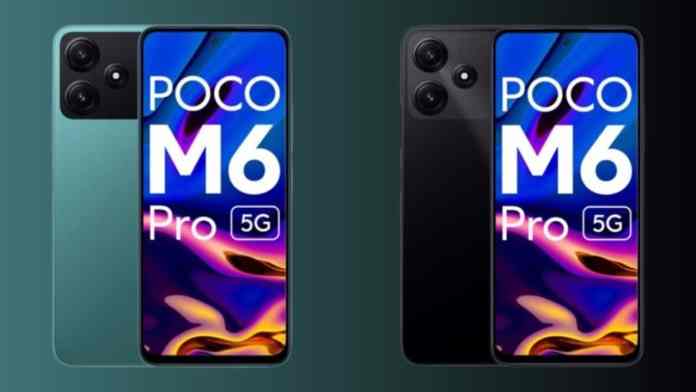
Poco M6 Pro 5G: Grab This Feature-Packed Smartphone at a Steal — Discounted Price, Specs & More

Published

on

Poco M6 Pro 5G: Grab This Feature-Packed Smartphone at a Steal — Discounted Price, Specs & More

Looking for a reliable 5G smartphone that won’t burn a hole in your pocket? The Poco M6 Pro 5G deal currently on Flipkart might be exactly what you need. With a striking price drop and a host of premium features, this device is turning heads in the budget segment. Let’s explore what makes this phone a smart buy right now.

How Much Does the Poco M6 Pro 5G Cost After Discount?

The standard price of the Poco M6 Pro 5G (4GB RAM + 128GB storage) is ₹15,999. However, during the ongoing Flipkart sale, the phone sees a massive 25% discount, bringing it down to just ₹11,999. That’s a saving of ₹4,000 on a device packed with modern features.

But the savings don’t stop there. Flipkart Axis Bank credit card users can enjoy an additional 5% cashback. Furthermore, if you have an old smartphone to trade in, you could get up to ₹10,750 in exchange value. Combining these offers, the effective cost of the phone could be as low as ₹588. This makes the Poco M6 Pro 5G deal one of the most aggressive offers in the market right now.

Display and Performance: A Smooth Everyday Companion

One of the standout features of this phone is its display. The Poco M6 Pro 5G sports a large 6.79-inch FHD+ screen with a 90Hz refresh rate. This means scrolling through social media, browsing the web, or playing casual games feels fluid and responsive. The higher refresh rate is a feature usually found on more expensive devices.

Under the hood, the phone is powered by the Qualcomm Snapdragon 4 Gen 2 chipset. This processor is built for efficiency and handles daily tasks with ease. Paired with up to 6GB of RAM and 128GB of internal storage, the device offers enough space for apps, photos, and videos. It also runs on Android 13 out of the box, providing a clean and up-to-date software experience.

Camera System: Capture Life in Detail

For photography enthusiasts on a budget, the Poco M6 Pro 5G delivers a capable setup. The rear camera array features a 50MP primary sensor that captures sharp and vibrant images in good lighting. A 2MP depth sensor assists with portrait shots, helping to create a natural bokeh effect.

On the front, an 8MP selfie camera handles video calls and self-portraits. While it may not compete with flagship devices, it performs adequately for social media sharing and video chats. The camera app also includes various modes to enhance your photography experience.

Battery Life and Charging: All-Day Power

Battery anxiety is a thing of the past with the Poco M6 Pro 5G. It houses a massive 5000mAh battery, which easily lasts a full day of moderate to heavy use. Whether you’re streaming videos, playing games, or working on the go, this phone will keep up.

When it’s time to recharge, the device supports 18W fast charging. While not the fastest in its class, it’s sufficient to top up the large battery in a reasonable time. For a phone in this price range, the combination of a big battery and decent charging speed is a strong selling point.

Is the Poco M6 Pro 5G Worth Buying in 2025?

Absolutely. If you are in the market for a budget 5G phone in India, this offer is hard to ignore. The Poco M6 Pro 5G deal on Flipkart provides excellent value for money. You get a large, smooth display, a capable camera, long battery life, and the latest connectivity standards — all for under ₹12,000.

Considering the exchange bonus and cashback options, the effective price becomes almost unbelievable. This phone is ideal for students, first-time 5G users, or anyone looking for a reliable secondary device. Don’t miss out on this limited-time offer. For more budget smartphone options, check out our guide on best smartphones under ₹15,000.

In conclusion, the Poco M6 Pro 5G successfully bridges the gap between affordability and features. It proves that you don’t need to spend a fortune to enjoy a modern 5G experience. Head over to Flipkart now to grab this deal before it ends. You can also read our comparison of Poco vs Realme budget phones to see how it stacks up against the competition.

Continue Reading
Click to comment

Leave a Reply

Your email address will not be published. Required fields are marked *

How To

The 9 Best Free Antivirus Software Of 2023: Comprehensive Guide

Published

on

The 9 Best Free Antivirus Software Of 2023: Comprehensive Guide

In today’s digital age, securing your system is non-negotiable. A reliable antivirus program not only performs regular updates to shield files from malware but also ensures your personal information remains private. With on-demand scans to detect viruses, the best free antivirus software of 2023 offers robust protection without costing a dime. However, the sheer number of options can be overwhelming. To simplify your decision, we’ve curated a list of the top nine free antivirus solutions, each evaluated for features, usability, and effectiveness.

Why You Need Free Antivirus Software

Cyber threats are evolving rapidly, from ransomware to phishing attacks. Free antivirus tools provide essential defenses, such as real-time scanning and malware removal, without the financial commitment. They are ideal for individuals seeking basic protection or those who want to test a product before upgrading. While free versions may lack advanced features, they often deliver reliable security for everyday use.

Top 9 Best Free Antivirus Software of 2023

1. Kaspersky Free

Kaspersky Free stands out for its clean interface and advanced features. It offers scheduled scanning, customizable security levels, and a self-defense mechanism that blocks unauthorized changes to system files. Compatible with Windows 7 through 11, it effectively detects rootkits, adware, and auto-dialers. However, it requires account creation and annual license renewal, making setup slightly slower. For those prioritizing performance, this is a solid choice.

Learn more about cybersecurity best practices to complement your antivirus setup.

2. Adaware Antivirus Free

Lightweight and quick to install, Adaware Antivirus Free operates in two modes: regular real-time protection and as a supplement to existing antivirus software. It defends against spyware, ransomware, and viruses through full, quick, or custom scans. Features include scheduled daily, weekly, or monthly scans and rootkit detection. On the downside, it lacks advanced network and email protection, and real-time email scanning is absent. It runs smoothly on Windows 7, 8, and 10.

3. AVG AntiVirus Free

AVG AntiVirus Free offers a user-friendly experience with automatic updates and full control over scan settings. It supports rootkit detection and cybercapture technology, working across Windows XP to 11. Setup is straightforward, allowing users to enable features during installation. However, the free version has limitations—some features are locked, and ads for AVG Internet Security are persistent. Despite this, its reliability makes it a popular choice.

4. Immunet Antivirus

Immunet Antivirus boasts a small setup file, fast installation, and no ads. It provides real-time cloud-based protection, automatically excluding temp and system folders from scans. Scheduled scans are available, but compatibility is limited to Windows 7 and newer versions. Its customizable options and automatic updates make it a strong contender for modern systems.

5. ZoneAlarm Free Antivirus

ZoneAlarm Free Antivirus includes a built-in firewall, offering protection against trojans, viruses, bots, and spyware. Features include real-time cloud updates, a gamer mode to block interruptions, and backup/restore of security settings. It works on Windows 7, 10, and 11. However, it can be resource-heavy and has a slow installation process, which may deter some users.

6. TotalAV

TotalAV is a comprehensive scanner compatible with Mac, Android, iOS, and Windows. The free version includes a smart scan for malware, junk files, and duplicates, plus safe browsing extensions for Chrome, Edge, and Firefox. It blocks harmful URLs and offers a free trial of the Pro version. While real-time protection is limited to the premium tier, its excellent lab test scores make it a top pick.

7. Bitdefender

Bitdefender delivers premium-grade protection for free, with comprehensive scans (system, custom, vulnerability) and real-time defense. It uses machine learning to detect behavioral threats, minimizing performance impact. Users can try the 30-day premium version without credit card details. However, macOS users lack a free plan, which is a notable drawback.

Explore our guide on best free antivirus apps for Android for mobile protection.

8. NordVPN Threat Protection

NordVPN Threat Protection combines VPN and antivirus features, working on iOS, macOS, Windows, and Android. It includes background scans, ad blocking, malicious website filtering, and automatic download scanning. The 30-day money-back guarantee adds value. However, it lacks real-time system scans and advanced scan options, focusing more on web security.

9. ESET NOD32

ESET NOD32 is a multi-platform antivirus compatible with macOS, Windows, Linux, and Android. It offers full, quick, and custom scans, real-time protection, and an anti-theft suite to track lost devices. Cloud-based performance and ransomware file encryption are key features. A 30-day free trial of premium features is available, but affordable paid plans and some advanced tools are missing.

How to Choose the Best Free Antivirus for You

Selecting the right software depends on your needs. Consider factors like system compatibility, desired features (e.g., firewall, VPN), and resource usage. For basic protection, AVG or Adaware work well. For advanced features, Kaspersky Free or Bitdefender are excellent. If you need a VPN, NordVPN Threat Protection is a hybrid option. Always test free versions before committing.

Check out top antivirus tips for 2023 to maximize your security.

Final Words

Investing in antivirus software—even a free one—is a wise decision for system security. The options above offer varying levels of protection, from basic scanning to comprehensive suites. Evaluate features, customer support, and your specific requirements to make an informed choice. With these free tools, you can safeguard your data without breaking the bank. Start protecting your device today.

Continue Reading

How To

PS5 Digital Edition Faces Price Increase in India: Everything You Need to Know!

Published

on

PS5 Digital Edition Faces Price Increase in India: Everything You Need to Know!

Indian gamers, brace yourselves: the PS5 Digital Edition price increase India is now a reality. Sony has quietly raised the cost of its disc-less console, catching many buyers off guard. The new listing on Sony’s official online store shows the slim digital version at ₹49,990, up from ₹44,990 — a jump of ₹5,000. While the company hasn’t made an official announcement yet, multiple trusted sources and retail listings confirm the change. This article breaks down the new pricing, past trends, and what might be driving this decision.

New Price Details: What Changed?

The latest adjustment applies only to the PS5 Digital Edition. Specifically, the slim digital variant now carries a price tag of ₹49,990 on Sony‘s Indian store. Earlier, it was available for ₹44,990, meaning a straight ₹5,000 increase. Interestingly, the Fortnite PS5 digital bundle remains at ₹44,990, possibly due to stock clearance or a temporary promotional price.

Meanwhile, the disc edition stays unchanged at ₹54,990. Sony has also left accessories like DualSense controllers and headsets untouched. For now, only the digital edition has seen a hike, but sources suggest the disc version might follow suit soon.

A Look Back: PS5 Price Trends in India

This isn’t the first time the PS5 Digital Edition price increase India has made headlines. When the console launched in 2020, the digital edition cost ₹39,990, while the disc version was ₹49,990. In 2022, global inflation forced Sony to raise prices: the digital edition went up to ₹44,990, and the disc edition jumped to ₹54,990.

However, in 2023, Sony cut ₹5,000 from both models, bringing them back to launch levels. The PS5 Slim launched in 2024 at those reduced prices. Now, with the current hike, the digital edition returns to its 2022 peak. Internationally, Sony also raised PS5 prices in the UK, Europe, and Australia, with Europe seeing a €50 increase due to inflation and currency fluctuations.

Why Is Sony Raising Prices Again?

Although Sony hasn’t provided an official reason for the PS5 Digital Edition price increase India, several factors likely play a role. In April 2025, Sony increased PS5 digital prices worldwide, and India’s adjustment follows that global pattern. Economic pressures, including inflation and currency issues, are common culprits.

Additionally, Sony sold fewer PS5 units in FY 2024 — 18.5 million — compared to 20.8 million in FY 2023. This drop in sales, combined with rising component costs and tariffs, may be forcing the company to adjust prices. Even Microsoft raised Xbox console and game prices recently, indicating industry-wide challenges.

Retailers like DT Zone and social media users have also corroborated the price update, adding credibility to the news. For Indian buyers, the timing is tricky: the hike comes ahead of major festival seasons, but discounts during sales events like Diwali or Amazon Great Indian Festival could soften the blow.

What Should Indian Gamers Do Now?

Given the PS5 Digital Edition price increase India, potential buyers have a few options. Waiting for festival offers or flash sales might yield discounts, especially on bundles. Alternatively, consider the disc edition, which remains at ₹54,990 for now, or explore third-party retailers for older stock at the previous price.

If you’re not in a hurry, holding off could be wise. Sony often runs promotional campaigns during festive seasons, and the Fortnite bundle’s unchanged price hints at possible temporary deals. However, if the disc version also gets a hike soon, the window for savings may narrow.

For more insights on console pricing, check out our guide on PS5 buying tips in India or read about PS5 Slim vs Digital Edition differences. Stay tuned to TechNewzTop for the latest updates on gaming hardware.

Continue Reading

How To

Find Your Match: How to Use an Online Dating App for Android to Chat and Meet New People

Published

on

Find Your Match: How to Use an Online Dating App for Android to Chat and Meet New People

Are you single and looking to expand your social circle? Many people today feel the same way. Fortunately, technology makes it easier than ever to connect with others. An online dating app can help you meet new people, chat with interesting individuals, and even find lasting friendships. This guide walks you through everything you need to know about downloading and using such an app on your Android device.

Why Use an Online Dating App on Android?

First, let’s understand the appeal. Millions of Android users turn to dating apps to break the ice. Instead of waiting for chance encounters, you can actively search for people who share your interests. This approach saves time and removes much of the awkwardness from meeting someone new. Moreover, these apps offer a safe space to get to know someone before deciding to meet in person.

Benefits of Chatting with New People

Building connections online has several advantages. You can talk to multiple people at your own pace. You also get to learn about different cultures and perspectives. For shy individuals, chatting behind a screen feels less intimidating than face-to-face conversations. As a result, many find it easier to express themselves honestly.

How to Choose the Right Online Dating App

Not all dating apps are created equal. Some focus on serious relationships, while others are for casual chats. When selecting an online dating app for your Android phone, consider these factors:

  • User base: Look for apps with a large, active community in your area.
  • Features: Free messaging, video calls, and profile verification add value.
  • Privacy: Check the app’s privacy policy to ensure your data is safe.
  • Cost: Many apps are free to download but offer premium subscriptions for extra features.

Popular options include Tinder, Bumble, and OkCupid. Each has its own strengths, so explore a few to see which fits your style.

How to Download an Online Dating App on Android

Downloading an online dating app is straightforward. Follow these simple steps:

  1. Open the Google Play Store on your Android device.
  2. Search for the app by name or browse the “Dating” category.
  3. Tap “Install” and wait for the download to complete.
  4. Once installed, open the app and create your account.

You can also download APK files from trusted sources if the app isn’t available in your region. However, always prioritize official stores to avoid security risks. For more tips on safe app usage, check out our guide on staying safe on dating apps.

How to Use an Online Dating App: Step-by-Step

After installation, you need to set up your profile. Here’s a quick walkthrough:

Step 1: Create Your Profile

Open the app and sign up using your email, phone number, or social media account. Upload a clear photo and write a short bio. Be honest about your interests and what you’re looking for. A genuine profile attracts genuine people.

Step 2: Adjust Your Settings

Set your preferences, such as age range, location, and gender. This helps the app show you relevant matches. You can also enable notifications to receive alerts when someone likes or messages you.

Step 3: Start Swiping and Chatting

Browse through profiles and swipe right if you’re interested. If the feeling is mutual, you can start a conversation. Begin with a friendly greeting or a comment about their profile. Avoid generic messages like “Hi” — instead, ask a question or share a fun fact.

Building on this, remember to be respectful. If someone isn’t interested, move on politely. The goal is to make meaningful connections, not to pressure others.

Tips for a Great Experience on an Online Dating App

To get the most out of your online dating app, keep these pointers in mind:

  • Stay safe: Never share personal information like your home address or bank details. Meet in public places for first dates.
  • Be patient: Finding the right match takes time. Don’t get discouraged by a few mismatches.
  • Update your profile: Refresh your photos and bio occasionally to keep your profile active.
  • Use filters: Many apps let you filter by hobbies, education, or lifestyle. Use these to narrow down your search.

Furthermore, consider using apps that offer video chat before meeting in person. This adds an extra layer of security and helps you gauge chemistry.

Common Mistakes to Avoid

Even experienced users make errors. Avoid these pitfalls:

  • Overthinking: Don’t spend hours crafting the perfect message. Be yourself.
  • Ignoring red flags: If someone seems too good to be true or asks for money, report them immediately.
  • Neglecting your profile: A blank profile looks suspicious. Fill it out completely.

By steering clear of these mistakes, you’ll have a smoother and more enjoyable experience.

Conclusion: Start Connecting Today

In summary, an online dating app for Android opens doors to new friendships and relationships. The process is simple: download, create a profile, and start chatting. Remember to prioritize safety and authenticity. Whether you’re looking for a casual conversation or a lifelong partner, the right app can make all the difference. So why wait? Download an app today and take the first step toward meeting someone new. For more app reviews and tutorials, explore our Apps Reviews section.

Continue Reading

Trending