Connect with us

How To

Touch Screen Locker App for Smartphone: Unlock Your Creativity Today!

Published

on

Touch Screen Locker App for Smartphone: Unlock Your Creativity Today!

Have you ever wished for a simple way to prevent accidental touches while watching videos or letting your child play on your phone? A Touch Screen Locker app offers exactly that, turning your device into a more versatile and creative tool. This guide explores how such an app works, its standout features, and why it deserves a spot on your Android phone.

What Is a Touch Screen Locker App?

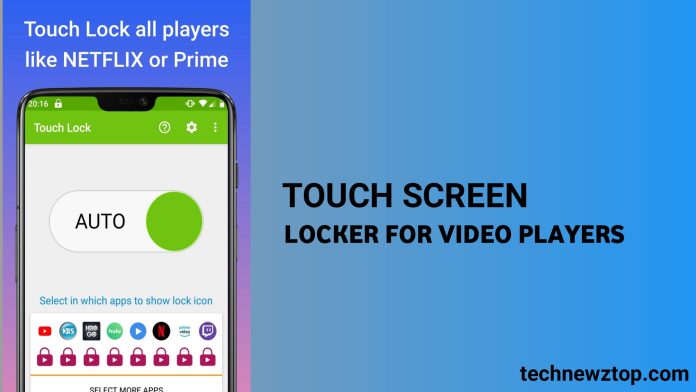
A Touch Screen Locker app is a utility that temporarily disables touch input on your smartphone’s screen. Unlike traditional screen locks that secure your device, this app focuses on preventing unintended taps during specific activities—like watching videos, listening to music, or entertaining a toddler. It essentially gives you control over when and where the screen responds to touch.

For Android users, this app is particularly valuable. It integrates seamlessly with video players, music apps, and even games. As a result, you can enjoy content without worrying about accidental pauses or exits. Many versions also support fingerprint or pattern unlock, adding a layer of convenience and security.

Key Features of the Touch Screen Locker App

Understanding the features helps you see why this app is more than just a simple lock. Here are the most notable capabilities:

Lock Touch Input While Watching Videos

One of the primary uses is locking the screen during video playback. Whether you are using YouTube, Netflix, or a local player, the app prevents accidental touches that might interrupt your viewing. This means no more unexpected pauses or skipped scenes.

Screen-Off Music Mode

Another clever feature is the ability to turn off the screen while playing music. This saves battery life significantly, especially during long playlists. By default, this option is disabled, but you can enable it easily from the app’s settings. It is a simple yet effective way to extend your listening time.

Baby Lock for Kids

Parents will appreciate the Baby Lock mode. You can start a fun video or toddler app for your child, then activate the invisible touch lock. This keeps the screen active for viewing but unresponsive to random taps. It is a stress-free solution for giving your little one screen time without the risk of them navigating away or making unintended calls.

Floating Lock Icon

The app automatically displays a floating lock icon over video players. This makes it easy to lock or unlock touch input with a single tap. The icon is unobtrusive and does not interfere with your content.

Unlock with Fingerprint or Pattern

To regain control, you can unlock the screen using your fingerprint or a pattern. This ensures that only you can disable the lock, adding security when needed.

How to Download and Use the Touch Screen Locker App

Getting started with a Touch Screen Locker app is straightforward. Follow these steps:

  1. Find the app: Search for “Touch Screen Locker for Video Players” on the Google Play Store or use the download link provided below.
  2. Install it: Tap the install button and wait for the process to complete.
  3. Grant permissions: The app may require overlay or accessibility permissions to function properly. Accept these to enable features like the floating icon.
  4. Enable Screen Off (optional): Go to settings and turn on the Screen Off mode for music playback.
  5. Start using it: Open a video or music app, tap the floating lock icon, and enjoy uninterrupted use.

Download Touch Screen Locker App Now

Why This App Unlocks Creativity

At first glance, a screen lock might seem purely functional. However, using a Touch Screen Locker app can actually boost your creativity. How? By removing distractions and accidental interruptions, you can focus fully on content creation or consumption. For instance, if you are editing a video or designing graphics, locking the touch input prevents accidental tool changes. Similarly, parents can let their kids explore educational apps without constant supervision, freeing up mental space for creative thinking.

Moreover, the battery-saving feature means you can listen to music or podcasts for longer periods, fueling inspiration during commutes or workouts. The app essentially gives you more control over your device, allowing your creativity to flow without technical hiccups.

Final Thoughts

In summary, a Touch Screen Locker app is a small but powerful tool for any Android user. It offers practical benefits like preventing accidental touches, saving battery, and providing a safe mode for children. Beyond utility, it enhances your overall smartphone experience by reducing friction and letting you engage with content more deeply.

If you are ready to try it, the download link above will get you started. For more tips on optimizing your device, check out our guide on best Android productivity apps and how to extend battery life. Share this article with friends who might benefit from a smarter screen lock solution!

Continue Reading
Click to comment

Leave a Reply

Your email address will not be published. Required fields are marked *

How To

Kaun Banega Crorepati Season 12: Complete Registration Process and How to Apply

Published

on

Kaun Banega Crorepati Season 12: Complete Registration Process and How to Apply

The wait is finally over for millions of fans across India. Kaun Banega Crorepati (KBC) Season 12 is returning to Sony TV, and the legendary Amitabh Bachchan is once again ready to host the show that changes lives. If you have been dreaming of sitting on the iconic hot seat and answering questions to win crores, now is your chance. This guide covers everything you need to know about KBC Season 12 registration, from online applications to offline methods.

Registration for the show officially opened on 9 May 2020, but the final deadline to apply is 22 May 2020. During this period, specific questions will be broadcast on television, and the audience must answer them correctly to qualify. The process is straightforward, but you need to follow each step carefully to avoid missing out.

How to Register for KBC Season 12 Online

The easiest way to complete your Kaun Banega Crorepati apply online is through the official SonyLIV website or mobile app. Simply visit www.sonylive.com and look for the KBC registration banner. You will need to create an account or log in using your existing credentials. Fill in your personal details, including name, age, city, and contact information. Once submitted, you will receive a confirmation via email or SMS.

Alternatively, you can download the SonyLIV app from the Google Play Store or Apple App Store. The app is free to install and provides a seamless registration experience. After installing, navigate to the KBC section and follow the on-screen instructions. This method is particularly useful for users who prefer mobile access.

Offline Registration via IVR and SMS

For those without reliable internet access, KBC 12 audition process also supports offline registration through IVR (Interactive Voice Response) and SMS. Dial the designated number provided on the official Sony TV website or during the show’s broadcast. Follow the voice prompts to submit your details. Similarly, you can send an SMS with your name and city to the specified number. The team will then contact you for further steps.

Building on this, the registration confirmation will be sent to your registered mobile number or email. Keep an eye on your inbox, as the KBC team uses this channel to notify shortlisted candidates about the next stages.

KBC Season 12 Audition and Selection Process

Once your registration is accepted, the selection process begins. The KBC hot seat registration involves four key stages: registration screening, online audition, personal interview, and final selection. The screening team reviews all applications and shortlists candidates based on their responses and eligibility. Shortlisted participants then undergo an online audition, where they answer questions via video call. This is followed by a personal interview in one of the audition cities.

Auditions are conducted in multiple cities across India, including major metros. The exact schedule and locations are announced on the official SonyLIV platform. Make sure to check for updates regularly. The entire process is designed to find the most deserving contestants who can handle the pressure of the hot seat.

Important Tips for a Successful KBC Registration

To increase your chances of being selected, follow these practical tips. First, ensure that all the information you provide is accurate and matches your official documents. Any discrepancy can lead to disqualification. Second, participate in the televised questions between 9 May and 22 May 2020. Answering them correctly is a mandatory step for eligibility. Third, keep your phone and email handy for any communication from the KBC team.

Furthermore, avoid relying on third-party websites or unofficial links. Always use the official SonyLIV portal or the app. The show’s production team does not charge any fee for registration, so beware of scams asking for money. For more details, check out our guide on how to prepare for KBC audition and SonyLIV app download guide.

In conclusion, KBC Season 12 registration is your ticket to potentially winning life-changing prizes. Whether you choose the online route via SonyLIV or the offline IVR/SMS method, the process is simple and accessible to all. Do not miss the deadline of 22 May 2020. Register today and take the first step toward your dream of sitting across from Amitabh Bachchan on the KBC hot seat. Good luck!

Continue Reading

How To

How to Become the Best Player in PUBG: 5 Essential Strategies for Victory

Published

on

How to Become the Best Player in PUBG: 5 Essential Strategies for Victory

Every PUBG player dreams of being the last one standing. But achieving that chicken dinner consistently requires more than just luck. If you want to become the best player in PUBG, you need a solid game plan. Fortunately, mastering a few core tactics can dramatically improve your survival rate and kill count. This guide breaks down five proven methods to elevate your gameplay, from choosing the right landing spot to moving like a ghost through the map.

1. Master Your Drop Zone Selection

Your journey to becoming the best player in PUBG starts before you even touch the ground. Where you parachute sets the tone for the entire match. Hot drops like the Military Base offer high-risk, high-reward action. Statistics show that around 70% of early-game deaths in these areas come from players caught in windows or open spaces.

Instead of landing in the middle of chaos, aim for rooftops. Getting on top of a building gives you immediate sightlines over the area. You can quickly spot weapons and then use the window to check for enemies moving in the open. The Military Base, for instance, has large stretches of open ground. If you land on a roof, you control the high ground and can pick off opponents below.

Tips for Safe Landing

  • Scout your surroundings: As you descend, look for weapon icons on the roofs or balconies.
  • Land on the highest point: This gives you a 360-degree view and a tactical advantage.
  • Move quickly after looting: Don’t stay in one spot for too long. Grab a weapon and reposition.

2. Always Stay in Cover

Walking in the open is a death sentence in PUBG. Always move from cover to cover. This simple habit can save your life countless times. Whether it’s a tree, a rock, a wall, or a vehicle, use everything around you as a shield.

When you stay behind cover, you make it much harder for enemies to get a clean shot. Furthermore, you can peek out to fire and then quickly duck back. This technique, often called “peeking,” is a core skill for any aspiring best player in PUBG. Even when hiding behind a door, be cautious. Your weapon can sometimes clip through the door, revealing your position. Keep your gun pointed away from the edge to stay hidden.

3. Never Fight Alone — Use Team Play

Even if you’re playing solo, you can use the environment and other players to your advantage. However, in squad or duo modes, team play is non-negotiable. Sticking together provides multiple benefits. You can cover each other’s blind spots, revive downed teammates, and share resources.

When you finish clearing a location like the Military Base, moving as a unit is crucial. For example, when jumping from a roof, one teammate can provide cover while the other descends. This coordination prevents ambushes. If you don’t have a team, use the in-game voice chat to make temporary alliances. A lone wolf rarely survives until the final circle. For more advanced squad tactics, check out our guide on PUBG Squad Coordination Tips.

4. Master Stealth and Hiding Techniques

Sometimes, the best offense is a good defense. Knowing how to hide effectively can turn the tide of a match. Use walls and structures to your advantage. You can peek around corners to scout rooms without exposing your whole body. This allows you to gather information and plan your attack.

Another effective tactic is using the “door peek.” When a door opens, it can reveal an enemy’s location. Use this to your advantage by waiting behind a door and then shooting as soon as it opens. Additionally, use bushes and tall grass for concealment. Crawling into a bush can make you almost invisible, especially in later circles. This is a classic PUBG strategy for survival.

5. Dominate Building Entries

Buildings are both safe havens and death traps. Knowing how to enter them safely is a key PUBG tip. There are several ways to breach a building. The first is through the roof. If you land on the roof, immediately find a spot to hide and listen for footsteps below. However, entering directly through the front door is risky.

A better approach is to use windows. Jumping from a roof onto a balcony and then entering through a window is a surprise tactic that few enemies expect. This method allows you to bypass common entry points and catch opponents off guard. Once inside, clear each room methodically. Use the third-person camera to peek around corners before entering. For more on this, read our article on Advanced Building Clearing in PUBG.

Final Circle Positioning

As the circle shrinks, positioning becomes everything. Use the terrain to your advantage. In the final circles, prone in the grass or behind a rock is often the safest bet. Avoid running in open fields. Instead, crawl or use smoke grenades to obscure enemy vision. Remember, patience is a virtue. The last player standing is often the one who waits the longest.

By consistently applying these five strategies, you will see a noticeable improvement in your performance. Becoming the best player in PUBG is a journey, not a destination. Practice these techniques in every match, and soon, those chicken dinners will become routine. For more gaming insights, check out our complete gaming tips hub.

Continue Reading

How To

How to Send Voice Messages on WhatsApp: A Complete Privacy Guide for 2025

Published

on

How to Send Voice Messages on WhatsApp: A Complete Privacy Guide for 2025

Voice messaging has become one of the most popular ways to communicate on WhatsApp, offering a quick alternative to typing long texts. But what if you need to share something confidential? In this guide, you will learn exactly how to send voice messages on WhatsApp using the view-once privacy feature — a tool designed to keep your sensitive audio safe from forwarding or saving.

Whether you are sharing a credit card number, a one-time password, or a personal confession, this step-by-step walkthrough covers everything from recording to sending a self-destructing voice note. Let’s dive in.

What Are Self-Destructing Voice Messages on WhatsApp?

Self-destructing voice messages, also known as view-once voice notes, disappear immediately after the recipient plays them once. This means the audio cannot be forwarded, saved, or shared again. It is a powerful addition to WhatsApp’s growing suite of privacy tools.

However, there is a catch: this feature is only available on the mobile versions of WhatsApp for Android and iPhone. Desktop users will not see the option. Building on this, you should also remember that while the message self-destructs, someone could still record it externally using another device.

How to Send View-Once Voice Notes on WhatsApp for Android

If you are using an Android phone, the process is straightforward. First, ensure your WhatsApp is updated to the latest version from the Google Play Store. Then follow these steps:

  1. Open any chat conversation in WhatsApp.
  2. Swipe up on the microphone icon and tap the lock icon to start hands-free recording.
  3. Record your voice message as usual.
  4. Before sending, tap the 1 in a circle icon (the view-once button) located near the clip or send button.
  5. When the icon turns green, tap the Send button to deliver the self-destructing voice note.

That is all there is to it. The recipient will see a notification that the voice message can only be played once.

How to Send View-Once Voice Notes on WhatsApp for iPhone

For iPhone users, the steps are nearly identical. WhatsApp for iOS offers the same privacy feature, and activating it is just as simple:

  1. Open a conversation in WhatsApp on your iPhone.
  2. Swipe up on the microphone and tap the lock icon to begin recording.
  3. Record your voice message.
  4. Tap the 1 in a circle icon next to the clip to enable view-once privacy.
  5. Confirm by tapping the Send arrow.

As a result, your voice message will vanish after the first play. This means that even if the recipient tries to screenshot or record the screen, the audio itself is protected from being replayed.

Important Cautions When Using Self-Destructing Voice Messages

While the view-once feature adds a strong layer of privacy, it is not foolproof. Here are a few things to keep in mind:

  • External recording: The recipient could use another phone or a voice recorder to capture the audio while it plays. Never share absolutely critical information via voice message.
  • No desktop support: This feature currently works only on mobile apps. If you frequently use WhatsApp Web or the desktop app, you will not be able to send or receive view-once voice notes there.
  • Recipient awareness: The other person will know the message is view-once, which might raise suspicion. Use this feature selectively.

For more ways to protect your chats, check out our guide on how to hide WhatsApp blue ticks and other privacy tricks.

Additional WhatsApp Privacy Features Worth Exploring

Sending self-destructing voice messages is just one part of a bigger privacy ecosystem. WhatsApp also offers end-to-end encrypted backups, disappearing messages, and two-step verification. By combining these tools, you can significantly reduce the risk of your data being misused.

Furthermore, you can explore our dedicated article on top WhatsApp privacy tricks to learn about locking individual chats, hiding your online status, and more.

Final Thoughts on Sending Voice Messages on WhatsApp Privately

Learning how to send voice messages on WhatsApp with the view-once feature is a simple yet effective way to boost your privacy. Whether you are on Android or iPhone, the process takes only a few seconds. Just remember to keep your app updated and use the feature wisely.

By following these steps, you can ensure that your confidential audio stays secure and cannot be saved or forwarded. WhatsApp continues to roll out privacy-focused updates, so stay tuned for even more ways to protect your conversations.

Continue Reading

Trending