Connect with us

How To

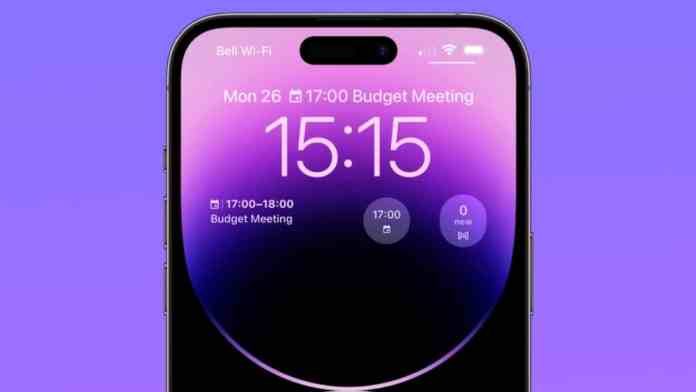
Lock Screen Widgets: Android & iOS Productivity Hacks That Save Time

Published

on

Lock Screen Widgets: Android & iOS Productivity Hacks That Save Time

How many times do you unlock your phone each day? Twenty? Fifty? More? Every time you swipe or tap to enter your device, you’re losing precious seconds. Those moments add up quickly. What if your phone could show you what you need before you even unlock it?

Modern smartphones have transformed the lock screen from a simple security barrier into a dynamic information hub. Both Android and iOS now support widgets that display everything from your next meeting to the weather forecast. This isn’t just about customization—it’s about reclaiming time and attention.

Why Your Lock Screen Should Work Harder

Think about your typical morning. You wake up and check your phone. Without widgets, you might unlock it, open your calendar app, check the weather app, then maybe glance at your fitness tracker. That’s multiple steps and several seconds gone.

With properly configured lock screen widgets, all that information appears at a glance. Your next meeting, today’s forecast, your activity rings—they’re all visible before you touch your passcode. This immediate access eliminates what psychologists call “micro-friction”—those tiny barriers that disrupt our flow throughout the day.

The benefits extend beyond convenience. By reducing unnecessary unlocks, you naturally decrease distractions. How often have you unlocked your phone for one specific purpose, only to find yourself scrolling through social media minutes later? A focused lock screen helps you stay on task.

Essential Widgets for Maximum Efficiency

Not all widgets are created equal. Some provide genuine utility, while others just add visual clutter. Here are the categories that deliver real value.

Calendar and Schedule Widgets

These are arguably the most useful lock screen additions for professionals. A well-designed calendar widget shows your next appointment, its location, and how soon it starts. No more frantic unlocking to check if you’re running late for that 2 PM conference call.

The best implementations show just enough information—time, title, and maybe the video conferencing link—without overwhelming the display. This glanceable format means you can check your schedule while walking between meetings or during a quick coffee break.

Weather and Travel Information

Will it rain this afternoon? Should you grab an umbrella before leaving the house? A weather widget answers these questions instantly. Beyond basic temperature, advanced widgets show precipitation chances, sunrise and sunset times, and even air quality indexes.

For travelers, some widgets can display multiple time zones or flight status information. Imagine knowing your boarding time without digging through email confirmations.

Quick Action and Control Widgets

These are your shortcuts to frequently used functions. Music playback controls let you skip tracks or adjust volume without opening your streaming app. Smart home widgets can turn lights on or off, adjust thermostats, or view security cameras.

Voice assistant widgets provide hands-free access to Siri or Google Assistant. Fitness widgets show your daily step count or exercise rings. The key is choosing actions you perform regularly—not every possible function your phone offers.

Customizing Your Lock Screen Experience

Both Android and iOS offer extensive customization options, though their approaches differ slightly.

iOS Lock Screen Personalization

Apple’s lock screen customization has evolved significantly, particularly with recent iOS versions. The system now supports multiple lock screens that you can switch between based on Focus modes or time of day.

Visual customization goes deep. You can adjust font styles and colors to match your wallpaper. The Depth Effect uses computational photography to make subjects appear in front of the time display. Photo Shuffle cycles through your favorite memories automatically.

Thematic lock screens—like travel, fitness, or minimalist designs—help create cohesive visual experiences. But remember: aesthetics should enhance functionality, not compete with it.

Android Widget Flexibility

Android’s approach varies by manufacturer and version, but generally offers more flexibility in widget placement and sizing. Some devices let you add widgets by swiping left or right on the lock screen, then tapping the plus icon.

Manufacturer skins matter. Samsung’s One UI might offer different widget options than Google’s Pixel launcher. The availability of third-party widgets also depends on your device and Android version.

Adding widgets typically requires authentication first—you’ll need to enter your PIN or use biometrics before making changes. This security measure prevents unauthorized modifications to your lock screen layout.

Avoiding Common Widget Mistakes

More widgets don’t necessarily mean more productivity. In fact, overcrowding your lock screen can have the opposite effect.

Too many widgets create visual noise. Instead of quickly finding the information you need, you waste time scanning through cluttered displays. Performance can suffer too—widgets that update frequently consume battery life and processing power.

Privacy considerations are crucial. Some widgets might display sensitive information like calendar details or message previews. Always balance convenience with security. If you work in public spaces, consider which widgets should appear on your lock screen versus those better kept behind authentication.

Choose widgets that update on demand rather than constantly refreshing. Calendar events don’t change minute-by-minute, so there’s no need for real-time updates. Weather information might refresh every hour, not every minute.

The Cumulative Impact of Small Savings

Let’s do some math. Suppose checking your calendar the old way takes 8 seconds—unlocking, finding the app, waiting for it to load. With a lock screen widget, it takes 2 seconds. That’s a 6-second saving.

If you check your calendar six times daily, you save 36 seconds. Add weather checks, music controls, and quick app launches, and you might reclaim 2-3 minutes daily. Over a year, that’s 12-18 hours saved—almost an entire waking day returned to you.

Beyond time savings, there’s cognitive benefit. Every decision to unlock your phone carries what behavioral economists call “decision fatigue.” By making essential information available without that decision, you preserve mental energy for more important tasks.

Your phone’s lock screen has evolved from a simple security feature to a potential productivity powerhouse. With thoughtful widget selection and mindful customization, you can transform those brief glances into meaningful time savings. The seconds you save today become hours you reclaim over months—all from a screen you were already looking at anyway.

Continue Reading
Click to comment

Leave a Reply

Your email address will not be published. Required fields are marked *

How To

Xiaomi Mix Flip 2: The Next Foldable Revolution Powered by Snapdragon 8 Elite SoC

Published

on

Xiaomi Mix Flip 2: The Next Foldable Revolution Powered by Snapdragon 8 Elite SoC

The foldable smartphone segment is evolving at a rapid pace, and Xiaomi Mix Flip 2 is shaping up to be one of the most anticipated releases of early 2025. Following the impressive reception of its predecessor, the Xiaomi Mix Flip, the Chinese tech giant is reportedly preparing a second-generation clamshell foldable that promises significant hardware upgrades. According to reliable tipster Digital Chat Station, the Xiaomi Mix Flip 2 is expected to debut in the first half of 2025, likely between January and June. This timeline suggests Xiaomi is eager to capitalize on the momentum built by the original Mix Flip, which became a hit in its home market thanks to its compact design and flagship-level performance.

What Chipset Will Power the Xiaomi Mix Flip 2?

One of the most exciting rumors surrounding the Xiaomi Mix Flip 2 is its processor. Leaks indicate that the device will be equipped with the Snapdragon 8 Elite SoC, Qualcomm’s upcoming premium chipset. This would mark a substantial leap over the Snapdragon 8 Gen 3 found in the first-generation model.

Performance Expectations

The Snapdragon 8 Elite is expected to deliver notable improvements in CPU and GPU performance, as well as enhanced AI capabilities. For users, this means smoother multitasking, faster app loading, and an overall more responsive experience. The chipset should also support advanced gaming features and better power efficiency, which is crucial for a foldable device with limited internal space for cooling and battery.

In addition to the processor, the Mix Flip 2 is likely to feature 12GB or 16GB of RAM, paired with 256GB or 512GB of internal storage. This configuration would position it as a true flagship competitor in the clamshell foldable category.

Display and Camera Upgrades on the Mix Flip 2

Xiaomi is known for pushing display technology forward, and the Mix Flip 2 should continue that trend. The predecessor featured a 6.86-inch 1.5K AMOLED main screen and a 4.01-inch 1.5K AMOLED cover display, both with HDR10+ and Dolby Vision support. For the sequel, we can expect similar or even improved panels, possibly with higher refresh rates or brighter peak brightness levels.

Camera System

The original Mix Flip impressed with its dual 50-megapixel Leica-tuned rear cameras, offering 2x optical zoom. The Mix Flip 2 might retain this partnership with Leica, but rumors suggest potential upgrades to the sensor size or the addition of a telephoto lens. The front-facing 32-megapixel selfie camera should also see refinements for better low-light performance and video quality.

As for battery life, the Mix Flip 2 could pack a slightly larger cell than the 4,780mAh unit in the first model, along with 67W fast charging and possibly 50W wireless charging. The software will likely be Xiaomi HyperOS based on Android 15, offering deep integration with the foldable form factor.

Pricing and Launch Timeline

Xiaomi has historically offered competitive pricing for its foldable devices. The original Mix Flip launched at CNY 5,999 (approximately ₹69,000). The Mix Flip 2 is expected to maintain a similar price point, though minor increases could occur due to the new chipset and potential hardware upgrades. This pricing strategy would make it one of the more affordable clamshell foldables on the market, rivaling devices like the Samsung Galaxy Z Flip series.

For those interested in the broader foldable landscape, check out our coverage of the Samsung Galaxy Z Flip 7 processor details and the Motorola Edge 50 Pro Android 15 update.

Final Thoughts on the Xiaomi Mix Flip 2

Building on the success of its predecessor, the Xiaomi Mix Flip 2 has the potential to redefine the clamshell foldable experience. With a powerful Snapdragon 8 Elite SoC, refined cameras, and a sleek design, it is poised to attract both foldable enthusiasts and mainstream users. As the launch window approaches, more concrete details will emerge, but the early signs are promising. Stay tuned for further updates on this exciting foldable phone.

Continue Reading

How To

How to Save Friends WhatsApp Status on Your Phone: A Simple Step-by-Step Guide

Published

on

How to Save Friends WhatsApp Status on Your Phone: A Simple Step-by-Step Guide

WhatsApp remains the world’s most popular messaging platform, with billions of active users sharing daily moments through the status feature. However, a common frustration persists: the app offers no native option to download or save these fleeting updates. If you have ever wanted to keep a friend’s funny video or a beautiful photo they shared as a status, you are not alone. This guide will show you exactly how to save friends WhatsApp status directly to your phone using a reliable third-party tool.

Fortunately, a straightforward solution exists. By using a dedicated app from the Google Play Store, you can bypass WhatsApp’s limitations and store any status you like. The process takes just a few minutes and requires no technical skills. Let’s walk through the steps together.

Why You Need a Special App to Save WhatsApp Status

WhatsApp does not include a built-in download button for status updates. This is by design, as the feature is meant for temporary sharing. However, many users want to preserve memorable content from their contacts. A status saver app acts as a bridge, accessing the temporary files WhatsApp stores on your device and making them available for permanent saving.

These apps work by scanning the internal storage folder where WhatsApp caches status media. Once detected, you can preview and download anything you like. It is a simple, effective workaround that has become incredibly popular among WhatsApp users worldwide.

Step-by-Step: How to Save Friends WhatsApp Status

Follow these five simple steps to download any WhatsApp status to your phone. The entire process takes less than two minutes.

Step 1: Install a Status Downloader App

First, head to the Google Play Store and search for “Status Downloader for WhatsApp.” Multiple options exist, but look for one with high ratings and positive reviews. Install it just like any other app on your device. Make sure you grant the necessary permissions when prompted, as the app needs access to your storage to function.

Step 2: Open the App and Browse Statuses

Once installed, open the status downloader app. It will automatically scan your phone and display a list of all recent status updates from your WhatsApp contacts. You will see thumbnails of both photos and videos. The interface is usually clean and easy to navigate.

Step 3: Select the Status You Want to Save

Browse through the list and tap on the specific status you wish to keep. Tapping it will open the media in full-screen view. This allows you to confirm it is the right file before saving.

Step 4: Download the Status to Your Phone

After selecting the status, look for a download button or icon—typically a downward arrow. Tap it, and the app will instantly save the file to your device. Most apps also offer a “Save All” option if you want to download multiple statuses at once.

Step 5: Find Your Saved Files

Open your phone’s file manager and navigate to the folder named “Downloader” or “Status Downloader” (the exact name depends on the app you chose). Here, you will find all the photos and videos you have saved. You can now view, share, or back them up as you wish.

Important Tips for Using Status Saver Apps

Before you start downloading, keep these practical tips in mind to ensure a smooth experience.

  • Check Permissions: Ensure the status downloader app has permission to access your media and files. Without this, it cannot detect or save statuses.
  • Respect Privacy: Only save statuses that you have permission to use. Avoid sharing someone else’s private content without their consent. It is always best to ask first.
  • Monitor Storage Space: Videos can take up significant space. Regularly check your phone’s storage to avoid running out of room for new downloads. You can also delete old saved statuses you no longer need.

For more helpful guides, check out our article on how to change your WhatsApp number without losing chats or learn about using multiple WhatsApp accounts on one phone.

Final Thoughts on Saving WhatsApp Statuses

Saving a friend’s WhatsApp status is a simple task once you have the right tool. By following the steps outlined above, you can easily download and keep any status that catches your eye. The process is quick, free, and requires no technical expertise.

Have you tried using a status downloader app before? Do you have any questions about the steps? Feel free to leave a comment below. If you found this guide useful, share it with your friends on social media so they can learn how to save their favorite WhatsApp statuses too.

Continue Reading

How To

Realme 14 Pro Series Leaked Specs: What the Flagship Mid-Range Phones Bring to the Table

Published

on

Realme 14 Pro Series Leaked Specs: What the Flagship Mid-Range Phones Bring to the Table

The Realme 14 Pro series leaked specs have generated considerable buzz ahead of the official launch, scheduled for January 2025 in India. According to multiple leaks and official teases, the lineup will include two models: the Realme 14 Pro and the Realme 14 Pro+. These devices aim to deliver a premium experience at a competitive price point, packing impressive hardware upgrades over their predecessors.

From a massive battery to a periscope zoom camera, the Realme 14 Pro series looks set to challenge rivals in the mid-range segment. Let’s dive into the key details that have surfaced so far.

Realme 14 Pro: Performance and Battery Highlights

The standard Realme 14 Pro is expected to feature the MediaTek Dimensity 7300 Energy chipset. This processor promises a noticeable performance boost compared to the Snapdragon 7s Gen 2 found in the Realme 13 Pro series. As a result, users can expect smoother multitasking and better gaming capabilities.

Battery life is another standout area. The phone reportedly houses a 6,000mAh battery, all while maintaining a slim profile of just 7.55mm. For context, achieving such capacity in a thin chassis is rare in this price bracket. Additionally, 45W fast charging support means you won’t be tethered to a wall outlet for long.

Camera and Display Upgrades

On the camera front, the Realme 14 Pro is tipped to sport a Sony IMX882 primary sensor with optical image stabilization (OIS). This combination should help capture sharp images even in low light. The rear setup also includes triple-flash “studio-level” lighting with intelligent color temperature adjustment, which could significantly improve portrait shots.

For selfies, a 16MP AI camera handles the front-facing duties. Meanwhile, the display is a 120Hz curved panel with 1.5K resolution and 3,840Hz PWM dimming. This high-frequency PWM dimming is particularly beneficial for reducing eye strain during prolonged use, making the phone suitable for both gamers and binge-watchers.

Realme 14 Pro+: Periscope Zoom and Faster Charging

The Realme 14 Pro+ steps up the game with a Snapdragon 7s Gen 3 processor. Qualcomm’s chip offers improved CPU and GPU performance, ensuring a flagship-like experience for demanding apps and games. The Pro+ model also supports 80W fast charging, which is a significant upgrade over the standard variant’s 45W charging.

Camera enthusiasts will appreciate the inclusion of a Sony IMX896 sensor with OIS, paired with a 3x periscope zoom lens. This setup allows for high-quality optical zoom shots, a feature typically reserved for more expensive devices. Whether you’re capturing distant landmarks or detailed close-ups, the periscope lens adds versatility.

Other notable features include a quad-curved bezel-less display and Realme UI 6.0 based on Android 15. The bezel-less design should provide an immersive viewing experience, while the latest software skin brings new customization options and performance optimizations.

Design and Durability: Color-Changing Pearl Pattern

One of the most intriguing aspects of the Realme 14 Pro series is its design. The standard model features a Pearl pattern that changes color in chilly weather. This thermochromic effect adds a unique visual element, making the phone stand out in a crowd.

Durability is also a key focus. The Realme 14 Pro boasts IP66, IP68, and IP69 certifications, offering protection against dust, water, and even high-pressure water jets. Combined with shock resistance, this makes the device suitable for outdoor use and accidental drops. For more on how Realme builds its phones, check out our guide to Realme smartphone build quality.

Expected Pricing and Availability

While official pricing hasn’t been confirmed, leaks suggest the Realme 14 Pro series will be positioned competitively in the mid-range segment. The standard model is expected to start around ₹22,000, while the Pro+ variant could go up to ₹28,000. Given the specifications, these prices would undercut many rivals offering similar features.

India is likely the first market for launch, with a global rollout expected in the following weeks. Interested buyers can keep an eye on Realme’s official India store for updates. If you’re considering alternatives, our best mid-range phones 2025 roundup compares the Realme 14 Pro with competitors like the Xiaomi 17T Pro and Vivo X300 Ultra.

In summary, the Realme 14 Pro series leaked specs paint a picture of two well-rounded devices that prioritize battery life, camera versatility, and unique design elements. With the launch just around the corner, it won’t be long before we see if these leaks hold true.

Continue Reading

Trending