Connect with us

How To

boAt Smart Ring Details Leaked: Full Specifications, Expected Price, and Launch Insights

Published

on

boAt Smart Ring Details Leaked: Full Specifications, Expected Price, and Launch Insights

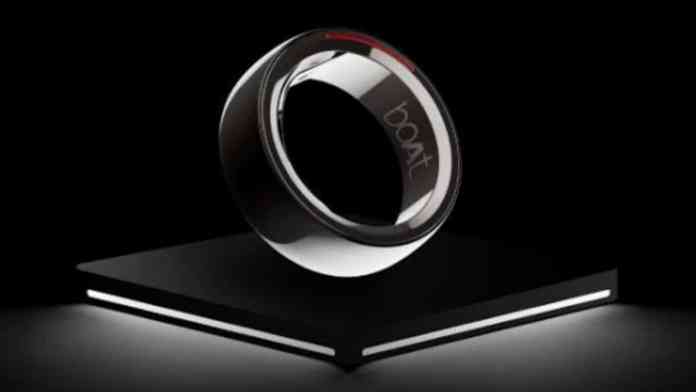
boAt, a household name in affordable audio and wearables, is quietly preparing to disrupt the smart ring market. Recent leaks have unveiled detailed specifications, pricing hints, and a potential launch window for the company’s first-ever smart ring. This boAt smart ring promises to bring premium health-tracking features to a budget-conscious audience, a move that could shake up the wearable industry. Here is everything we know so far from the leaked information.

boAt Smart Ring: What the Leak Reveals

According to insider reports and leaked images, the boAt smart ring will pack a suite of health sensors typically found on high-end smartwatches. These include a heart rate monitor, SpO2 sensor, sleep tracker, and even a body temperature monitor. A particularly interesting addition is period tracking, catering to a broader demographic of health-conscious users.

The ring’s design appears to blend ceramic and metal, aiming for both durability and a premium aesthetic. The leaked images show a sleek, minimalist form factor that should appeal to daily wearers. Furthermore, the ring is expected to feature a 5ATM water resistance rating, making it suitable for swimming and showering.

Health Tracking and App Integration

Data collected by the sensors will sync seamlessly with a dedicated boAt app. The app is expected to provide detailed insights into sleep stages, recovery metrics, and overall wellness. For fitness enthusiasts, the ring will include a body recovery mode, helping users optimize their training and rest cycles. This level of integration positions the boAt smart ring as a serious contender in the health-tech space.

You can explore similar wearable trends in our article on smart wearable trends for 2025.

Battery Life and Durability: Key Selling Points

One of the most impressive leaked specs is the battery life. The boAt smart ring is said to offer up to seven days of usage on a single charge. This is a significant advantage over many smartwatches that require daily charging. The ring also includes one-hand operation controls and an SOS feature, adding a layer of safety for users in emergencies.

The combination of long battery life and robust water resistance makes this ring a practical companion for active lifestyles. Whether you are hitting the gym or sleeping, the device is designed to stay on and track without interruption.

Expected Price and Launch Details

While boAt has not officially confirmed the price, leaks suggest the company will stick to its affordable pricing strategy. The boAt smart ring is expected to be priced competitively, likely undercutting rivals like the Noise smart ring. Availability is anticipated through major e-commerce platforms such as Flipkart and boAt’s own official website.

As of now, no official launch date has been announced. However, with leaks surfacing and competitors like Noise teasing their own smart rings, boAt may accelerate its timeline to capture early market share. The race for the best affordable smart ring in India is heating up.

For a deeper look at how other brands are entering this space, check our piece on Noise smart ring vs boAt smart ring.

Final Thoughts: Worth the Wait?

The leaked details paint a promising picture for the boAt smart ring. With a focus on essential health features, long battery life, and a durable design, it could become the go-to choice for users seeking an affordable entry into smart rings. However, the final verdict will depend on real-world performance and the official price tag. Tech enthusiasts should keep an eye on boAt’s official channels for the launch announcement.

Continue Reading
Click to comment

Leave a Reply

Your email address will not be published. Required fields are marked *

How To

Set Border Light on Screen Using the Border Light Wallpaper App!

Published

on

Set Border Light on Screen Using the Border Light Wallpaper App!

When you first unbox a new phone, the default wallpaper is often generic and forgettable. It rarely captures your personality or makes the device feel truly yours. Fortunately, there is a simple way to break away from the ordinary: using a Border Light Wallpaper app. This tool does more than just swap out your background; it introduces a vibrant, animated border that wraps around your screen, giving your phone a fresh and distinctive look.

Unlike standard static wallpapers, which can become dull after a few days, the Border Light Wallpaper app offers a dynamic experience. You can choose from a range of lighting effects, adjust colors, and even control the animation speed. Whether you prefer a subtle glow or a bold, multi-colored frame, this app provides the flexibility to match your style. In this guide, we will walk you through how to download, set up, and customize this color live wallpaper on your Android device.

What is the Border Light Wallpaper App?

The Border Light Wallpaper app, also known as Border Light Wallpaper 2020 – Color Live Wallpaper, is a specialized Android application designed to add edge lighting to your phone’s display. It is not just a simple wallpaper changer; it transforms the entire screen by creating a luminous border that can be customized to match your preferences. This app works on both the home screen and the lock screen, ensuring that every time you look at your phone, you see something visually engaging.

Many users appreciate how this app allows them to set a background image while simultaneously adding a colorful border. This dual functionality means you do not have to sacrifice your favorite photo for the sake of a cool effect. Instead, you can combine both elements for a truly personalized experience.

Key Features of the Border Light Wallpaper App

  • Border setting: Adjust the thickness and style of the edge lighting.
  • Notch setting: Customize the border to accommodate your phone’s notch design.
  • Set background image: Choose any photo from your gallery as the wallpaper behind the border.
  • Desaturation on lock screen: Automatically reduce color intensity on the lock screen for a cleaner look.
  • Add name: Display your name or a short text on the screen.
  • Change lighting color: Select from a wide spectrum of colors for the border.
  • Adjust animation speed: Control how fast the light moves around the edges.
  • Adjust border size on lock screen: Fine-tune the border dimensions specifically for the lock screen.
  • Change notch position: Align the border effect with your device’s camera notch.

How to Download and Install the Border Light Wallpaper App

Getting started with this color live wallpaper is straightforward. First, click the download link provided in the original article or search for the app on the Google Play Store. Once the app is installed, open it and tap on the Let’s Start button. You will then need to grant media file permissions so the app can access your photos and apply the wallpaper.

After granting permissions, you will see the main interface. Tap on the Magic Edge Light option. This will take you to the customization screen where you can preview the effect. Next, tap on the Set Wallpaper button. A prompt will appear asking where you want to apply the wallpaper: on the home screen only, or on both the home screen and lock screen. Select your preferred option to proceed.

Customizing Your Border Light Effect

Once the wallpaper is set, you can dive into the customization options to make the border truly your own. The app allows you to adjust the notch position to match your phone’s design—whether it is a punch-hole, teardrop, or bezel-less display. You can also change the lighting color by selecting from a palette of vibrant shades. For those who enjoy motion, the animation speed slider lets you make the light move slowly and smoothly or quickly and energetically.

Additionally, you can set a background image from your gallery. This feature is perfect for users who want to keep a personal photo while adding a professional-looking edge light. The app also includes a desaturation option for the lock screen, which reduces the intensity of the background image so the border stands out more clearly.

Why Use a Custom Wallpaper App for Your Phone?

Using a custom wallpaper app like Border Light Wallpaper offers several benefits. It helps your phone stand out in a crowd, especially if you are tired of seeing the same default backgrounds on every device. Moreover, the animated border adds a layer of depth and movement that static wallpapers cannot provide. This can make your phone feel more modern and polished.

Another advantage is the ease of use. You do not need to be a tech expert to set up this app. The interface is intuitive, and the steps are clearly laid out. For more tips on personalizing your device, check out our guide on How to Hide WhatsApp Blue Ticks or explore Lock Screen Widgets and Customization for additional ways to enhance your phone’s appearance.

Final Thoughts

In conclusion, the Border Light Wallpaper app is a fantastic choice for anyone looking to add a splash of color and movement to their Android device. Its combination of edge lighting, customizable colors, and background image support makes it one of the most versatile wallpaper apps available. The setup process is quick, and the results are immediately noticeable.

If you have any questions or run into issues while setting up the app, feel free to leave a comment below. Do not forget to share this article with friends who might also want to give their phone a stylish upgrade. With just a few taps, you can transform your screen into a vibrant canvas that reflects your unique taste.

Continue Reading

How To

Realme C100x Expected to Launch Soon in India with Massive 8000mAh Battery

Published

on

Realme C100x Expected to Launch Soon in India with Massive 8000mAh Battery

Realme is gearing up to expand its popular C-series lineup with a new model that could redefine budget smartphone expectations. The Realme C100x India launch is anticipated in the coming weeks, following its appearance on certification databases. Leaks and retail box images have already revealed key details about the device, including an enormous battery, modern design, and competitive pricing.

Realme C100x India Launch: What to Expect

According to tipsters, the Realme C100x will debut globally first, with an Indian release following shortly after. The phone has been spotted on multiple certification platforms, hinting that the launch is imminent. Realme aims to strengthen its foothold in the budget segment with this smartphone, which joins the existing C100 4G and C100 5G variants.

Expected storage configurations include 6GB RAM with 128GB storage and a 6GB RAM with 256GB storage option. Additionally, the device may support dynamic RAM expansion, allowing users to boost total RAM up to 18GB for smoother multitasking. This feature is particularly useful for those who run multiple apps simultaneously.

Massive 8000mAh Battery and Fast Charging

The standout feature of the Realme C100x is its massive 8,000mAh battery. Earlier rumors suggested a 7,500mAh cell, but the latest leaks confirm the larger capacity. This battery is expected to deliver exceptional screen-on time, making the phone ideal for heavy users, gamers, and media consumers.

Charging won’t be a hassle either, as the device is likely to support 45W wired fast charging. This means users can quickly top up the battery and get back to their day without long waiting periods. The combination of a huge battery and fast charging is a rare find in the budget segment.

Software and Performance

The Realme C100x will run Android 16 out of the box, layered with Realme UI 7.0. This software combination promises a clean, intuitive interface with several smart features. Integration of Google Gemini AI is expected, offering enhanced voice assistance and contextual help. The “Circle to Search” feature is also tipped, allowing users to quickly search for information by circling items on the screen.

These AI-driven tools aim to improve daily productivity and make the phone feel more premium than its price tag suggests. The device will likely be powered by a capable chipset, though official details on the processor are still under wraps.

Design and Display

Leaked retail box images reveal a sleek, modern design with two color options: Golden Coast and Deepblue Tide. The rear panel features a pill-shaped camera module housing dual cameras and an LED flash. Buttons are placed on the right side, while the left side remains clean.

The front sports a flat 6.7-inch HD+ display with a waterdrop notch for the selfie camera. The screen supports up to a 120Hz refresh rate, ensuring smooth scrolling and an enjoyable viewing experience. Realme has also emphasized build quality, with the phone expected to carry military-grade certification for durability.

Realme C100x Price in India and Availability

Pricing is a critical factor for budget buyers, and the Realme C100x is expected to be competitively priced. Leaks suggest a price range between Rs 10,000 and Rs 15,000, positioning it as a strong contender against rivals like Xiaomi and Samsung in the same bracket.

Connectivity options include NFC support, along with standard features like 4G LTE, Wi-Fi, and Bluetooth. The inclusion of NFC is a welcome addition for contactless payments and quick pairing with accessories.

As with any leak, official confirmation from Realme is still awaited. However, the accumulation of evidence strongly suggests that the Realme C100x India launch is just around the corner. For more updates on upcoming smartphones, check out our Android news section or read about Xiaomi’s latest leaks.

In summary, the Realme C100x is shaping up to be a compelling budget phone with an industry-leading battery, modern design, and useful AI features. If the pricing rumors hold true, it could become a popular choice for Indian consumers looking for long-lasting performance without breaking the bank.

Continue Reading

How To

Nothing Phone (1) Begins Receiving Nothing OS 2.0 Update: A Complete Overview of New Features

Published

on

Nothing Phone (1) Begins Receiving Nothing OS 2.0 Update: A Complete Overview of New Features

The wait is finally over for Nothing Phone (1) owners. After months of anticipation, the company has started rolling out the Nothing OS 2.0 update to its first-generation device. This major software overhaul, based on Android 13, brings a fresh design language, enhanced customization, and improved functionality. Initially teased by founder Carl Pei back in June, the update follows the launch of the Nothing Phone (2) and aims to unify the user experience across both devices.

What is the Nothing OS 2.0 Update?

This update represents a significant leap from Nothing OS 1.0. It is not just a minor patch; it is a complete reimagining of the software interface. The Nothing OS 2.0 update is designed to deliver a cleaner, more intuitive user experience while retaining the brand’s signature minimalist aesthetic. Although the download size is around 1GB, the changes it brings are substantial.

Carl Pei confirmed the rollout via a tweet, signaling that the company is committed to supporting its existing user base. For those who missed the announcement, the update is now being deployed in phases globally.

Key Features of Nothing OS 2.0 on Phone (1)

Redesigned UI and Widgets

The most noticeable change is the revamped user interface. Essential widgets like Clock, Weather, and Quick Look have been completely redesigned to be more informative and visually appealing. Furthermore, the launcher grid layout now offers greater flexibility. Users can finally hide app labels for a cleaner home screen, a feature many have requested.

Customizable folders are another highlight. The update introduces multiple folder layout options, allowing users to organize apps in a way that suits their workflow. This means you can switch between grid, list, or even large-icon views.

Glyph Interface 2.0 Upgrades

The iconic Glyph Interface on the back of the phone also receives a major boost. The highlight is the new Glyph Torch feature. By long-pressing the Torch Quick Settings tile, all rear LEDs illuminate simultaneously, turning the phone into a powerful flashlight. This is a practical addition that enhances the utility of the unique lighting system.

Building on this, the update also refines Glyph animations for notifications and calls, making them more responsive and customizable.

New Applications: Clone and App Locker

Nothing OS 2.0 update introduces two built-in apps: Clone and App Locker. Clone allows users to create a second instance of supported apps, perfect for managing multiple accounts on social media or messaging platforms. App Locker adds an extra layer of security, letting users lock sensitive apps behind a password or fingerprint scan. These additions eliminate the need for third-party solutions.

Additionally, the update includes routine bug fixes and performance optimizations. Users can expect smoother animations, better battery management, and improved system stability.

How to Install the Nothing OS 2.0 Update

Installing the update is straightforward. Navigate to Settings > System > System Update and tap the download button. The process is seamless, though the large file size means a stable Wi-Fi connection is recommended. If the update is not yet visible on your device, do not worry. The rollout is gradual, and it may take a few days to reach all regions.

Before updating, it is wise to back up important data. While the process is safe, caution never hurts. For a detailed guide on preparing your device, check out our guide to backing up your Nothing Phone.

Why This Update Matters for Nothing Phone (1) Owners

This release demonstrates Nothing’s commitment to long-term software support. By bringing the same core experience from the Phone (2) to the older model, the company ensures that early adopters are not left behind. The Nothing OS 2.0 update transforms the Phone (1) into a more capable and polished device, extending its lifespan significantly.

In a market where many brands neglect older devices, Nothing’s approach is refreshing. It proves that good hardware can get even better with thoughtful software updates. If you are curious about how the Phone (1) compares to its successor, read our comparison between Nothing Phone (1) and Phone (2).

Conclusion

The arrival of Nothing OS 2.0 on the Phone (1) is a welcome development. It brings a host of new features, a cleaner interface, and improved performance. Whether you are excited about the Glyph Torch or the new app cloning capability, there is plenty to explore. What do you think of this update? Share your thoughts in the comments below.

For more tech news and reviews, stay tuned to our platform. Also, do not forget to join our Telegram channel for instant updates.

Continue Reading

Trending