Connect with us

Artificial Intelligence

Googlebook Laptop: Gemini AI Powers a New Category of Devices from Acer, Asus, Dell, HP, and Lenovo

Published

on

Googlebook Laptop: Gemini AI Powers a New Category of Devices from Acer, Asus, Dell, HP, and Lenovo

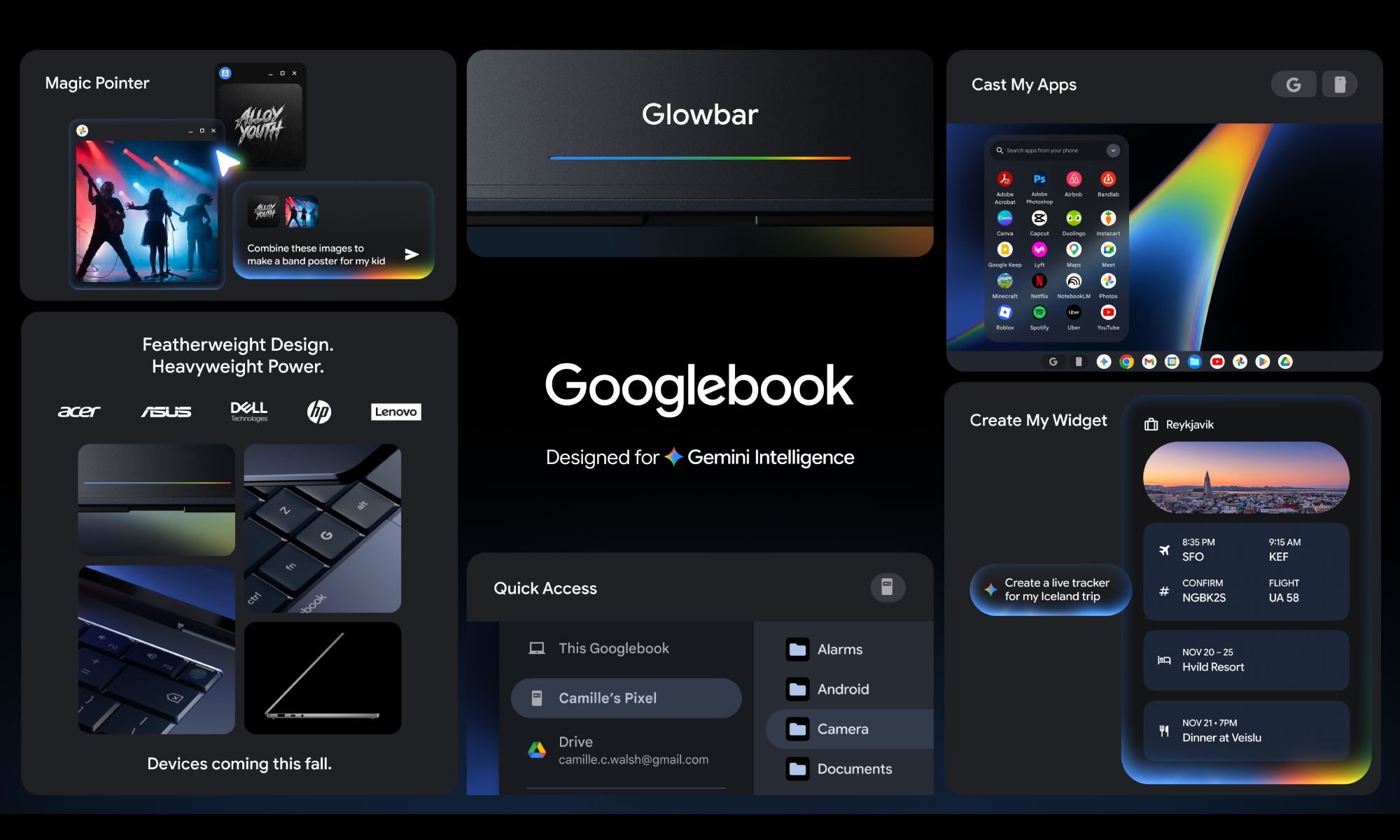
Google has officially unveiled a new laptop category called Googlebook, placing its Gemini AI at the very core of the user experience. This bold move aims to transform how people interact with their computers, making artificial intelligence a constant companion rather than a tool you have to seek out. Devices from major manufacturers like Acer, Asus, Dell, HP, and Lenovo are expected to hit the market this fall, promising a fresh take on personal computing.

Magic Pointer: AI at Your Fingertips

The standout feature of the Googlebook laptop is undoubtedly Magic Pointer. Developed in collaboration with Google DeepMind, this innovation brings Gemini directly to your cursor. Simply wiggle your mouse over any element on the screen, and contextual suggestions appear instantly.

For example, pointing at a date in an email triggers an option to schedule a meeting. Selecting two images allows you to composite them together without opening a separate app or typing a single prompt. This seamless integration means AI assistance is available at every point of interaction, eliminating the need to navigate menus or launch dedicated tools.

Custom Widgets and Personalized Dashboards

Another key feature is Create your Widget, which lets users build custom desktop widgets using natural language. Describe what you want—like a travel dashboard—and the tool pulls data from your Gmail, Google Calendar, and the web to assemble a personalized display. You can organize flight details, hotel reservations, and a trip countdown into a single widget, making information access effortless.

Seamless Android Integration

Google has also emphasized the Googlebook Android integration as a major selling point. A feature called Quick Access allows you to browse, search, and insert files from your Android phone directly into the laptop’s file browser—no transfers required. Additionally, you can run Android phone apps natively on the laptop without downloading them or dealing with emulated touch controls.

This level of connectivity bridges the gap between mobile and desktop environments, offering a unified ecosystem that many users have long desired.

Design and Operating System

Every Googlebook will feature a glowbar—a light strip on the device body that serves as both a visual identifier and a functional element. Google states that the devices will run “a modern OS that’s designed for Intelligence,” widely believed to be Aluminium OS, the company’s Android-based platform that merges ChromeOS and Android into a single desktop OS.

Exact specs and pricing remain under wraps, but the platform’s real-world appeal will depend on what manufacturing partners deliver this fall. For more insights on AI-driven computing, check out our guide on AI laptop features and best Chromebook 2024.

As a result, the Googlebook laptop represents a significant shift in how AI is integrated into everyday computing. By putting Gemini everywhere—from the cursor to widgets to phone integration—Google is betting that users will embrace a smarter, more intuitive experience.

Continue Reading
Click to comment

Leave a Reply

Your email address will not be published. Required fields are marked *

Artificial Intelligence

This Android Auto update is trying to change how you drive and use your car

Published

on

Android Auto update: how it changes your driving experience

Google’s latest Android Auto update is more than just a cosmetic refresh. As someone who relies on Android Auto daily, I can tell you this redesign feels like a genuine shift in how the system integrates with your car. Instead of a simple phone mirror, Google is aiming for a smarter, more intuitive co-pilot. The core of this change is the adoption of Material 3 Expressive design, which brings fluid animations, modern typography, and even wallpaper support to your dashboard. This makes the interface feel less static and more alive, especially when you are navigating busy streets.

Widgets make glanceable information a reality

One of the most practical additions in this Android Auto update is the introduction of widgets. Instead of tapping through multiple menus, you can now see key information at a glance. For example, weather updates appear directly on the home screen, and you can control smart home devices—like opening your garage door—with a single tap. This small change significantly reduces distraction, as you spend less time fiddling with the screen and more time focused on the road. It is a subtle but powerful improvement that makes daily drives smoother.

Immersive Navigation: a new way to see the road

Google Maps is getting a major boost with Immersive Navigation. This feature uses 3D models to show realistic views of buildings, overpasses, and terrain. It also highlights traffic lights, stop signs, and lane details, which is particularly helpful for complex intersections or highway merges. Instead of relying on abstract arrows, you get a visual representation of your surroundings. This reduces stress and helps you anticipate turns more naturally. Building on this, the system updates in real time, so you always have the latest road information.

How Immersive Navigation works in practice

When approaching a busy junction, the map zooms in to show a detailed 3D view. You can see exactly which lane to be in, and the system highlights potential hazards like pedestrians or cyclists. This makes navigation feel less like following instructions and more like having a conversation with the road. It is one of the most impressive aspects of the Android Auto update and sets a new standard for in-car navigation.

Entertainment and audio upgrades for parked moments

Google is also transforming how you use Android Auto when your car is stationary. Supported vehicles from brands like BMW, Hyundai, and Mercedes-Benz will allow full HD video playback at up to 60 fps from apps like YouTube. This turns your dashboard into a mini theatre, perfect for waiting in the car. However, safety remains a priority: once the car starts moving, video switches to audio-only mode. For audio enthusiasts, the Android Auto update includes support for Dolby Atmos spatial sound, creating a more immersive listening experience. This means that music, podcasts, and calls will feel richer and more detailed, especially in compatible vehicles.

Gemini AI: a smarter assistant for your car

Perhaps the most forward-looking change is the integration of Gemini AI. Google is positioning this as a voice-first assistant that can handle complex tasks. You can ask it to brainstorm ideas, explain dashboard warning lights, or even order food through services like DoorDash. For example, if a check engine light appears, you can ask Gemini what it means instead of panicking or searching forums. It also integrates with meeting apps like Zoom, allowing you to join calls hands-free, depending on regional availability. This makes the Android Auto update feel like a step toward a truly connected car experience.

Practical uses of Gemini in daily driving

Magic Cue is another feature that surfaces quick actions for incoming messages, so you can reply without typing. This reduces the urge to pick up your phone while driving. Additionally, Gemini can suggest routes based on your calendar or habits, making your commute more efficient. While these features are impressive, they will only be as good as their real-world execution. I am curious to see how reliably they work before fully trusting them with critical tasks.

For more insights on how technology is reshaping your commute, check out our guide on best car tech gadgets for 2025. You might also find our article on future of in-car entertainment useful.

Continue Reading

Artificial Intelligence

Google Gemini Transforms Your Handwritten Notes into a Complete Study Guide in Seconds

Published

on

Google Gemini Transforms Your Handwritten Notes into a Complete Study Guide in Seconds

Every student who prefers pen over keyboard knows the struggle. You’ve filled notebooks with lecture highlights, scribbled diagrams, and margin notes. But when exam season hits, that pile of paper feels more like a burden than a resource. Fortunately, Google Gemini now offers a solution that turns your handwritten notes into study guides almost instantly.

This new feature is surprisingly straightforward. It allows you to scan your handwritten pages and have Gemini generate a clean, organized study guide. No more deciphering your own messy handwriting or flipping through endless pages. Instead, you get a structured summary ready for review.

How to Turn Handwritten Notes into Study Guides with Gemini

The process is simple and requires only a few steps. First, take a clear photo of each page of your handwritten notes. Then, upload these images to Gemini. Finally, use a prompt like: “Create a study guide based on my course materials for my exams.”

That’s it. Gemini processes the images and produces a well-organized study guide. If you already understand the basics, you can ask it to skip introductory material and focus on complex topics. This saves time and lets you drill down on what matters most.

Building on this, you can also request flashcards instead of a full guide. This bite-sized format is perfect for quick reviews or last-minute cramming. It makes revisiting months of notes far less daunting.

Beyond Study Guides: Practice Exams and Audio Overviews

Uploading your notes unlocks more than just study guides. You can ask Gemini to create a custom practice exam based on your materials. This is an excellent way to test your knowledge and identify weak spots before the actual test.

Additionally, Gemini can turn your notes into an Audio Overview. Two AI hosts discuss the material in a conversational style, making it easy to review while commuting or doing chores. This feature originally debuted in NotebookLM, but now Gemini offers it too.

Why This Matters for Students

For students who rely on handwritten notes, this update bridges a gap. Digital tools often ignore analog methods. However, Gemini now integrates both worlds. You keep your preferred note-taking style while gaining the power of AI-driven organization.

Moreover, this feature encourages active learning. Instead of passively rereading notes, you engage with the material through quizzes, summaries, and discussions. This leads to better retention and understanding.

Practical Tips for Using Gemini with Your Notes

To get the best results, follow a few simple guidelines. Ensure your photos are well-lit and focused. Avoid clutter on the page—stick to one subject per session. Use clear handwriting or typed notes for higher accuracy.

You can also combine this with other AI study tools for a comprehensive approach. For example, use Gemini to generate a study guide, then create flashcards from it. This layered strategy reinforces learning.

Another tip: experiment with different prompts. Instead of a generic request, ask for a timeline, key definitions, or comparison tables. Gemini adapts to your needs, making it a versatile study companion.

The Future of AI-Assisted Learning

Google Gemini continues to evolve. By adding support for handwritten notes, it addresses a common pain point for students. This feature complements existing capabilities like summarization, question answering, and content creation.

As AI tools become more integrated into education, they empower students to work smarter. The ability to turn handwritten notes into study guides is just one example. Expect more innovations that blend traditional methods with cutting-edge technology.

In conclusion, if you’re a student drowning in paper notes, give Gemini a try. It transforms your hard work into a structured, accessible format. Whether you need a study guide, practice exam, or audio review, Gemini delivers. Start scanning your notes today and see the difference.

Continue Reading

Artificial Intelligence

Claude Just Took Over the Data Center Grok Needed Most: Inside the SpaceX-Anthropic Deal

Published

on

Anthropic Leases SpaceX Colossus 1 Data Center for Claude AI

In a twist that reshuffles the AI infrastructure deck, Anthropic has secured exclusive access to SpaceX’s massive Colossus 1 data center in Memphis, Tennessee. The early May 2026 agreement, first reported by the Wall Street Journal, hands the Claude maker over 220,000 Nvidia GPUs and more than 300 megawatts of processing power — exactly the kind of compute edge that Elon Musk’s xAI and its Grok chatbot would normally covet.

This Anthropic Claude data center lease turns unused capacity into a strategic weapon. For Anthropic, it eases pressure on Claude Pro and Claude Max demand. For SpaceX, it monetizes a major asset ahead of an anticipated IPO. And for xAI? It’s a stark reminder that infrastructure battles matter as much as model quality in the AI race.

Why the Colossus 1 Lease Matters for Claude’s Performance

The sharpest detail is timing. Anthropic isn’t waiting for late-2026 capacity from partners like Amazon and Google to fully come online. It gets a live Memphis cluster now, just as AI labs compete on power, GPUs, and model quality simultaneously.

This matters for Claude’s paid tiers, which need reliable infrastructure as demand grows. The added GPU supply can support heavier usage, faster responses, and future model work. Although exact user-facing changes weren’t detailed in the source material, the scale makes the optics hard to ignore: more than 220,000 Nvidia GPUs and 300-plus megawatts look less like spare capacity and more like ammunition in the model race.

For users, this means Claude Pro vs. Max could see steadier access and faster responses in the coming months. The lease also positions Anthropic to test heavier workloads before its larger cloud partnerships fully ramp up.

The Irony of Musk’s Business Calculus

The deal lands with extra irony because Musk had recently described Anthropic in hostile terms, then found a reason to work with it anyway. His later comment that no one at Anthropic triggered his “evil detector” makes the turn feel more transactional than friendly.

The business case is clear, however. SpaceX gets a way to monetize a major asset before an anticipated IPO, while Anthropic gets a shortcut around a near-term capacity crunch. Grok can still improve, but xAI now looks like it’s fighting from behind while Claude draws power from inside Musk’s corporate orbit.

As AI researcher Colin Wiel noted, data centers can matter as much as demos in this field. The Colossus 1 lease demonstrates that infrastructure deals can shift competitive dynamics overnight.

What This Means for xAI and Grok

For xAI, the takeaway is harsher. Grok’s next challenge is infrastructure, especially when a rival can rent power from inside Musk’s own corporate orbit. While Grok has made strides in conversational AI, its compute resources now appear constrained compared to Anthropic’s sudden windfall.

Building on this, xAI may need to accelerate its own data center plans or seek alternative partnerships to avoid falling further behind. The AI race isn’t just about algorithms — it’s about who can flip the switch on the most GPUs.

What Claude Users Should Watch Next

The next test is whether Anthropic turns the Colossus 1 lease into visible improvements before its larger cloud partnerships fully ramp up. Users should watch for:

  • Steadier access to Claude Pro and Claude Max during peak hours
  • Faster response times on complex queries
  • Fewer plan constraints on usage limits
  • New features tied to heavier workloads, like longer document processing

For those considering Claude vs. Grok, the infrastructure gap could become a deciding factor in the months ahead. Meanwhile, the broader AI industry will observe how this lease affects pricing and availability across competing platforms.

Ultimately, the SpaceX-Anthropic deal underscores a fundamental truth: in AI, compute is currency. And right now, Claude just got a lot richer.

Continue Reading

Trending