Connect with us

Artificial Intelligence

Google’s Rambler Could Finally Make Voice Typing Worth Using

Published

on

Google’s Rambler Could Finally Make Voice Typing Worth Using

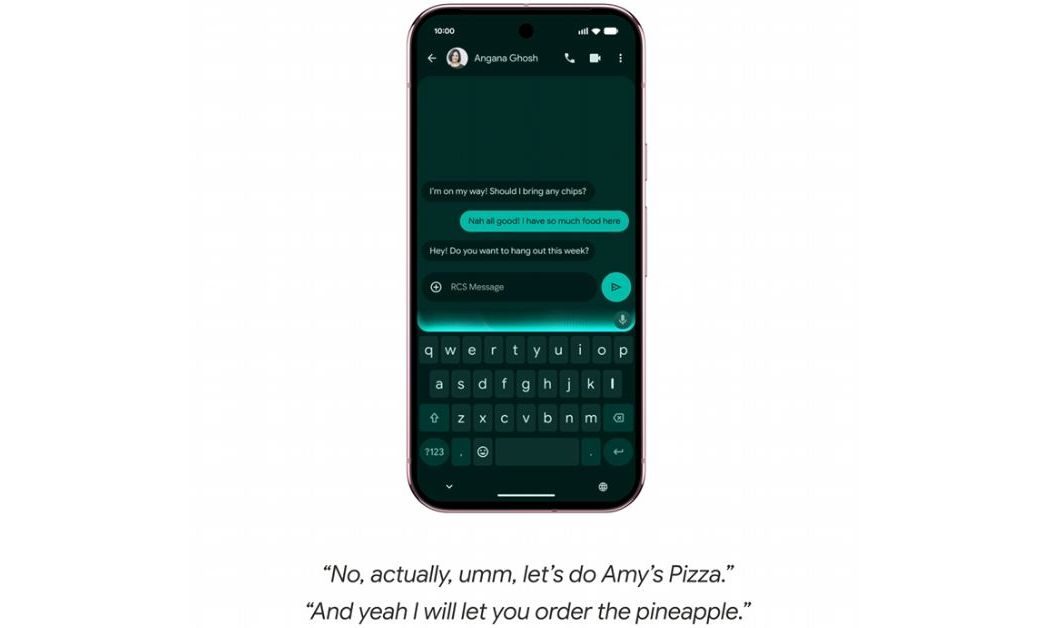
For years, voice typing has felt like a compromise. You speak clearly, avoid backtracking, and hope the phone catches every word. But real conversations are messy. They include ums, ahs, repeated phrases, and sudden corrections. That is why many users, including myself, rarely rely on speech-to-text for serious messages. However, Google’s new Rambler feature for Gboard aims to change that by using Gemini AI to transform natural, imperfect speech into polished, concise text. This could be the breakthrough that makes Google Rambler voice typing a daily habit.

Why Traditional Voice Typing Falls Short

Standard dictation tools are built for accuracy. They capture exactly what you say, which sounds ideal. But here is the catch: people do not speak in neat, ready-to-send sentences. We pause, restart, and add filler words. A voice note can carry that chaos because tone and pacing add meaning. A text message cannot.

As a result, voice typing often produces clunky, awkward drafts that require heavy editing. That defeats the purpose. You might as well have typed from scratch. This is especially frustrating on large smartphones, where reaching across a wide keyboard is a struggle. Typing one-handed while holding a coffee or carrying a bag leads to typos and short replies. Voice typing should have solved this, but it rarely does.

Building on this, Rambler takes a different approach. Instead of focusing on word-for-word accuracy, it prioritizes intent and clarity. It listens to your natural flow—including self-corrections and repeated words—and then distills the core message into clean text. That is a subtle but powerful shift.

How Rambler Handles Real Speech Patterns

Google describes Rambler as a feature that “turns natural spoken thoughts into concise text.” It is designed to handle the way people actually talk: with ums, ahs, restarts, and mid-sentence corrections. Rather than reproducing every stumble, it extracts the essential meaning and presents it in a way that still sounds like you.

This means you can speak freely without worrying about perfect grammar or linear sentences. You can double back, change your mind, or add a thought halfway through. Rambler will smooth out the rough edges while preserving your voice. For anyone who has ever dictated a message and then spent two minutes fixing it, this is a welcome change.

Moreover, Rambler is part of the broader Gemini intelligence on Android, which means it benefits from Google’s advanced language models. The feature is built directly into Gboard, making it accessible without switching apps or learning new commands.

Multilingual Support: A Game-Changer for Bilingual Speakers

One of the most exciting aspects of Rambler is its multilingual capability. Many bilingual speakers naturally mix languages in conversation—English with Hindi, Spanish with English, or Arabic with French. Standard voice typing struggles with this code-switching. It might get individual words right, but it loses the rhythm and flow.

Rambler, however, uses Gemini’s multilingual model to switch between languages within a single message. Google has demonstrated examples like English mixed with Hindi, and the feature is available from launch. This is not just a nice addition; it is a practical necessity for millions of users who do not think or text in one language alone.

If Rambler can preserve that natural, mixed-language flow while cleaning up filler and corrections, it becomes far more useful than a generic “make this sound professional” AI button. It respects how people actually communicate.

Will Rambler Replace Typing?

Despite its promise, Rambler still has to prove it is faster and more convenient than typing. Many people already type quickly on their phones. Others prefer sending voice notes. And some simply do not want to talk to their phone in public, no matter how smart the transcription gets.

There is also the question of privacy. Google states that audio is only used for real-time transcription and is not stored or saved. The phone will also show when Rambler is active. Still, trust takes time to build. For Rambler to become a daily habit, it must be fast, low-effort, and reliable every time.

That said, the potential is clear. By removing the pressure to speak perfectly, Google Rambler voice typing could finally make dictation feel natural. For more on how AI is reshaping mobile tools, check out our guide on AI-powered phone features you should try. And if you are curious about Gboard updates, read our overview of what’s new in Gboard.

Final Thoughts: A Smarter Approach to Speech-to-Text

Voice typing has always been a feature that works just well enough to be useful, but not often enough to be reliable. Rambler changes the equation by focusing on meaning rather than exact words. It embraces the messiness of real speech and turns it into something clean and readable.

Whether you are a fast typer, a voice note lover, or someone who avoids dictation altogether, Rambler offers a compelling reason to give voice typing another try. It may not replace keyboards entirely, but it could make one-handed replies, quick messages, and multilingual conversations far less frustrating.

For more insights on mobile productivity, see our article on how to type faster on your phone.

Continue Reading

Artificial Intelligence

Google’s Gemini Notebook Now Lets You Cite Books You Own — Here’s How It Works

Published

on

Gemini Notebook Expert Intelligence

Google’s Notebook AI Just Got Smarter — With Your Bookshelf

If you’ve ever wished your AI assistant could quote directly from a cookbook you own, or pull a specific argument from a biography sitting on your digital shelf, here’s the news you’ve been waiting for.

Google is rolling out a new capability for Gemini Notebook (the tool formerly known as NotebookLM) called Expert Intelligence. The name sounds fancy, but the idea is simple: instead of only drawing from documents you upload or pages you link, the AI can now tap into digital books you’ve actually purchased from the Google Play Books library.

That’s right — your personal library becomes a source. No more copy-pasting excerpts or hoping the AI finds a relevant PDF. If you own the book, you can cite it directly.

How Expert Intelligence Works in Practice

Let’s say you’re planning a week of dinners built entirely around chicken and spinach. Instead of scouring the web, you can ask Gemini to pull recipes from a Martha Stewart cookbook you own. The AI will search the text, pull relevant passages, and cite them as sources.

But it doesn’t stop at recipes. You can turn any owned book into a variety of formats:

  • Infographics — visual summaries of key concepts from the book.
  • Audio Overviews — listen to a conversational recap of the material.
  • Quizzes — test your understanding based on the book’s content.

It’s a natural extension of what NotebookLM already does with uploaded sources, just with a much more curated pool of knowledge.

Not a Free-for-All: Sharing Has Limits

Here’s a catch that’s worth knowing before you get too excited. If you create a shared notebook and add a book as a source, your collaborators can’t just freeload off your purchase. They’ll need to own or buy their own copy of the book to fully use Expert Intelligence. Google’s being careful about copyright, and that’s probably wise.

Which Publishers Are On Board?

The feature launches with a solid lineup of major publishers. We’re talking Bloomsbury, De Gruyter Brill, Johns Hopkins University Press, Macmillan Publishers, O’Reilly Media, and Penguin Random House. All told, that’s over 100,000 titles available from day one.

That’s a big deal for students, researchers, and lifelong learners who already rely on NotebookLM for organizing their research.

Free Book Offer — But Act Fast

To kick things off, Google is giving away one free book to users in the US. The catch? It’s “while supplies last,” so you’ll want to check the app sooner rather than later if you’re interested.

It’s a smart marketing move, honestly. Get people hooked on the feature with a freebie, and they’ll likely buy more books to keep using it.

What About the Main Gemini App and Search?

Right now, Expert Intelligence is available only in the Gemini Notebook app and its web dashboard. But Google has confirmed it’s planning to bring the feature to the core Gemini app and AI mode in Search down the road.

That expansion could be huge. Imagine asking Gemini in Search to explain a concept “according to this book” and getting a cited answer pulled straight from the text. It’s a glimpse of where AI-assisted research is heading.

Featured Notebooks: Extra Insights from Authors

Beyond the book-citing feature, Google has partnered with a handful of authors to create Featured Notebooks. These offer additional insights that go beyond what’s in the book itself — think of them as bonus material, but integrated right into your research workflow.

It’s a nice touch that adds value for readers who want more context or behind-the-scenes thinking from the authors they admire.

Why This Matters for Your Research Workflow

If you’re already using NotebookLM for projects, this is a meaningful upgrade. You no longer have to juggle between your book library and your notes app. The books you own become part of your AI-powered research stack.

That said, it’s not a replacement for critical thinking. The AI is still pulling from what it finds, and you should always verify the context. But as a starting point for essays, reports, or even just personal learning, it’s a powerful tool.

For more on how to get the most out of Google’s AI tools, check out our guide on using NotebookLM for research and our rundown of Google AI features for productivity.

So, is Expert Intelligence worth trying? If you own books on Google Play Books and you’re already in the Notebook ecosystem, absolutely. Just remember to check the free book offer before it runs out.

Continue Reading

Artificial Intelligence

Google Dreambeans AI app: Your personalized daily feed is now free — here’s how it works

Published

on

Dreambeans AI app

Google just made Dreambeans free — what changed?

Google has quietly dropped the paywall on Dreambeans, the Dreambeans AI app that curates a personalized daily feed of stories just for you. Starting now, any Google Account holder in the US can try it without spending a dime. The news first surfaced via 9to5Google, and it’s a significant shift from the app’s earlier rollout.

Dreambeans first appeared in June, but only for Google AI Ultra subscribers. Later, it expanded to AI Pro users. Now? It’s open to everyone. That’s a big deal for anyone curious about AI-driven content discovery but not ready to pay for a subscription.

Setup isn’t instant, though. Google says it takes about a day for the app to generate your first set of stories. The app itself is available on both Android and iOS, so you can start the process on your phone and check back tomorrow morning.

How the Dreambeans AI app builds your daily feed

Think of Dreambeans as a hyper-personal version of Google Discover, but smarter. With your permission, it taps into several Google services to understand what you care about. Here’s the breakdown:

  • Gmail and Workspace — Provides real-world context like receipts, bookings, or an upcoming flight.
  • Google Photos — Picks up on the people and places you frequently capture.
  • Calendar — Notes events and appointments that might spark story ideas.
  • YouTube — Tracks your active hobbies and viewing habits.
  • Search history — Flags interests you’re just beginning to explore.

Every morning, the app stitches these data points into a fresh batch of story suggestions. That could be a hike worth trying, a new restaurant in your neighborhood, or an event happening nearby. It’s not just generic content — it’s tailored to your life.

Custom artwork, not stock photos

One of the coolest touches? Each story comes with custom artwork generated by the Nano Banana image generator. Instead of boring stock photos, you get illustrated scenes that often depict you and people you know. It adds a personal, almost whimsical feel to the feed.

More Google Labs experiments worth trying

Dreambeans isn’t the only experiment coming out of Google Labs lately. If you run a small business, Pomelli can now build your entire brand identity from scratch — from your color palette to a full working website. That’s a serious time-saver for entrepreneurs who don’t have design skills.

For music lovers, ProducerAI lets you describe a song idea and walk away with actual beats, album art, and even a music video to match. It’s a wild tool for hobbyists and creators alike.

If you’re a student, there’s another perk worth noting. Google is offering a free year of Gemini AI Pro through a new student hub. That’s a smart move if you want to test premium AI features before committing to a subscription elsewhere.

Is Dreambeans the next big thing in AI feeds?

Honestly, it’s too early to say. But the move to make it free suggests Google is serious about gathering user feedback and refining the product. The AI feed space is getting crowded, with competitors like Microsoft and various startups pushing their own personalized content engines.

What sets Dreambeans apart is the depth of integration. It’s not just scraping public data — it’s reading your inbox and your photo library. That’s powerful, but it also raises privacy questions. You’ll need to weigh the convenience against the data access.

For now, if you’re in the US and curious, it’s worth giving it a shot. The setup takes a day, but the payoff is a feed that actually feels like it knows you.

Continue Reading

Artificial Intelligence

Sony Music, Warner Chappell sue Anthropic, accusing AI lab of ‘brazen’ copyright theft

Published

on

Sony Music Warner Anthropic lawsuit

Publishers take Anthropic to court over training data

Sony Music Publishing, Warner Chappell, and a coalition of other music publishers have filed a lawsuit against Anthropic and its co-founders, Dario Amodei and Benjamin Mann. The complaint, lodged late Friday in the U.S. District Court for the Northern District of California, accuses the AI lab of running a “brazen campaign of illegally torrenting, scraping, and downloading copyrighted works.”

This is more than a routine licensing dispute. The publishers are alleging what they call “blatant theft” — that Anthropic used thousands of copyrighted songs, lyrics, and sheet music to train its Claude AI models without permission or payment.

Anthropic isn’t staying quiet. “We disagree with the publishers’ claims and we intend to defend ourselves robustly in court,” a spokesperson told TechCrunch in an emailed statement.

Not the first IP fight for Anthropic

This isn’t Anthropic’s first rodeo in court over intellectual property. Some of the same lawyers behind this case previously represented Concord Music Group and Universal Music Group in a January lawsuit. They also led the Bartz v. Anthropic case, where a group of authors accused the company of using copyrighted books to train Claude.

In the Bartz case, a judge ordered Anthropic to pay $1.5 billion. The ruling was nuanced: using copyrighted works to train AI was deemed legal, but obtaining that content through piracy was not. That distinction matters here.

What’s different this time?

The new lawsuit is notably broader than its predecessors. It accuses Anthropic of “flagrant piracy” through illegal torrenting to secure millions of copies of books — including works containing lyrics and sheet music. The publishers argue this wasn’t just a copyright gray area; it was outright theft on a massive scale.

Legal experts will likely debate whether this case breaks new ground or simply extends the arguments from Bartz. Either way, the music industry is clearly drawing a line in the sand.

Why the music industry is pushing back

For publishers, the stakes couldn’t be higher. If AI companies can freely train on copyrighted music without compensation, the value of their catalogs could plummet. Lyrics, after all, are the backbone of countless streaming services, karaoke apps, and print publications.

This lawsuit isn’t just about money. It’s about control — who gets to decide how creative works are used in the age of generative AI.

What happens next

Anthropic has vowed to fight the claims. The company’s defense will likely hinge on the same arguments that partially succeeded in Bartz: that training on copyrighted material is transformative and should be allowed under fair use.

But the piracy angle complicates things. Torrenting, even for AI training, carries a different legal weight than simply scraping publicly available data. If the publishers can prove Anthropic knowingly engaged in illegal downloads, the court may not be sympathetic.

This case is one to watch. It could set a precedent for how AI companies source their training data — and whether the music industry can demand a slice of the AI pie.

For more on how AI is reshaping creative industries, check out our piece on AI music generation copyright issues and how AI companies handle licensing disputes.

Continue Reading

Trending