Mechanical Live Wallpaper & Animated Keyboard App: Transform Your Smartphone
Are you tired of the same static background on your phone? Do you want a fresh, dynamic look that reflects your personality? The Mechanical Live Wallpaper app offers a complete makeover for your device, combining stunning animated wallpapers with a fully customizable keyboard. This all-in-one tool is designed to breathe new life into your smartphone, making every interaction more engaging.
In this detailed review, we will explore the features, installation process, and benefits of this app. Whether you are a tech enthusiast or a casual user, you will find everything you need to personalize your phone. Let’s dive into how this app can transform your smartphone experience.
What Is the Mechanical Live Wallpaper App?
The Mechanical Live Wallpaper app is a versatile application available on the Google Play Store. It provides a wide array of live wallpapers, themes, and an animated keyboard. Many users seek ways to customize their devices, and this app delivers a simple yet powerful solution.
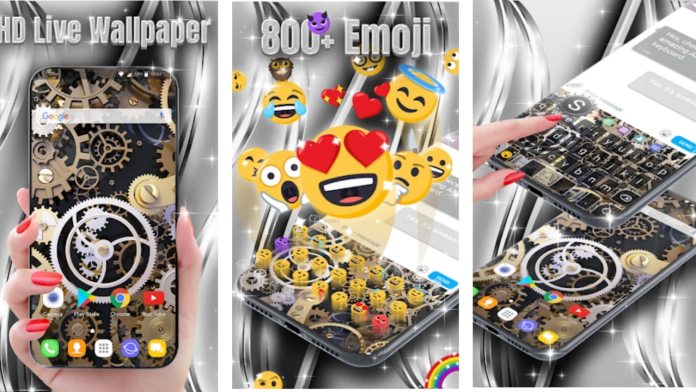
Building on this, the app offers more than just wallpapers. It includes features like theme packs and a premium keyboard, all in one place. This means you can change your phone’s look without downloading multiple apps. For example, you can apply a mechanical-themed wallpaper and pair it with a matching keyboard style for a cohesive design.
How to Download and Install the App
Downloading the Mechanical Live Wallpaper app is straightforward. Follow these steps to get started:
- Open the Google Play Store on your Android device.
- Search for “Mechanical Live Wallpaper” in the search bar.
- Click on the app from the search results and tap “Install.”
- Wait for the installation to complete, then open the app.
Alternatively, you can use a direct download link from a trusted source like Google Play. Once installed, you are ready to explore its features.
Key Features of the App
The Mechanical Live Wallpaper app comes packed with features that enhance your phone’s aesthetics and functionality. Here are the main highlights:
1. Live Wallpapers
You can choose from a vast collection of animated wallpapers. These include mechanical designs, abstract patterns, and nature scenes. Each wallpaper is optimized for battery life, so you don’t have to worry about draining your phone’s power.
2. Theme Packs
In addition to wallpapers, the app offers complete theme packs. These change your phone’s icons, colors, and overall interface. For instance, you can apply a dark mechanical theme that matches your wallpaper perfectly.
3. Premium Animated Keyboard
One standout feature is the built-in keyboard. This keyboard supports custom backgrounds, key sounds, and layouts. It is designed to work seamlessly with the wallpapers, creating a unified look. You can also access premium keyboard styles for free within the app.
4. Easy Customization
The app is user-friendly. You can browse categories, preview wallpapers, and apply them with a single tap. Similarly, switching between themes or keyboard styles takes only seconds.
How to Use the App Effectively
Using the Mechanical Live Wallpaper app is simple. After installation, open the app to see the main menu. You will find options like “Set Wallpaper,” “Apply Themes,” and “Get More Themes.” Tap on any option to explore the available content.
For example, to set a live wallpaper, select a design from the gallery and click “Apply.” The app will guide you through the process. If you want to change the keyboard, go to the keyboard section and enable it in your device settings. This integration makes customization hassle-free.
Furthermore, you can download additional themes and wallpapers from the app’s online library. This ensures you always have fresh content to try. The app also updates regularly, adding new designs based on user feedback.
Why Choose This App Over Others?
There are many customization apps on the market, but the Mechanical Live Wallpaper app stands out for several reasons. First, it combines multiple features in one app, saving storage space. Second, it offers a premium keyboard for free, which is rare among similar tools. Finally, the mechanical theme appeals to users who enjoy industrial or steampunk aesthetics.
However, it is important to note that the app may contain ads. These are unobtrusive and help keep the app free. If you prefer an ad-free experience, you can opt for the in-app purchase to remove them.
In comparison, other apps like Wallpaper Engine focus only on wallpapers, while this app provides a complete package. This makes it a great choice for users who want a one-stop solution.
Pros and Cons
Here is a quick summary of the advantages and disadvantages:
- Pros: Wide variety of wallpapers, free premium keyboard, easy to use, regular updates.
- Cons: Contains ads, some features require internet access, limited to Android devices.
Final Thoughts
Overall, the Mechanical Live Wallpaper app is a powerful tool for anyone looking to personalize their smartphone. Its combination of live wallpapers, themes, and an animated keyboard offers a unique experience. You can easily transform your device with just a few taps.
If you are ready to give your phone a fresh look, download the app today. Share your favorite wallpapers with friends and explore the endless customization options. For more app reviews and tech tips, check out our articles on best Android apps and smartphone customization.








 CyberSecurity7 months ago
 How To6 months ago
 How To4 months ago
 How To6 months ago
 How To5 months ago
 How To7 months ago

 How To6 months ago