Connect with us

Artificial Intelligence

Safari Finally Fixes Its Extensions Problem: Apple Lets You Create Custom AI-Powered Add-Ons, Unlike Chrome

Published

on

Safari Finally Fixes Its Extensions Problem: Apple Lets You Build Custom AI-Powered Add-Ons

For years, Safari AI extensions have been an afterthought in the browser world. While Chrome boasted a massive library of add-ons, Apple’s browser focused on speed, privacy, and seamless device integration. Now, Apple is rewriting that narrative with a bold new approach: letting users create their own extensions using artificial intelligence.

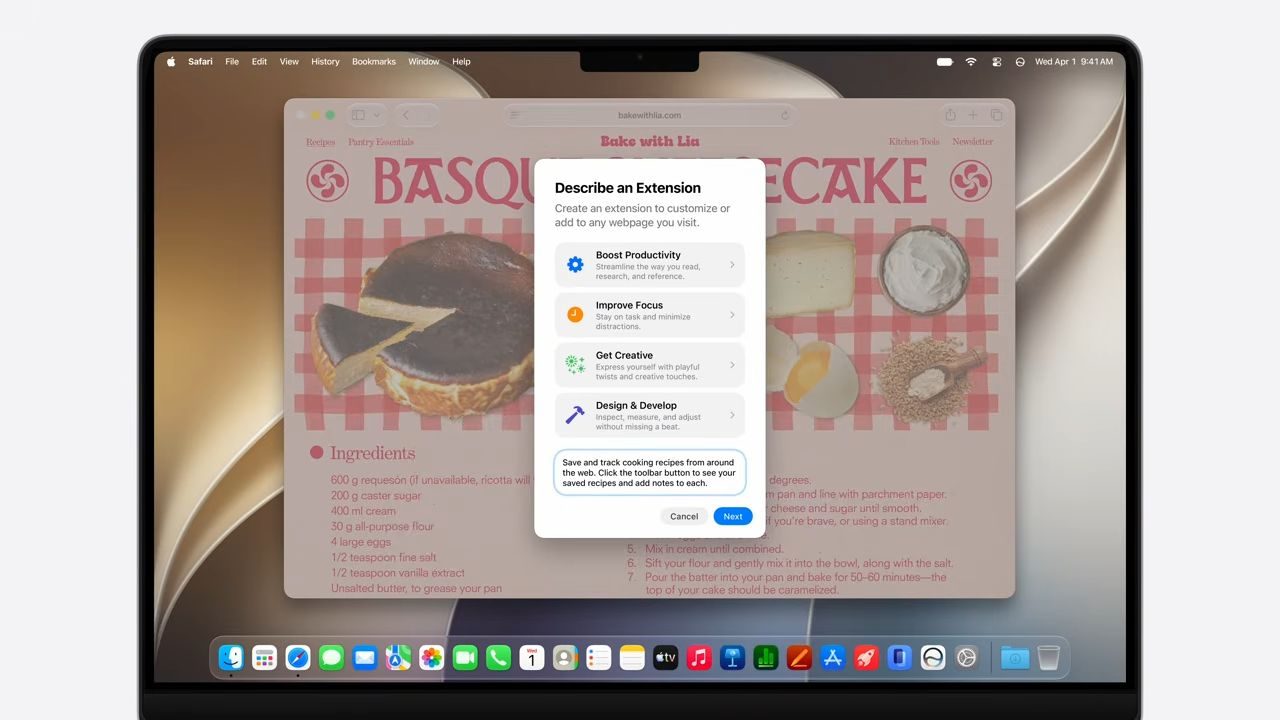
Announced at Apple WWDC, Safari will soon allow users to describe the extension they need in plain language. Apple Intelligence will then generate the custom add-on, turning the browser into a personal toolkit. This move directly challenges Chrome’s dominance in the extension space, offering a more intuitive and secure alternative.

How Safari AI Extensions Work: Describe and Build

The core of this innovation is a feature called “Describe an Extension.” Instead of hunting through a store for a specific tool, users can simply type or speak what they want. For example, you could say, “Create a button that highlights all prices on a shopping page and shows the total,” and Safari will build it.

This approach solves a common frustration: finding a niche extension that someone else maintains. With Safari AI extensions, you are no longer dependent on third-party developers for small, personalized tweaks. A recipe shortcut, a cleaner reading layout, or a quick rating button can now exist as a private browser fix.

What Makes This Different from Chrome

Chrome’s extension ecosystem is vast but often overwhelming. Users must search, compare, install, and trust each add-on. Moreover, many extensions request broad permissions, raising privacy concerns. In contrast, Apple’s method keeps everything within its walled garden, with AI-generated code that is inherently more transparent.

Apple emphasizes that the AI processes your request on-device, meaning sensitive browsing data never leaves your machine. This is a significant advantage over Chrome, where extensions can potentially access all your web activity. For users who prioritize privacy, this feature could be a major draw.

Beyond Extensions: Smarter Tab Management and Notifications

The custom extension builder is just one part of Safari’s broader AI overhaul. Two other features aim to reduce browser clutter: Intelligent Tab Management and Notify Me.

Intelligent Tab Management

This feature automatically analyzes your open tabs, identifying related pages and grouping them into topics. For instance, if you have multiple tabs open for a research project or shopping spree, Safari will cluster them together. You can then close the group or save it as a Tab Group for later. It is a practical way to tame the chaos of dozens of open tabs.

Notify Me: Stop Babysitting Pages

How often do you keep a tab open just to check for a price drop, a restock, or a form opening? Notify Me eliminates this habit. You tell Safari what to watch for on a specific page, close the tab, and receive a notification when the change occurs. It is a simple but powerful time-saver.

Privacy and Security: What Safari Needs to Prove

While the promise of Safari AI extensions is exciting, questions remain about control and transparency. Apple claims the generated extensions are designed to be secure, but users need clear visibility into what each add-on can access.

Apple states that the AI avoids sharing sensitive browsing data with anyone, including Apple itself. However, this claim must translate into a user-friendly interface where you can see permissions, monitor activity, and instantly disable any extension that behaves unexpectedly. For the feature to succeed, trust must be built through clear, on-device management tools.

For anyone who has ever searched for a browser extension and immediately regretted the internet, this could be the more interesting fix. Safari does not need a mountain of add-ons if the small ones feel safe enough to create. With this AI-powered approach, Apple is betting that personal, private, and easy-to-build tools will win over a bloated extension store.

Looking for more ways to optimize your browsing? Check out our guide on how to manage browser extensions for better performance and top privacy tools for 2025.

Continue Reading
Click to comment

Leave a Reply

Your email address will not be published. Required fields are marked *

Artificial Intelligence

iOS 27 Is Packed: Here Are the Small but Useful Updates You Might Have Overlooked

Published

on

iOS 27 Is Packed: Here Are the Small but Useful Updates You Might Have Overlooked

Every fall, Apple rolls out a major iOS update packed with headline features like Siri AI and Apple Intelligence. But the real magic often lies in the iOS 27 hidden features—the quiet tweaks that smooth out daily frustrations. While the keynote highlights grab attention, it’s the smaller changes that make your iPhone feel more intuitive and less needy over time.

From smarter Mail search to seamless network switching and shared album upgrades, iOS 27 delivers a host of practical improvements. Let’s dive into the updates that didn’t make the main stage but could transform your everyday experience.

Mail Search Gets a Brain Boost

Search in Mail has long been a pain point. Digging for a specific receipt, boarding pass, or appointment confirmation often feels like sifting through years of digital clutter. iOS 27 addresses this with a new ranking system that pushes more relevant results to the top.

This isn’t a flashy feature, but it’s one of those iOS 27 small updates that saves time and frustration. Instead of scrolling endlessly, you’ll find what you need faster. For anyone who relies on email for travel, shopping, or work, this is a quiet win.

Network Switching and Connectivity Tweaks

One of the most annoying moments with a smartphone is when it fails to switch smoothly between Wi-Fi and cellular. You leave home with Maps running, and suddenly the connection drops. iOS 27 fixes this with smarter network switching, ensuring your iPhone chooses the best connection seamlessly.

AirDrop and AirPlay also receive speed boosts. Transfers are faster, and nearby-device discovery is quicker. These iOS 27 hidden features eliminate those tiny failures that make an expensive phone feel sluggish. Whether you’re sharing a file or streaming to a speaker, the experience feels more fluid.

Shared Albums Become Cross-Platform Friendly

iCloud Shared Albums have always been a convenient way to share photos with family and friends. But until now, they were heavily tied to Apple’s ecosystem. iOS 27 changes that by making it easier for Android and Windows users to join and contribute through iCloud.com.

This is a game-changer for mixed-device groups. Imagine a family trip where everyone uses different phones—now everyone can add their photos without hassle. Additionally, iOS 27 introduces full-resolution sharing, filtering, reactions, more invite options, and expiring albums. It’s overdue housekeeping for a feature that often leaves users asking, “Where did the photos go?”

Save Stills from Video Frames

The Photos app also gains a handy trick: you can now save a still image from a video frame. This is perfect for capturing that perfect moment from a clip without needing a separate app. It’s a small addition, but one that adds convenience.

Accessibility Upgrades That Matter

Accessibility often gets overlooked in major updates, but iOS 27 brings some of its strongest improvements here. VoiceOver can now provide richer image descriptions, making it easier for visually impaired users to understand photos. A new captioning feature generates synchronized subtitles for videos and can even translate existing captions.

These iOS 27 small updates make saved clips and shared videos more accessible without requiring third-party tools. For anyone who relies on captions, this is a significant boost.

Quiet Utility Tweaks: Alarms, Notes, and More

The tiny utility pile keeps growing. iOS 27 now lets you separate alarm, timer, alert, and system sounds from ringtone volume. This means one setting doesn’t have to govern every noise your iPhone makes. You can keep your ringer loud while having alarms at a lower volume—a small but welcome change.

Notes also gets a niche but useful upgrade: copy and paste Markdown support. For writers, bloggers, and anyone who works with text online, this is basically a tiny holiday. It simplifies formatting and makes note-taking more efficient.

These iOS 27 hidden features aren’t the loudest changes, but they’re the kind that make your phone feel less needy every day. For more on what’s new, check out our guide on iOS 27 new features or explore Apple Intelligence updates. If you’re considering an upgrade, see our iPhone 17 Pro review.

Continue Reading

Artificial Intelligence

Which iPhones Are Ready for iOS 27? Here Is the Complete Compatibility List

Published

on

Which iPhones Are Ready for iOS 27? Here Is the Complete Compatibility List

Apple officially unveiled iOS 27 at WWDC 2026, and the big news is that the update supports an impressive 29 iPhone models. Contrary to earlier speculation that the iPhone 11 series would be dropped, Apple kept those devices on the list. This decision marks a first for the company, as no models were cut from the previous iOS 26 support roster.

iOS 27 Compatible iPhones: The Full Roster

Here is every iPhone that will receive the iOS 27 update:

  • iPhone SE (2nd generation and later)
  • iPhone 11
  • iPhone 11 Pro
  • iPhone 11 Pro Max
  • iPhone 12 mini
  • iPhone 12
  • iPhone 12 Pro
  • iPhone 12 Pro Max
  • iPhone 13 mini
  • iPhone 13
  • iPhone 13 Pro
  • iPhone 13 Pro Max
  • iPhone 14
  • iPhone 14 Plus
  • iPhone 14 Pro
  • iPhone 14 Pro Max
  • iPhone 15
  • iPhone 15 Plus
  • iPhone 15 Pro
  • iPhone 15 Pro Max
  • iPhone 16e
  • iPhone 16
  • iPhone 16 Pro
  • iPhone 16 Pro Max
  • iPhone 17e
  • iPhone 17
  • iPhone Air
  • iPhone 17 Pro
  • iPhone 17 Pro Max

As you can see, the list spans from the iPhone 11 to the latest iPhone 17 Pro Max. This means that even users with older devices like the iPhone 11 will get the new software features, though not all of them.

Which iPhones Support Siri AI and Apple Intelligence?

Getting iOS 27 does not guarantee you can use every feature. Apple confirmed that older models will miss out on AI capabilities because many processes require advanced chips. For example, Apple Intelligence tools like Clean Up and Live Translation need an iPhone 15 Pro or newer. Siri AI, the revamped voice assistant, has an even shorter list of compatible devices:

  • iPhone 15 Pro
  • iPhone 15 Pro Max
  • iPhone 16e
  • iPhone 16
  • iPhone 16 Pro
  • iPhone 16 Pro Max
  • iPhone 17e
  • iPhone 17
  • iPhone 17 Pro
  • iPhone 17 Pro Max
  • iPhone Air

Interestingly, Siri AI will not launch in the European Union or China due to regulatory hurdles. Apple plans to roll out iOS 27 to all compatible models in September 2026. For more details, check out our guide on how to prepare your iPhone for an iOS update.

What Does iOS 27 Mean for Older iPhones?

For owners of older iPhones like the iPhone 11 or iPhone 12, the update brings essential security patches and performance improvements. However, you will not get the AI-driven features that define this release. This is a common trend: Apple extends software support but reserves cutting-edge capabilities for newer hardware.

On the other hand, if you own an iPhone 15 Pro or later, you will experience the full power of iOS 27, including on-device AI processing. This makes upgrading worthwhile for those who want the latest innovations.

How to Check Your iPhone’s Compatibility

Wondering if your device is on the list? Go to Settings > General > About and check your model number. Alternatively, you can visit Apple’s official website for the complete compatibility chart. Remember, even if your iPhone is supported, you might need to free up storage space for the update. Learn more in our article on freeing up storage for iOS updates.

Final Thoughts on iOS 27 Compatibility

Apple’s decision to include the iPhone 11 series in iOS 27 is a pleasant surprise, extending the lifespan of these devices. While AI features remain exclusive to newer models, the broad support ensures that millions of users can enjoy the latest software. Keep an eye out for the September release and plan your upgrade accordingly.

Continue Reading

Artificial Intelligence

Apple Intelligence Is Coming to Safari: Smarter Tabs, Custom Extensions, and Password Fixes

Published

on

Apple Intelligence Is Coming to Safari: Smarter Tabs, Custom Extensions, and Password Fixes

At WWDC 2026, Apple unveiled a suite of Apple Intelligence Safari features that aim to solve real-world browsing headaches. Unlike some AI announcements that feel like solutions in search of problems, these tools focus on practical, everyday annoyances—from managing dozens of open tabs to updating weak passwords automatically.

AI-Powered Tab Organization: No More Tab Hoarding

One of the standout additions is automatic tab grouping. Safari can now analyze open webpages, identify related content, and automatically cluster tabs into topics. As you continue browsing, the browser intelligently adds new tabs to the appropriate groups.

This means you no longer need to manually sort through 30+ tabs you swore you’d revisit later. The feature is designed to reduce clutter and improve focus, especially for research-heavy sessions or online shopping sprees.

For users who juggle multiple projects, this AI-driven organization could be a game-changer. It’s a subtle but powerful way to keep your digital workspace tidy.

Custom Extensions via Natural Language: Describe What You Need

Another practical tool is the “Describe an Extension” feature. Instead of writing code or searching for third-party add-ons, you can simply tell Safari what you want. For example, you could request a custom recipe-rating tool that adds a star system to any cooking website.

Safari uses Apple Intelligence Safari capabilities to generate the extension on the fly. This opens up browser customization to everyone, not just developers. It’s a smart move that aligns with Apple’s philosophy of making powerful tools accessible.

Building on this, users can also tweak existing extensions using natural language prompts. This flexibility could reduce reliance on the App Store for simple browser modifications.

Notify Me: Never Miss a Change Again

Refreshing a webpage repeatedly for product restocks, ticket sales, or registration openings is a common frustration. Safari’s new “Notify Me” feature eliminates this chore. You simply tell the browser what you’re waiting for in natural language, and it monitors the page in the background.

When the requested change occurs—like a new item in stock or a price drop—Safari sends a notification. This background monitoring is privacy-focused, with Apple claiming no sensitive browsing data is shared. It’s a small but significant time-saver for online shoppers and event seekers.

Automatic Password Updates: A Security Boost

Security also gets a major upgrade with deeper integration into the Passwords app. Using Apple Intelligence Safari, the browser can automatically update eligible accounts to stronger passwords with a single tap. It then navigates to the website, signs in, and completes the change process securely.

This feature addresses a common pain point: many users know they should use strong passwords but find the manual update process tedious. By automating it, Apple encourages better security habits without extra effort.

Furthermore, the system works across websites that support password changes, making it a practical addition for anyone concerned about account security.

Privacy at the Core: What Apple Promises

Throughout the announcement, Apple emphasized privacy. The company claims that Safari processes AI tasks on-device or in a way that doesn’t share browsing data with Apple itself. While the effectiveness of these features in real-world use remains to be seen, the privacy-first approach is reassuring.

As a result, users can benefit from AI-powered tools without sacrificing confidentiality. This balance could be a key differentiator as other browsers race to integrate AI.

Conclusion: Practical AI That Actually Helps

Apple’s AI strategy for Safari feels refreshingly grounded. Instead of flashy demos, the company focused on removing everyday annoyances: organizing tabs, tracking webpage changes, and updating weak passwords. These are tasks people regularly struggle with but rarely enjoy doing themselves.

For more on Apple’s ecosystem, check out our guide on best iPhone features and macOS Ventura tips. Whether these tools work as smoothly as demonstrated remains to be tested, but on paper, this is one of the most useful Apple Intelligence updates to date.

Continue Reading

Trending