Connect with us

Artificial Intelligence

Google’s New Gemini TV Controls Are Here — and TCL Owners Get Them First

Published

on

Google’s New Gemini TV Controls Are Here — and TCL Owners Get Them First

Adjusting your television settings often feels like a chore. You start with one simple change, and before you know it, you are buried three menus deep searching for the brightness slider. Google has now streamlined this entire process with its latest rollout of Gemini TV controls, and TCL owners are the first to experience the upgrade.

Google announced that TCL will serve as the exclusive launch partner for the new feature. This means TCL TV users get access to the Gemini controls for the first 60 days. After that window, the functionality will expand to other Google TV brands.

What Can the New Gemini TV Controls Do?

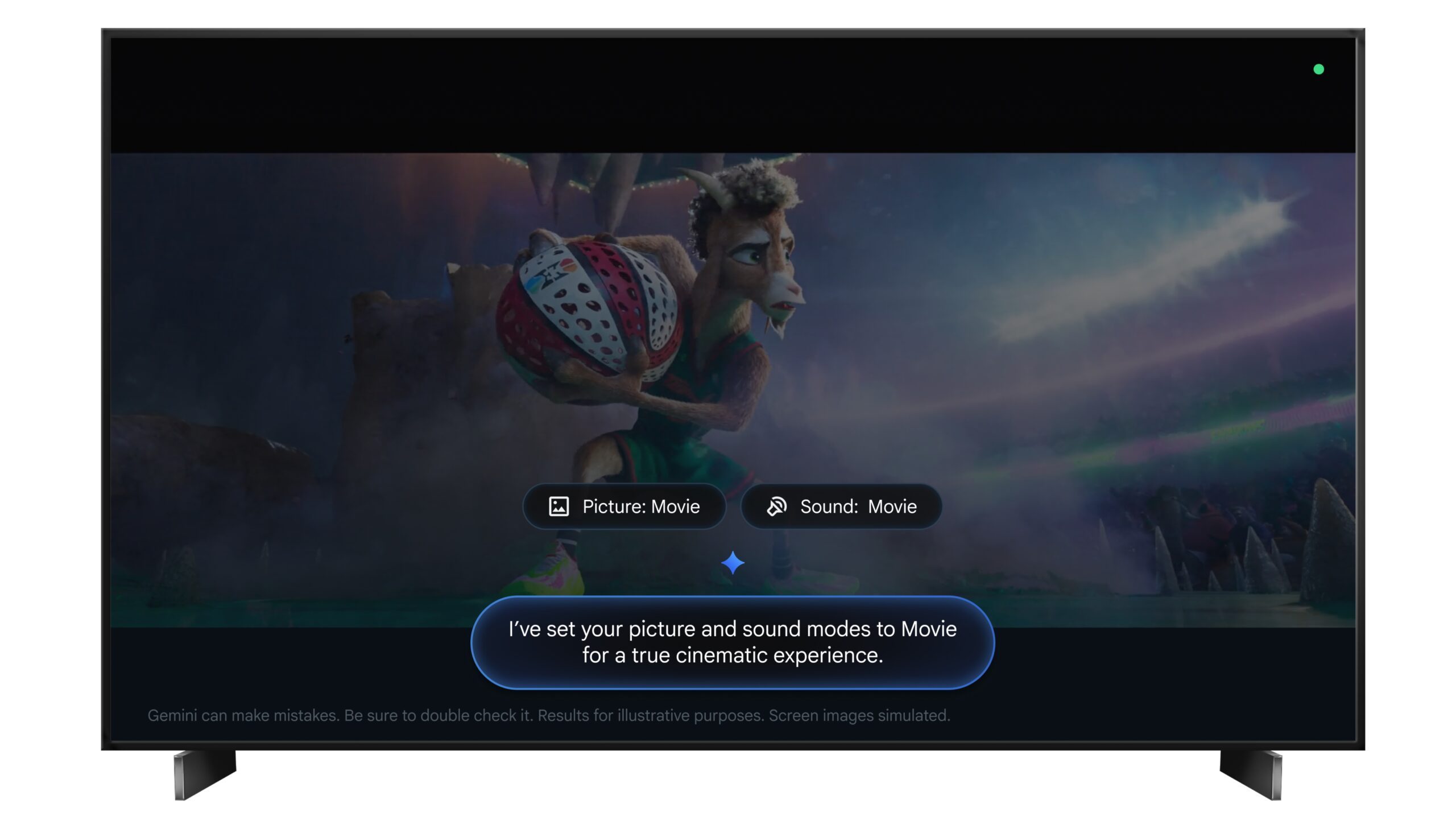
Instead of navigating through endless settings menus, you can now use your voice to make adjustments. Ask Gemini to tweak brightness, contrast, volume, or picture modes. If something looks or sounds off, describe the problem in plain language.

For example, saying “the screen is too dark” or “I can’t hear the dialogue” prompts Gemini to fix it directly. You can also ask it to fine-tune settings based on what you are watching, or jump straight into the settings menu without clicking through multiple screens. It is a small change that saves time every single time you use it.

This development builds on Google’s broader push to integrate AI into everyday devices. For more on how AI is reshaping home entertainment, check out our guide to AI-powered home entertainment.

Which TCL TVs Are Getting This Update?

The rollout is live now across select 2025 and 2026 TCL Google TV models in the United States. Compatible models include the QM9K, QM7L, RM7L, X11L, QM9L, QM8L, and RM9L. It remains unclear whether older models like the QM6K, QM7K, or QM8K will receive the update later.

In addition, the timing aligns with the upcoming FIFA World Cup this summer. Having quick voice control over picture and sound settings before a big match is a practical addition. Google is also launching a dedicated World Cup Hub on Google TV, featuring live match information, schedules, highlights, and YouTube content.

If you own a compatible TCL model, you can start using Gemini controls today. For those with other Google TV devices, you will have to wait a couple of months. In the meantime, you can explore our guide to optimizing Google TV settings for a better viewing experience.

How to Use Gemini TV Controls

Using the new controls is straightforward. Press the voice button on your remote and speak naturally. You can ask Gemini to adjust brightness, contrast, volume, or even switch picture modes. The system understands conversational phrases, so you do not need to memorize specific commands.

This means that you can say “make the picture brighter for sports” or “turn down the volume a bit.” Gemini handles the rest. It is a more intuitive way to interact with your television.

Why This Matters for Smart TV Users

Voice control is not new, but Gemini TV controls represent a shift toward more contextual and helpful AI. Instead of requiring precise commands, the system interprets your intent. This reduces friction and makes the TV experience smoother.

As more devices adopt AI assistants, the line between simple voice commands and intelligent home management blurs. For a deeper look at how AI is transforming smart homes, read our analysis of smart home AI trends.

In summary, Google’s Gemini TV controls are a welcome addition for TCL owners. They simplify common tasks, save time, and set the stage for broader adoption across other brands. If you are in the market for a new TV, this feature might be worth considering.

Continue Reading
Click to comment

Leave a Reply

Your email address will not be published. Required fields are marked *

Artificial Intelligence

OpenAI and Visa join forces to bring secure payments to ChatGPT and AI agents

Published

on

OpenAI and Visa join forces to bring secure payments to ChatGPT and AI agents

The OpenAI Visa partnership marks a significant step toward letting artificial intelligence handle real-world purchases on your behalf. Imagine asking ChatGPT to reorder household supplies or find the best wireless headphones within your budget — and it completes the transaction without you lifting a finger. That scenario is now closer to reality, as the two companies announced a strategic collaboration at the Visa Payments Forum.

Under this deal, Visa will integrate its global payment infrastructure directly into OpenAI’s AI agent experiences, including ChatGPT and the Atlas browser. Instead of just recommending products, these agents will be able to buy them securely, with Visa handling the entire transaction process.

How the ChatGPT payment system works

The partnership is part of Visa’s broader Intelligent Commerce initiative, which aims to extend secure payment capabilities into emerging digital spaces. When an AI agent makes a purchase on your behalf, Visa manages the transaction using tokenized card credentials, real-time authorization, and fraud monitoring.

Tokenization ensures your actual card details are never exposed during a purchase, similar to how Apple Pay keeps your information private. You also set your own rules — spending limits, approved merchant categories, and whether certain purchases require your explicit approval. This means you stay in control without having to oversee every transaction.

As a result, the system balances convenience with security. The user defines boundaries, and the AI operates within them, while Visa’s network handles the heavy lifting of fraud detection and dispute resolution.

OpenAI’s second attempt at commerce

This is not OpenAI’s first foray into turning ChatGPT into a checkout tool. An earlier feature called Instant Checkout, which charged merchants a 4% fee, failed to gain traction with retailers and was retired in March. That attempt relied on OpenAI handling payments directly, which proved challenging.

This time around, OpenAI is outsourcing the difficult parts — fraud detection, dispute management, and compliance — to Visa, a network that already processes over 300 billion transactions annually. The shift in strategy reflects a recognition that payment infrastructure requires specialized expertise.

Visa’s Chief Product and Strategy Officer, Jack Forestell, noted that moving from recommending a product to actually buying it demands a completely different level of trust. However, there is still no launch date, pricing model, or user interface to show yet. The companies are still in the planning phase, meaning consumers may wait months or longer before seeing this feature live.

What this means for AI-powered shopping

The OpenAI Visa partnership could reshape how people interact with AI assistants. Instead of simply providing information, these agents become active participants in commerce. This opens up possibilities for automated grocery orders, subscription management, and even travel bookings — all handled by an AI that understands your preferences.

Nevertheless, several questions remain unanswered. Will merchants accept payments from AI agents? How will refunds and returns work? And what happens if the AI makes a mistake, like ordering the wrong size or color? Visa’s existing dispute resolution system offers a framework, but the specifics of AI-driven transactions are still being defined.

Building on this, the partnership also signals a broader trend: payment networks are positioning themselves as essential infrastructure for the AI economy. Just as they power e-commerce today, they could power autonomous commerce tomorrow.

Security and control in AI transactions

Security is the cornerstone of the OpenAI Visa partnership. Visa’s tokenization technology replaces sensitive card numbers with unique digital tokens, which are useless if intercepted. Real-time authorization checks each transaction against the user’s predefined rules, while fraud monitoring scans for unusual activity.

Users will also receive notifications for every transaction, with the ability to approve or block purchases instantly. This layered approach aims to build trust in a system where the buyer is not actively clicking “confirm.”

For merchants, the integration could reduce cart abandonment and open new sales channels. An AI agent that shops on behalf of a user might make more frequent, targeted purchases than a human browsing manually.

The road ahead for AI commerce

While the OpenAI Visa partnership is promising, it is still in its infancy. No concrete timeline has been announced, and the companies have not revealed how they will split transaction fees or handle cross-border payments. Industry observers expect a phased rollout, starting with simple, low-risk purchases like digital goods or subscriptions.

For now, the announcement positions Visa as a key player in the emerging AI agent ecosystem. As more companies build autonomous shopping tools, partnerships like this could become the standard for secure, scalable payments.

If you are interested in how AI is transforming e-commerce, check out our guide on AI shopping assistants or learn about tokenized payment systems. The future of shopping may not involve a shopping cart at all — just a conversation with your AI.

Continue Reading

Artificial Intelligence

Your Windows 11 PC Can Now Natively Run AI Workloads, Even If It Lacks the Copilot+ Badge

Published

on

Your Windows 11 PC Can Now Natively Run AI Workloads, Even If It Lacks the Copilot+ Badge

For nearly a year, Microsoft has insisted that the future of AI on Windows is tied to Copilot+ PCs. If you wanted advanced local AI features, you needed a machine with a dedicated Neural Processing Unit (NPU). That was the narrative. Now, the company is quietly rewriting the script.

According to updated documentation, Windows 11’s local Language Model APIs can now run on non-Copilot+ PCs, provided they have an Nvidia GeForce RTX 30-series GPU (or newer) with at least 6GB of VRAM. On the surface, this appears to be a developer-focused tweak. In reality, it could signal one of the most significant shifts in Microsoft’s AI PC strategy since Copilot+ PCs launched last year. More importantly, it raises a lingering question: Did we really need NPUs for all of this in the first place?

The Copilot+ Exclusivity Era Was Always a Bit Awkward

When Copilot+ PCs debuted in June 2024, Microsoft positioned them as the gateway to local AI experiences on Windows. To qualify, a device needed 16GB of RAM, SSD storage, and an NPU capable of delivering at least 40 TOPS of AI performance. The messaging suggested that these specialized chips were essential for running Windows 11 AI workloads locally. While that’s true in terms of efficiency, it never told the full story.

Anyone familiar with AI hardware already knew that GPUs were more than capable of handling these workloads. In fact, modern graphics cards are often significantly more powerful than NPUs for running language models and generative AI applications. That’s why most enthusiasts experimenting with local AI tools, from small language models to image generators, have been relying on GPUs for years. Yet Windows’ native AI experiences remained locked behind the Copilot+ badge.

That created an odd situation. A gaming PC with an RTX 4070 had more than enough horsepower to run AI models locally, but it couldn’t access Microsoft’s native AI framework because it lacked an NPU. Meanwhile, a thinner laptop with a qualifying NPU could. This latest change doesn’t completely erase that divide, but it certainly makes it look thinner than ever.

Microsoft May Be Laying the Groundwork for AI Beyond NPUs

The newly expanded Language Model APIs allow developers to tap into local AI capabilities on supported Nvidia hardware. Microsoft says these APIs can now run on non-Copilot+ systems equipped with RTX 30-series GPUs or newer, provided they have at least 6GB of VRAM. These APIs are powered by Phi Silica, Microsoft’s compact on-device language model. Applications can use it for tasks such as summarizing text, rewriting content, converting text into tables, formatting information, and generating responses from prompts.

Think of it as a lightweight, local version of the AI features people typically associate with services like ChatGPT. The difference is that everything runs directly on the device rather than in the cloud. That’s important for two reasons. First, privacy — if AI processing stays on your PC, sensitive documents, notes, emails, and drafts don’t have to leave the machine. Second, performance — local AI features can run instantly without waiting for cloud servers, subscriptions, or an internet connection.

The interesting part is how Microsoft plans to distribute these capabilities. If an app needs Phi Silica, Windows can download the required model through Windows Update and run it locally using supported hardware. So, the operating system is beginning to treat AI models like another Windows component rather than a premium feature reserved for a specific class of PCs. That’s a notable philosophical shift.

What This Means for Developers and Users

For developers, this change opens up new possibilities. They can now build apps that leverage Windows 11 AI capabilities without requiring users to own a Copilot+ PC. This could accelerate the adoption of local AI features across a wider range of devices. For users, it means that existing gaming or workstation PCs with capable Nvidia GPUs can now participate in the AI revolution without needing a hardware upgrade.

However, not all AI features are suddenly available. Features such as Recall, Click to Do, and some of Microsoft’s AI-powered creative tools still appear tied to systems with NPUs. The newly expanded support currently applies to Language Model APIs, which are primarily focused on text-based AI experiences.

The Beginning of the End for Copilot+ Exclusives?

Before you get too excited, this doesn’t mean every AI feature is suddenly coming to older Windows machines. Still, history suggests these walls rarely stay up forever. Once Microsoft demonstrates that local AI can run effectively on mainstream RTX hardware, it becomes harder to justify why certain AI experiences must remain exclusive to NPUs. Developers won’t care whether the AI workload is running on an NPU or a GPU as long as the experience works well. Consumers certainly won’t. That’s why this update feels more significant than the documentation change might suggest.

For now, it’s just one API. But it also represents Microsoft’s first meaningful step toward acknowledging something many PC enthusiasts have been saying all along: capable GPUs were never the problem. And if local AI can run perfectly well on millions of existing RTX-powered PCs, the distinction between a “Copilot+ PC” and a regular Windows PC may start to matter a lot less than Microsoft originally hoped.

As a result, the Windows 11 AI landscape is evolving rapidly. This move could democratize AI access, allowing more users to experience local AI without the need for specialized hardware. For more insights on optimizing your PC for AI workloads, check out our guide to optimizing Windows 11 for AI performance and learn about the best AI tools for Windows 11.

Continue Reading

Artificial Intelligence

Your ChatGPT Bills Could Soon Get a Drastic Price Cut: Here’s Why

Published

on

Your ChatGPT Bills Could Soon Get a Drastic Price Cut: Here’s Why

If you’ve ever flinched at your monthly AI subscription costs, relief may be on the horizon. According to a recent report from The Wall Street Journal, OpenAI is exploring significant OpenAI price cut measures to reduce what users pay for its services. This move comes as the company battles to retain customers against rivals like Anthropic.

The proposed reductions target token pricing—the unit AI firms use to charge for their products. Interestingly, OpenAI is preparing for similar cuts from Anthropic, meaning that regardless of which service you choose, your AI bills should shrink soon.

Why Is OpenAI Suddenly Feeling Generous?

The answer is straightforward: businesses are growing weary of exorbitant AI expenses. There have even been reports of AI tools costing companies more than hiring actual employees. OpenAI CEO Sam Altman acknowledged this at a recent event, calling costs ‘a huge issue’ and adding, ‘I think we’ll have a lot of ways we can help people get more value for less spend.’

However, it’s not just about customer goodwill. OpenAI faces intense competition. Anthropic’s revenue skyrocketed after its coding tool, Claude Code, went viral among software engineers, pushing the five-year-old startup past OpenAI’s valuation for the first time. In response, OpenAI has refocused on its own coding tool, Codex, but it still trails behind.

The Competitive Landscape Driving the OpenAI Price Cut

Corporate Spending Constraints and Tokenmaxxing

Some corporations poured so much money into AI coding tools that their leaders are now pulling back. An Uber executive revealed that the company had already maxed out its 2026 budget for agentic AI. These comments have sparked a Silicon Valley debate about ‘tokenmaxxing’—the practice of burning through as many tokens as possible to boost productivity, even when it doesn’t generate returns.

This means that an OpenAI price cut could help businesses justify continued AI investment by lowering the cost per token. Without such reductions, many firms might scale back their AI usage.

Google’s Aggressive Pricing Adds Pressure

Google has also entered the fray. Its Gemini models, particularly the budget Flash tiers, undercut both ChatGPT and Claude on price. Google’s business plans cost nearly half of what OpenAI charges, adding more competitive pressure. As a result, OpenAI must act swiftly to retain its user base.

What Does This Price War Mean for You?

For the companies involved, slashing prices is risky. Both OpenAI and Anthropic already lose billions on computing costs, and both have confidentially filed for IPOs. Cutting prices right before facing public investors will be the first real test of their business models.

For users, however, it’s excellent news. You will soon see a drastic reduction in your AI costs. Competition is always good for consumers, and a price cut is one of the biggest benefits. So sit back and let the AI giants fight it out—because for once, we are the ones who win.

To stay updated on the latest AI pricing trends, check out our guide on how to choose the best AI tool for your budget. Additionally, learn about OpenAI vs Anthropic pricing strategies to make informed decisions.

Continue Reading

Trending