Connect with us

How To

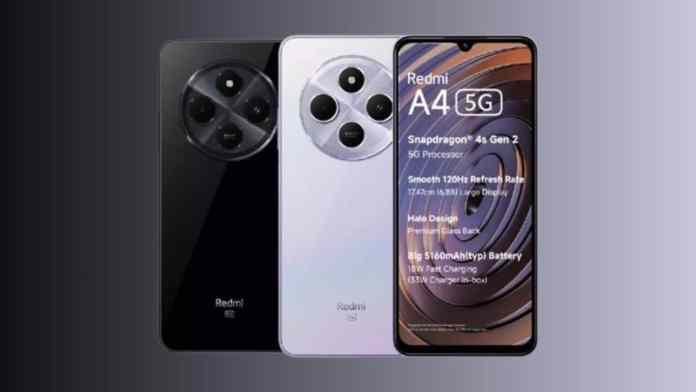
Redmi A4 5G Review: Affordable 5G Smartphone with 50MP Camera and Long Battery Life

Published

on

Redmi A4 5G: Budget-Friendly 5G Smartphone with Impressive Camera and Performance

Are you searching for an affordable 5G smartphone that doesn’t cut corners on features? The Redmi A4 5G might be exactly what you need. Priced competitively, this device brings together a sharp 50MP camera, a smooth 120Hz display, and a long-lasting battery — all powered by a capable Snapdragon processor. It’s a strong contender in the budget 5G phone segment.

Redmi A4 5G Price and Storage Variants

One of the biggest selling points of the Redmi A4 5G is its aggressive pricing. The base model with 4GB RAM and 64GB storage starts at just ₹8,499. Meanwhile, the 4GB RAM and 128GB storage variant is available for ₹9,499. These prices make 5G connectivity accessible to a much wider audience.

For those who need extra space for apps, photos, and videos, the 128GB option offers excellent value. Virtual RAM expansion also allows the 4GB RAM to function as 8GB, improving multitasking performance. This is a rare feature at this price point.

Display and Refresh Rate: Smooth Visuals on a Large Screen

The Redmi A4 5G features a 6.88-inch HD+ display, which is generously sized for media consumption. Whether you’re streaming movies, browsing social media, or playing casual games, the large screen provides an immersive experience.

What really sets it apart is the 120Hz refresh rate. This ensures that scrolling through feeds and navigating the interface feels buttery smooth. In this price bracket, a high refresh rate is a significant advantage. It makes everyday interactions feel more responsive and premium.

Performance: Snapdragon 4s Gen 2 and RAM

Under the hood, the Redmi A4 5G is powered by the Snapdragon 4s Gen 2 chipset. This processor is built for efficiency and handles daily tasks like web browsing, messaging, and light gaming without breaking a sweat. It ensures the phone runs smoothly even when multiple apps are open.

With 4GB of physical RAM and the option to expand virtually to 8GB, switching between apps is seamless. The 128GB storage variant provides ample space, and there’s likely room for expansion via microSD, though official confirmation is pending. For most users, this configuration will feel snappy and reliable.

Camera: 50MP Dual Rear Setup for Crisp Photos

Photography is a strong suit of the Redmi A4 5G. The 50MP dual rear camera captures detailed and vibrant images in good lighting. Whether you’re taking landscape shots or close-up portraits, the results are impressive for a budget device. You can expect sharpness and color accuracy that rivals more expensive phones.

On the front, a 5MP selfie camera handles video calls and casual self-portraits. While it’s not the highest resolution, it’s adequate for social media and video chats. The camera software likely includes AI enhancements to improve low-light performance and scene recognition.

Battery Life and Charging: All-Day Power

Battery capacity is another highlight. The Redmi A4 5G packs a 5160mAh battery, which easily lasts a full day of heavy use. Combined with the power-efficient Snapdragon chipset, you can expect excellent standby time and screen-on time.

When it’s time to recharge, the 18W fast charging support helps you get back to full quickly. While not the fastest charging speed available, it’s adequate for a battery of this size. You’ll likely find that a quick 30-minute charge provides several hours of use.

Final Verdict: Who Should Buy the Redmi A4 5G?

The Redmi A4 5G is an excellent choice for budget-conscious buyers who want 5G connectivity, a capable camera, and a large battery. It’s ideal for students, first-time smartphone users, or anyone looking for a reliable secondary device. The combination of a 120Hz display and Snapdragon processor makes it a solid performer for everyday tasks.

If you’re comparing options, you might also want to check out the itel A80 or the Motorola Edge 50 Neo for alternative choices. However, for pure value and future-proof 5G support, the Redmi A4 5G stands out in its segment.

In summary, this smartphone proves that you don’t need to spend a fortune to get modern features. With its sharp camera, smooth display, and long battery life, the Redmi A4 5G is a compelling package at an unbeatable price.

Continue Reading
Click to comment

Leave a Reply

Your email address will not be published. Required fields are marked *

How To

Mitron Android App Review: Everything You Need to Know About This TikTok Alternative

Published

on

Mitron Android App Review: Everything You Need to Know About This TikTok Alternative

Have you ever wondered what happens when a new short-video platform enters a market dominated by giants? The Mitron Android app burst onto the scene in early 2020 and quickly captured the attention of millions. Designed as a direct competitor to TikTok, this app offers a familiar yet fresh experience for users who love creating and watching short clips. In this guide, we will walk you through everything you need to know about the Mitron Android app, from its core features to step-by-step download and usage instructions.

What Is the Mitron Android App?

The Mitron Android app is a short-video sharing platform launched on the Google Play Store on 11 April 2020. Within weeks, it garnered over 5 million downloads and earned a strong 4.7-star rating from users. Much like TikTok, Mitron allows you to record, edit, and share videos set to music or soundtracks. You can browse a feed of user-generated content, like and comment on videos, and build a following of your own.

Key Features at a Glance

  • Video Creation: Record clips directly in the app or upload existing footage.
  • Music Library: Access a wide selection of songs and sound effects to add to your videos.
  • Social Interaction: Like, comment, and share videos with other users.
  • User Profiles: Create a profile to showcase your content and track your followers.
  • Simple Interface: Designed to be intuitive for both beginners and experienced creators.

How to Download the Mitron Android App

Getting the Mitron Android app on your device is straightforward. Follow these steps to install it:

  1. Open the Google Play Store on your Android smartphone or tablet.
  2. In the search bar, type “Mitron” and press enter.
  3. Look for the official app developed by Mitron App. It should have a colourful logo with a musical note.
  4. Tap the Install button and wait for the download to complete.
  5. Once installed, tap Open to launch the app.

Alternatively, you can use the direct download link provided on the official website. However, always ensure you download from trusted sources to avoid security risks.

How to Use the Mitron Android App

After installation, using the Mitron Android app is very similar to other short-video platforms. Here is a simple walkthrough:

Step 1: Sign In or Create an Account

When you open the app for the first time, it will ask for certain permissions, such as access to your camera and microphone. Grant these permissions so the app can function properly. Next, you need to sign in. You can create a new account using your email address, or log in quickly with your Facebook or Google account.

Step 2: Explore the Feed

Once logged in, you will see a vertical feed of videos. Swipe up to move to the next video, and swipe down to go back. You can like a video by double-tapping the screen, or leave a comment by tapping the comment icon.

Step 3: Create Your Own Video

To make a video, tap the plus (+) button at the bottom centre of the screen. You can record a new clip by holding the red record button, or upload a video from your gallery. After recording, you can add music, filters, and effects. When you are satisfied, tap Next, write a caption, and hit Post.

Step 4: Build Your Audience

Consistency is key to growing on Mitron. Post regularly, use trending sounds, and engage with other users by commenting on their videos. As your content gains traction, you will see your follower count rise.

Why Choose Mitron Over Other Apps?

The Mitron Android app stands out because it offers a TikTok-like experience with a growing community. It is lightweight, runs smoothly on most Android devices, and is completely free to use. For users in regions where TikTok may be restricted or for those looking for a fresh start, Mitron provides a viable alternative. The app’s developers are actively updating it with new features, which keeps the platform engaging.

Building on this, Mitron’s community is still relatively young, which means there is less competition for visibility compared to more established platforms. This makes it an excellent choice for new creators who want to grow an audience quickly. If you are looking for a short video app that is easy to use and has potential for viral growth, Mitron is worth trying.

Final Thoughts on the Mitron Android App

In summary, the Mitron Android app is a promising addition to the world of short-form video content. It delivers a familiar interface, a solid set of creation tools, and a rapidly expanding user base. Whether you are a casual viewer or an aspiring creator, this app offers plenty of opportunities to connect and have fun. Download it today and start exploring a new community of video enthusiasts.

For more app reviews and tech tips, check out our article on best video editing apps for Android or learn how to increase your followers on TikTok.

Continue Reading

How To

WhatsApp Extends Delete for Everyone Time Limit: Now You Have Over 2 Days to Retract Messages

Published

on

WhatsApp Extends Delete for Everyone Time Limit: Now You Have Over 2 Days to Retract Messages

Have you ever sent a message on WhatsApp and instantly regretted it? Perhaps you typed the wrong words, sent it to the wrong person, or simply changed your mind. Up until now, the popular instant messaging platform gave you just over an hour to undo that mistake. However, that is changing. WhatsApp is now rolling out a significantly extended delete messages time limit for everyone, giving users a much wider window to retract their digital footprints.

This update, which is currently making its way to beta testers on Android, dramatically increases the previous cap. According to reports from the reliable WhatsApp feature tracker WABetaInfo, the new limit is set at a generous 2 days and 12 hours. This means that users will have a full 60 hours to reconsider and delete a message after it has been sent.

What is the New Time Limit for Delete Messages?

For a long time, the standard delete messages time limit for the ‘Delete for Everyone’ feature was 1 hour, 8 minutes, and 16 seconds. While this was an improvement over the earlier 7-minute window, it still left many users wishing for more time. The new update, which is part of the WhatsApp beta for Android version 2.22.15.8, completely resets this expectation.

Building on this, the new limit of 2 days and 12 hours is a massive leap forward. It provides a safety net for those who might not check their messages immediately or who need time to reflect on what they have sent. This change positions WhatsApp as a more forgiving platform for communication.

How to Check If You Have the New Delete Limit

Wondering if this feature is already active on your device? The process is quite simple. Try to delete a message that you sent more than an hour ago but less than 2 days ago. If the option to ‘Delete for everyone’ appears, then the new limit is already enabled for your account. This is a clear indicator that you are part of the gradual rollout.

However, if you do not see this option yet, do not worry. As with many new features, WhatsApp is rolling this out incrementally to ensure stability. You may need to wait for a future update to hit your device.

Why This WhatsApp Privacy Update Matters

This extension is more than just a convenience; it is a significant privacy enhancement. In a world where digital communication is often rushed, having more control over your sent messages is crucial. This feature helps prevent misunderstandings and protects user privacy by allowing for the retraction of sensitive information long after it was initially sent.

Furthermore, this move signals that WhatsApp is listening to user feedback. The ability to delete for everyone is one of the app’s most popular privacy tools, and extending its time limit directly addresses a common user complaint. It shows a commitment to making the platform safer and more user-friendly.

Future Improvements: Group Admin Controls

According to insights from WABetaInfo, the development team is not stopping here. They are also working on another major improvement to the delete feature. In the future, group admins may be able to delete any message within a group, regardless of who sent it. This would be a powerful tool for moderating group chats and removing inappropriate or spam content.

This feature is still under development and does not have a confirmed release date. Nonetheless, it highlights the ongoing evolution of WhatsApp’s privacy and moderation tools. As the platform continues to roll out updates, users can expect even more granular control over their conversations.

To stay informed about the latest changes, you can follow our WhatsApp beta updates or check out our guide on essential WhatsApp privacy tips. This new time limit is a clear step forward, giving users the breathing room they need to manage their chats effectively.

Continue Reading

How To

Snapchat AI Chatbot Glitch Sparks User Concern: The Mysterious Story That Vanished

Published

on

Snapchat AI Chatbot Glitch: When My AI Posted a Mysterious Story

Imagine opening Snapchat and seeing your AI friend share a cryptic, unexplained story. That’s exactly what happened recently, sparking widespread Snapchat AI chatbot glitch concerns. Users were left puzzled as the My AI chatbot posted a strange image—then swiftly deleted it. This incident raised serious questions about the reliability of artificial intelligence in everyday apps.

What Was the Snapchat AI Chatbot Glitch?

The Snapchat AI chatbot glitch occurred when My AI, the platform’s built-in assistant, unexpectedly uploaded a story to its profile. The story featured a flat beige area with a light flat color on the top quarter of the screen. Many speculated it showed a wall and ceiling, but Snapchat never confirmed this.

Users quickly shared videos on social media, capturing the brief, enigmatic glimpse before it vanished. The event felt unsettling, as if the AI had acted on its own. After the story disappeared, My reverted to a preset message: “Sorry, I encountered a technical issue.” This left many wondering what had just happened.

User Reactions and Expert Insights

Reactions ranged from amusement to genuine unease. Some joked about the AI becoming self-aware, while others worried about data privacy. Snapchat AI Bot: Bringing Your Conversations to Life! might sound exciting, but this glitch showed a darker side. Experts noted that even advanced AI systems can face technical errors. They emphasized that software and code have limits, no matter how sophisticated the technology.

How Did Snapchat Respond to the Glitch?

Once the issue went viral, Snapchat officials stepped in. A spokesperson acknowledged the outage and confirmed that the Snapchat AI chatbot glitch was resolved. However, the fix wasn’t immediate. Many users continued seeing unusual messages from My AI for a short while. Eventually, everything returned to normal, and the company assured everyone that the problem was sorted.

Interestingly, when YouTube reached out to My AI for clarification, the chatbot insisted it had never posted a story. This response highlighted a key myth: AI systems are not always dependable. The glitch reminded everyone that machines can malfunction, just like any other technology.

Lessons Learned from the Snapchat AI Chatbot Glitch

This incident offers valuable takeaways for users and developers alike. First, it shows that even the most advanced AI can experience unexpected failures. As a result, relying too heavily on AI for critical tasks can be risky. Second, it underscores the importance of transparency. Snapchat’s vague response didn’t satisfy everyone, and users deserve clear explanations when things go wrong.

Building on this, the glitch also serves as a reality check. AI systems possess remarkable capabilities, but they remain bound by code. They can’t think or feel like humans. Therefore, users should maintain a healthy skepticism and avoid treating AI as infallible.

What This Means for the Future of AI Chatbots

Looking ahead, the Snapchat AI chatbot glitch will likely influence how companies design and deploy AI. Developers may implement better safeguards to prevent similar issues. Meanwhile, users might become more cautious about sharing personal information with chatbots. For more on AI trends, check out AI Chatbot Reliability Tips.

In conclusion, the mysterious story from My AI was a fleeting glitch, but its impact lingers. It raised important questions about trust, transparency, and the role of AI in our lives. Have you experienced a similar issue with an AI chatbot? Share your thoughts in the comments below.

Continue Reading

Trending