Connect with us

Artificial Intelligence

This $9 NFC key forces you to physically unlock your most addictive apps — no willpower required

Published

on

Autonomous Key

The problem with screen-time apps

Most screen-time tools rely on a fragile thing: your willpower. They ping you with reminders, let you set timers, or throw up a soft block you can dismiss with a single tap. For anyone who’s ever told themselves “just five more minutes” on Instagram or TikTok, you know how easily those notifications get ignored. The system depends on you wanting to stop — and when you don’t, it’s useless.

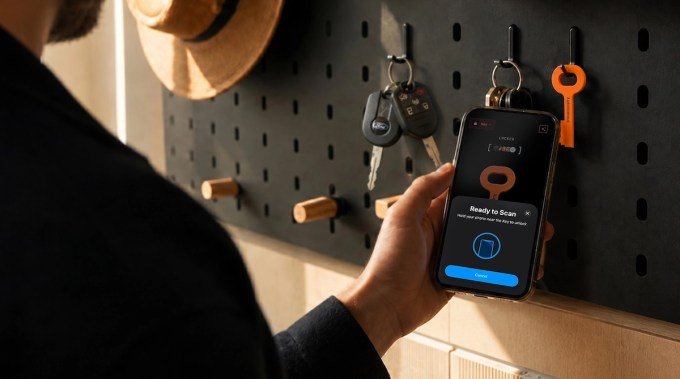
Enter the Autonomous Key. It’s a tiny NFC key, about three inches long, that takes a radically different approach. Instead of a software toggle, it requires a physical scan. Want to open Twitter again? You have to walk to wherever you left the key, tap it to your phone, and only then do you get access. That extra step — the act of getting up — turns a mindless impulse into a deliberate choice.

How the Autonomous Key works

The concept is simple. You pair the NFC key with a companion app, then designate which apps you want to lock. Once locked, those apps are inaccessible until you tap the key against your phone’s NFC reader. Each unlock session lasts up to 60 minutes, after which the apps automatically lock again. Leave the key in another room, at the office, or even at the gym, and suddenly opening TikTok requires a conscious effort — not just a reflexive thumb tap.

At $9, the Autonomous Key is significantly cheaper than its main competitors. Brick costs $59, Blok runs $29, and Unpluq is $26.50. Brick does offer extras like Sleep Mode and in-app purchase blocking, but for the core functionality — physically blocking apps — the Autonomous Key delivers at a fraction of the price.

Compatibility and setup

The key works with Android 8.0 or later and iOS 15 or later. Setup takes a couple of minutes: download the app, tap the key to pair, then select which apps to lock. It comes in five colors: pink, orange, blue, gray, and brown. One key can be paired with multiple phones, which makes it practical for families or people with both a work and personal device.

AI-powered insights with attitude

The companion app doesn’t just lock apps — it tracks your behavior. It logs how often you unlock each app, how long you keep them accessible, and the times of day you’re most likely to reach for them. Then it summarizes those patterns with an AI personality that the company describes as “deliberately sassy.”

For example, if you repeatedly unlock an app immediately after locking it, the AI might say something like, “Clearly the key wasn’t far enough away. Try putting it in another room.” It’s a small touch, but it adds a layer of accountability that a simple timer doesn’t provide. And unlike many app blockers, there are no subscriptions or premium tiers. You pay $9 once, and that’s it.

Real-world testing: one annoying flaw

During testing, the core idea held up. When the key was in the kitchen and I was on the couch, the friction of getting up was enough to stop me from mindlessly opening Instagram. But there’s a catch: the NFC scan occasionally took multiple attempts to register. It’s not a dealbreaker, but it’s frustrating when you’re trying to unlock a messaging app to reply to a text. For that reason, the Autonomous Key is probably best for locking time-sink apps like social media and games — not essential tools like email or WhatsApp.

There’s also the question of what happens if you lose the key. If your apps are currently locked, the workaround is to uninstall and reinstall the companion app. If they’re already unlocked, you can simply remove the key from your account. The company says it’s developing a backup unlock method that will arrive in a future update.

Is the Autonomous Key worth $9?

For the price of a fast-food meal, you get a tool that introduces genuine friction into your scrolling habits. It won’t work for everyone — if you’re the type who keeps your keys on the same table as your phone, the effect is minimal. But if you’re willing to stash the key somewhere inconvenient, it’s a clever way to outsmart your own impulses.

The Autonomous Key is currently in beta, following a Kickstarter campaign, and began shipping earlier this month. If you’ve tried every screen-time app and still find yourself doomscrolling at midnight, this $9 piece of plastic might be the simplest fix yet.

Continue Reading
Click to comment

Leave a Reply

Your email address will not be published. Required fields are marked *

Artificial Intelligence

Guardoc Health processes one million clinical documents daily using Amazon Nova models

Published

on

Guardoc Health Amazon Nova

The scale of the documentation challenge

Guardoc Health says it now processes more than one million clinical documents every single day using Amazon Nova models through Amazon Bedrock. The company builds documentation software specifically for long-term care providers — nursing homes, skilled nursing facilities, and similar settings where paperwork volume is enormous and the margin for error is razor-thin.

The stakes are brutally concrete. Get a diagnosis code wrong, and Medicare claims get denied under the Patient-Driven Payment Model. Audit fines pile up. Worse, a missed condition can alter a patient’s entire treatment trajectory. AI in healthcare documentation is not some abstract efficiency play; it’s a risk management problem where the cost of failure is measured in both dollars and patient outcomes.

Guardoc’s published figures suggest they’re tilting the odds in the right direction. A 46 percent reduction in documentation errors. A 70 percent drop in audit fines. More than $400,000 in annual ROI for a single facility. The company hasn’t disclosed the baseline period or methodology behind those numbers, but the direction of travel is clear.

Why clinical documents break most AI pipelines

Clinical documents arrive in formats that would make most document processing systems cry. Multi-page PDFs with handwritten physician annotations layered over printed text. Prior authorization forms where a single checkbox state determines a coverage decision — but that checkbox might have a handwritten note next to it that overrides everything. Medication lists that show up as clean tables in one chart and free text buried inside a doctor’s note in the next. Patient intake forms mixing typed fields, rubber stamps, and handwriting on the same page.

Research published in BMJ Quality and Safety estimates that around 12 million US outpatients are affected by diagnostic error each year, with information-handling failures cited as a contributing factor. At Guardoc’s volume — one million documents daily — even a one percent error rate in condition detection would generate thousands of incorrect records every day. Each one carries its own patient safety or compliance consequence.

In one quarterly deployment covering two facilities and 200 patients, Guardoc says its system drove 847 documentation corrections, flagged 86 issues tied to PDPM reimbursement accuracy, and was associated with a 74 percent reduction in hospital transfers per 100 admissions. A separate case study across seven facilities and 1,618 residents identified 10,612 issues.

A retrieval pipeline built around cost as much as accuracy

Guardoc’s architecture is a multi-stage retrieval augmented generation (RAG) pipeline designed with a clear cost-tiering logic: cheap components handle the high-volume grunt work, and expensive multimodal reasoning only fires when it’s actually needed.

It starts with Amazon Textract, which extracts text and structural metadata from each incoming page. Guardoc treats this as the lowest per-page cost point in the pipeline. That output gets chunked along clinical boundaries — so a medication list or a diagnosis section stays intact rather than getting split by arbitrary character count.

Each chunk is embedded using Amazon Titan Text Embeddings V2 and stored in Amazon DynamoDB, partitioned by patient so retrieval never crosses patient boundaries. A custom pre-filter narrows the candidate set by document type and recency before a k-nearest neighbour search retrieves the chunks most relevant to a given classification query. At this stage, only page references are returned — keeping data transfer light.

Nova 2 Lite and Nova Pro handle the heavy lifting

Amazon Nova 2 Lite runs a text-based pass to remove obvious non-matches. Only the pages that survive every prior filter reach Amazon Nova Pro, which receives the raw PDF bytes and reasons over layout, handwriting, signatures, and stamps to produce the final classification. This is where the computationally intensive multimodal reasoning happens — and only for the subset of documents that actually need it.

Two document types account for most of what earlier pipeline versions missed, according to Guardoc. The first is physician attestation fields on prior authorization forms, where a handwritten note can override a printed checkbox. The second is patient-reported symptom sections, where handwriting often carries information that doesn’t appear anywhere else in the record.

Medication extraction presents a related problem. Drug names, dosages, routes, and frequencies show up in structured tables, in prose buried inside physician notes, in handwritten additions to printed lists, and in scans that have been faxed through multiple hands. Guardoc’s hybrid pipeline runs Amazon Textract first for clean printed tables, then passes both the original PDF and the Textract output to Amazon Nova Pro to resolve wrapped table columns, handwritten additions, and non-standard formats that OCR alone can’t parse correctly.

What this means for long-term care

“With the Nova family, we’re making it easier for healthcare organisations to detect high-risk cases earlier and act before issues become costly,” said Assaf Amiaz, Director of Product at Guardoc Health. “By automating workflows that once required manual oversight, the Nova family helps teams reduce compliance gaps, prevent errors, and focus more of their time on improving patient outcomes.”

The real takeaway here is that AI clinical documentation processing isn’t about replacing human judgment — it’s about catching the things humans miss when they’re buried under paper. A single nurse or coder might process hundreds of documents per shift. The error rate that seems small per document becomes massive at scale. Guardoc’s approach, with its cost-aware RAG pipeline and multimodal reasoning on the hard cases, is a template for how to deploy AI in regulated healthcare settings without blowing the budget on unnecessary compute.

The question now is whether other vendors follow the same playbook — or whether they’ll keep throwing expensive models at every document, regardless of whether the problem actually warrants it.

Continue Reading

Artificial Intelligence

OpenAI just took the handcuffs off your ChatGPT Work and Codex usage limits, at least for now

Published

on

ChatGPT Work usage limit

OpenAI drops the 5-hour ceiling — for now

If you’ve ever been deep in a coding session or drafting a long report in ChatGPT Work, only to hit a sudden wall with a ChatGPT Work usage limit warning, you know the frustration. OpenAI just pulled that wall down, at least temporarily.

The company announced it is removing the five-hour usage restriction on OpenAI ChatGPT Work and Codex for all Plus, Business, and Pro subscribers. The move is not permanent — the word temporarily is doing heavy lifting here — but for now, users get an unrestricted run.

This is the kind of change that makes a real difference when you’re in flow. No more watching the clock or rationing queries. Just work.

GPT 5.6 Sol gets smarter about resource use

The second piece of news is about efficiency. OpenAI is rolling out backend improvements to GPT 5.6 Sol that make the model consume less usage for the same output. In plain English: your allowance stretches further.

Tibo, a Member of Technical Staff at OpenAI, posted on X that the exact impact is still being quantified. “The exact impact is still being quantified and will be shared later,” he wrote. So we don’t yet know whether this is a modest trim or a significant leap. But the direction is clear — OpenAI wants users to get more done per unit of compute.

For anyone who works with long documents, complex code, or iterative prompts, this efficiency gain compounds over a session. Less overhead, more output.

Usage counter reset: a fresh start today

The third update is immediate and tangible. OpenAI is resetting the usage counter within the hour of the announcement. If you had already burned through your daily allowance, your counter now starts from zero.

Stack that with the lifted cap and the efficiency improvements, and you are looking at the most generous version of ChatGPT Work and Codex we have seen in a while. The catch, as always, is that we don’t know how long this window stays open.

What this means for Plus, Business, and Pro users

  • Plus plan: Normally subject to the 5-hour limit. Now temporarily uncapped.
  • Business plan: Same treatment — no usage ceiling for now.
  • Pro plan: Already had higher limits, but this removes any remaining cap entirely.

If you are on a free tier, these changes do not apply. The announcement specifically covers paid plans.

Why this matters for heavy users

For power users — developers using OpenAI Codex, writers drafting in ChatGPT Work, analysts running repeated queries — the 5-hour limit was a real bottleneck. A single long debugging session or a complex research task could easily eat up the allowance. The temporary removal means you can now push through without interruption.

It also signals something about OpenAI’s current capacity and strategy. The company has been releasing updates at a brisk pace: just days ago it launched the GPT 5.6 Sol, Terra, and Luna models to the public. Easing usage limits suggests either improved infrastructure or a deliberate effort to keep users engaged during a competitive period.

Either way, the window is open. Use it while it lasts.

What to watch next

The big question is how long “temporarily” lasts. OpenAI has not given a timeline. It could be days, weeks, or until the next major model release. Users should not assume permanence.

Also worth watching: when OpenAI shares the quantified efficiency gains for GPT 5.6 Sol. That data will tell us whether the improvements are incremental or substantial. For now, the combination of a reset counter, no cap, and better efficiency makes this the best time to push ChatGPT Work and Codex hard.

If you have been holding back on a big project, this is your moment. Just don’t get too comfortable — the handcuffs are off, but they are still on the table.

Continue Reading

Artificial Intelligence

What are Copilot+ PCs? A complete guide to Microsoft’s AI-powered Windows laptops

Published

on

Copilot+ PCs

Microsoft’s Copilot+ badge: more than just a chatbot upgrade

Stroll through a computer store in 2026, and you’ll spot the Copilot+ PC logo on most Windows laptops. It’s everywhere — from Microsoft’s own Surface lineup to machines from Samsung, HP, and Dell. The name suggests a better version of the Copilot chatbot. But that’s only a sliver of the story.

A Copilot+ PC is a Windows 11 computer that meets Microsoft’s strict hardware standard for advanced on-device AI. The key ingredient? A processor with a dedicated Neural Processing Unit (NPU) that hits at least 40 TOPS. You also need 16GB of RAM and a 256GB SSD. Meet those specs, and you unlock Windows features like Recall, Click to Do, improved search, and live translation — all powered locally by the NPU rather than cloud servers.

The badge has spread fast. When the first Copilot+ laptops landed in June 2024, only Qualcomm’s Snapdragon X chips qualified. Today, you can also pick models with AMD Ryzen AI 300/400 or Intel Core Ultra 200/300 processors. That means buyers now have a real choice between Arm-based and traditional x86 Windows systems.

Copilot+ PC hardware requirements: what you actually need

Microsoft sets a clear, non-negotiable baseline. Every Copilot+ PC must include:

  • A compatible processor or system-on-chip with an NPU delivering 40+ TOPS
  • 16GB of DDR5 or LPDDR5 memory
  • A 256GB SSD or UFS storage drive
  • Windows 11 with the latest supported updates

As of now, Microsoft lists three processor families as compatible: the AMD Ryzen AI 300 and 400 series, Intel Core Ultra 200 and 300 series, and the Qualcomm Snapdragon X series. But a word of caution: just because a chip belongs to one of those families doesn’t mean every configuration supports every Copilot+ feature. Always look for the official badge on the laptop and double-check the manufacturer’s fine print.

TOPS and the NPU: why they matter

Copilot+ PCs are all about AI. But earlier “AI PCs” had a problem: they included NPUs with little software to use them. The NPU is a dedicated piece of silicon built to run AI workloads efficiently. CPUs and GPUs can also handle AI, but the NPU is designed for sustained tasks — background effects, image analysis, speech processing, semantic search — without bogging down the main processor or graphics card.

Microsoft measures NPU power in TOPS, or trillions of operations per second. A Copilot+ PC needs at least 40 TOPS. That number only describes the NPU, though. It tells you nothing about CPU speed or gaming performance. Two laptops with the same Copilot+ badge can feel very different in everyday use.

AI PC vs. Copilot+ PC: not the same thing

“AI PC” is a loose industry label. Manufacturers slap it on any computer with an NPU or AI-accelerating hardware. Copilot+ PC is Microsoft’s tighter definition. Every Copilot+ PC is an AI PC, but many AI PCs fall short of Microsoft’s 40-TOPS requirement or lack access to the full Copilot+ feature set. An older Intel Core Ultra laptop, for instance, might advertise an NPU and AI tricks but miss the Copilot+ badge because its NPU doesn’t meet the threshold.

Are all Copilot+ PCs Arm-based? No. The first wave used Qualcomm’s Arm-based Snapdragon X chips, making the category look tied to Windows on Arm. Intel and AMD have since added qualifying x86 processors. Snapdragon models often offer snappy responsiveness and great battery efficiency, but they rely on Microsoft’s Prism emulator to run many x86 and x64 apps that lack native Arm versions. Compatibility isn’t always seamless.

What AI features do Copilot+ PCs include?

Microsoft has expanded the Copilot+ feature list considerably since launch. Availability varies by processor, region, language, account type, and Windows update. Here are the highlights.

Recall

Recall creates an optional, searchable timeline of your on-screen activity. Describe a document, webpage, or image you remember seeing, and Recall digs through the saved snapshots to find it. Microsoft still labels it a preview. The feature drew heavy criticism at first, leading to a delayed rollout and a redesigned security model. The current version is opt-in and requires Windows Hello Enhanced Sign-in Security with biometric authentication. Snapshots are encrypted, stored locally, and tied to your Windows profile. Microsoft says it can’t access them, and other apps can’t retrieve the database. Sensitive-information filtering is on by default to avoid saving passwords or payment details. You can pause snapshots, delete them, limit storage, and exclude specific apps or websites. Recall can even be removed as an optional Windows component. One catch: it needs at least 50GB of free space. A 256GB system allocates 25GB to snapshots by default, which Microsoft estimates holds about three months of activity.

Click to Do

Click to Do analyzes selected text and images on your screen, then offers relevant actions. Depending on the content, it might let you copy text, summarize or rewrite it, search the web, remove an image background, blur a background, or open the selection in another app. Some actions require a subscription.

Improved Windows Search and Agent in Settings

Improved Windows Search uses semantic indexing so you can find files and images with natural descriptions. Searching for “team at the conference” works without knowing the exact filename. It appears in File Explorer, the Windows search box, and supported Settings searches. Agent in Settings lets you describe a Windows problem in plain language. It surfaces the relevant option and, for supported changes, helps apply it. Microsoft expanded language support in 2026.

Live Captions and creative tools

Copilot+ systems add local translation from more than 40 languages into English, and from supported languages into Simplified Chinese. The PCs also support AI tools across Paint, Photos, Snipping Tool, Voice Access, Narrator, and Windows Studio Effects — including Cocreator, Restyle Image, Image Creator, Super Resolution, Perfect Screenshot, flexible voice commands, richer image descriptions, background blur, eye contact, automatic framing, and voice focus. Some tools still have processor restrictions. Automatic Super Resolution, Paint Generative Fill, and Photos Relight currently list Snapdragon X requirements on Microsoft’s feature page.

Are Copilot+ PCs faster and more efficient?

Microsoft markets Copilot+ systems as its fastest and longest-lasting Windows PCs. Commissioned testing claims up to 22 hours of local video playback and 15 hours of web browsing on select devices. Real-world results vary wildly with the processor, display, battery size, workload, and manufacturer. The badge itself is not a performance ranking. Qualcomm systems often prioritize efficiency, AMD offers strong integrated graphics and multi-core performance, while new Intel Core Ultra processors can lean toward battery life or raw horsepower. Traditional specs still matter.

Should you buy a Copilot+ PC?

The Copilot+ badge alone isn’t a reason to buy. But if you’re shopping for a high-end or upper mid-range laptop, you’ll probably end up with one anyway. Only entry-level models use older processors without the new NPUs. Another limitation is RAM: after a period of 16GB becoming standard, 8GB machines are creeping back, so budget buyers may find Copilot+ PCs a bit pricey. Honestly, you’re not missing much — at least for now. Tools like Recall or Click to Do can be handy, but they won’t radically change how you use your PC. I own a Copilot+ laptop myself, and I rarely touch those features.

Continue Reading

Trending