What Is the Docs to Video Feature in Google Vids?
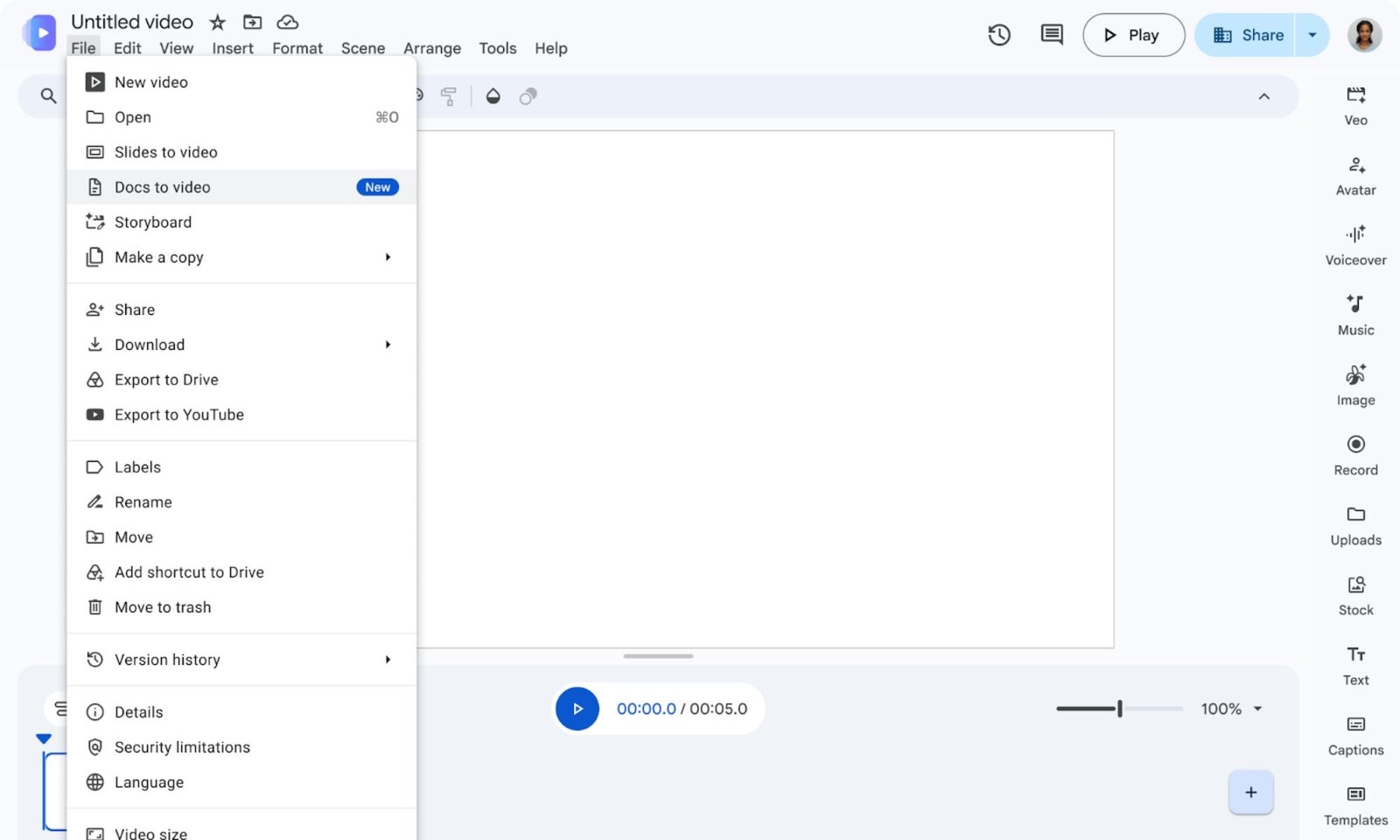
Google Vids now includes a new option in its File menu called Docs to Video. It lets you pull in a document directly from your Drive or your computer. Then, using AI, it scans the content, creates a script that boils everything down to key points, and adds a voiceover to match.
The result is a short, narrated video with AI-generated visuals and backgrounds. No editing chops required.
For anyone who spends hours grinding through meeting notes, training PDFs, or dense internal reports, this is the kind of shortcut you didn’t know you needed. It doesn’t just save time — it makes the material far less painful to absorb.
How Does Google’s Document-to-Video Tool Work?
The workflow is straightforward. You start by choosing a file — PDF, Word document, or Google Docs all work. Vids’ AI then reads through the material, identifies the main talking points, and drafts a script you can review before anything gets rendered.
That review step matters. You can rewrite specific sections if the AI missed the nuance, or swap in a different narrator voice if the default doesn’t fit your audience. Once you’re happy, Vids stitches it together with visuals and background music.
If that sounds familiar, it’s because NotebookLM already does something similar. But Vids is aimed at a slightly different use case — quick, shareable video summaries rather than deep-dive audio overviews.
Who’s This Actually For?
The obvious audience is anyone drowning in text. Think of the manager who gets 50 pages of meeting minutes after every project sync, or the new hire handed a 200-page training manual on day one.
But there’s a second, arguably bigger benefit: retention. A voiceover with visuals makes dry material stick better than staring at a wall of text. That’s not a small thing when the content is mandatory compliance training or quarterly financial updates.
As someone who plows through press releases and text-heavy decks all day, I can see myself using this the moment I get access.
When Can You Use Docs to Video?
Here’s the catch: it’s not free. The feature is locked to Google AI Plus, Pro, or Ultra subscribers, plus those on Business, Enterprise, and Education plans. Rollout depends on your account type.
Google’s Rapid Release domains already have access as of today. Scheduled Release domains will get it over the next two weeks, starting September 5, 2026.
So if you’re on a personal free Google account, you’re out of luck for now. This is squarely aimed at paying customers — which makes sense, given the compute involved in generating video from scratch.
Does It Actually Work?
Early hands-on reports are mixed. AndroidAuthority’s test run got as far as generating the script, then hit a repeated error when trying to render the final video.
That’s worth flagging, but it’s also typical for a brand-new multimodal AI feature doing a lot at once. Generating a script, syncing narration, and rendering visuals is heavy lifting. Don’t be surprised if your first attempt fails — retry, and if it still breaks, give it a few days for fixes to roll out.
For a tool that’s literally designed to save you time, a little patience upfront is a fair trade.
What to Expect Next
Google has been pushing Vids as a workspace tool since its launch, and this feature fills a real gap. Instead of forcing employees to watch long recordings of meetings, you can now get a tight, narrated summary in minutes.
If you’re already paying for a Google AI plan, it’s worth testing the moment it lands in your account. If you’re not, this might be the feature that pushes you over the edge.
Either way, the era of skimming 40-page PDFs by hand is slowly coming to an end. Google just gave you a better way to get through the boring stuff — and that’s something worth paying attention to.








 CyberSecurity8 months ago
 How To6 months ago
 How To5 months ago
 How To6 months ago
 How To5 months ago
 How To7 months ago

 How To6 months ago