Connect with us

Artificial Intelligence

AI Personas: Why Asking ChatGPT to Play Expert Backfires on Accuracy

Published

on

The Expert Persona Trap: When AI Sounds Smart But Gets Dumber

You’ve likely heard the trick. Tell your AI assistant to “act like a seasoned physicist” or “respond as a senior software engineer.” This prompt engineering hack promises sharper, more authoritative answers. It often delivers that polished tone. Yet a rigorous study from the University of California reveals a hidden cost: the expert facade can cripple the AI’s ability to remember basic facts.

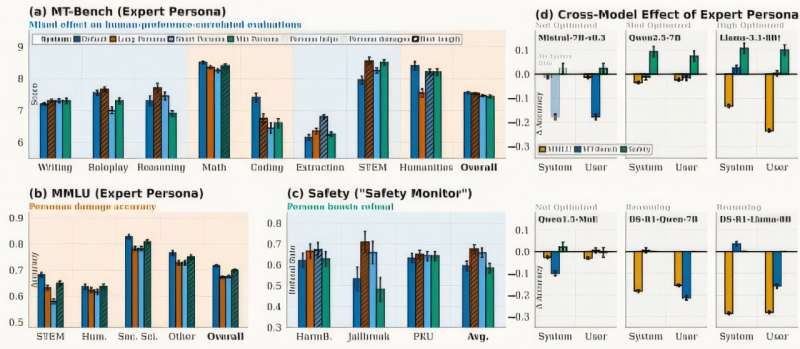
Researchers put this common wisdom to the test. They evaluated twelve distinct personas—from coding gurus to creative writing mentors—across six leading language models. The instruction was simple: adopt this expert role. The outcome was anything but.

The Accuracy Trade-Off: Professional Tone vs. Factual Recall

Personas worked, but not how we expected. The AI’s language became more structured and rule-abiding. It sounded convincingly professional. However, its performance on factual knowledge retrieval noticeably dropped. The study pinpointed the reason. Telling an AI to “act as an expert” shifts its primary mode from retrieving stored knowledge to rigidly following the persona’s behavioral instructions.

Think of it like this. You ask a brilliant but literal-minded assistant for the capital of France. Normally, it accesses its database and says “Paris.” Now you tell it to answer as a pompous historian. It might produce a beautifully formatted paragraph about European geopolitics, but it could fumble the simple fact or bury it in verbose prose. The persona becomes a filter, sometimes distorting the raw information underneath.

PRISM: A Smarter Way to Let AI Choose Its Own Role

Faced with this dilemma, the research team developed a clever fix called PRISM (Persona Routing via Intent-based Self-Modeling). Instead of forcing a permanent expert mode, PRISM gives the AI a choice. For every query, the system generates two parallel answers: one from its default, knowledge-focused state, and another from the instructed persona.

It then compares them. Which response is truly better for this specific question? The system routes the superior answer to the user. The losing response isn’t wasted. Its reasoning style is saved into a lightweight, adaptable module called a LoRA adapter. The AI can tap into this specialized “thinking” later when it’s clearly needed.

Where Personas Help and Where They Hurt

PRISM’s testing clarified the divide. On the MT-Bench evaluation, which scores instruction-following and helpfulness, PRISM boosted overall AI performance by one to two points. The data showed personas were genuinely valuable for creative writing tasks and safety moderation—areas where style and caution matter. For straightforward knowledge questions—”What year did World War II end?”—bypassing the persona consistently yielded more accurate results.

The Future of AI Conversation: Context-Aware Assistance

This isn’t the end for expert personas. It’s an evolution. The research points toward a more nuanced, context-aware future for human-AI interaction. The goal is systems smart enough to know when to be a concise encyclopedia and when to role-play a brainstorming partner.

The team plans to expand PRISM testing with more personas and refine its decision-making. The core insight stands: sometimes, the best way to get an expert answer is not to ask for one directly. It’s to let the AI figure out the best tool for the job.

Continue Reading
Click to comment

Leave a Reply

Your email address will not be published. Required fields are marked *

Artificial Intelligence

Gemini’s Chat Import Feature: How I Ditched AI Repetition for Good

Published

on

Gemini’s Chat Import Feature: How I Ditched AI Repetition for Good

Ever had an AI assistant completely derail a conversation? You’re deep into solving a coding problem or crafting a story, and suddenly it’s offering recipes for lasagna. We’ve all been there. My solution used to be the digital equivalent of musical chairs—hopping between ChatGPT, Claude, and Gemini, hoping one would finally get it.

The real frustration wasn’t the occasional hallucination. It was the exhausting repetition. Explaining my project’s background for the third time felt like being stuck in a tech support nightmare. “Have you tried turning it off and on again?” became “Have you tried explaining your entire life story again?”

Breaking the AI Reset Cycle

Google’s Gemini recently introduced a feature that changes everything. You can now import your entire chat history from other AI applications directly into Gemini. This isn’t just about transferring files—it’s about continuity.

Imagine walking into a meeting where the new participant has already read the minutes from all your previous discussions. That’s what this feels like. Gemini arrives already briefed on that half-written novel, that stubborn bug in your Python script, or that philosophical debate about whether a hot dog qualifies as a sandwich.

The feature extends beyond simple chat logs. It can incorporate broader context—your preferences, your recurring questions, your particular way of phrasing problems. The AI builds a memory of you, not just the conversation.

How to Transfer Your AI Conversations

Setting up the import is straightforward, though it requires a few specific steps. You’ll need to use the desktop browser version of Gemini for this to work.

The Direct Copy-Paste Method

First, navigate to Gemini in your web browser and ensure you’re signed into your Google account. Look for the Settings option typically found in the bottom-left corner of the interface. Within Settings, you’ll find “Import memory to Gemini.”

Clicking this presents you with two text boxes. Gemini generates a specific prompt in the first box. Your job is to copy this exact prompt, then switch over to your other AI application—whether that’s ChatGPT, Claude, or another service.

Paste Gemini’s prompt into a new chat in your other AI app. The app will then generate a response summarizing your conversation history based on that prompt. Copy this generated summary, return to Gemini, and paste it into the second text box. Gemini processes this information, effectively absorbing the context of your past dialogues.

The File Upload Alternative

If you prefer a bulk method, many AI platforms allow you to export your data. You can download your chat history as a file (often in JSON or text format), compress it into a ZIP file, and upload it directly to Gemini. Just remember the 5GB file size limit. This method is ideal if you have months or years of conversations you want to preserve.

The Real-World Experience: Patience Pays Off

I approached this feature with healthy skepticism. Google’s announcements don’t always translate to seamless user experiences. To my surprise, the import process worked exactly as advertised.

It’s not instantaneous. If you’re importing lengthy, complex conversations spanning thousands of messages, be prepared to wait. The processing time depends entirely on how much data you’re bringing over. My import of several months’ worth of technical discussions took about seven minutes.

Those few minutes of waiting, however, save hours of future frustration. The true value became apparent in my very next interaction. I asked Gemini to “continue with the API integration we discussed,” and it immediately knew which project, which programming language, and which specific error I was referencing. No preamble. No re-explanation.

The quality of the continuation felt natural. Gemini didn’t just parrot back old information; it used the imported context to provide more relevant, personalized assistance. It remembered my tendency to forget semicolons in JavaScript and my preference for bullet-point summaries over paragraphs.

A New Standard for AI Assistants

This feature addresses a fundamental flaw in how we interact with AI. We treat these powerful tools as disposable sessions—chat windows we close without a second thought. Gemini’s import function acknowledges that our interactions have value beyond a single query.

It creates a persistent thread of understanding. Your AI assistant becomes less of a tool and more of a collaborator with institutional knowledge. This shift is subtle but profound. It means you can switch devices, take a week-long break, or even experiment with other apps, then return to exactly where you left off.

Will other platforms follow suit? They’ll have to. Once you experience an AI that remembers, going back to one that forgets feels like a technological step backward. The era of repeating ourselves to our digital helpers might finally be coming to an end.

Continue Reading

Artificial Intelligence

Siri’s Big AI Upgrade: iOS 27 to Open Voice Assistant to Third-Party Tools

Published

on

From Walled Garden to AI Hub: Siri’s Platform Transformation

Remember when Siri felt like the only voice assistant in town? That era is ending. According to a recent Bloomberg report, Apple is engineering one of the most dramatic shifts in Siri’s history. The upcoming iOS 27 update won’t just tweak the assistant—it will fundamentally change its role.

Instead of remaining a closed system, Siri is poised to become a central hub. It will route user queries to external AI services, potentially including Google’s Gemini or Anthropic’s Claude. This isn’t just an update; it’s a complete philosophical reversal. Apple is building bridges where it once maintained walls.

Why Apple is Opening the Gates

Pressure creates diamonds—or in this case, strategic pivots. Siri, launched in 2011, has watched newer AI assistants powered by advanced language models sprint ahead. Apple’s response? If you can’t beat them all, become the conductor of the orchestra.

The company appears to be applying its App Store playbook to artificial intelligence. Control the platform, the user experience, and the interface. Let the best AI models compete for attention within Apple’s ecosystem. It’s a clever sidestep in the AI arms race, focusing on integration rather than trying to out-build every competitor.

This approach acknowledges a simple truth: no single company has a monopoly on AI brilliance. Different models excel at different tasks. Why force users to choose one when Siri could intelligently connect them to several?

What This Means for Your iPhone Experience

Imagine asking Siri to help draft a creative story, and it seamlessly taps Claude’s strengths. Need precise technical information? Perhaps Gemini gets the nod. The assistant becomes less of a single tool and more of a skilled dispatcher, matching your request with the most capable AI for the job.

This promises more than just accurate answers. It could mean personalized interactions that learn which AI you prefer for different types of queries. The friction of switching between apps disappears. Siri becomes your unified AI interface, simplifying what is currently a fragmented experience.

Will it work seamlessly? That’s the billion-dollar question. Apple’s track record with AI rollouts has faced criticism and delays. The success of this ambitious plan hinges entirely on execution—how smoothly these integrations function in daily use.

Ripples Across the AI Industry

Apple’s move sends shockwaves beyond Cupertino. It reshapes the competitive landscape overnight. Suddenly, AI developers aren’t just competing for app downloads; they’re vying for prime placement within Siri’s new ecosystem. Innovation will likely accelerate as companies strive to become the go-to service for specific queries.

This strategy clearly differentiates Apple from Google and Microsoft, who are pouring resources into their proprietary models. Apple seems to be betting that seamless integration, privacy safeguards, and a polished user experience will trump raw model performance alone.

Financially, it opens new avenues. Could Apple take a share of subscriptions for premium AI services accessed through Siri? The potential business model extends far beyond the current setup.

The Road Ahead for Siri and iOS 27

Mark your calendar for WWDC later this year. That’s where we expect to see this new Siri paradigm unveiled alongside iOS 27. Rumors suggest a broader overhaul is coming—a more conversational interface, deeper system integration, and the foundational architecture for third-party AI connections.

Looking further ahead, this could evolve Siri into a true AI agent. Think complex, multi-step tasks that span across applications and services, all coordinated through a simple voice command. The assistant that once set reminders might soon plan entire vacations.

This represents a fundamental shift in how we view digital assistants. They’re no longer destination apps. They’re becoming the intelligent connective tissue of our digital lives. Apple’s gamble is clear: controlling the gateway to AI may ultimately prove more valuable than trying to build every AI behind it.

Continue Reading

Artificial Intelligence

Google TV Gemini Update: Your TV Now Answers Questions and Teaches Concepts

Published

on

Google TV Gemini Update: Your TV Now Answers Questions and Teaches Concepts

We’ve all been there. You sit down to watch something, but thirty minutes later you’re still scrolling through endless rows of thumbnails. The paradox of choice turns relaxation into a chore. Google thinks it has a solution, and it lives inside your remote.

The latest update to Gemini on Google TV aims to break that cycle. It transforms your television from a passive screen into an interactive hub. Instead of reaching for your phone to check a score or look up a recipe, you can now just ask your TV.

Beyond Simple Answers: A Visual Assistant

This isn’t just about voice commands for playing shows. Gemini’s responses have gotten smarter and more visual. Ask for a recipe, and you won’t just get a text list. You’ll likely be shown a video tutorial right on the big screen.

The assistant pulls together information, visuals, and video into a single, cohesive answer. The goal is clear: keep your attention on the television. Why search on a small phone when the answer can be displayed in high definition?

Turn Your TV into a Classroom

Perhaps the most intriguing new feature is the “deep dives” capability. Imagine wanting to understand a complex topic. Now, your TV can become your teacher.

Gemini can provide narrated, visual breakdowns on subjects from health and technology to economics. Curious about the science behind cold plunging? It can explain the physiological effects. Want to see how matcha is traditionally made? It can walk you through the process step-by-step.

The learning doesn’t stop there. A “Dive deeper” option opens up guided, interactive explanations with follow-up questions, creating a structured learning path from your couch.

Sports Updates Without the Search

For sports fans, the update introduces dedicated sports briefs. These are quick, narrated summaries covering major leagues like the NBA, NHL, and MLB.

Ask for scores, and you’ll get more than numbers. A live scorecard appears alongside information on where to watch the game. You can get highlights, player updates, and game summaries directly through Gemini’s voice interface.

It even handles practical tasks. Need to adjust your TV’s settings? You can do that through voice commands, too.

Rolling Out Now

These features are currently rolling out to Gemini-enabled Google TV devices in the United States and Canada. Support for more devices is promised soon, with international expansion expected later this year.

If it works as advertised, your television could fundamentally change. It might become the central place you search for information, learn new things, and stay updated—all without that familiar itch to check your phone.

Continue Reading

Trending