Connect with us

Artificial Intelligence

Beyond the Code: Inside the Smart Systems Stage at TechCrunch Disrupt 2026

Published

on

Smart Systems Stage

AI’s Dirty Secret: It’s Not Just Algorithms

Everyone talks about the model. The training data. The next breakthrough in reasoning. But here’s what keeps energy CEOs up at night: AI doesn’t run on code. It runs on electrons. And the grid is buckling.

That’s the core tension driving the Smart Systems Stage at TechCrunch Disrupt 2026, happening October 13–15 at San Francisco’s Moscone Center. The agenda, released today, reads less like a typical tech conference lineup and more like a crisis-response strategy session. Fusion startups, grid modernizers, and data center operators will share the stage — because, increasingly, they share the same problem.

Fusion’s Race to the Grid

Commercial fusion has been “five years away” for decades. But this year feels different. Commonwealth Fusion Systems and Helion — two of the most heavily funded private fusion companies — are sending their top leaders to Disrupt. David Kirtley, Helion’s CEO, and Brandon Sorbom, Chief Science Officer at Commonwealth, will break down what’s actually changed.

They’re not just talking about plasma confinement or magnet technology. The panel, titled “Bringing Fusion to the Grid,” will address the hard stuff: regulatory pathways, construction timelines, and the sheer capital required to build a power plant that doesn’t exist yet. Can fusion scale before AI’s energy demand outruns everything else? That’s the question nobody has answered — yet.

From Twilio to Tokamaks

One of the more intriguing sessions features Inertia CEO Jeff Lawson. You know him as the founder of Twilio, the cloud communications giant. Now he’s leading one of the best-funded fusion startups in the world. In a fireside chat, Lawson will explain how scaling Twilio shaped his approach to talent, engineering, and — crucially — timelines.

Fusion has a reputation for over-promising. Lawson’s track record suggests he might be the one to change that narrative. Or not. Either way, the conversation should be brutally honest.

The Grid Is Cracking. Here’s Who’s Fixing It.

Electricity demand in the U.S. hasn’t grown much in two decades. Then AI happened. Suddenly, utilities are staring at projections that show demand doubling by 2030. And the infrastructure? It’s 1970s vintage.

The panel “Rewiring the Grid for the Electric Age” brings together Drew Baglino — founder and CEO of Heron Power, and formerly a top executive at Tesla — alongside Apoorv Bhargava, CEO of WeaveGrid, which specializes in grid-edge software. They’ll dig into where investment is flowing, how startups are bypassing legacy bottlenecks, and whether utilities can actually move fast enough.

Spoiler: They probably can’t. But the panel will explore how technology providers and nimble operators are building a more flexible grid anyway — often outside the traditional utility framework.

Data Centers vs. The Power Supply

AI’s insatiable compute demand has created a land grab for electricity. Data center operators are signing power purchase agreements years in advance, sometimes locking up entire regional grids. That’s squeezing everyone else — and it’s not sustainable.

The session “AI’s Power Problem” features Sara Spangelo, president and co-founder of Ambrosia Energy, and Bill Thayer, SVP and head of datacenter solutions at Bloom Energy. Expect a no-holds-barred discussion on whether the grid can keep up, what role on-site generation (like fuel cells) plays, and whether AI’s growth will hit a literal wall — the power wall — before 2030.

Thayer’s perspective is particularly sharp: Bloom Energy makes solid-oxide fuel cells that sit right next to data centers. He sees the problem from the inside. Spangelo, meanwhile, is building software to optimize energy consumption across fleets of assets. Together, they represent two sides of the same coin: generation and efficiency.

Why the Smart Systems Stage Matters Now

This isn’t a stage for theoretical debates. Every speaker on the Smart Systems Stage is building something real — a reactor, a grid platform, a power system. And every attendee, whether founder, investor, or operator, is trying to understand one thing: What’s actually constraining AI’s next wave?

The answer, increasingly, is power. Not algorithms. Not chips. Electrons.

Disrupt 2026 also includes every other stage, full networking, side events, and the rest of the speaker lineup. It’s a three-day immersion into the startup ecosystem — but the Smart Systems Stage is where the existential questions get asked. TechCrunch Disrupt 2026 tickets are still available at discounted pricing, but that window is closing fast.

If you’re building in energy, infrastructure, or AI, you need to be in that room. Because the future doesn’t run on hype. It runs on power.

Continue Reading
Click to comment

Leave a Reply

Your email address will not be published. Required fields are marked *

Artificial Intelligence

America’s AI Investment Boom Is Reshaping the Economy — And It’s Just Getting Started

Published

on

AI investment boom

The Numbers Are Staggering — and Still Climbing

Artificial intelligence has become one of the defining investment stories in the United States, and the numbers continue to grow. Microsoft, Meta, Amazon and Alphabet are collectively committing hundreds of billions of dollars to AI infrastructure, while demand for advanced chips has turned NVIDIA into one of the world’s most valuable companies.

It’s apparent that what started as a race to build smarter AI models is now a driving force behind investment in construction, manufacturing, energy and digital infrastructure, with effects that are spreading throughout the wider economy.

AI Investment Fueling America’s Biggest Infrastructure Push in Years

The headlines often focus on new AI models, but rarely focus on the resources required to make those models workable. Every chatbot, image generator and AI assistant relies on vast data centres packed with specialised processors, connected by high-speed fibre networks and powered by enormous amounts of electricity. Building that capacity requires billions of dollars in construction, engineering and equipment, and it creates a level of demand that reaches far beyond the technology sector.

These investments are also reshaping expectations for the US economy, with productivity gains and capital spending influencing currency markets before they appear in official data. For investors, forex trading can provide an early view of how global markets are responding to America’s expanding AI economy.

Productivity Is Influencing the Next Phase of Growth

An important factor to consider is that the long-term value of AI isn’t going to be measured by how many new tools reach the market, but rather by whether businesses become more productive with those tools.

That’s a process that’s already underway. For example, manufacturers are using AI to identify faults before products leave the factory, healthcare providers are reducing administrative workloads, and financial institutions are analysing market data in seconds instead of hours. In fact, Goldman Sachs estimates that generative AI could increase global GDP by around 7% over the next decade if adoption continues to accelerate, highlighting why businesses view AI as an investment in future growth rather than simply another software upgrade.

What It Takes to Make AI Work in Practice

Realising those gains, however, will require careful implementation. Businesses must invest in training, establish AI governance, and address data security and regulatory compliance to ensure new tools deliver lasting value rather than short-term efficiency gains. AI adoption is also changing how employees spend their time. Rather than replacing entire roles, many organisations are using AI as supplementary tools that automate repetitive tasks such as drafting reports, analysing large datasets, or handling routine customer enquiries. With repetitive tasks taken off their plates, employees can focus on higher-value work, while businesses can improve efficiency without fundamentally changing how they operate overnight.

The Ripple Effect Extends Well Beyond Silicon Valley

The companies building AI models are only one part of a much larger ecosystem. This can be seen in how utilities are expanding electricity generation to support new data centres, in how semiconductor manufacturers are increasing domestic production, and in how construction firms are winning contracts to build facilities capable of housing next-generation computing infrastructure.

States like Texas, Arizona, and Virginia have become major beneficiaries for companies that want locations with reliable power, skilled workers, and room to expand. Together, these investments support local economies and strengthen AI-powered industries.

Financial Markets Are Responding Long Before the Economy Fully Adjusts

Markets rarely wait for quarterly GDP figures before reassessing growth prospects, inflation expectations, and interest-rate outlooks. Instead, investors respond to new information as it becomes available, particularly when major AI investment announcements point to stronger productivity or sustained business spending.

This also helps explain why movements in the US dollar can sometimes reflect optimism about economic prospects long before those trends are apparent in official statistics — currency markets often react to expectations before they’re confirmed.

Investors also watch whether AI investment translates into stronger earnings and sustained capital spending, both of which can influence interest-rate expectations and global capital flows.

Understanding the broader impact of AI means looking beyond technology headlines and instead at the elements that influence the market: corporate earnings, employment reports, inflation data, and central bank decisions. Platforms like OANDA support this approach by combining access to the foreign exchange market with real-time market analysis, economic calendars, and research tools that help traders interpret macroeconomic developments.

America’s AI Economy Is Still in Its Early Stages

Unlike a couple of years ago, AI investment is no longer confined to technology companies or venture capital funding rounds; it’s reshaping supply chains, accelerating infrastructure projects, creating demand for skilled workers, and influencing how investors evaluate the outlook for the U.S. economy. Even though those changes will take years to play out, many of them are already visible today.

The next chapter of the AI story will likely be measured not by faster models, but by how effectively businesses convert record levels of investment into increased workplace productivity, and how financial markets respond.

Continue Reading

Artificial Intelligence

I tried to parody the most absurd AI products, but the tech industry beat me to it

Published

on

absurd AI products

My attempt at satire

I wanted to invent an AI product so silly that no founder could turn it into a seed round.

It had to solve a problem nobody had, collect far more data than the problem deserved, and turn normal behavior into an insight that sounded vaguely disappointed in its owner. Somewhere around the third feature, it would ask for a subscription.

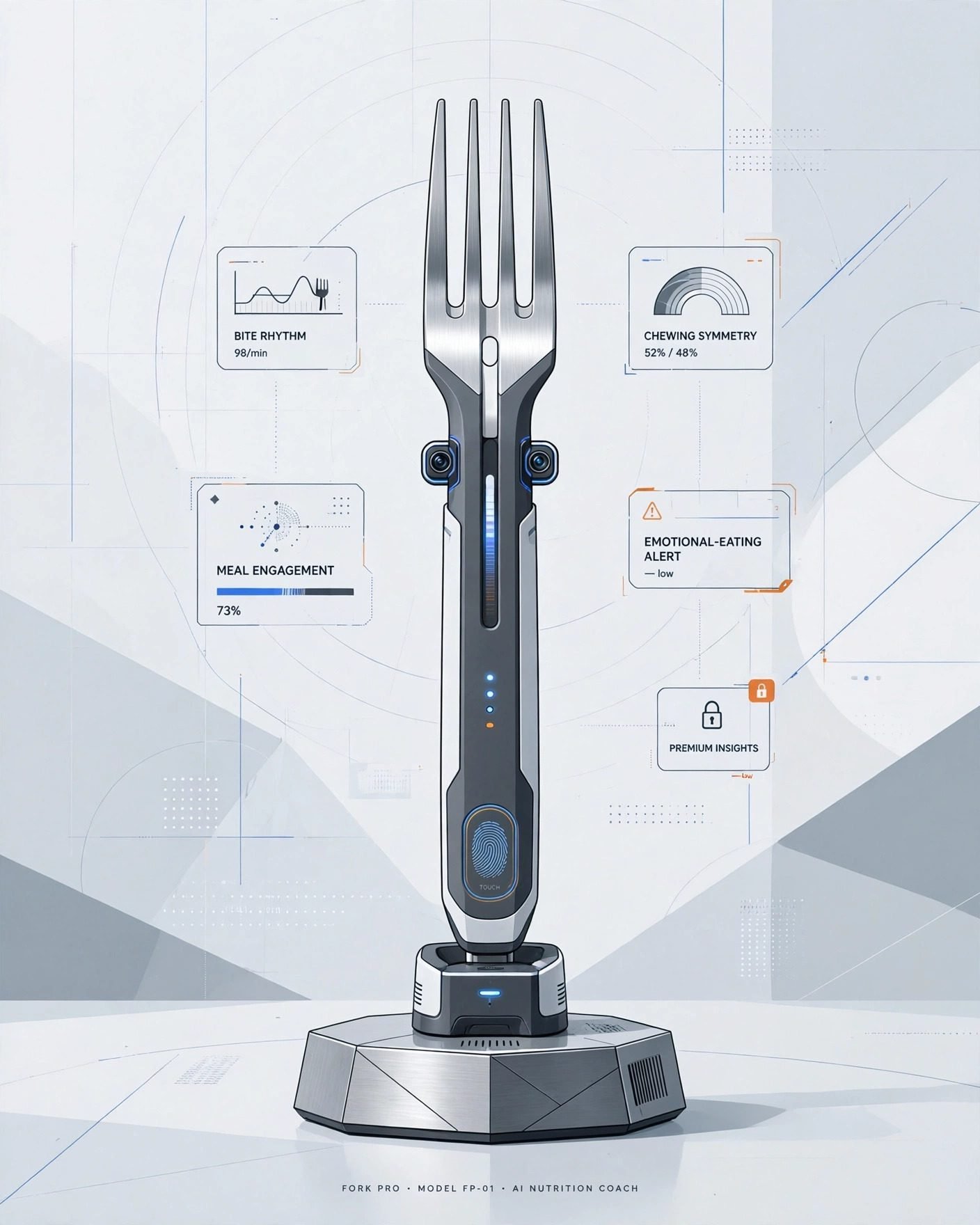
I started with an AI fork. It measures chewing speed, bite symmetry, and something called meal engagement. When it detects emotional eating, it vibrates gently. Premium users can ask the fork why they’re like this.

The silliest ideas I could think of kept coming. An AI pillow that listens to your sleep talking and turns it into a morning executive summary. Slippers that map every defeated lap around the kitchen. An AI shower that lowers the temperature whenever your outlook becomes insufficiently entrepreneurial.

Then came the coffee mug that links each refill to the meeting that caused it, and a chair that tracks posture, procrastination, and low-authority sitting before sending a weekly performance summary to your manager.

My final product: a toilet-paper holder that studies roll velocity, generates household digestive trends, and requires account creation before it’ll dispense the final sheet.

That one felt safely beyond anything a real company would build.

None of those products are real. At least, they weren’t when I wrote them down.

The judgmental fork already has relatives. The Epitome e1 is an AI toothbrush fitted with more than 100 sensors. It maps teeth into 100,000 pixels, detects contamination, and generates detailed oral-health insights.

I went looking for an object that could monitor my mouth and found that the industry had already arrived there.

The imaginary pillow also has competition from companion devices built to listen, remember, interpret moods, and respond emotionally. Razer’s Project Ava watches its owner through a camera, sees what’s happening on a computer screen, and offers advice through a holographic character. Loona promises conversation, games, home monitoring, and companionship through ChatGPT.

The surveillance products get harder to parody around pets

PETKIT’s Purobot Max Pro 2 uses an AI camera, facial recognition, weight sensors, and separate profiles for multiple cats. It records bathroom visits, photographs stool and urine clumps, listens for distressed yowling, and sends health alerts through an app.

That information could help an owner catch a medical problem early. It also means one of the most technically advanced cameras in a modern household may spend its life documenting cat poop.

My imaginary mug monitored one corner of the day. Razer’s Project Motoko wants the full picture. The concept headphones place two 4K cameras near the wearer’s face while microphones capture voices and surrounding audio. An AI assistant can interpret whatever the wearer sees, translate signs, identify objects, suggest recipes, and offer workout guidance. Apparently, headphones that listen to everything still lacked context, so somebody gave them eyes.

Even kitchen appliances have joined the production crew. LG has shown ovens and microwaves with internal cameras that recognize food, monitor cooking, and create recap videos. Dinner can now be observed repackaged as content before anyone’s decided whether it tastes good.

My fictional products were supposed to become gradually less believable. Reality kept refusing to cooperate.

The eight-step plan for putting AI in anything

After comparing the fake products with the real ones, I think I’ve reverse-engineered the process.

  • Find an object that already works without an account.
  • Add cameras, microphones, or enough sensors to monitor a regional airport.
  • Rename all that surveillance as personalization.
  • Turn an ordinary habit into a score.
  • Generate advice.
  • Put the history, interpretation, or useful setting behind Premium.
  • ???
  • PROFIT

The finished product doesn’t necessarily complete the task. It watches you complete the task, grades the attempt, and sends a notification explaining where you could improve.

Companies keep mistaking the ability to observe something for the ability to help with it.

Congratulations, your toothbrush is now your manager

A useful appliance reduces effort. A middle manager measures effort.

A lot of these AI gadgets behave like the second one. The toothbrush reviews your technique while you do the actual cleaning. The mirror studies your face and recommends improvements while you get yourself ready. The headphones play music, watch the world, interpret it, and decide what information deserves your attention.

Some of that information may be useful. A litter box that notices a sick cat has identified something worth knowing. An oven that keeps dinner from burning has actually completed a useful job. The problem begins when every mundane activity produces a score, trend, summary, alert, recommendation, or warning about personal growth.

I already know I drink too much coffee during bad meetings. I don’t need the mug building a case file.

I bought an object and received a relationship

Adding AI can also turn a finished product into an ongoing administrative commitment.

The object needs an account. The account needs permissions, and the app wants notifications. The firmware needs an update. The camera misunderstands what it saw, so the owner has to correct it. The cloud service produces a report that has to be opened, interpreted, dismissed, or upgraded.

A toothbrush once asked for toothpaste. The intelligent version may want your email address, Wi-Fi password, date of birth, and consent to a privacy policy nobody has ever read voluntarily.

That relationship also depends on the company staying interested. When the intelligence lives on a server, the manufacturer controls how long the feature survives, which insights remain available, and whether tomorrow’s most useful setting becomes part of a paid plan.

That’s a lot of uncertainty to attach to an object whose previous version already worked.

I still think the toilet-paper holder is too absurd to become real. Unfortunately, I’ve now described the features, identified the business model, and published the idea online.

Continue Reading

Artificial Intelligence

What is Copilot? A complete guide to Microsoft’s sprawling AI assistant

Published

on

Microsoft Copilot

What exactly is Microsoft Copilot?

Microsoft has slapped the Copilot name on so many products that the answer to “What is Copilot?” depends entirely on context. There’s the main chatbot, the version inside Microsoft 365, the coding assistant for developers, a gaming helper for Xbox, and even a whole category of Windows laptops called Copilot+ PCs.

For most people, Microsoft Copilot means the company’s general-purpose AI assistant. Think of it as Microsoft’s answer to ChatGPT and Google Gemini. It answers questions, searches the web, generates and edits images, and handles the usual chatbot tricks. You can reach it through a browser, dedicated apps for Windows, macOS, Android, and iOS, or directly inside Microsoft Edge, the Xbox mobile app, and Windows 11’s Game Bar.

Copilot has come a long way from its Bing Chat origins. It now offers multiple conversation modes, can analyze your screen or phone camera feed through Copilot Vision, and connects to Outlook, OneDrive, Gmail, Google Drive, Contacts, and Google Calendar when you give permission.

The exact experience shifts depending on the product, device, and subscription. Here’s how Microsoft’s growing Copilot lineup breaks down, what it costs, and what each version actually does.

Copilot pricing: Free vs. paid plans

The core Copilot chatbot is free. Its website and apps include AI chat, image generation, web search, voice, and file analysis — with usage limits, naturally. Microsoft also bundles Copilot features into its consumer Microsoft 365 plans.

Current US pricing:

  • Microsoft 365 Personal: $9.99/month or $99.99/year
  • Microsoft 365 Family: $12.99/month or $129.99/year
  • Microsoft 365 Premium: $19.99/month or $199.99/year

Personal and Family plans include Copilot in supported Office apps. Premium unlocks the highest consumer AI limits and advanced features. One catch: AI benefits in Family plans apply only to the subscription owner, not everyone sharing the plan. Pricing varies by country.

Microsoft now directs new buyers toward the Premium tier. Existing Copilot Pro customers can keep their plan or switch. Business and enterprise editions use separate licensing and security controls entirely.

Which AI model runs Copilot?

That depends on which Copilot you’re using. Microsoft routes requests through different models based on the selected mode, subscription, and workplace settings.

For the consumer Copilot app, Smart mode is still described as powered by GPT-5. It chooses between a quick answer and deeper reasoning. Think Deeper uses available OpenAI reasoning models, though Microsoft doesn’t name the exact model behind every response.

Microsoft 365 Copilot can also tap other OpenAI and Anthropic models through supported model selectors. Some commercial organizations must enable OpenAI-operated models before GPT-5.6 appears. Microsoft plans to enable those models by default for eligible commercial customers on July 24, 2026, unless an admin disables them. As of July 2026, GPT-5.6 is available in Microsoft 365 Copilot, while consumer Copilot still officially lists GPT-5 for Smart mode.

What can Copilot actually do?

Copilot handles the usual AI assistant tasks: answering questions, drafting or rewriting text, translating, summarizing, comparing products, brainstorming, and searching the web. You can upload files or images and ask it to explain, summarize, compare, or extract information. Its image tools generate pictures from prompts and edit existing ones through natural-language instructions.

Some standout features:

  • Copilot Voice: Speak with the assistant instead of typing. It listens, replies aloud, and saves a text transcript after the session ends.
  • Copilot Vision: The assistant examines your screen, Edge browser session, or mobile camera feed. Ask questions about what it sees or request guidance while working through a task. Microsoft says images and screen content from Vision sessions are deleted when the session ends, though a transcript may remain in your history.
  • Deep Research: Spends longer gathering and analyzing information before producing a structured report. Available to signed-in users, with higher limits for Microsoft 365 subscribers.
  • Copilot Pages: Turns a response into an editable workspace. You can revise the text yourself or keep working with Copilot to restructure, expand, simplify, or polish the content.
  • Copilot Podcasts: Turns a requested topic into personalized audio.
  • Copilot Tasks: Completes supported multi-step browser workflows after you grant permission to use the necessary sites and services.
  • Browse with Copilot: Navigates pages, selects items, types into fields, and performs supported browser actions on your behalf. Rolling out first to Microsoft 365 Premium subscribers in the US.

Copilot can also connect to Outlook, OneDrive, Gmail, Google Drive, Google Contacts, and Google Calendar. It retrieves information your account already has permission to access, and Microsoft says connected-service data is not used to train Copilot.

Copilot inside Microsoft 365

Microsoft 365 places Copilot directly inside Word, Excel, PowerPoint, Outlook, OneNote, and Teams. In Word, it drafts, summarizes, restructures, or changes the tone of text. PowerPoint builds presentations from an outline or document. Excel analyzes tables, identifies patterns, creates formulas, and explains data. Outlook summarizes email threads, drafts replies, and pulls out action items.

Teams users can ask Copilot to recap meetings and conversations, depending on their account and permissions. Business versions can also work with organizational information the user is already allowed to access.

Copilot on Windows and other devices

The Windows app includes the same core chat experience as the web version, plus OS integrations. It can search local and OneDrive-synced files, analyze screenshots, answer questions about Windows settings, and launch Voice through an optional “Hey Copilot” wake phrase. Vision can also view selected apps while you ask for help.

These features do not require a Copilot+ PC. Microsoft reserves another group of locally processed Windows AI tools for computers that meet Copilot+ hardware requirements.

Copilot is available through:

  • A modern web browser
  • Windows and macOS apps
  • Android phones and tablets
  • iPhone and iPad
  • Microsoft Edge
  • The Xbox mobile app and Xbox Game Bar on Windows 11

Features vary by device. Windows includes additional file, screenshot, settings, and Vision integrations, while mobile apps can use the phone camera during Vision sessions. Copilot is available in more than 170 markets, with some regional exceptions.

Is Copilot private and reliable?

Copilot, like any chatbot, makes mistakes. It can misunderstand a prompt or confidently produce inaccurate information. Important answers should still be checked against reliable sources, especially for work, money, health, legal matters, or personal data.

Personal Copilot accounts include controls for memory, personalization, conversation history, and model training. You can view or delete what Copilot remembers and opt out of having conversation activity used to train Microsoft’s generative AI models.

Uploaded files may be stored securely for up to 18 months unless you delete the associated conversation. Vision handles data differently: Microsoft says screenshots and camera images are processed for the session and are not retained afterwards.

Microsoft 365 Copilot used through a work or school account follows a separate enterprise data-protection model. It can only access organizational content that the user already has permission to view.

The Copilot family at a glance

Copilot has become a broad family of AI tools rather than a single chatbot tucked inside Windows. The free consumer app remains the simplest place to start. Microsoft 365 subscriptions make sense for people who want Copilot inside Office apps, while the workplace, coding, gaming, and Copilot+ PC versions serve their own separate purposes.

Quick product guide:

  • Microsoft Copilot: The general AI assistant available through web, Windows, macOS, Android, iOS, and Edge.
  • Microsoft 365 Copilot: Adds AI tools to Microsoft productivity apps and can work with documents, emails, meetings, and other permitted workplace information.
  • Copilot in Microsoft 365 Personal, Family, and Premium: Gives home subscribers access to Copilot features in Word, Excel, PowerPoint, Outlook, and other supported apps.
  • GitHub Copilot: A coding assistant that works inside development tools and code repositories.
  • Gaming Copilot: A gaming-focused assistant available through supported Xbox and Windows experiences.
  • Copilot+ PC: A Windows hardware category designed for advanced on-device AI features. Separate from the Copilot chatbot.

Continue Reading

Trending