Connect with us

How To

Complete Guide to Protecting Photo Privacy on Mobile Devices: Android and iOS Security Methods

Published

on

Essential Photo Privacy Strategies for Modern Mobile Users

Therefore, protecting sensitive images on smartphones has become a critical concern for millions of users worldwide. With photo privacy breaches increasingly common, understanding how to safeguard personal content on your mobile device is no longer optional—it’s essential.

This comprehensive guide reveals proven methods to secure your most private photographs and videos. From built-in smartphone features to specialized applications, we’ll explore every available avenue for maintaining complete photo privacy on both Android and iOS platforms.

Google Photos Locked Folder: Your First Line of Defense

However, many users overlook the powerful security features already installed on their devices. Google Photos offers an innovative Locked Folder feature that provides immediate photo privacy protection without requiring additional downloads.

Setting up this security layer requires just minutes. Navigate to your Library section within the app, locate Utilities, and select the Locked Folder setup option. The system will prompt you to create authentication credentials, ensuring only you can access these hidden files.

As a result, any images moved to this secure location disappear from your main gallery entirely. The content remains accessible only through the Locked Folder interface, which requires your chosen authentication method each time you want to view the protected media.

Advanced Android Photo Privacy Using Native File Management

In addition to gallery-based solutions, Android devices offer file-level security through the native Files application. This approach provides an alternative method for users seeking comprehensive photo privacy without relying solely on cloud-based services.

The Safe folder feature within Files operates independently of your gallery applications. This means that even if someone gains access to your photos app, the securely stored content remains completely invisible and inaccessible.

Building on this foundation, users can create multiple secure compartments for different types of sensitive content. Personal photographs, confidential documents, and private videos can all be segregated into separate protected areas within the system.

Samsung Galaxy Secure Folder Implementation

On the other hand, Samsung device owners benefit from an even more robust security infrastructure. The Secure Folder feature integrates deeply with the device’s hardware security features, providing military-grade encryption for stored content.

This system creates a completely isolated environment within your device. Applications running inside the Secure Folder operate independently of the main system, ensuring that even sophisticated malware cannot access your protected photo privacy content.

Third-Party Applications for Enhanced Photo Privacy Protection

Nevertheless, built-in features may not satisfy all user requirements. Third-party applications offer advanced customization options and additional security layers that go beyond standard mobile photo privacy features.

Vaulty stands out among security applications for its innovative disguise capabilities. The app appears as a functioning calculator, providing excellent cover while offering robust encryption and multiple vault organization options. Users can create separate compartments for different content categories while maintaining complete photo privacy.

LockMyPix takes a different approach by implementing advanced encryption algorithms that secure files at the binary level. This application supports biometric authentication on compatible devices and includes decoy features designed to mislead unauthorized users attempting to access your private content.

Gallery Vault Features and Benefits

Furthermore, Gallery Vault provides comprehensive security through its ability to completely hide its presence from standard app discovery methods. The application can integrate with password management systems, ensuring that your photo privacy credentials remain secure even if other applications are compromised.

These applications typically offer backup and synchronization features that work with encrypted cloud storage services. This approach ensures that your photo privacy protection continues even if you lose or replace your device.

iOS Photo Privacy Solutions and Implementation Strategies

This means that iOS users require different approaches due to the platform’s more restrictive application ecosystem. Apple’s built-in photo privacy features focus on seamless integration rather than extensive customization options.

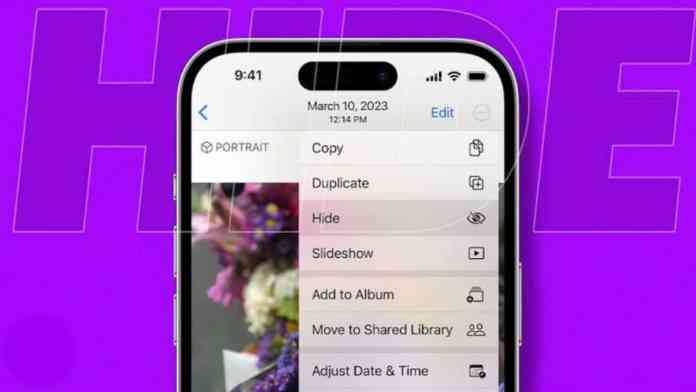
The Hidden Photos album provides basic concealment for sensitive images, though this feature offers limited security compared to Android alternatives. Content moved to this location disappears from main photo streams but remains accessible through the Albums interface.

As a result, iOS users seeking comprehensive photo privacy protection often rely on third-party applications that work within Apple’s security framework. These solutions typically emphasize ease of use while maintaining strong encryption standards that comply with iOS security requirements.

Best Practices for Maintaining Long-Term Photo Privacy

Therefore, implementing effective photo privacy measures requires ongoing attention to security practices and regular system maintenance. Creating multiple backup locations ensures that hardware failures don’t compromise your protected content permanently.

Regular security audits help identify potential vulnerabilities in your chosen photo privacy system. This includes updating authentication credentials, reviewing application permissions, and ensuring that all security features remain properly configured after system updates.

Additionally, consider implementing comprehensive mobile security measures that extend beyond photo privacy to protect your entire device ecosystem. This holistic approach provides better overall protection for all sensitive content stored on your mobile device.

Creating Effective Backup Strategies

Building on this foundation, establish secure backup procedures that maintain photo privacy while ensuring content availability. Cloud storage solutions with end-to-end encryption provide excellent protection while enabling access from multiple devices when necessary.

Document your security setup thoroughly, including authentication methods and recovery procedures. Store this information securely but separately from your protected content to ensure accessibility during emergency situations without compromising your photo privacy measures.

In conclusion, protecting personal photographs and videos requires a multi-layered approach that combines built-in device features with carefully selected third-party applications. Whether you choose Android’s flexible security ecosystem or iOS’s integrated protection framework, implementing proper photo privacy measures ensures that your most sensitive content remains secure from unauthorized access.

Remember to review and update your security configuration regularly, as both threats and available protection methods continue to evolve. For additional information on mobile device security, explore our comprehensive privacy protection guide that covers additional aspects of smartphone security beyond photo privacy.

Continue Reading
Click to comment

Leave a Reply

Your email address will not be published. Required fields are marked *

How To

Microsoft’s MAI-DxO Medical AI Tool Outperforms Doctors with 85% Accuracy Rate

Published

on

Healthcare stands on the brink of transformation as Microsoft unveils its groundbreaking Microsoft medical AI tool, MAI-DxO. This revolutionary diagnostic system promises to reshape how complex medical cases are resolved, delivering unprecedented accuracy rates that surpass human expertise.

What Makes Microsoft Medical AI Tool MAI-DxO Revolutionary

The Medical AI Diagnostic Orchestrator represents a quantum leap in artificial intelligence applications. Rather than relying on single-algorithm approaches, this sophisticated system employs a collaborative framework of five specialized AI agents. Each agent assumes distinct responsibilities: symptom analysis, test recommendations, differential diagnosis, and treatment pathway suggestions.

This innovative “chain of debate” methodology ensures comprehensive evaluation of each medical mystery. Instead of rushing to conclusions, the system methodically examines evidence at every stage. The result? A thorough diagnostic process that mirrors the best practices of medical consultation teams.

Exceptional Performance Results of Microsoft Medical AI Tool

Testing revealed extraordinary performance metrics that challenge traditional healthcare paradigms. When evaluated against 304 real-world cases from the New England Journal of Medicine, MAI-DxO achieved an impressive 85.5% accuracy rate. In stark contrast, experienced physicians with five-plus years of practice managed only 20% accuracy on identical cases.

These weren’t textbook scenarios or simplified clinical vignettes. Each case represented genuine diagnostic challenges that had previously stumped medical professionals. The Sequential Diagnosis Benchmark (SD Bench) created by Microsoft established rigorous testing standards that both human doctors and AI systems had to navigate independently.

How This Microsoft Medical AI Tool Reduces Healthcare Costs

Beyond diagnostic accuracy, MAI-DxO demonstrates remarkable efficiency in resource utilization. The system consistently recommended fewer expensive diagnostic procedures while maintaining superior diagnostic precision. This dual benefit—enhanced accuracy with reduced testing—addresses two critical healthcare challenges simultaneously.

Traditional diagnostic processes often involve costly trial-and-error approaches. Physicians may order multiple tests before reaching definitive conclusions, driving up medical expenses and delaying patient care. However, MAI-DxO’s strategic approach minimizes unnecessary procedures through intelligent reasoning and evidence-based decision-making.

Consider the broader implications: reduced diagnostic delays mean faster treatment initiation. Lower testing costs translate to more accessible healthcare. These improvements could benefit millions of patients worldwide who currently face lengthy diagnostic journeys.

Real-World Applications and Future Implementation

Currently, Microsoft conducts hospital-based trials to validate MAI-DxO’s performance in clinical settings. These real-world evaluations will determine how effectively the Microsoft medical AI tool integrates with existing healthcare workflows and electronic medical record systems.

The company plans to release the Sequential Diagnosis Benchmark to research communities, enabling broader scientific collaboration. This open approach could accelerate medical AI development across the industry, potentially spawning additional innovations in diagnostic technology.

Meanwhile, Microsoft continues expanding its healthcare AI portfolio. Tools like RAD-DINO assist radiologists with image interpretation, while Dragon Copilot streamlines clinical documentation through voice recognition. These complementary technologies create a comprehensive ecosystem supporting various aspects of medical practice.

Addressing Global Healthcare Challenges

Diagnostic errors and delays represent persistent global health crises. Millions of patients worldwide experience misdiagnosis or prolonged diagnostic uncertainty, leading to delayed treatments and worse outcomes. The Microsoft medical AI tool directly confronts these systemic issues through technological innovation.

Daily health searches exceed 50 million queries across platforms like Bing and Copilot, indicating widespread public interest in AI-assisted health guidance. This existing trust foundation positions Microsoft advantageously for broader healthcare AI adoption.

Furthermore, the collaborative AI approach employed by MAI-DxO offers scalability benefits. Unlike systems requiring extensive human oversight, this autonomous diagnostic framework could extend specialist-level expertise to underserved regions lacking adequate medical resources.

As a result, rural communities and developing nations might gain access to diagnostic capabilities previously available only in major medical centers. This democratization of medical expertise represents a significant step toward global healthcare equity.

Therefore, Microsoft’s medical AI tool MAI-DxO stands poised to revolutionize diagnostic medicine through superior accuracy, cost efficiency, and worldwide accessibility. As hospital trials progress and research partnerships expand, this innovative system may soon transform how healthcare providers approach complex medical challenges.

Continue Reading

How To

OnePlus Nord 3 Launch Event Confirmed: Everything You Need to Know About India Release

Published

on

OnePlus Nord 3 Launch Event Confirmed: Everything You Need to Know About India Release

The anticipation surrounding the OnePlus Nord 3 launch reaches its peak as the company officially confirms the release date for the Indian market. This announcement brings excitement to tech enthusiasts who have been eagerly waiting for OnePlus to expand its affordable smartphone portfolio with cutting-edge features.

The upcoming event promises to showcase not just one, but three remarkable devices that could reshape the mid-range smartphone landscape in India. What makes this launch particularly significant is the strategic timing and competitive pricing that OnePlus has maintained throughout its Nord series journey.

OnePlus Nord 3 Launch: The Flagship Killer Returns

Building on this momentum, the OnePlus Nord 3 emerges as the centerpiece of this highly anticipated launch. The device positions itself as a premium offering that delivers flagship-level performance without the hefty price tag typically associated with high-end smartphones.

The smartphone features an impressive AMOLED display engineered for superior visual experiences. However, what truly sets this device apart is its integration of the latest Snapdragon processor, ensuring smooth performance across demanding applications and multitasking scenarios.

In addition, the Nord 3 maintains the sleek design philosophy that OnePlus has perfected over the years. The high refresh rate display provides fluid animations and responsive touch interactions that enhance the overall user experience significantly.

Nord CE 3: Striking the Perfect Balance

On the other hand, the Nord CE 3 targets users who prioritize value without compromising essential features. This device represents OnePlus’s commitment to democratizing premium smartphone experiences across different price segments.

The smartphone boasts a vibrant display technology that delivers crisp visuals for entertainment and productivity tasks. As a result, users can expect excellent color reproduction and clarity that rivals more expensive alternatives in the market.

Therefore, the camera system receives particular attention, featuring advanced computational photography capabilities. The large battery capacity ensures extended usage periods, making it ideal for users with demanding daily routines and heavy smartphone dependency.

Nord Buds 2R: Completing the Ecosystem

Furthermore, the Nord Buds 2R represents OnePlus’s strategic move into the competitive true wireless earbuds market. These audio accessories complement the smartphone lineup by offering seamless connectivity and premium sound quality.

The earbuds feature active noise cancellation technology that blocks external distractions effectively. This means that users can enjoy immersive audio experiences whether they’re commuting, exercising, or working in noisy environments.

Additionally, the design prioritizes comfort during extended wear periods. Quick charging capabilities ensure minimal downtime, while the battery life supports all-day usage patterns that modern consumers demand from their wireless audio devices.

Official Launch Timeline and Market Availability

According to official communications, the OnePlus Nord 3 launch event is scheduled for July 5th, 2023. The company will broadcast the announcement through its official YouTube channel, ensuring global accessibility for interested consumers and tech enthusiasts.

Consequently, the devices will become available through both online and offline retail channels shortly after the official unveiling. This multi-channel approach reflects OnePlus’s commitment to reaching diverse consumer segments across India’s varied market landscape.

The strategic pricing positions these devices competitively within their respective market segments. The Nord 3 targets the under ₹40,000 category, while the CE 3 aims for the sub-₹30,000 segment, making premium features accessible to broader audiences.

Market Impact and Consumer Expectations

This launch carries significant implications for India’s smartphone market dynamics. OnePlus has consistently delivered products that challenge established pricing conventions while maintaining quality standards that satisfy demanding consumers.

The Nord series has historically performed exceptionally well in the Indian market, creating high expectations for these new offerings. Tech analysts predict strong consumer response based on the brand’s track record and the compelling feature sets promised in early previews.

As a result, competitors will likely respond with their own product launches and pricing adjustments. This healthy competition ultimately benefits consumers by driving innovation and maintaining competitive pricing across the mid-range smartphone segment.

Check out our comprehensive analysis of OnePlus smartphone evolution to understand how the brand has shaped the premium mid-range category over recent years.

Continue Reading

How To

Complete App Permission Manager Review: Take Control of Your Mobile Privacy and Data Security

Published

on

Understanding App Permission Manager: Your Privacy Guardian

In today’s digital landscape, protecting your personal information has become more crucial than ever. The App Permission Manager emerges as an essential tool designed to help users monitor and control what data their installed applications can access. This powerful utility provides transparency into the permissions granted to various apps on your device.

However, many smartphone users remain unaware of the extensive permissions they’ve granted to applications during installation. This oversight can lead to potential privacy breaches and unauthorized data collection by malicious or overly intrusive apps.

Why App Permission Manager Matters for Your Digital Safety

Therefore, understanding the importance of permission management becomes critical for maintaining digital privacy. Every time you download an application, it requests specific permissions to function properly. These permissions might include access to your camera, microphone, location data, contacts, or storage.

Unfortunately, some applications request more permissions than necessary for their core functionality. This practice raises legitimate concerns about data misuse and privacy violations. An effective app permission manager addresses these concerns by providing users with detailed insights into their granted permissions.

In addition, regular permission auditing helps identify potentially problematic applications that might be collecting unnecessary personal information. This proactive approach significantly enhances your overall mobile security posture.

Installation and Setup Process

Getting started with an app permission manager requires following several straightforward steps. First, locate and download the application from your device’s official app store or trusted source. Once downloaded, the installation process typically takes just a few moments to complete.

Subsequently, launch the newly installed application by tapping its icon from your home screen or app drawer. The interface usually presents an intuitive dashboard displaying all installed applications alongside their respective permission statuses.

As a result, you’ll immediately gain visibility into which applications have access to sensitive device features. This transparency empowers you to make informed decisions about your privacy settings.

Key Features and Functionality

The core functionality of any reliable permission management tool centers around comprehensive oversight capabilities. Most applications in this category offer real-time monitoring of permission usage, allowing users to track when and how often apps access specific device features.

Building on this foundation, advanced features often include permission history logs, automatic alerts for suspicious activity, and batch permission management options. These capabilities streamline the process of maintaining optimal privacy settings across multiple applications.

On the other hand, some tools also provide detailed explanations of what each permission type means and why applications might require specific access levels. This educational component helps users make more informed decisions about their privacy preferences.

Managing Permissions Effectively

Effective permission management involves regularly reviewing and adjusting access levels based on your comfort level and actual usage patterns. Start by examining applications that have access to sensitive information like your location, camera, or personal files.

Consider whether each application truly needs the permissions it has been granted. For example, does a simple calculator app really need access to your contacts or camera? These questions help identify potentially unnecessary permission grants that could be revoked.

This process of permission optimization not only enhances privacy but can also improve device performance by reducing background processes and data usage. Regular maintenance ensures your device remains both secure and efficient.

Best Practices for Mobile Privacy Protection

Implementing robust privacy protection goes beyond just installing an app permission manager. Establish a routine of reviewing new app installations before granting extensive permissions. Read permission requests carefully and question whether each access level aligns with the app’s stated functionality.

As a result of this mindful approach, you’ll develop better awareness of potential privacy risks. Consider creating different user profiles or using app containers to isolate sensitive applications from others that might pose higher security risks.

Furthermore, keep your permission management tools updated to ensure they can detect and address the latest privacy threats. Regular updates often include improved detection capabilities and support for newer application types.

Taking control of your mobile privacy requires both the right tools and consistent vigilance. By leveraging an effective app permission manager and following security best practices, you can significantly reduce your exposure to privacy risks while maintaining the functionality you need from your favorite applications.

Want to learn more about mobile security? Check out our comprehensive guide on smartphone security tips and discover additional ways to protect your personal information. You might also find our article about Android privacy settings helpful for further securing your device.

Continue Reading

Trending