Connect with us

How To

Complete WhatsApp Web Setup Guide: Access Your Messages on Desktop

Published

on

Understanding WhatsApp Web: Your Gateway to Desktop Messaging

Are you tired of constantly switching between your phone and computer while working? WhatsApp Web offers the perfect solution for seamless desktop communication. This browser-based version allows you to access your WhatsApp Web setup directly through your computer’s web browser, eliminating the need for constant phone checking during work hours.

The platform mirrors your mobile conversations in real-time, making it ideal for professionals who spend most of their day at a computer. Whether you’re sharing files, managing group conversations, or simply prefer typing on a full keyboard, this desktop solution transforms how you communicate.

WhatsApp Web Setup: Two Simple Connection Methods

Connecting your account to the desktop version involves two straightforward approaches. Each method caters to different situations and device capabilities.

QR Code Scanner Method

The primary WhatsApp Web setup process uses QR code technology for instant pairing:

  • Navigate to web.whatsapp.com in your preferred browser
  • Wait for the QR code to display on your screen
  • Open WhatsApp on your mobile device
  • Tap the three-dot menu icon in the top-right corner
  • Select “Linked Devices” from the dropdown menu
  • Press the green “Link a Device” button
  • Point your phone’s camera at the computer screen to scan the code

This method typically takes less than thirty seconds once both devices are ready. However, ensure your phone’s camera lens is clean for optimal scanning performance.

Phone Number Verification Alternative

When camera scanning isn’t possible, the phone number method provides a reliable backup:

  • Visit the official WhatsApp Web page
  • Click “Link with phone number” below the QR code
  • Enter your registered phone number
  • Check your mobile device for a verification notification
  • Confirm the connection request on your phone

This approach proves particularly useful when dealing with camera malfunctions or poor lighting conditions that prevent successful QR scanning.

Key Features and Limitations of Desktop WhatsApp

Understanding what the platform offers helps you maximize its potential while recognizing its boundaries.

Powerful Desktop Advantages

The desktop experience brings several productivity benefits. Typing lengthy messages becomes effortless with a full-size keyboard, dramatically improving your response speed. File sharing directly from your computer eliminates the need to transfer documents to your phone first.

Additionally, the larger screen real estate makes group conversations more manageable. You can easily track multiple conversation threads while maintaining focus on your primary work tasks.

Notable Platform Restrictions

Despite its convenience, certain limitations exist. Voice and video calling features remain unavailable through the browser version, requiring you to use your mobile device for these functions. Similarly, status updates can be viewed but not created from the desktop interface.

These restrictions stem from browser security limitations and the need to maintain consistency across different platforms.

Advanced Tips for Optimal WhatsApp Web Setup Experience

Maximizing your desktop messaging efficiency requires understanding several advanced features and best practices.

Multi-Device Connectivity Benefits

Recent updates allow simultaneous connections across multiple devices for up to 14 days. This means your desktop session remains active even when your phone is offline, a significant improvement from earlier versions that required constant phone proximity.

To maintain this connection, ensure you access the web version at least once every two weeks. Otherwise, you’ll need to repeat the WhatsApp Web setup process.

Security and Privacy Considerations

When using shared computers, always log out completely after your session. The “Log out from all computers” option in your mobile app’s Linked Devices section provides additional security for sensitive conversations.

Consequently, avoid saving login credentials in public or shared browsers to prevent unauthorized access to your personal messages.

Troubleshooting Common Setup Issues

Even with straightforward instructions, users occasionally encounter connection problems during their WhatsApp Web setup attempts.

Connection Problems and Solutions

If the QR code fails to load, try refreshing your browser or clearing its cache. Outdated browser versions sometimes cause compatibility issues, so ensure you’re running the latest version of Chrome, Firefox, or Safari.

Network connectivity problems can also disrupt the setup process. Both your phone and computer need stable internet connections for successful pairing.

Maintaining Stable Performance

For consistent performance, close unnecessary browser tabs that might consume system resources. The web application works best when it has adequate memory allocation and processing power.

Regular browser updates ensure compatibility with new features and security improvements that enhance your overall messaging experience.

This comprehensive approach to WhatsApp messaging strategies helps you stay connected across all your devices. Whether you’re managing business communications or staying in touch with family, mastering the desktop version significantly improves your daily workflow efficiency.

By following these detailed steps and understanding the platform’s capabilities, you’ll transform how you handle digital communications. The convenience of desktop access combined with mobile flexibility creates a powerful communication ecosystem that adapts to your specific needs and preferences.

Continue Reading
Click to comment

Leave a Reply

Your email address will not be published. Required fields are marked *

How To

Audio Technica ATH-SQ1TW True Wireless Earbuds Launch in India: Complete Review and Pricing Details

Published

on

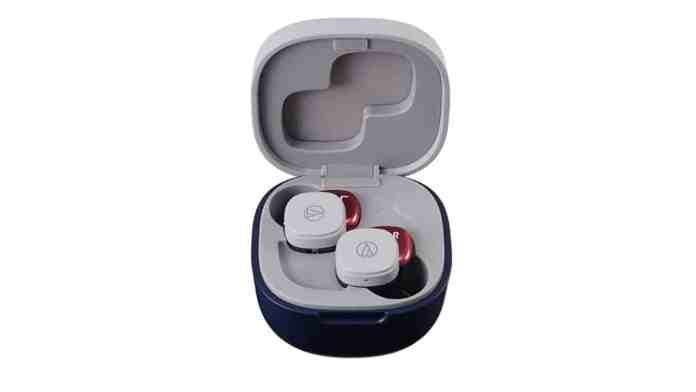
The Audio Technica ATH-SQ1TW has officially arrived in the Indian market, bringing affordable true wireless audio technology to consumers seeking quality sound without breaking the bank. These vibrant earbuds represent the company’s commitment to delivering multimedia excellence in a compact, user-friendly package.

Audio Technica ATH-SQ1TW Design and Build Quality

The standout feature of these earbuds lies in their distinctive square charging case design, which sets them apart from conventional circular cases. This unique aesthetic choice reflects Audio Technica’s innovative approach to product design.

Moreover, the earbuds are available in six eye-catching color variants: Liquorice Black, Blueberry, Caramel, Cupcake Pink/Brown, Popsicle Red/Navy, and Popcorn White. This diverse palette ensures users can find a style that matches their personality.

In addition to their visual appeal, the earbuds boast an IPX4 water resistance rating. This certification provides protection against sweat, rain, and light water exposure, making them ideal for workouts and outdoor activities.

Sound Performance and Audio Technica ATH-SQ1TW Features

At the heart of these earbuds are 5.8mm dynamic drivers that deliver balanced audio reproduction across different frequency ranges. The sound signature caters to both music enthusiasts and casual listeners who prioritize clear vocals and detailed audio.

Furthermore, the low-latency mode addresses a common issue with wireless audio by reducing delays during video playback and gaming sessions. This feature ensures lip-sync accuracy and responsive audio feedback during interactive content consumption.

The Hear-through functionality allows users to remain aware of their surroundings without removing the earbuds. This safety-oriented feature proves particularly valuable during outdoor activities or commuting.

Additionally, voice guidance provides real-time updates about battery levels, pairing status, and connection information, enhancing the overall user experience through intuitive audio feedback.

Battery Life and Charging Technology

Battery performance represents a crucial aspect of any true wireless earbuds evaluation. The Audio Technica ATH-SQ1TW delivers up to 6.5 hours of continuous playback on a single charge, which extends to 19.5 hours when combined with the charging case.

However, the fast charging capability ensures minimal downtime when power runs low. The earbuds automatically power on and off when placed in or removed from the charging case, streamlining the user experience.

Users can operate the earbuds in either single-ear or dual-ear mode, providing flexibility for different listening scenarios such as taking calls while remaining aware of surroundings.

Audio Technica ATH-SQ1TW Connectivity and Controls

The earbuds utilize Bluetooth 5.1 technology for stable wireless connections with compatible devices. This latest Bluetooth standard ensures improved range, better audio quality, and enhanced power efficiency compared to previous versions.

On the other hand, Android users benefit from Google Fast Pair support, which simplifies the initial pairing process and enables seamless switching between registered devices.

Touch controls provide intuitive operation for essential functions including call management, music playback control, volume adjustment, and voice assistant activation. These controls eliminate the need to reach for the connected device during regular use.

Pricing and Market Availability

The Audio Technica ATH-SQ1TW carries a maximum retail price of ₹8,710, but the actual market price stands at ₹7,490, making it an attractive option in the competitive true wireless earbuds segment.

Therefore, these earbuds position themselves as budget-friendly alternatives to premium offerings while maintaining essential features that modern users expect from wireless audio devices.

Consumers can purchase the earbuds through Amazon India or visit authorized offline retail stores across the country. This multi-channel availability ensures convenient access for different shopping preferences.

As a result, the Audio Technica ATH-SQ1TW presents a compelling package for users seeking reliable wireless audio performance, distinctive design aesthetics, and practical features at an accessible price point. The combination of decent battery life, water resistance, and multiple color options makes these earbuds worth considering for everyday audio needs.

Continue Reading

How To

Top Indian Dating Apps 2024: Free Platforms to Meet Local Singles and Build Meaningful Connections

Published

on

The landscape of romance in India has transformed dramatically with the rise of digital platforms. As traditional matchmaking evolves, Indian dating apps have become the preferred choice for millions seeking meaningful connections across the subcontinent.

Why Indian Dating Apps Are Revolutionizing Romance

The surge in smartphone usage has created unprecedented opportunities for Indians to connect beyond geographical boundaries. However, what makes these platforms particularly appealing is their understanding of local cultural nuances and preferences.

Dating applications designed specifically for the Indian market address unique challenges. They incorporate features that respect family values while enabling modern courtship practices. This balance has made them incredibly popular among young professionals and students alike.

Essential Features of Top Indian Dating Apps

When evaluating the best platforms for Indian singles, several key features distinguish exceptional apps from mediocre alternatives:

Cultural Sensitivity: Leading Indian dating apps understand the importance of family approval and traditional values. They often include options to share profiles with family members or indicate serious relationship intentions.

In addition, privacy controls allow users to maintain discretion while exploring potential matches. This feature proves particularly valuable in conservative communities where dating might still carry social stigma.

Language Support: The best platforms offer multiple Indian languages, making them accessible to users across different states and regions. This multilingual approach significantly expands the user base.

Spotlight on Woo: A Premier Dating Platform for Indian Singles

Among the numerous options available, Woo stands out as a comprehensive solution designed with Indian users in mind. This platform has garnered over 5 million downloads, establishing itself as a trusted name in the digital dating space.

The application’s tagline, “The Dating App Women Love,” reflects its commitment to creating a safe, respectful environment. This focus on user safety has contributed significantly to its popularity among female users who often face harassment on other platforms.

What sets Woo apart from competitors is its sophisticated matching algorithm. Rather than relying solely on photographs, the platform emphasizes personality compatibility and shared interests through detailed profiles and interactive features.

Key Features That Make Indian Dating Apps Successful

Modern Indian dating apps incorporate several innovative features that enhance user experience and increase the likelihood of meaningful connections:

Local Discovery: Advanced geolocation technology helps users find potential matches within their preferred distance range. This feature proves especially valuable in metropolitan areas with diverse populations.

As a result, users can arrange convenient meetups and dates without dealing with long-distance relationship challenges initially.

Interest-Based Matching: Sophisticated algorithms analyze user preferences, hobbies, and lifestyle choices to suggest compatible matches. This approach moves beyond superficial attraction to focus on long-term compatibility.

The most successful platforms also incorporate social media integration, allowing users to showcase their personalities through connected Instagram or Facebook accounts.

Safety and Privacy in Indian Dating Apps

Security remains a paramount concern for users exploring online dating in India. Reputable platforms implement multiple safety measures to protect their communities:

Verification systems ensure profile authenticity, reducing the risk of catfishing or fraudulent accounts. Many apps require phone number verification and offer optional photo verification processes.

Furthermore, robust reporting and blocking features enable users to address inappropriate behavior quickly. Customer support teams actively monitor platforms to maintain respectful environments conducive to genuine connections.

The Future of Indian Dating Apps

The evolution of Indian dating apps continues as developers integrate artificial intelligence and machine learning to improve matching accuracy. Video calling features have become standard, especially following the pandemic when in-person meetings became challenging.

Emerging trends include virtual date ideas, compatibility quizzes, and enhanced privacy controls. These innovations demonstrate the industry’s commitment to adapting to user needs and changing social dynamics.

The success of platforms like Woo proves that Indians are embracing digital solutions for finding love and companionship. As these applications continue evolving, they’re likely to play an increasingly important role in shaping modern Indian relationships.

Whether seeking casual friendships or serious relationships, today’s best dating platforms offer something for everyone. The key lies in choosing applications that align with individual values and relationship goals while maintaining safety and authenticity throughout the journey.

Continue Reading

How To

Revolutionary Ways to Unlock Your Computer Using Your Android or iPhone

Published

on

Modern computing demands smarter security solutions. The ability to unlock computer via mobile represents a significant advancement in personal cybersecurity, combining convenience with enhanced protection protocols.

Traditional password systems have become increasingly vulnerable to cyber threats. Therefore, mobile-based authentication offers a robust alternative that transforms your smartphone into a sophisticated security key.

Why Mobile Authentication Revolutionizes Computer Security

However, the shift toward mobile-based computer access isn’t just about convenience. This approach addresses fundamental security weaknesses inherent in traditional login methods.

Password-based systems face multiple vulnerabilities. Users often create weak passwords or reuse credentials across platforms. In contrast, mobile authentication creates a dynamic security environment that adapts to user behavior patterns.

Furthermore, smartphones contain multiple security layers including biometric scanners, encryption chips, and secure elements. These components work together to create an authentication system far superior to static passwords.

Essential Benefits of Smartphone Computer Access

The advantages of implementing mobile-based computer unlocking extend beyond basic security improvements. This technology fundamentally transforms how users interact with their computing environment.

As a result, users experience seamless authentication without memorizing complex passwords. The smartphone becomes a personal security token that remains constantly accessible yet secure from unauthorized access.

Building on this foundation, two-factor authentication creates multiple verification checkpoints. Even if someone obtains your password, they cannot access your computer without your physical mobile device.

Key advantages include:

  • Elimination of password memorization requirements
  • Enhanced security through device proximity detection
  • Streamlined login processes for multiple accounts
  • Automatic session management capabilities
  • Cross-platform compatibility with Microsoft Windows and macOS

Implementing Rohos Login Key for Mobile Authentication

Nevertheless, setting up mobile computer authentication requires careful attention to configuration details. Rohos Login Key provides a comprehensive solution for Windows users seeking reliable smartphone integration.

This software creates encrypted communication channels between your computer and mobile device. The initial setup process establishes secure authentication protocols that remain active across system restarts.

Installation steps include:

  1. Download the application on both computer and smartphone platforms
  2. Launch the desktop program and navigate to configuration settings
  3. Select QR code verification method for initial pairing
  4. Install the mobile companion app from official app stores
  5. Scan the generated QR code to establish secure connection

On the other hand, the system requires active Bluetooth connectivity for proximity detection. This ensures your computer remains locked when your smartphone moves beyond the designated range.

Configuring Windows Dynamic Lock Features

Windows 10 and 11 include built-in dynamic lock capabilities that integrate seamlessly with mobile devices. This native feature eliminates the need for third-party software while maintaining robust security standards.

The configuration process utilizes existing Bluetooth infrastructure to create automatic locking mechanisms. When your paired smartphone moves beyond detection range, Windows automatically secures your desktop session.

Configuration requires these steps:

  1. Access Windows Settings and select Devices menu
  2. Enable Bluetooth connectivity in system preferences
  3. Pair your smartphone through standard Bluetooth protocols
  4. Navigate to Accounts section within Settings
  5. Activate Dynamic Lock through Sign-in Options

This means that your computer maintains security even when you forget to manually lock the screen. The system monitors smartphone proximity continuously and responds accordingly.

Advanced Security Considerations and Best Practices

Despite the convenience of mobile authentication, implementing proper security protocols remains essential. Users must understand potential vulnerabilities and mitigation strategies.

Bluetooth connectivity, while convenient, creates potential attack vectors. Therefore, regularly updating device firmware and maintaining current security patches becomes critical for system integrity.

Additionally, backup authentication methods should remain available. Hardware failures or software conflicts could temporarily disable mobile authentication features, requiring alternative access methods.

Security best practices include:

  • Regular security updates for all connected devices
  • Backup authentication methods configuration
  • Network security monitoring and logging
  • Periodic review of paired device lists
  • Strong device encryption implementation

Consequently, users should treat mobile authentication as one component of comprehensive security strategy rather than a complete solution.

Future Developments in Mobile Computer Authentication

The evolution of mobile authentication continues advancing rapidly. Emerging technologies promise even more sophisticated security mechanisms while maintaining user-friendly interfaces.

Artificial intelligence integration will enable behavioral authentication patterns. These systems will recognize individual usage patterns and detect anomalous access attempts automatically.

In addition, quantum encryption protocols may eventually replace current security standards. These developments will create virtually unbreakable authentication systems while preserving seamless user experiences.

The ability to enhance mobile security protocols continues expanding as manufacturers integrate more sophisticated hardware components into consumer devices.

Looking ahead, biometric authentication will likely combine with location-based services and machine learning algorithms. This convergence will create adaptive security systems that adjust protection levels based on contextual risk assessment.

For users interested in comprehensive computer security strategies, mobile authentication represents just the beginning of advanced protection methodologies.

Continue Reading

Trending