Connect with us

How To

Drone Technology: Future Applications Transforming Industries

Published

on

Drone Technology: Future Applications Transforming Industries

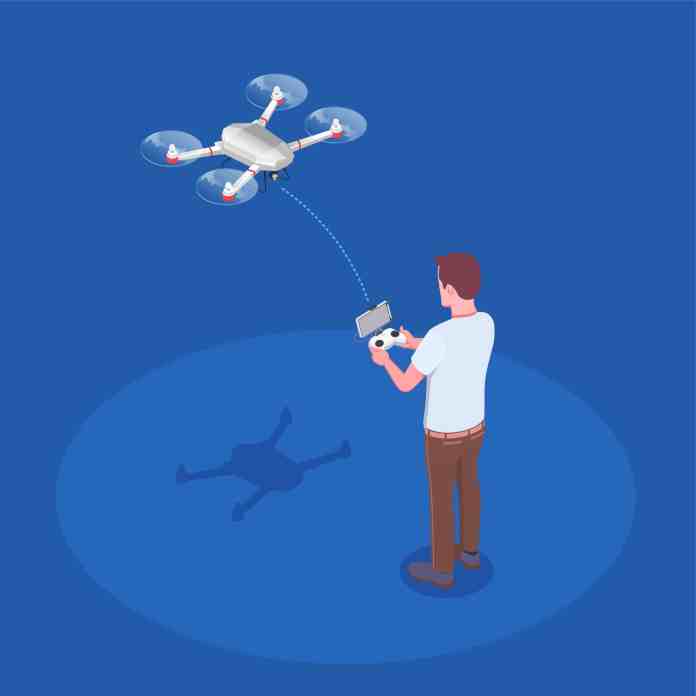
Picture a small, buzzing device hovering over a field, scanning every inch of soil. Now imagine that same device delivering a life-saving defibrillator through city traffic in minutes. This isn’t science fiction; it’s the tangible reality of drone technology today. Unmanned Aerial Vehicles (UAVs), commonly called drones, have shed their image as mere high-tech toys or military tools. They are becoming indispensable partners across countless sectors.

What makes drones so powerful? Their core advantage is simple: access. They go where humans can’t, shouldn’t, or simply wouldn’t go efficiently. From inspecting a thousand-foot radio tower to mapping a disaster zone, drones perform complex, risky tasks with precision and safety. Their versatility is only expanding as sensors shrink, batteries improve, and artificial intelligence gets smarter.

Beyond the Camera: Core Drone Types

Not all drones are created equal. The right tool for the job depends heavily on its design. Understanding the main categories helps clarify their potential.

Fixed-wing drones resemble miniature airplanes. They use wings for lift, making them exceptionally efficient for covering large areas like farmland or pipelines. Their long flight times are ideal for mapping and surveying.

Multi-rotor drones, like the common quadcopter, are the masters of stability and hover. They can take off and land vertically, hold a position perfectly still, and maneuver in tight spaces. This makes them perfect for detailed inspections, photography, and close-quarters work.

Hybrid VTOL (Vertical Take-Off and Landing) models combine the best of both worlds. They take off like a helicopter, then transition to efficient forward flight like an airplane. This design is gaining traction for applications requiring both range and pinpoint accuracy.

Single-rotor helicopters offer heavy-lift capabilities. While more mechanically complex, they can carry significant payloads, opening doors for larger sensor suites or delivery of heavier goods.

Where Drones Are Making an Impact Today

The applications for this technology are exploding. It’s moving from niche uses to mainstream operational tools.

Revolutionizing Agriculture and Conservation

Farmers are early adopters. Drones equipped with multispectral cameras don’t just take pretty pictures; they create detailed health maps of crops. They can identify areas suffering from drought, disease, or nutrient deficiency long before the human eye can see it. This allows for precise intervention—applying water, fertilizer, or pesticide only where needed. The result is higher yields, lower costs, and a reduced environmental footprint.

In wildlife conservation, drones are silent guardians. They patrol vast forest reserves and national parks, monitoring animal populations and deterring poachers. Thermal imaging cameras make this possible day or night, spotting heat signatures of animals or illegal human activity from a safe, non-intrusive distance.

Transforming Logistics and Emergency Response

The promise of drone delivery is inching closer to reality. Companies are already testing last-mile delivery for medicines, small parcels, and even food. In remote or congested areas, a drone can bypass road infrastructure entirely, delivering critical supplies in a fraction of the time.

Perhaps the most profound impact is in search and rescue. Every minute counts when someone is lost. Drones with thermal cameras can sweep large areas of wilderness, rugged terrain, or disaster rubble quickly, locating missing persons by their body heat. They can also drop survival supplies like water, radios, or first-aid kits to stabilize victims until rescue teams arrive, all while keeping those teams out of immediate danger.

In construction and infrastructure, drones are project managers in the sky. They conduct weekly flyovers to create accurate 3D models and progress reports. This allows managers to spot issues early, track inventory, and ensure projects stay on schedule and budget. Inspecting bridges, cell towers, and wind turbines becomes faster, cheaper, and far safer.

The Next Frontier: Future Uses on the Horizon

The technology is still accelerating. Several groundbreaking applications are moving from prototype to pilot program.

Urban Air Mobility and Medical Logistics

Traffic gridlock is a global problem. The concept of “air taxis”—larger, passenger-carrying drones—aims to leapfrog it entirely. While regulatory and safety hurdles remain, companies are actively developing electric vertical takeoff and landing (eVTOL) aircraft for short urban hops.

More imminent is the drone ambulance or medical courier. Imagine a drone delivering an automated external defibrillator (AED) to a cardiac arrest victim within three minutes of a 911 call. Or transporting blood samples or anti-venom across a city faster than any ground vehicle. In flood zones or mountainous regions, this could be the difference between life and death.

Enhanced Public Safety and Environmental Science

Law enforcement and fire departments are integrating drones into their toolkits. For large public events, drones provide a real-time aerial view for crowd management and security. Firefighters use them to assess the spread of a wildfire or to look for hotspots in a building fire without sending personnel into unnecessary risk.

Meteorologists see drones as a new window into severe weather. Small, rugged drones can be flown into the outer bands of hurricanes or near tornadoes, gathering temperature, pressure, and wind data that is too dangerous or impossible for manned aircraft to collect. This data feeds into better, faster, and more accurate weather forecasts.

The thread connecting all these uses is data. Drones are fundamentally data collection platforms. They gather visual, thermal, multispectral, and LiDAR information. The real magic happens when this data is processed by AI—identifying patterns, predicting failures, and automating decisions. The drone itself is just the vehicle; the intelligence it carries and generates is the true game-changer.

We are only scratching the surface. As regulations evolve alongside the technology, drones will become quieter, smarter, and more integrated into the fabric of our daily lives and work. They are not replacing humans but augmenting our capabilities, taking on the dull, dirty, and dangerous tasks so we can focus on higher-level problem-solving. The future isn’t just in the air; it’s being shaped by it.

Continue Reading
Click to comment

Leave a Reply

Your email address will not be published. Required fields are marked *

How To

Send High Quality Photos on WhatsApp: Your Complete Guide

Published

on

Send High Quality Photos on WhatsApp: Your Complete Guide

You just captured the perfect sunset, a hilarious pet moment, or your child’s first steps. You tap ‘send’ on WhatsApp, eager to share the joy. Moments later, your friend replies: “Can you send the original? This one’s all blurry.” Sound familiar? For years, WhatsApp’s aggressive compression has been the silent killer of photo quality, turning sharp memories into pixelated disappointments. But what if you didn’t have to accept that?

Why Your WhatsApp Photos Lose Quality

WhatsApp automatically compresses images to save data and speed up delivery. It’s a practical default for quick chats, but a disaster for detail. That intricate birthday cake decoration becomes a smudge. The text in a document photo becomes unreadable. The feature was designed for efficiency, not for preserving the moments that matter.

Thankfully, the app now hands control back to you. Buried in the settings is a simple toggle that can transform your shared visual experience. No more apologies needed.

How to Enable High Quality Photo Uploads

Changing this setting takes less than a minute. The steps are nearly identical on both Android and iPhone.

Step-by-Step Instructions

First, open your WhatsApp application. Look for the three vertical dots in the top-right corner (on Android) or the ‘Settings’ tab (on iOS, usually a gear icon). Tap it.

Navigate to ‘Settings’. From there, select ‘Storage and Data’. Scroll down this menu. You’re looking for the option labeled ‘Photo upload quality’ or ‘Media upload quality’. Tap it.

You’ll be presented with three choices: ‘Auto’, ‘Best quality’, and ‘Data saver’. ‘Auto’ lets WhatsApp decide, which often means compression. ‘Data saver’ maximizes compression for the smallest file size. For the clearest photos, you must select ‘Best quality’.

That’s it. The change is immediate. The next photo you send will use this new setting. Your friends don’t need to change anything on their end to receive the better-quality image.

When to Use the Best Quality Setting

This feature is a game-changer for specific scenarios. Sharing important documents? A photo of a whiteboard from a meeting? ‘Best quality’ ensures every word is legible. Sending portrait photos or landscape shots where detail is key? This setting preserves the texture and color.

Consider your connection, though. On a slow mobile network, ‘Best quality’ photos will take longer to send and use more of your data plan. For casual, low-stakes photos sent over cellular data, ‘Auto’ might still be the pragmatic choice.

The beauty is in the control. You’re no longer stuck with one-size-fits-all compression. You decide what level of quality each moment deserves.

Beyond the Basic Setting: Pro Tips for Quality

Enabling ‘Best quality’ is the main fix, but a few extra habits can ensure top results. Before sending, check the photo in your gallery. Is it in focus? Is it well-lit? A high-quality upload of a blurry photo is still a blurry photo.

For the absolute best possible quality, consider using ‘Document’ mode. When attaching a photo, instead of choosing ‘Gallery’, select ‘Document’ and then ‘Browse other docs’. Navigate to your image. This method sends the file completely uncompressed, but it arrives as a document, not an image in the chat gallery. It’s the nuclear option for critical images.

Remember, this setting only affects photos you upload. Videos and photos you receive are still subject to WhatsApp’s standard compression. The feature is about improving what you send out into the world.

So go ahead. Share that photo of your garden blooms, your latest art project, or the menu from that amazing restaurant. Do it with the confidence that the person on the other end will see it just as you intended—clear, vibrant, and full of life.

Continue Reading

How To

Volume Booster App: Amplify Your Android Phone Sound 10x

Published

on

Volume Booster App: Amplify Your Android Phone Sound 10x

Have you ever missed an important call because your ringtone was too faint? Or strained to hear dialogue in a video while commuting? You’re not alone. Many Android users face this daily frustration, even with their volume sliders maxed out.

The problem often isn’t your ears—it’s a hardware limitation or weak app audio output. But what if you could bypass these restrictions entirely?

Enter the GOODEV Volume Booster app. This free Android tool claims to amplify your device’s sound up to ten times its normal maximum. Let’s explore how it works and whether it’s the solution you’ve been searching for.

Why Your Phone’s Volume Falls Short

Manufacturers set volume limits for good reasons. Excessive amplification can damage small speakers, distort audio quality, or even pose hearing risks. These safety caps are why your phone might still sound quiet at full volume.

Certain apps also output sound at lower levels. A YouTube video might play softer than your music library. Phone calls, especially on older devices, often suffer from weak earpiece volume.

Hardware aging compounds the issue. Speakers accumulate dust and wear down over time, gradually losing their punch. Before you consider expensive repairs or a new phone, a software solution might bridge the gap.

How GOODEV Volume Booster Works

GOODEV’s app operates as a digital audio processor. It doesn’t physically modify your speakers. Instead, it intercepts the audio signal before it reaches your hardware and applies software-based amplification.

Think of it like turning up the gain on a microphone. The app boosts the signal strength, making everything from system sounds to media playback noticeably louder. It essentially tricks your phone into outputting beyond its programmed limits.

The interface is straightforward. After installation, you’ll see a simple slider or percentage control. Adjust it incrementally until you reach your desired volume level. The app works globally, affecting all audio output across your device.

Getting Started with GOODEV

Downloading the app takes seconds. Search “GOODEV Volume Booster” on the Google Play Store, or use the direct download link often provided on tech blogs. The installation process is standard—tap install, then open.

Upon launching, you’ll likely need to grant the app accessibility permissions. This allows it to modify system audio. Don’t worry; this is standard for apps that interact with core functions.

Start conservatively with the volume boost. Crank it to 150% first, not 1000%. Test with various audio types: a phone call, a song, a video. This helps you find the sweet spot where volume increases without introducing crackling or distortion.

Practical Uses and Benefits

Imagine never missing another call because you didn’t hear it ring. For those in noisy environments—workshops, public transit, crowded cafes—this alone justifies the download.

Media consumption transforms. Movies gain cinematic presence; podcasts become crystal clear; music feels fuller. It’s particularly useful for shared viewing, when one device needs to fill a small room.

Older adults and those with mild hearing challenges report significant improvements. While not a medical device, the app can make everyday phone use more accessible and less frustrating.

Important Considerations and Cautions

More power comes with responsibility. Pushing your phone’s speakers beyond their design limits for extended periods can cause damage. You might notice distortion at extreme settings or even eventual speaker failure.

Audio quality often degrades as volume increases. Sounds can become tinny or muddy. The app amplifies everything, including background hiss and compression artifacts.

Battery life may suffer slightly. Processing audio requires extra CPU cycles, though the impact is usually minimal for modern devices.

Use the booster judiciously. Turn it off when using headphones or Bluetooth speakers, which have their own amplification. Reserve the extreme boosts for situations where you absolutely need them.

Is GOODEV Volume Booster Right for You?

If your phone’s low volume is a constant annoyance, this app offers a legitimate fix. It’s free, simple, and delivers immediate results. For casual users who just want slightly louder media playback, it’s nearly perfect.

Power users should manage expectations. This isn’t magic—it can’t make a tiny smartphone speaker sound like a home theater system. But it can provide that extra 30-50% volume that makes all the difference.

The app has stood the test of time, with consistent updates since its 2022 prominence. User reviews generally praise its effectiveness, though some note occasional compatibility issues with specific phone models.

Ready to try it? Search the Play Store today. Start with moderate boosts and experiment. Your ears—and your missed call log—might thank you.

Have you used a volume booster app? What was your experience? Share your thoughts in the comments below, and if this guide helped, consider passing it along to someone else struggling with quiet phone syndrome.

Continue Reading

How To

Airtel 5G Launch: Service Now Live in 8 Major Indian Cities

Published

on

Airtel 5G Launch: Service Now Live in 8 Major Indian Cities

The wait is over for many Indian smartphone users. Bharti Airtel, the country’s second-largest telecom operator, has officially switched on its next-generation 5G network. The announcement came directly from company chairman Sunil Bharti Mittal at the India Mobile Congress (IMC) launch event.

This initial phase is a limited rollout, targeting eight key metropolitan areas. For now, residents of Bengaluru, Chennai, Delhi, Hyderabad, Kolkata, Mumbai, Siliguri, and Varanasi are the first to experience Airtel’s high-speed 5G connectivity. The company has set an ambitious target to expand this coverage across the entire nation by March 2024.

What Airtel’s 5G Rollout Means for You

5G isn’t just an incremental upgrade. It represents a fundamental shift in mobile network technology, promising dramatically faster data speeds and significantly lower latency. Think of it as moving from a country road to a multi-lane expressway for your data.

The immediate benefit? Activities that strain current 4G networks—like streaming ultra-high-definition video, immersive cloud gaming, and using augmented or virtual reality applications—will become smoother and more responsive. Prime Minister Narendra Modi highlighted this potential at the launch, stating that 5G would “open new possibilities” and be a key driver for India’s digital transformation.

Here’s the best part for early adopters: Airtel is currently offering its 5G service at existing 4G data plan rates. The company has stated that new, dedicated 5G tariffs and data schemes will be announced at a later date.

How to Get Airtel 5G on Your Phone

If you live in one of the eight launch cities and have a 5G-capable smartphone with an active Airtel SIM, you’re likely eligible. Enabling the service is a straightforward settings change.

Step-by-Step Activation Guide

First, open the Settings app on your Android or iOS device. Navigate to the section for mobile networks or SIM card settings—this might be labeled “Network & Internet,” “Cellular,” or something similar depending on your phone’s manufacturer.

Look for an option called “Network Mode,” “Preferred Network Type,” or “Voice & Data.” Tap on it. You should see a list including options like 2G, 3G, 4G/LTE, and now, 5G. Select the 5G option (it may appear as “5G/4G/3G/2G auto” or similar).

Your phone will immediately begin searching for a 5G signal. Once found, the 5G icon should appear in your status bar, replacing the 4G or LTE indicator.

What If You Don’t See the 5G Signal?

Don’t panic if you follow the steps but the 5G icon doesn’t show up right away. Network rollouts of this scale are complex. Airtel’s CEO has clarified that the team is actively installing the necessary 5G equipment on mobile towers across the launch cities.

Coverage will naturally be strongest closest to these upgraded towers. If you’re not in an immediate coverage zone, your access may come gradually over the coming days and weeks as the infrastructure build-out continues. Patience is key; the network is actively expanding even within these initial eight cities.

This phased launch allows Airtel to test network stability and performance under real-world conditions before the massive nationwide expansion. It marks the beginning of a new connectivity era for India, one that promises to reshape how we work, play, and interact with technology.

Continue Reading

Trending