Connect with us

How To

DuckDuckGo Fights AI Slop and Scams with New Privacy-Focused Features

Published

on

DuckDuckGo Fights AI Slop and Scams with New Privacy-Focused Features

In a significant move to refine the online experience, the privacy-centric search engine DuckDuckGo has rolled out two powerful new tools: an AI-generated image filter and a proactive scam blocker. This development directly addresses growing user frustration with low-quality synthetic media and the ever-present threat of malicious websites. Consequently, these features aim to deliver a cleaner, safer, and more trustworthy search environment without compromising the platform’s foundational commitment to user privacy.

Why an AI Image Filter is Now Essential

The digital landscape is increasingly saturated with AI-generated imagery, often referred to by the company itself as “AI slop.” This term describes the flood of low-quality, misleading, or simply irrelevant synthetic visuals that can clutter search results and hinder genuine discovery. Building on this, user feedback highlighted a common pain point: sifting through pages of computer-generated art when searching for authentic photographs or illustrations. Therefore, DuckDuckGo’s new filter responds to a clear and present need for greater user control over search outcomes.

How the DuckDuckGo AI Image Filter Works

Activating the filter is a straightforward process. Users can find a new “AI Images” dropdown menu within the Images tab of search results. From there, they simply select “hide” to filter out the majority of AI-generated pictures. Alternatively, the setting can be enabled permanently within the search settings menu. It’s important to note that the system isn’t perfect; it relies on community-maintained, open-source blocklists like the “nuclear” list from uBlock Origin and the Huge AI Blocklist from uBlacklist to identify and filter content. This means it catches a significant portion, but not all, of synthetic imagery, steadily working to declutter the visual web.

The New Scam Blocker: A Silent Guardian

Parallel to the visual cleanup, DuckDuckGo has introduced a robust Scam Blocker designed to shield users from fraudulent websites. This feature operates as a local, privacy-preserving shield on your device. Instead of sending your browsing data to a remote server for analysis, it downloads a frequently updated list of known malicious URLs from the security company Netcraft. This list updates approximately every 20 minutes directly on your device.

When you attempt to visit a site flagged on this list—be it a fake online store, a phishing page, or a site hosting scareware—a clear warning page interrupts the navigation. This gives you the immediate choice to back away safely. The entire process happens locally; no information about your browsing is shared with DuckDuckGo, Google, or any other third party, aligning perfectly with the search engine’s privacy-first ethos.

Privacy Remains the Core Principle

A key differentiator for these DuckDuckGo tools is their architectural design. Unlike many security features that rely on cloud analysis and data collection, both the AI image filter and the Scam Blocker are engineered to work on-device. This approach ensures that your search queries and browsing habits are not monitored or logged. For users increasingly concerned about digital surveillance, this local processing model is a major advantage. It provides tangible safety benefits without the trade-off of personal data.

What This Means for the Future of Search

The introduction of these features signals a shift towards more curated and user-empowered search experiences. As a result, DuckDuckGo is positioning itself not just as an alternative for the privacy-conscious, but as a pragmatic choice for anyone weary of online noise and danger. The company has also hinted that more filtering and control options are in development, suggesting this is just the beginning of a more proactive approach to search quality. For more on enhancing your online privacy, explore our guide on essential secure browsing habits.

Taking Control of Your Digital Experience

Ultimately, these updates are about handing control back to the user. The AI image filter allows individuals to define what constitutes relevant visual content for their searches. Simultaneously, the Scam Blocker acts as an automated sentry against well-documented digital threats. Together, they enhance the utility of DuckDuckGo as a comprehensive tool for navigating the modern web. This move may pressure other search giants to reconsider how they balance algorithmic results with user-defined preferences and safety. To see how other platforms are adapting, read our analysis on evolving search engine trends.

In summary, DuckDuckGo’s latest rollout is a direct response to two of the web’s most persistent modern ailments: visual pollution from AI and the constant risk of scams. By tackling these issues with privacy-preserving technology, the company reinforces its unique value proposition. For users, it means a search experience that is not only safer and cleaner but also remains unequivocally their own.

Continue Reading
Click to comment

Leave a Reply

Your email address will not be published. Required fields are marked *

How To

How to Move Your WhatsApp History from Android to iPhone: A Step-by-Step Guide

Published

on

How to Move Your WhatsApp History from Android to iPhone: A Step-by-Step Guide

Switching from an Android device to an iPhone is exciting, but the thought of losing years of WhatsApp conversations can be daunting. For a long time, transferring your WhatsApp chat history between these two different ecosystems felt nearly impossible. However, this crucial task is now achievable. This guide will walk you through a reliable method to transfer WhatsApp from Android to iPhone, ensuring your memories and important conversations make the journey with you.

Why Transferring WhatsApp Data Was Historically Difficult

The core challenge has always been the fundamental difference in how Android and iOS handle data. Specifically, Android devices use Google Drive for cloud backups, while iPhones rely exclusively on iCloud. These are separate, walled systems that weren’t designed to talk to each other. Consequently, a direct transfer through the apps themselves wasn’t an option, leaving users to choose between manual exports or starting fresh.

Introducing a Powerful Cross-Platform Solution

Thankfully, dedicated software has emerged to bridge this gap. One prominent tool that simplifies this process is AnyTrans. This application acts as a universal data manager, specializing in moving information—including your precious WhatsApp data—between different operating systems. It’s more than just a chat mover; it’s a comprehensive utility for managing your mobile life.

Building on this, the advantage of using a dedicated tool is the preservation of your chat’s structure. Your conversations, complete with timestamps, group chats, and media, remain exactly as they were on your old phone.

Step-by-Step: How to Transfer WhatsApp from Android to iPhone

Ready to move your data? Follow this clear, step-by-step process. First, ensure you have a Windows or macOS computer available, as the software runs on a desktop.

Step 1: Preparation and Setup

Begin by downloading and installing the AnyTrans software on your computer. Next, use USB cables to connect both your Android phone and your new iPhone to the computer. Launch AnyTrans and navigate to the ‘Social Messages Manager’ section, then select ‘WhatsApp to Device’. The software should detect both connected devices.

Step 2: Selecting Source and Destination

Inside the AnyTrans interface, you will designate your Android device as the ‘Source’ and your iPhone as the ‘Target’ or destination. Click ‘Next’ to proceed. At this stage, it’s critical to create a fresh local backup of your WhatsApp data on your Android phone. Also, remember to temporarily disable ‘Find My iPhone’ on your new device for the transfer to work smoothly.

Step 3: The Transfer Process

After you confirm the settings, AnyTrans will begin the migration. Your iPhone may prompt you to install a specific version of WhatsApp; approve this installation. The software handles the heavy lifting, converting the backup format from Android to one your iPhone can read. This process is typically much faster than traditional methods and happens without needing to factory reset either device.

Step 4: Verification and Completion

Once the progress bar completes, you can disconnect your phones. Open WhatsApp on your iPhone and verify your phone number. You should now see all your chats, photos, videos, and voice messages successfully transferred. Your conversation history is now seamlessly integrated into your new iOS experience.

Key Benefits of Using a Dedicated Transfer Tool

Choosing a tool like AnyTrans offers several distinct advantages over manual workarounds. Primarily, it transfers everything in one go: messages, photos, videos, documents, and even your call logs. This means you don’t have to manually save and re-send hundreds of media files. Furthermore, the process is designed to be ‘flawless,’ aiming to prevent data corruption or loss during the cross-platform jump.

In addition, it saves an immense amount of time and effort. What could take hours of manual labor is condensed into a mostly automated process that takes just a few clicks. For more tips on managing your new device, check out our guide on setting up a new iPhone.

Important Considerations Before You Start

Before initiating the transfer, keep a few key points in mind. Always ensure you have a recent backup of your Android WhatsApp data. Double-check that you have enough free storage on your iPhone to accommodate all the incoming chat history and media. Also, make sure both your phones are sufficiently charged or plugged in during the transfer to avoid any interruptions from a dead battery.

This means that planning ahead can prevent headaches. It’s also wise to explore other iPhone migration tips to move your contacts and photos efficiently.

Beyond WhatsApp: What Else Can You Transfer?

While our focus is on WhatsApp, it’s worth noting that comprehensive tools offer broader functionality. You can often transfer your entire photo library, text message history (SMS), contacts, and even app data for certain supported applications. This holistic approach makes switching ecosystems less painful, as you’re not just moving one app but a significant portion of your digital identity.

Therefore, investing time in a proper migration tool can enhance your overall setup experience on your new iPhone, letting you focus on enjoying the device rather than reconstructing your data.

In conclusion, moving your WhatsApp chat history from Android to iPhone is no longer a mythical challenge. With the right software and by following a clear guide, you can achieve a complete and intact transfer. Your conversations are a valuable record of your connections; now you can take them with you, no matter which platform you choose.

Continue Reading

How To

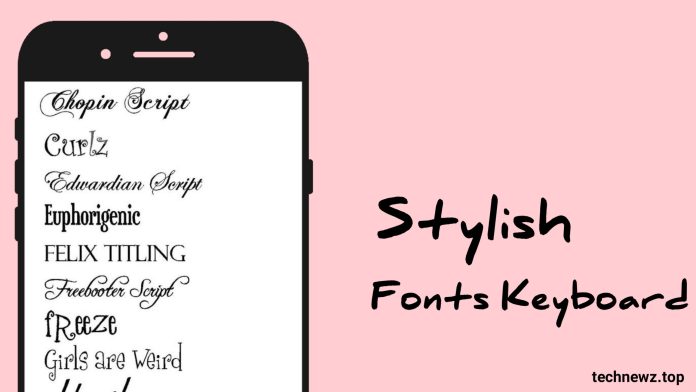
Transform Your Android Keyboard: A Guide to Stylish Fonts & Customization

Published

on

Transform Your Android Keyboard: A Guide to Stylish Fonts & Customization

Are you tired of the same plain text when you message friends? Your Android device holds the key to a more expressive digital conversation. This is where a stylish font keyboard app becomes essential. It allows you to break free from standard fonts and add a personal flair to every message you send on platforms like WhatsApp, Instagram, and Facebook.

Why Your Android Needs a Font Makeover

Standard keyboards are functional, but they lack personality. In a world where visual communication is king, your text should stand out. Consequently, millions of users globally are turning to third-party keyboard applications. These apps do more than change how you type; they transform how you are perceived in chats and comments.

Building on this, a specialized font app provides access to hundreds of unique typefaces. From elegant cursive to bold, funky block letters, the variety is immense. This means that a simple “hello” can become a statement, making your conversations more engaging and visually appealing.

Key Features of a Top Stylish Font Keyboard

What should you look for in a quality stylish font keyboard application? First, ease of use is non-negotiable. The best apps integrate seamlessly, requiring just a few taps to set as your default keyboard. After that, the creative control is in your hands.

Extensive Font Libraries & Emojis

A vast collection of fonts is the core feature. The right app offers countless styles, ensuring you find the perfect look for any occasion. Additionally, many of these keyboards include exclusive stylish emojis and symbols. This allows you to craft messages that are not only textually unique but also rich in visual expression.

Universal App Compatibility

True utility comes from wide compatibility. Therefore, a superior keyboard app works across all your messaging and social platforms. Whether you’re drafting an email, posting a caption, or sending a quick WhatsApp note, your chosen fonts will carry through. This consistent branding of your digital voice is a powerful tool.

How to Download and Activate the App

The process is straightforward. Initially, you need to download the app from a trusted source like the Google Play Store. Once installed, open the app’s settings to enable it. You will typically be guided to your device’s ‘Language & Input’ settings to select the new keyboard as your default.

On the other hand, some apps might operate as a clipboard manager. In this case, you copy stylish text from the app and paste it directly into your message field. Both methods are effective, but the system-wide keyboard integration offers a smoother, more permanent solution.

Maximizing Your New Typing Tool

With your new stylish font keyboard active, the fun begins. Experiment with different fonts for different contacts or platforms. Use a playful font for close friends on Instagram and a more refined one for professional emails. The ability to switch styles keeps your communication dynamic and context-appropriate.

Moreover, this tool can be a subtle way to enhance your social interactions. A creatively styled compliment or a uniquely formatted joke can leave a stronger impression than plain text. It adds a layer of effort and thoughtfulness to your digital correspondence.

For more tips on personalizing your device, explore our guide on the best Android customization apps.

Addressing Common Questions & Tips

New users often wonder about safety. It is crucial to download keyboard apps only from official stores like the Play Store to avoid security risks. Reputable apps request necessary permissions only for functionality, not for accessing personal data.

Another point to consider is battery usage. Well-coded keyboard apps are lightweight and have a negligible impact on battery life. If you notice significant drain, it might be worth trying a different, more optimized application. For a deep dive into app performance, check out our comprehensive Android app reviews.

Finally, remember that creativity has its place. While stylish fonts are great for informal chats, it’s wise to default to standard fonts for formal or official communication where clarity is paramount.

In summary, installing a stylish font keyboard is one of the simplest yet most effective ways to refresh your Android experience. It empowers you to communicate with greater personality and visual appeal across all your apps. So why settle for ordinary text when you can make every message uniquely yours?

Continue Reading

How To

How to Make Money with Meesho: Your Complete Guide to Social Commerce

Published

on

How to Make Money with Meesho: Your Complete Guide to Social Commerce

In today’s digital economy, opportunities to generate income from home are expanding rapidly. Among these, the Meesho app has emerged as a prominent platform for aspiring entrepreneurs. This guide will walk you through exactly how to make money with Meesho, transforming your smartphone into a potential revenue stream.

What Exactly is the Meesho Platform?

Fundamentally, Meesho operates as a social commerce marketplace. It bridges the gap between Indian suppliers and individual resellers. Instead of creating your own inventory, you act as a digital curator, sharing products from various categories with your social network. Consequently, you earn a commission on every successful sale without handling logistics or customer service directly.

Getting Started: Your Meesho Setup Process

First, download the Meesho app from the Google Play Store—it’s completely free. After installation, sign up using your mobile number. The registration process is straightforward, requiring basic details. Once your account is active, you gain immediate access to thousands of products across fashion, home decor, electronics, and more.

Navigating the Product Catalog

Meesho maintains strict quality standards for its listed items. You can browse categories, check supplier ratings, and review detailed product descriptions. This vetting process means you can share items with confidence, knowing they meet a certain quality threshold. Additionally, the platform’s flexible return policy protects both you and the end customer.

How the Earning Model Actually Works

The core mechanism is commission-based. For instance, if you share a product priced at ₹10,000 with a 5% commission, you earn ₹500 when a purchase is made through your shared link. Therefore, your earnings directly correlate with your sharing strategy and network engagement. Building on this, your potential income scales with the size and responsiveness of your audience.

Effective Strategies to Make Money with Meesho

Simply having the app isn’t enough; strategy is key. Start by identifying products that resonate with your social circles. Are your contacts interested in ethnic wear, kitchen gadgets, or mobile accessories? Tailor your shares accordingly. Next, leverage multiple platforms—WhatsApp groups, Facebook stories, Instagram posts, and Telegram channels. Consistent, authentic sharing yields better results than sporadic posts.

Optimizing Your Social Media Approach

Create compelling captions that highlight value, not just price. Share customer testimonials or your own positive experiences with the ordering process. Use high-quality images and videos from the app. Remember, you’re building trust. As a result, people are more likely to buy from someone they perceive as a reliable source.

Is Meesho Legitimate and Safe?

Founded in 2015 by IIT Delhi alumni Sanjeev Barnwal and Vidit Aatrey, Meesho is a registered, venture-backed company. Its mission is to empower small entrepreneurs across India. The platform handles payments securely, and funds are transferred to your account after order fulfillment. This structure minimizes risk for resellers, allowing you to focus purely on marketing.

Maximizing Your Long-Term Earnings

To treat this as a sustainable side income, analyze which products convert best. Track your shares and sales within the app’s dashboard. Engage with your audience—answer questions promptly. Furthermore, explore other earning apps to diversify your income streams. Over time, you can build a loyal customer base that returns for new deals.

On the other hand, manage expectations. Success requires consistent effort. It’s not instant wealth, but a feasible way to supplement your income. This means that patience and persistence are your greatest allies.

Common Questions from New Resellers

Do you need inventory? No. Meesho operates on a zero-inventory model. What about customer complaints? The central support team handles returns and issues. How are payments received? Commissions are credited to your linked bank account. For more detailed troubleshooting, refer to our social selling FAQ.

In conclusion, the Meesho app provides a structured, accessible entry point into social commerce. By strategically sharing products and nurturing your network, you can create a meaningful secondary income. The barrier to entry is low, but the potential for growth is significant. Start today, experiment with different approaches, and track what works best for your unique audience.

Continue Reading

Trending