Connect with us

Artificial Intelligence

Google Chrome Tests a Floating ‘Ask Gemini’ Button That Follows Your Every Highlight

Published

on

Google Chrome Tests a Floating ‘Ask Gemini’ Button That Follows Your Every Highlight

Google is quietly experimenting with a new feature in Chrome Canary that could fundamentally change how you interact with its AI assistant. The Ask Gemini button appears as a floating toolbar whenever you select text on a webpage, offering instant access to Gemini without extra clicks. But will this innovation enhance your browsing experience or simply add clutter?

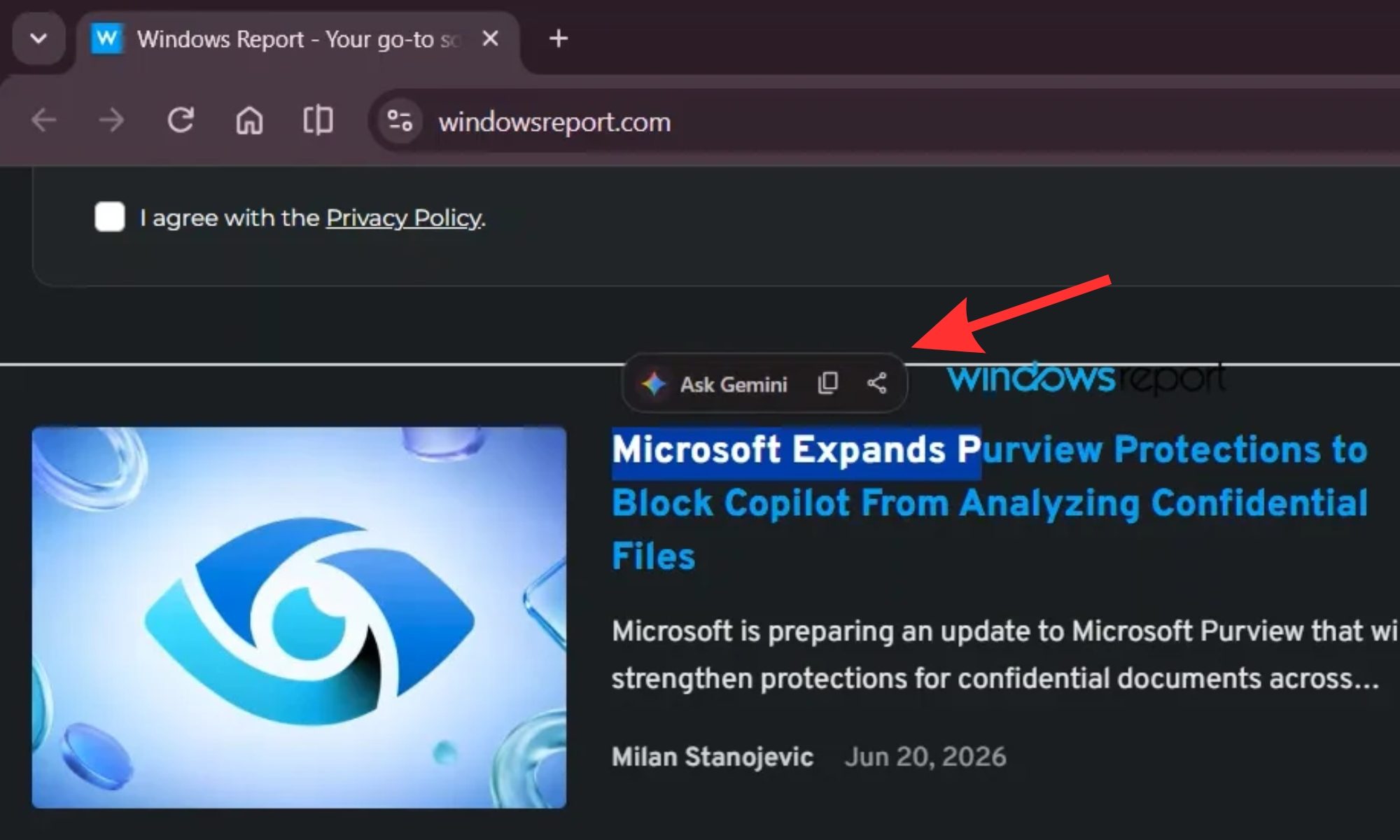
According to reports from Windows Central, the feature is still in early testing. It presents a small pop-up above any highlighted text, similar to the context menu on Android phones. The toolbar includes four options: Ask Gemini, Copy, Share, and a three-dot menu for additional settings.

This move signals Google’s ambition to embed its AI deeply into Chrome. However, users who frequently copy text without wanting an AI intervention may find the constant appearance intrusive. The key question is whether Google can strike the right balance between utility and annoyance.

How the Floating Ask Gemini Toolbar Works

When you highlight any text on a webpage, a sleek toolbar hovers just above the selection. The star of the show is the Ask Gemini option, which opens the Gemini side panel with your selected text as a ready prompt. This eliminates the need to switch tabs or manually copy content into a separate Gemini window.

Building on this, users can ask follow-up questions directly within the side panel, making research seamless. The three-dot menu currently offers two choices: “Hide for this site” and “Settings.” The latter opens Chrome’s general content settings, which appears unfinished—indicating the feature is a work in progress.

For those who prefer a cleaner interface, the “Hide for this site” option is a welcome addition. It allows you to suppress the toolbar on specific websites where you don’t need AI assistance, giving you control over the experience.

Gemini’s Expanding Presence in Chrome

Google has been systematically adding Gemini entry points across Chrome. The Chrome AI assistant is now accessible via the @gemini address bar shortcut and a pinnable AI Mode toolbar button, both currently in testing. This suggests the company envisions Gemini as an omnipresent layer within the browser.

Furthermore, the text selection toolbar takes this logic further: instead of you seeking out Gemini, the AI finds you every time you select something. This approach mirrors the strategy seen in other Google products, where AI becomes a background utility rather than a separate tool.

It’s worth noting that this news follows the recent addition of an “Ask Gemini” shortcut to the right-click menu, which many users discovered a few weeks ago. That feature already made accessing Gemini relatively effortless. However, the new floating toolbar puts the option front and center, reducing the steps needed to engage with the AI.

Will This Feature Reach Stable Chrome?

Google has not publicly announced the floating toolbar. It remains confined to Chrome Canary, the experimental version of the browser, and there is no guarantee it will ever reach the stable release. The company often tests features that never see the light of day, depending on user feedback and performance metrics.

Nevertheless, the pattern is clear: Google is committed to integrating Gemini into every corner of Chrome. The Ask Gemini button could become a standard tool for power users who rely on AI for research, summarization, or writing assistance. On the other hand, casual users might find the persistent toolbar distracting, especially if they highlight text frequently for copying.

As with any new feature, the success will hinge on customization options. Users who dislike the toolbar can hide it for specific sites, but a global toggle might be necessary to satisfy everyone. Google’s track record with such features—like the side panel and address bar shortcuts—suggests they will refine the experience based on real-world usage.

Practical Implications for Everyday Browsing

For content creators, researchers, and students, the Gemini floating toolbar could save significant time. Instead of manually copying text, opening Gemini, and pasting it, you can now trigger the AI with a single click. This streamlined workflow is particularly valuable when conducting research across multiple tabs.

However, the feature also raises questions about privacy and data handling. When you highlight text and click “Ask Gemini,” that content is sent to Google’s servers for processing. Users concerned about data collection may want to review their privacy settings or use the “Hide for this site” option on sensitive pages.

In addition, the toolbar’s placement could interfere with other browser functions. For example, if you frequently use the context menu for copying or searching, the floating toolbar might overlap with those options. Google will need to ensure the feature doesn’t disrupt existing workflows.

Ultimately, the Chrome AI assistant is evolving rapidly, and this test is just one piece of a larger puzzle. Whether you love or hate the idea, it’s clear that Google sees AI as the future of browsing. The floating Ask Gemini button is a bold step toward making that future a reality.

Continue Reading
Click to comment

Leave a Reply

Your email address will not be published. Required fields are marked *

Artificial Intelligence

Apple’s Camera-Equipped AirPods: Why They Might Not Be the ‘Pervert Pods’ Everyone Fears

Published

on

camera-equipped AirPods

The Rumor That Set the Internet on Edge

Picture this: you’re on a crowded train, and the person across from you is wearing AirPods. Now imagine those tiny earbuds have cameras. Creepy, right? That’s the fear that erupted when reports surfaced that Apple is working on camera-equipped AirPods. The internet, predictably, dubbed them “pervert pods.”

But here’s the thing — the reality might be far less sinister than the memes suggest.

What the Leaks Actually Reveal

The rumors gained traction after video footage surfaced in Apple’s macOS 26.7 RC (release candidate) — the final test version before public release. The clip shows a man holding a book while wearing AirPods, chatting with Siri about it. The audio track says: “With Visual Intelligence, your world becomes savable. See something you like? Just ask me to save it for later.”

Further evidence comes from code referencing a “Hair Detected” error. This would warn users when their hair blocks the AirPods’ camera. It’s a small detail, but it confirms the hardware is real — and that Apple is thinking about real-world usage.

Why These Aren’t Spy Cameras

Here’s where the narrative shifts. According to a report from Bloomberg’s Mark Gurman, these cameras won’t record photos or video. At all. As Gurman put it: “The cameras essentially act as eyes for the Siri digital assistant and aren’t designed to take photos or video. These components — located in both the right and left earbuds — allow the device to capture visual information in low resolution.”

So what’s the point? The goal is to feed visual data to Siri, which is getting a major AI upgrade in September with iOS 27. Instead of pulling out your iPhone to ask about something, you just look at it and speak. A book, a recipe’s ingredients, a street sign — Siri can see it and respond.

This isn’t surveillance. It’s a hands-free way to interact with your environment. Think of it as a smart assistant with eyes, not a hidden camera.

The LED Indicator: A Double-Edged Sword

Apple isn’t ignoring the privacy elephant in the room. Gurman reports the new AirPods will include an LED indicator that lights up whenever the device shares visual data to the cloud. That’s a transparency move — but it’s also a risk.

The LED could visually lump AirPods in with other AI wearables already facing public skepticism, like Meta‘s Ray-Bans, Snap’s Specs, or Google’s AI glasses. Apple can control what the cameras do, but it can’t control what people assume they do. A tiny light on an earbud might not be enough to reassure a nervous public.

The Visibility Problem

Gurman himself questioned the LED’s visibility given the AirPods’ small size. If the light is too small to see, it defeats its purpose. But if it’s too prominent, it could make wearers self-conscious. It’s a delicate balance.

A Strategic Bet on a Screen-Free Future

For Apple, this is about more than just a hardware refresh. It’s a bet that consumers want to interact with technology without staring at a screen. By baking AI access into a socially acceptable wearable, Apple is pushing toward a future where you don’t need to pull out your iPhone every five minutes.

That’s a compelling vision. Walking directions that whisper in your ear without checking your phone. Cooking help that sees your ingredients. A world where your devices work in the background, not in your face.

But it’s also a gamble. AirPods are currently a seamless accessory — people wear them all day without a second thought. Adding cameras, even benign ones, changes that perception. It forces people to wonder: is that person recording me?

The Privacy Tightrope Apple Must Walk

Apple has built its brand on privacy. That’s why this is riskier than a typical product launch. The company needs to convince consumers that the cameras are for Siri’s benefit, not for surveillance.

The LED indicator is a start, but it’s not enough. Apple will need a massive education campaign. It’ll need to explain, repeatedly, that these cameras can’t save photos or video. It’ll need to show, not just tell, how the data is processed and protected.

If Apple gets this right, it could redefine how we interact with AI. If it gets it wrong, the “pervert pods” label will stick — and that’s a PR nightmare no company wants.

For now, the leaked footage and code suggest Apple is thinking carefully. But in the court of public opinion, careful thinking isn’t always enough. The cameras are coming. The question is whether we’ll accept them.

Continue Reading

Artificial Intelligence

Gemini Notebook’s new Collections bring order to your research chaos

Published

on

Gemini Notebook Collections

Google finally gives NotebookLM users a way to breathe

Google hasn’t even finished rebranding NotebookLM, and it’s already fixing one of the biggest pain points for heavy users: a cluttered dashboard.

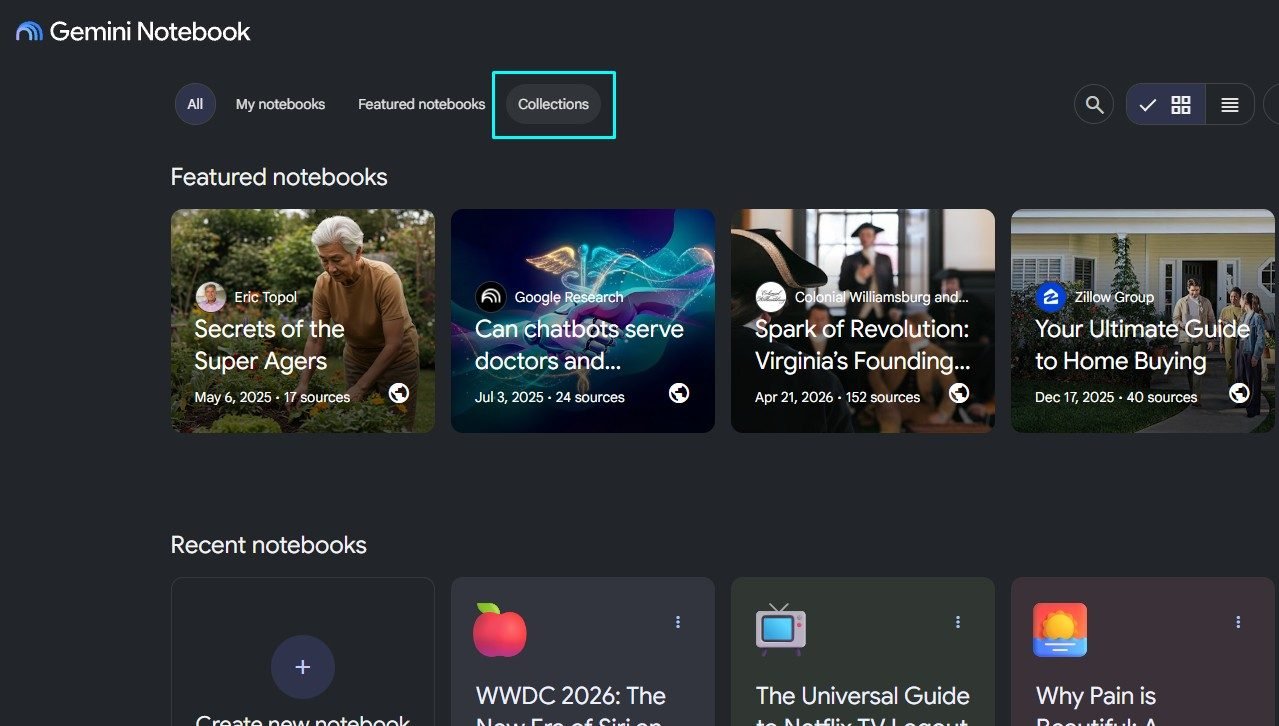
Starting this week, Gemini Notebook Collections are rolling out to everyone. The new tab lets you group related notebooks while keeping everything visible under My Notebooks. No forced reorganization. No rigid folder trees. Just a little structure for the chaos.

The timing makes sense. Google is tying the former NotebookLM more tightly into Gemini and Google Search, turning a standalone research tool into something that follows you across the company’s AI products. More places for notebooks means more notebooks. And more notebooks means you need a way to sort them.

Collections act like labels, not folders

The core idea is refreshingly simple. A notebook can belong to multiple Collections at once. That research project on climate policy could sit under both “Work” and “Environment” without duplicating a single file or forcing you to pick one permanent home.

Think of Collections like photo albums or playlists. They’re flexible by design. Anything that doesn’t need sorting stays ungrouped under My Notebooks, so your existing library doesn’t get turned upside down.

Google’s own announcement on X put it plainly: “zero rigid folder structures with maximum flexibility.” You can add notebooks to as many collections as you want, or skip the whole system entirely if it doesn’t fit your workflow.

Why this matters for heavy researchers

If you’ve ever stared at a wall of 50 notebooks with no way to tell them apart, you know the pain. Collections give crowded dashboards some breathing room without introducing a complicated filing system you’ll have to maintain forever.

The setup is deliberately basic. That’s a feature, not a bug. Google isn’t asking you to reorganize everything — just to group what needs grouping.

Organization becomes critical as Notebooks spread

This update isn’t happening in a vacuum. Notebooks can now appear inside the Gemini app, where you can work with uploaded material alongside your previous chats and custom instructions. Changes sync with the separate Gemini Notebook service, so the same project continues seamlessly across both products.

Google is also pulling Gemini Notebook into Search results. With notebooks gaining more places to appear and more ways to accumulate information, leaving them in one increasingly crowded library would become frustrating fast.

Collections add an organizational layer before that expansion makes the dashboard impossible to navigate. Smart timing, honestly.

What Collections still don’t give you

Let’s be clear about the limits. Google hasn’t announced nested Collections, automatic sorting, or anything resembling a full file-management system. You can group notebooks, but you can’t build a detailed hierarchy or hand the cleanup over to Gemini.

That leaves Collections with a narrow job: divide a growing library into useful groups without duplicating projects or removing anything from the main dashboard.

For anyone already drowning in notebooks, that may be enough. But if you were hoping for the control of a proper folder system with subfolders and drag-and-drop organization, you’ll find this pretty basic.

How to start using Collections today

Ready to tidy up? Here’s what you need to know:

  • Open Gemini Notebook and look for the new Collections tab at the top of your dashboard.
  • Create a collection and give it a name — anything from “Q3 Research” to “Recipes I’ll never cook.”
  • Add notebooks by selecting them from your existing library. A notebook can live in multiple collections simultaneously.
  • Leave ungrouped notebooks alone if they don’t need sorting. They’ll stay visible under My Notebooks.

The rollout is gradual, so if you don’t see the tab yet, check back in a few days. Google typically pushes these updates to all users within a week or two.

For more on how to get the most out of Google’s AI tools, check out our guide on using Gemini for research projects and tips for organizing your digital workspace.

Continue Reading

Artificial Intelligence

The future of AI may hinge on this one behind-the-scenes protocol update

Published

on

MCP update

Why everyone’s missing the real story about AI progress

Whenever a new AI model drops, the hype machine goes into overdrive. We hear about how much smarter it is, how quickly it answers, how photorealistic its outputs have become. But here’s the uncomfortable truth: none of that matters if the AI can’t reliably plug into the apps and services you use daily.

That’s why an upcoming update to the Model Context Protocol (MCP) caught my eye. It’s not a flashy new chatbot or a breakthrough model. Most people will never even notice it’s happening. Yet it could quietly make the entire AI ecosystem far more robust.

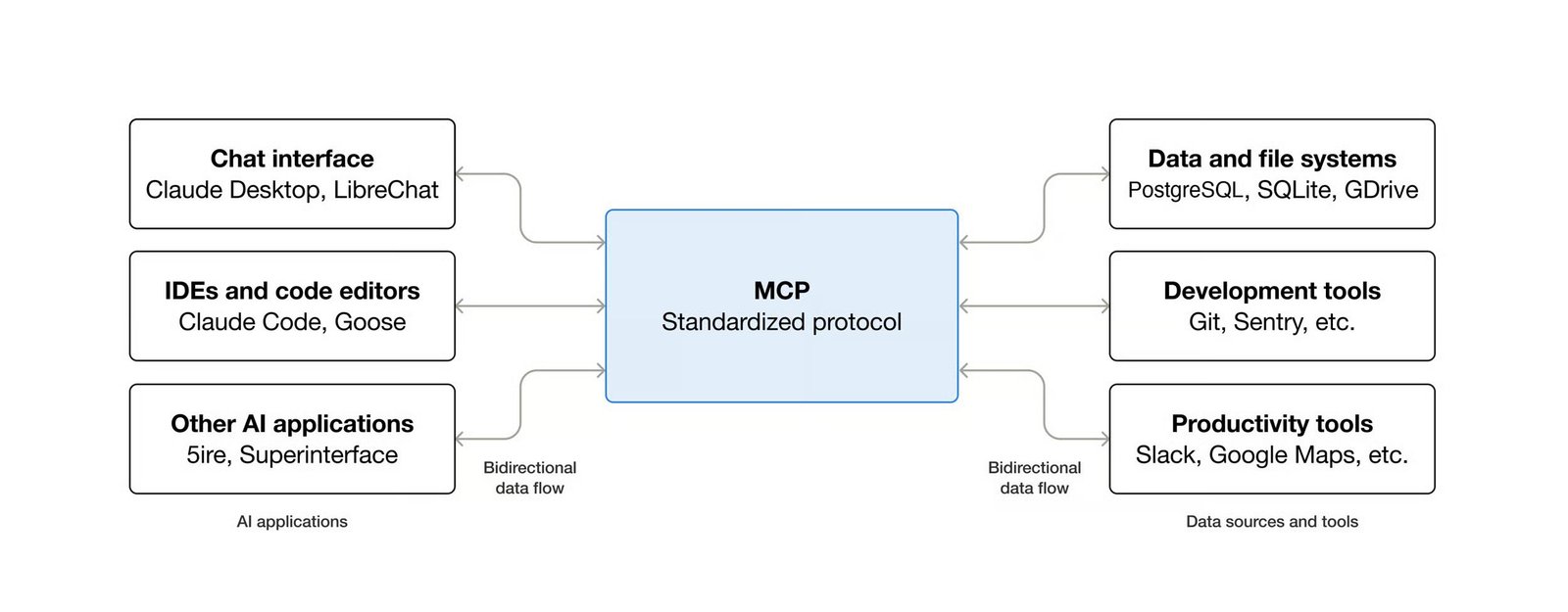
If you’ve never heard of MCP, think of it as a universal translator for AI. It lets assistants like ChatGPT, Claude, or Gemini safely talk to Gmail, Slack, calendars, databases, and countless other tools. Instead of every company inventing its own proprietary bridge, MCP provides a shared rulebook.

The problem isn’t the AI — it’s the plumbing

It’s tempting to assume AI only improves when companies release beefier models. In practice, many of today’s growing pains have nothing to do with intelligence. They’re infrastructure issues.

Imagine calling a friend every few minutes and having to reintroduce yourself each time. That’s roughly how many AI services operate today. Servers burn extra cycles tracking who’s talking to them, especially when millions of people hit the same service simultaneously. The next MCP version changes that dynamic. Instead of forcing one server to manage every conversation, the protocol makes requests easier to shuffle between different servers.

Sounds like a minor technical tweak, right? But it strips away a surprising amount of complexity for companies running AI at scale. That translates into faster responses, lower costs, and fewer bottlenecks — even if you never see the change.

What the MCP update actually does

The upcoming revision targets a core inefficiency in how AI systems authenticate and route requests. Current implementations often require a single server to hold context for an entire session. That works fine in a demo, but it crumbles under real-world load.

The new approach decentralizes that responsibility. Requests become more portable, so they can be handled by whichever server is best positioned at the moment. It’s a bit like upgrading from a single checkout line to a system that dynamically opens new lanes as queues grow.

For developers, this means less time wrestling with session management and more time building features. For users, it means AI tools that feel more responsive and reliable — even during peak usage spikes.

Why this matters beyond the tech bubble

This update won’t suddenly make your favorite chatbot feel like a genius overnight. What it does is lay the groundwork for AI to move beyond isolated chat windows and into your everyday workflow. That’s the direction the industry is heading: AI that drafts emails, updates your CRM, books meetings, and queries internal databases — all without you juggling a dozen logins.

That vision only works if the underlying connections are solid. MCP is the glue, and this update makes the glue stickier.

Sometimes boring is exactly what AI needs

I’ll admit, a protocol update isn’t headline-grabbing material. But it’s precisely these unglamorous fixes that separate a promising demo from a dependable product.

Consider how far we’ve come. Early AI integrations were brittle — one change in an API could break everything. MCP’s standardized approach changes that calculus. It creates a stable foundation that both startups and tech giants can build on.

That’s why this quiet update deserves attention. It’s not about teaching AI a new trick; it’s about fixing the pipes so everything else flows. And while that may not sound thrilling today, it’s exactly the kind of improvement that makes tomorrow’s AI feel effortless and genuinely useful.

For more on how AI is evolving beyond chatbots, check out our guide to AI-powered productivity tools or how to connect AI assistants to your daily apps.

Continue Reading

Trending