Connect with us

Artificial Intelligence

Google Trends Mobile Update: How Gemini AI is Transforming Search Analytics on Your Phone

Published

on

Search analytics just became significantly more accessible with Google‘s latest enhancement to its popular trends platform. The Google Trends mobile experience now integrates artificial intelligence capabilities, transforming how users explore and understand global search patterns directly from their smartphones.

Revolutionary AI Integration Changes Google Trends Mobile Experience

The transformation centers around seamless integration of Gemini artificial intelligence technology. Instead of requiring manual configuration for comparative analysis, the platform now automatically identifies and presents related search queries. This intelligent approach eliminates the traditional barriers that often frustrated users seeking comprehensive trend insights.

Previously, understanding search patterns required multiple steps and considerable time investment. Now, artificial intelligence anticipates user needs by suggesting relevant comparisons and surfacing connected topics without prompting. This represents a fundamental shift from reactive to proactive trend analysis.

Enhanced Google Trends Mobile Interface Streamlines Data Discovery

Visual improvements accompany the AI enhancements, addressing the unique challenges of mobile trend analysis. Each search term receives distinct color coding and iconography, preventing confusion when tracking multiple data points simultaneously. The redesigned interface prioritizes clarity without sacrificing analytical depth.

Furthermore, the updated layout accommodates more comparison terms within a single view. Rising queries receive enhanced visibility, providing crucial context about trending momentum. These refinements prove particularly valuable during quick mobile consultations when screen real estate remains limited.

A dedicated side panel introduces guided exploration through suggested prompts. This feature proves especially beneficial for users uncertain about their next analytical step, offering structured pathways through complex search data landscapes.

Smart Comparison Features Transform Search Pattern Analysis

The platform’s comparison capabilities received substantial improvements through AI-powered suggestions. Rather than manually constructing comparative frameworks, users can now rely on intelligent recommendations that identify naturally related search terms. For instance, researching dog breeds automatically generates comparisons across multiple popular breeds within unified visualization.

This automated approach reveals patterns that might otherwise remain hidden. By presenting interconnected search queries simultaneously, the system enables rapid identification of emerging trends and relationship patterns. The technology essentially functions as an analytical assistant, expanding initial concepts into comprehensive insights.

Additionally, the system introduces nearby topics functionality, encouraging exploration beyond original search parameters. This discovery mechanism helps users uncover unexpected angles and related phenomena they might have overlooked during traditional manual searches.

Gradual Rollout Strategy and Availability Timeline

The enhanced Google Trends mobile experience follows a phased deployment approach, beginning with desktop implementations before extending to mobile platforms. This strategy ensures stability while managing the transition across different device categories and geographical regions.

Current availability varies by location, with broader accessibility expected as the rollout progresses. Users interested in accessing these features should regularly check the Explore page on their mobile devices to identify when updates become available in their region.

The gradual expansion approach allows for refinement based on user feedback and technical optimization. This methodology demonstrates commitment to delivering a polished experience rather than rushing incomplete features to market.

Impact on Researchers, Creators, and Casual Users

These enhancements benefit diverse user groups with varying analytical needs. Content creators can now rapidly assess trending topics and identify emerging opportunities without extensive setup procedures. The streamlined interface enables quick content inspiration during mobile research sessions.

Researchers gain access to more sophisticated comparative tools without sacrificing mobility. The AI-powered suggestions can reveal research directions that traditional manual exploration might miss, potentially uncovering valuable insights for academic or commercial investigations.

Casual users benefit from simplified access to global search patterns, making trend exploration more approachable. The guided experience reduces intimidation factors while maintaining analytical sophistication, democratizing access to powerful search insights.

As this technology continues evolving, the integration of artificial intelligence with search trend analysis represents a significant step toward more intuitive and powerful mobile analytics tools. The combination of enhanced visualization, automated suggestions, and guided exploration creates a more accessible yet sophisticated platform for understanding global search behavior patterns.

Continue Reading
Click to comment

Leave a Reply

Your email address will not be published. Required fields are marked *

Artificial Intelligence

Google Fuses NotebookLM into Gemini, Creating a Unified AI Research Hub

Published

on

Google Fuses NotebookLM into Gemini, Creating a Unified AI Research Hub

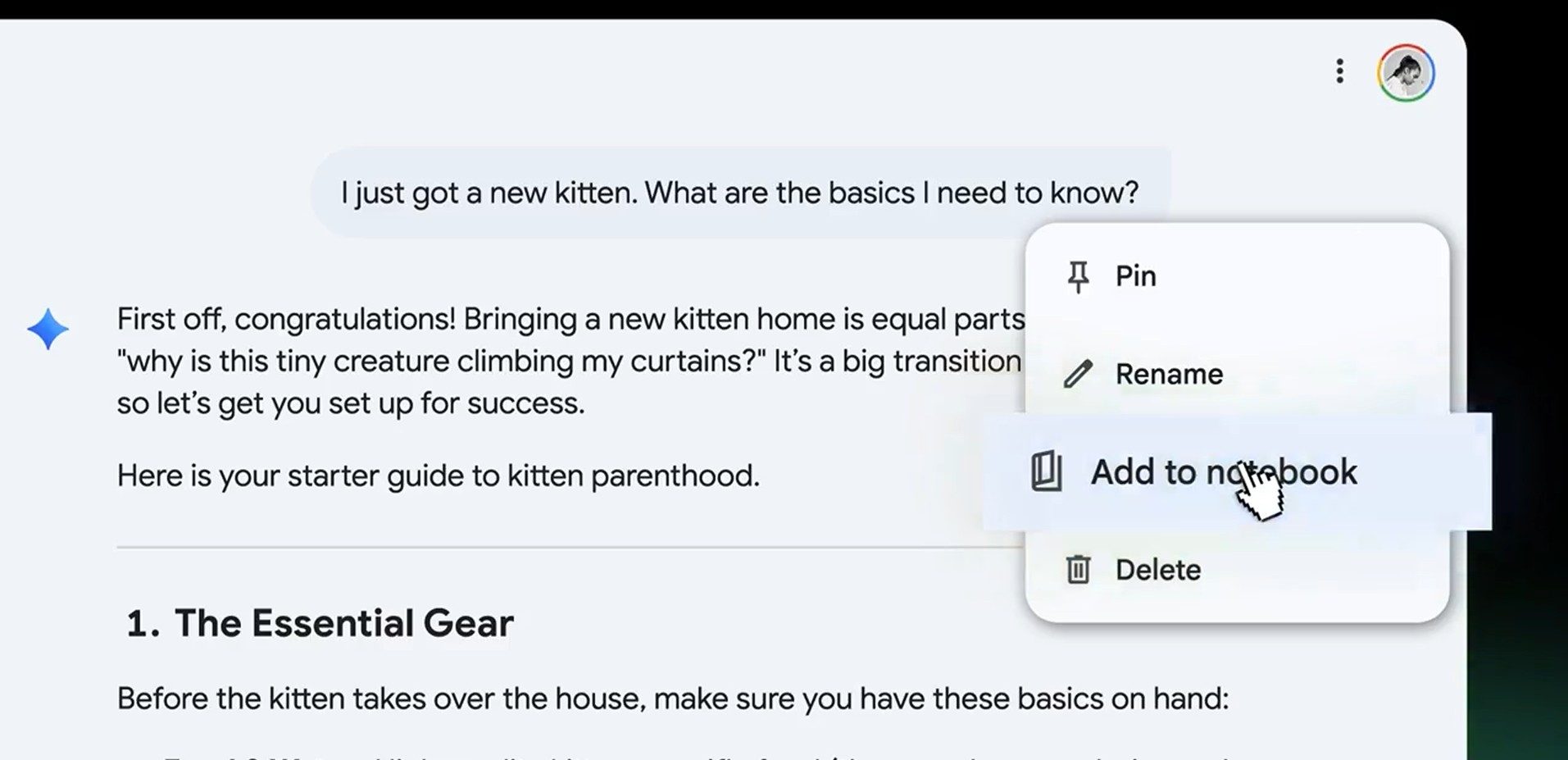
Google has taken a decisive step in reshaping its AI assistant. Starting today, the core functionality of NotebookLM is being woven directly into the Gemini experience. This integration, dubbed ‘Gemini Notebooks,’ marks a pivotal shift. It moves the platform from a reactive question-and-answer tool toward a proactive, context-rich workspace designed for sustained research and complex projects.

From Separate Tools to a Cohesive Workspace

Previously, users interested in grounding their AI interactions in personal documents had to navigate between different products. This new update eliminates that friction. Consequently, your saved research, PDFs, and notes now reside natively within Gemini’s interface, sitting side-by-side with your chat history and prompts. This structural change is fundamental. It means your curated material is no longer just a static library but becomes active, live context that directly informs the AI’s responses in real time.

How Live Context Transforms Conversations

The most significant upgrade lies in how Gemini now utilizes stored information. When you select a specific notebook or collection at the start of a chat, the AI automatically grounds its responses in that content. Therefore, you no longer need to repeatedly upload files or paste excerpts to steer the conversation. The system draws from your pre-organized sources seamlessly, ensuring outputs are relevant and factually anchored to your provided materials. This capability, a hallmark of NotebookLM’s original design, is now central to the Gemini experience.

Building a ‘Second Brain’ for Long-Term Projects

This integration reflects a broader industry trend toward AI systems with memory and continuity. Instead of treating each chat as an isolated event, Gemini can now maintain a thread of context across sessions. Building on this, the platform allows you to fold past conversations *into* new notebooks. Imagine a research project where early exploratory chats about a topic can be saved and later used as source material for a more focused, analytical discussion. This creates a virtuous cycle where research and conversation continuously reinforce and build upon each other.

In addition, the organizational aspect is crucial. Users can upload up to 100 sources for free and structure their chats into thematic collections. This organizational layer is what transforms a simple chatbot into a powerful project management aid. However, it’s important to note that the utility of this system is directly tied to the quality of the input. Disorganized or messy source material may limit the coherence and usefulness of the AI’s contextual responses.

Current Rollout and Future Implications

As of now, the rollout of Gemini Notebooks is initially available on the web for subscribers to Google’s AI Ultra, Pro, and Plus tiers. Support for the mobile Gemini app and broader access, including for free users, is expected to follow, though Google has not provided a specific public timeline.

This strategic move places significant pressure on competitors. By blending document-aware intelligence with persistent conversational memory, Google is positioning Gemini as a central hub for knowledge workers, students, and anyone engaged in research-heavy tasks. For more on how AI is changing workspaces, see our analysis on the future of AI productivity tools.

A New Phase for AI Assistants

Ultimately, this update signals a clear evolution in Google’s vision. Gemini is being reimagined not merely as a tool for quick answers but as a companion for ongoing, intellectually demanding work. The integration of NotebookLM’s strengths is the first major step in this direction. Looking ahead, the platform’s success will hinge on achieving feature parity across all devices and tiers, and on users adopting the new organizational workflows it enables. To understand the competitive landscape, explore our guide to AI-powered note-taking applications.

This means that the era of the ephemeral AI chat may be giving way to the age of the cumulative, context-aware AI workspace. The race is no longer just about who has the smartest model, but about who can best integrate that intelligence into the messy, document-rich flow of real human work.

Continue Reading

Artificial Intelligence

X’s Grok AI Now Translates Posts Instantly and Edits Photos with Simple Prompts

Published

on

X’s Grok AI Now Translates Posts Instantly and Edits Photos with Simple Prompts

Elon Musk’s social media platform, X, is deepening its integration of artificial intelligence. The company has unveiled two significant features powered by its Grok AI system, fundamentally changing how users interact with content and media on the platform. This move signals a clear strategy to make advanced AI tools a central, everyday part of the social media experience.

Automatic Translation Reaches a Global Audience

One of the most immediate changes users will notice is the removal of language barriers. Previously, reading a post in a foreign language required manually tapping a translation button. Now, that process happens automatically behind the scenes. Powered by Grok’s language models, posts are instantly translated into a user’s preferred language as they scroll.

This means a user in Tokyo can seamlessly read a thought from someone in Paris, while a person in Mexico City can engage with content from Cairo, all without a second thought. The goal is to foster truly global conversations and give every post the potential for worldwide reach. For purists who prefer the original text, the auto-translate function can be disabled on a per-language basis in the settings.

A New Era for In-App Photo Editing

Alongside breaking down language walls, X is also empowering users to create more dynamic visual content. The platform has launched a built-in photo editor for its iOS app, with an Android version promised soon. While it includes standard tools like drawing, adding text, and applying blurs to redact sensitive information, its standout feature is AI-powered.

Building on this, the editor integrates Grok to understand and execute natural language commands. Users can now type prompts like “make this look like a watercolor painting” or “apply a vintage filter” directly within the composer. The AI then processes the image accordingly, turning simple ideas into edited realities without requiring technical editing skills. This represents a significant shift from manual slider adjustments to conversational creation.

Why X is Doubling Down on Integrated AI

The underlying motivation for these updates is clear: platform retention. By offering powerful translation and editing tools natively, X aims to become a more self-contained ecosystem. Consequently, users may spend less time switching to external translation websites or dedicated photo editing apps like Adobe Photoshop or Canva for quick fixes.

This strategy isn’t entirely novel; other social networks have explored AI-driven features. However, X’s approach is distinct in its attempt to bundle these capabilities under the Grok umbrella, making the AI a central utility for both consumption and creation. The success of this integration, explored further in our analysis on the future of social media AI, hinges entirely on execution.

The User Experience Will Be the Ultimate Test

Will these Grok AI features feel like genuine enhancements or just more digital clutter? The answer depends on their reliability and intuitiveness. If the translations are accurate and nuanced, and if the photo edits are high-quality and fast, they could significantly smooth the content creation pipeline. Users might find themselves more willing to engage with international accounts or experiment with their images.

On the other hand, if the tools are slow, produce awkward translations, or deliver cheesy image effects, they risk being immediately ignored. This would add interface complexity without delivering meaningful value. Therefore, the rollout is as much a test of Grok’s technical prowess as it is of X’s product design philosophy. For creators looking to adapt, understanding these new social media tools is crucial.

A Strategic Play in the AI Social Media Race

Ultimately, these updates are a strategic bet. X is positioning Grok not just as a chatbot, but as a foundational layer that enhances core platform functionalities—reading and posting. The automatic translation feature directly tackles the problem of fragmented, language-specific audiences, potentially increasing engagement metrics and ad reach.

Similarly, the prompt-based photo editor lowers the barrier to creative expression, which could lead to a more visually engaging feed. This two-pronged approach shows X’s ambition to use AI to solve real user friction points. Whether this makes the platform more indispensable or simply more complicated is the question now facing its global user base as the Grok AI features become part of their daily scroll.

Continue Reading

Artificial Intelligence

Google’s Gemini Projects Feature Will Transform How You Organize AI Conversations

Published

on

The endless scroll through scattered AI conversations is about to become a thing of the past. Google is quietly testing a revolutionary Gemini Projects feature that promises to solve one of the most frustrating aspects of AI chat management.

Currently, regular Gemini users face an overwhelming collection of conversations spanning everything from professional research to personal planning. However, this chaos appears headed for a solution through Google’s latest organizational innovation.

What Makes the Gemini Projects Feature Revolutionary

The Gemini Projects feature operates on a simple yet powerful concept: dedicated folders for your AI conversations. Rather than hunting through dozens of randomly ordered chats, users will soon categorize discussions based on topics, projects, or purposes.

This approach mirrors ChatGPT‘s successful folder implementation, but Google appears to be developing its own unique spin on conversation organization. The system integrates directly into Gemini’s existing interface without disrupting current workflows.

In addition, the feature maintains Google’s signature simplicity while addressing a genuine user pain point. No more scrolling endlessly to find that important brainstorming session from last week.

How Users Can Access Gemini Projects

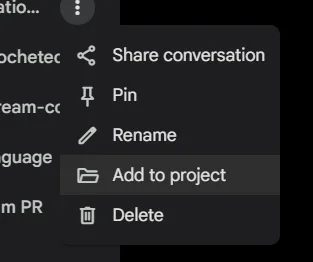
Early adopters have discovered the feature through Gemini’s standard three-dot menu system. When hovering over any conversation in the web interface, users now see an “Add to project” option alongside familiar choices like Share, Pin, and Rename.

Clicking this new option reveals a popup window displaying existing project categories. Unfortunately, the current test version doesn’t allow new project creation directly from this menu, indicating the feature remains under active development.

Therefore, the functionality appears limited to assigning conversations to pre-existing project folders. This suggests Google is still refining the complete user experience before wider deployment.

Real User Experiences with Chat Organization

Reddit user medazizln became among the first to document this emerging Gemini Projects feature, sharing screenshots that confirmed its existence. The discovery sparked considerable interest across AI communities, with users expressing excitement about improved conversation management.

TestingCatalog News subsequently verified these reports, suggesting the appearance might be “unintended” rather than a deliberate beta release. This indicates Google may be conducting internal testing that accidentally became visible to select users.

Consequently, the feature’s current state reflects typical pre-release development, with core functionality present but refinements still needed. Users report the basic organization concept works well, even with limited creation options.

Timeline for Gemini Projects Feature Release

Google hasn’t announced any official rollout schedule for the Gemini Projects feature, maintaining their typical secrecy around product development timelines. Nevertheless, the fact that real users are encountering the feature suggests internal testing has progressed significantly.

Industry observers note that accidental feature appearances often precede official announcements by weeks or months. This pattern has held true for previous Google product launches, from Google Workspace updates to Search enhancements.

As a result, users might expect broader availability sometime in the coming months, though Google could adjust timelines based on testing feedback and technical refinements.

Benefits Beyond Simple Chat Sorting

The Gemini Projects feature addresses more than just visual clutter in conversation lists. Professional users juggling multiple clients or projects will find tremendous value in contextual conversation grouping.

Students and researchers can maintain separate project spaces for different subjects or assignments. Personal users benefit from distinguishing between entertainment, planning, and problem-solving conversations.

On the other hand, this organizational structure could enhance productivity by reducing cognitive load when switching between different types of AI interactions. Users won’t need to mentally filter through unrelated conversations to find relevant discussions.

Building on this foundation, Google might eventually introduce advanced features like project-specific settings, shared folders, or integration with other Workspace tools. The current implementation appears designed to support future enhancements while establishing core organizational functionality.

Continue Reading

Trending