Google’s new trick: Gemini remembers where you put things
Losing your passport is a special kind of panic. You tear through drawers, check the same coat pocket twice, and eventually swear you’ll never misplace it again. Google thinks its assistant can help with that — provided you’re willing to tell it where you stash your stuff.
The company announced a new Gemini location memory feature as part of the September Android Drop. It’s rolling out alongside four other updates, and it’s aimed squarely at people who forget where they keep important documents.
How does the new Gemini Find Hub feature work?
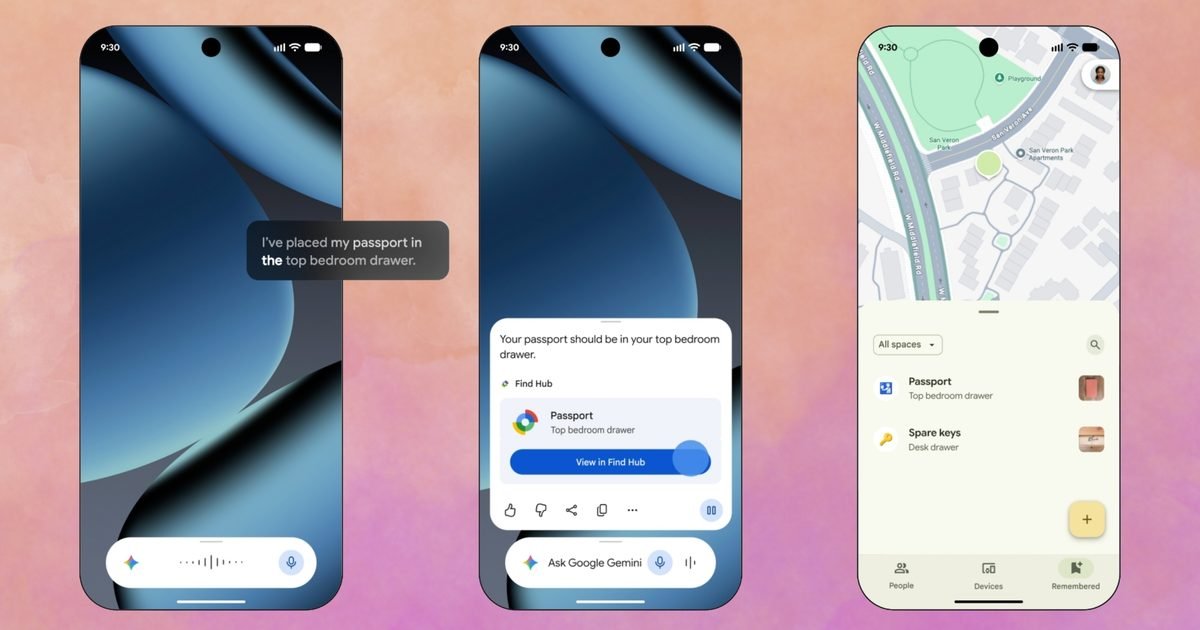
The idea is simple. You tell Gemini something like “I put my passport in the bedroom drawer,” optionally attach a photo, and the assistant saves that location in Find Hub. No tracker tag required. Nothing to pair, charge, or replace batteries in.
Later, when you’ve inevitably forgotten again — and Google seems to be counting on that — you can ask Gemini where you left the item, or open Find Hub and check the “remembered” items tab.
There are a few catches. The feature needs Android 16 or newer. It also only works in countries where both Gemini and Find Hub are available, so not everyone will see it right away.
This is not tracking — it’s just memory
Here’s the important distinction: Gemini isn’t actually tracking your belongings. It’s merely remembering what you told it. That’s it. No real-time location, no pinging, no map showing where your wallet currently sits.
Honestly, I’ve been doing this in the Notes app on my iPhone for years. Write down where I left something, check the note later. Works fine. But Google clearly thinks there’s value in having the assistant handle that recall for you — and tying it into Find Hub means it lives alongside your actual tracker-tagged items.
Motion Assist: fighting carsickness with moving bubbles
The other headline feature in this drop is Motion Assist. It targets the queasy feeling you get from staring at a stationary phone screen while the car moves around you.
The feature overlays small bubbles on your screen that drift along with the vehicle’s motion. The idea is that your eyes get a visual cue that matches what your inner ear is feeling, which can help reduce motion sickness. It’s aimed at passengers who want to read or text without feeling nauseous.
Whether it actually works well remains to be seen, but it’s a thoughtful approach to a very common problem.
Guided vision and other smaller updates
Three smaller additions round out the September Drop. Guided vision is designed for blind and low-vision users. During a Gemini Live session, it narrates whatever your camera sees — reading labels, menus, or other text aloud in real time.
That’s a genuinely useful accessibility feature, and it builds on Google’s existing work with Lookout and other vision tools.
Google Keep inside Messages
Google Keep is also getting deeper integration with Google Messages. You’ll soon be able to open Keep directly inside a conversation thread, letting a group build a shared list without leaving the chat. Planning a trip or a group dinner gets easier when the list and the discussion live in the same place.
Chat themes for customization
Finally, chat themes are arriving. These let you swap in custom backgrounds and colors per conversation, so you can tell at a glance which thread you’re in. It’s a purely cosmetic change, but it adds a layer of personalization that many users have wanted for a while.
When will these Android updates arrive?
Here’s the timing breakdown: Keep in Messages and chat themes are already live as of the announcement. The Gemini location memory feature, Motion Assist, and Guided vision will roll out later this month.
If you’re on a supported device with Android 16, keep an eye on your updates. The September Drop is shaping up to be a mix of practical tools and comfort features — some more useful than others, but all pointing in the same direction.
Google wants its assistant to be more than a search box. It wants Gemini to remember what you forget, help you avoid carsickness, and make your phone a little more accessible. Whether that’s enough to make you switch from your Notes app habit is another question entirely.








 CyberSecurity7 months ago
 How To6 months ago
 How To5 months ago
 How To6 months ago
 How To5 months ago
 How To7 months ago

 How To6 months ago