Connect with us

Video

How I’d Build a One-Person Business to $10,000 a Month Using Claude AI

Published

on

Imagine starting from scratch—no tech background, no audience, and only a few hours a week—yet still reaching a $10,000 monthly income within a year. That’s the promise Shane Hummus unpacks in his latest video, where he reveals a counterintuitive blueprint for building a one-person business using Claude AI. Instead of chasing trends or overcomplicating the process, he focuses on a single AI tool and a specific niche that most creators overlook. As a result, this method has already transformed a 50-year-old non-technical user into a profitable content creator in just one month. Building on this, the video challenges the common wisdom that you need to be a tech expert or have a massive following to succeed. Instead, it emphasizes clarity, consistency, and leveraging AI to handle the heavy lifting.

The Tool That Does 90% of the Work

At the heart of this strategy is Claude AI, an advanced language model that goes beyond simple chat responses. Hummus explains that most people use AI incorrectly—they ask for generic advice or one-off content. However, the real power lies in using Claude to build a complete content system. For instance, by feeding it a few questions about your niche, audience, and goals, Claude can generate an entire content roadmap, including video scripts, social posts, and email sequences. This layered approach saves hours of planning, allowing solo builders to focus on execution rather than ideation. In addition, Claude can help refine your messaging, ensuring that every piece of content aligns with your brand voice. Therefore, if you’re serious about building a one-person business, mastering this tool is non-negotiable.

The Niche That Opens Doors at Big Companies

One of the most surprising insights from the video is the choice of niche. Hummus advocates for a “boring” niche—something like business consulting, financial planning, or industry-specific software tutorials. He argues that these niches, while not flashy, have high demand and lower competition. Consequently, they open doors at major corporations and attract clients willing to pay premium rates. The key is to focus on a problem that businesses consistently face, such as optimizing workflows or improving customer retention. By positioning yourself as an expert in this niche, you can build a one-person business that scales without needing a large team. Moreover, this approach aligns with the platform hierarchy Hummus explains: start with YouTube for visibility, then expand to LinkedIn and email lists for deeper engagement.

The Two-Phase Approach to Visibility

Hummus introduces a two-phase system that most creators never consider. Phase one involves creating “ugly” first videos—rough, unpolished content that focuses on value over production quality. He shares an example of a creator whose first video, despite being poorly edited, exploded because it solved a critical problem. This phase is about testing ideas and building momentum without overthinking. Phase two then shifts to refining your content and building a brand around you, not just a topic. As a result, your audience connects with your personality, making your one-person business more resilient to algorithm changes. Additionally, Hummus emphasizes that the same content can either flop or blow up depending on timing and distribution. Therefore, consistency and repurposing are vital.

Why This System Works for Solo Builders

Ultimately, this system is designed for individuals who want to escape the corporate grind or create a side income without hiring employees. By focusing on a single AI tool, a specific niche, and a repeatable content process, you can build a one-person business to $10,000 a month faster than you might think. The video even highlights a milestone that changed everything for one beginner: landing their first high-ticket client after publishing just ten videos. This success isn’t about luck—it’s about following a structured approach that leverages AI for efficiency. If you’re ready to take action, watch the full video to get the step-by-step roadmap and see how Claude AI can transform your solo venture.

Continue Reading
Click to comment

Leave a Reply

Your email address will not be published. Required fields are marked *

Video

How to Repair Corrupt Outlook PST Files Using the Inbox Repair Tool – A Step-by-Step Guide

Published

on

repair corrupt Outlook PST files

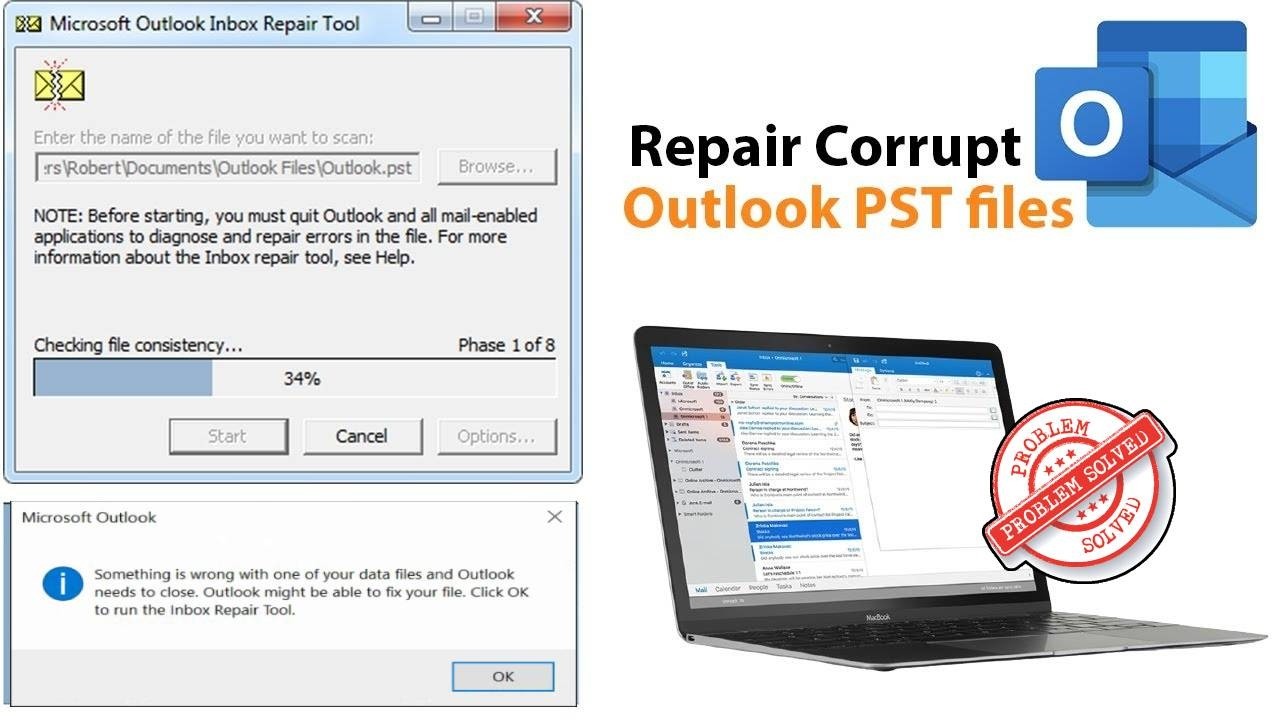
If you’ve ever seen the dreaded error message “Something is wrong with one of your data files and Outlook needs to close,” you know the panic that follows. Your emails, contacts, and calendar entries suddenly feel out of reach. Fortunately, there’s a built-in solution that can save the day: the Inbox Repair Tool. In a straightforward tutorial, a tech expert walks you through the process of using this utility to repair corrupt Outlook PST files and restore your data without third-party software.

Understanding the Inbox Repair Tool

The Inbox Repair Tool, also known as Scanpst.exe, is a free utility included with Microsoft Outlook. Its primary purpose is to scan and repair corrupt Personal Storage Table (PST) files. As explained in the video, this tool is your first line of defense when Outlook crashes or refuses to open your data file. Instead of panicking or searching for expensive recovery software, you can run this tool and often fix the problem in minutes.

Step-by-Step Process to Repair Corrupt Outlook PST Files

Building on the tutorial’s clear instructions, the process begins by locating the Inbox Repair Tool on your computer. Typically, it’s found in the Microsoft Office installation folder. The video shows exactly where to look, whether you’re using Outlook 2010, 2013, 2016, 2019, 2021, or 2024. Once you open the tool, you simply browse to the corrupted PST file and click “Start.” The tool scans the file and reports any errors. If issues are found, you can proceed with the repair, creating a backup of the original file as a safety measure.

Common Errors and How to Avoid Them

Many users encounter the error “Outlook might be able to fix your file” when trying to open their profile. As the video highlights, this is exactly when you should run the Inbox Repair Tool. In addition, the tutorial addresses related issues like print preview errors in Microsoft Word, showing that these tools are part of a larger ecosystem of built-in fixes. To avoid future corruption, always close Outlook properly, avoid large attachments, and regularly archive old emails.

Why This Method Works and When to Seek Alternatives

Therefore, the Inbox Repair Tool is effective for minor to moderate corruption. It can fix damaged headers, missing folders, or indexing issues. However, as the video notes, if the tool fails to repair the file, you may need to use a more advanced third-party PST repair tool. Nonetheless, for most users, this built-in solution resolves the problem without additional cost. The tutorial provides a clear roadmap, making it easy for anyone to follow.

Final Thoughts

In conclusion, learning how to repair corrupt Outlook PST files with the Inbox Repair Tool is an essential skill for any Outlook user. The video offers a practical, no-nonsense guide that saves you time and frustration. So, the next time Outlook gives you that ominous error, remember this simple fix. Watch the full tutorial below to see the exact steps and get your data back in no time.

Continue Reading

Video

AI Skills That Employers Are Desperate For: Mastering Claude AI for Career Growth

Published

on

AI skills employers

The job market is shifting faster than most professionals realize. While headlines scream about AI replacing roles, the real story is more nuanced—and far more promising for those who adapt. Employers aren’t just looking for people who can use AI; they’re desperate for individuals who can wield it with precision, creativity, and strategic thinking. In a recent deep dive, Shane Hummus breaks down exactly which AI skills are in high demand, using Claude AI as the primary tool. This isn’t another generic tutorial—it’s a blueprint for standing out in a crowded field.

Why Employers Are Desperate for These AI Skills

The buzz around AI often focuses on automation replacing jobs, but the truth is that companies are scrambling to find talent that can bridge the gap between raw AI power and practical business outcomes. **AI skills employers** crave include the ability to craft sophisticated prompts, build automated workflows, and interpret complex data with ease. Shane emphasizes that knowing a single AI tool is no longer enough; employers want versatility and problem-solving aptitude. As he notes, “The one pattern every successful AI creator shares” is a willingness to experiment beyond basic queries.

The Prompting Secret Most People Get Wrong

One of the most critical **Claude AI skills** is effective prompting. Shane reveals that most users approach prompting too linearly, expecting the AI to read their minds. Instead, he advocates for a structured, iterative method: start with context, specify the format, and refine based on outputs. For example, instead of asking “Summarize this report,” successful users say, “You are an expert analyst. Summarize this quarterly report in three bullet points, focusing on revenue trends and risks.” This shift transforms AI from a toy into a powerful assistant. Employers notice this difference because it saves time and reduces errors.

Building Automated Workflows That Go Further

Automation is a cornerstone of **employer AI demands**, and Shane demonstrates how Claude AI can power workflows that handle repetitive tasks without human intervention. He shares a build that “went further than expected,” where a simple chain of prompts turned a messy spreadsheet into a clean, actionable dashboard. The key is chaining: using the output of one prompt as input for the next. For instance, you can have Claude clean data, then generate insights, then write a summary email—all in one seamless process. This skill is gold for hiring managers because it directly boosts productivity.

Turning Confusing Spreadsheets into Plain English

Data literacy is a universal need, but not everyone can parse complex spreadsheets. Shane highlights a hack that uses Claude AI to translate raw numbers into plain English explanations. By prompting, “Explain this data as if I were a manager who needs to present it to the board,” users get concise, actionable insights. This **AI automation skill** is particularly valuable for roles in finance, marketing, and operations, where data-driven decisions are paramount. Employers are desperate for people who can democratize data access without needing a data science degree.

The Overlooked Strategy Hiding in Your Existing Content

Many professionals overlook the goldmine of their own past work. Shane explains how to repurpose old content—videos, articles, or reports—by feeding them into Claude AI for fresh angles. For example, you can ask Claude to extract key themes, generate social media posts, or create a study guide. This not only saves time but also ensures consistency across platforms. It’s a **Claude AI skills** trick that shows employers you can maximize resources without extra effort.

Why Knowing the Whole Toolbox Beats Knowing One Hammer

A recurring theme in the video is versatility. Shane argues that mastering a single AI tool is like knowing only one hammer—you can’t build a house with just that. Instead, he encourages learning multiple AI platforms and techniques. For instance, combining Claude’s analytical strengths with other tools for creative tasks creates a robust skill set. Employers value this adaptability because it means you can handle diverse challenges without hand-holding.

Conclusion: Your Next Step Toward Career Growth

The demand for **AI skills employers** are chasing is real and growing. Whether you’re a freelancer, a corporate employee, or an entrepreneur, investing time in Claude AI and automation skills can open doors. Shane’s video provides a roadmap, but the real work begins when you apply these techniques to your own projects. Watch the full breakdown to see the live demonstrations and bonus tips—it might just be the career pivot you need.

Continue Reading

Video

Samsung Galaxy Z Fold 8 Official Teaser: Key Specs and Unpacked 2026 Details

Published

on

Samsung Z Fold 8

Samsung has officially ignited the hype machine for its next-generation foldable lineup. The company just dropped a teaser trailer confirming that the next Samsung Galaxy Unpacked event will take place on July 22, 2026, live from London. This announcement marks a significant milestone, as it gives us our first official look at the design language of the Galaxy Z Fold 8 and the highly anticipated Galaxy Z Fold 8 Ultra. The teaser doesn’t just show off sleek aesthetics; it also hints at major upgrades across the entire ecosystem, including the Z Flip 8 and the Galaxy Watch Ultra 2. For anyone who follows mobile innovation, this is a pivotal moment—and the teaser is packed with details that demand a closer look.

Decoding the Samsung Z Fold 8 Teaser Trailer

The official teaser, which runs just over a minute, is a masterclass in subtle reveals. It shows two distinct Fold 8 models: a wider variant and a more standard form factor. Building on this, the teaser suggests that Samsung is finally addressing one of the biggest complaints about previous folds—the narrow front screen. The Galaxy Z Fold 8 Wide appears to feature a significantly broader cover display, making it more practical for one-handed typing and media consumption. In contrast, the Galaxy Z Fold 8 Ultra seems to double down on the large-screen experience, likely boasting a thinner profile and a larger main display when unfolded. The teaser also flashes brief shots of the hinge mechanism, which appears sleeker and possibly more durable. For those eager to see the full reveal, the video on [YouTube](https://www.youtube.com/watch?v=irKdQMsLT5I) breaks down each frame.

Confirmed Specs: Galaxy Z Fold 8 Ultra and Z Flip 8

Beyond the visuals, the teaser confirms several key specifications that have been rumored for months. The Galaxy Z Fold 8 Ultra is expected to feature a 200-megapixel main camera, a significant leap from the 50-megapixel sensor on the Fold 6. Additionally, the Ultra model will likely include a larger battery, possibly around 5,000 mAh, and support for faster 45W charging. The standard Galaxy Z Fold 8, on the other hand, will retain a 50-megapixel camera but will see upgrades in processing power with the Snapdragon 8 Gen 5 chipset. As for the Galaxy Z Flip 8, changes are more iterative: a slightly larger cover screen, improved hinge durability, and a new color palette. However, the biggest surprise comes from the Galaxy Watch Ultra 2, which the teaser confirms will receive a massive battery upgrade—potentially reaching 600 mAh, which could translate to over 80 hours of typical use.

How the Samsung Z Fold 8 Compares to Previous Models

When compared to the Galaxy Z Fold 6, the Z Fold 8 series represents a generational leap. The Fold 6 had a 7.6-inch main display and a 6.2-inch cover screen, but the Fold 8 Wide is rumored to have a 6.5-inch cover display and an 8-inch main screen. This change alone makes the device more competitive with traditional slab phones when folded. Moreover, the Fold 8 Ultra introduces a titanium frame, similar to the Galaxy S25 Ultra, which reduces weight while increasing durability. The Z Flip 8, while less revolutionary, still offers meaningful improvements: a 3.9-inch cover screen (up from 3.4 inches) and a more robust Flex Mode for hands-free photography. For existing Fold users, the upgrade path is clear—especially for those who want a better camera and longer battery life.

Why the Galaxy Z Fold 8 Matters for the Foldable Market

Samsung’s teaser comes at a critical time for the foldable market. Competitors like [Google](https://store.google.com) with the Pixel Fold and [OnePlus](https://www.oneplus.com) with the Open have been gaining traction, but Samsung still holds the largest market share. The introduction of the Galaxy Z Fold 8 Ultra signals that Samsung is not resting on its laurels; instead, it is pushing the envelope on camera technology and battery life. Furthermore, the July 2026 Unpacked event in London underscores Samsung’s global ambitions. By revealing the Fold 8 series alongside the Watch Ultra 2, Samsung is positioning its ecosystem as the ultimate productivity and fitness companion. As a result, consumers now have more reasons than ever to consider a foldable as their primary device.

Final Thoughts: Watch the Full Breakdown

In summary, the official Samsung Galaxy Z Fold 8 teaser has set the stage for what promises to be an exciting Unpacked event. From the wider cover screen on the Fold 8 to the massive camera and battery upgrades on the Ultra model, there is plenty to look forward to. The Z Flip 8 and Galaxy Watch Ultra 2 also bring meaningful enhancements that round out the ecosystem. To get the full story—including a frame-by-frame analysis of the teaser and confirmed specs—be sure to watch the video above. It offers insights that go beyond what any article can capture, especially regarding the design nuances and performance benchmarks. Don’t miss out on the chance to see the future of foldable technology in action.

Continue Reading

Trending