Connect with us

Artificial Intelligence

How OpenAI’s ChatGPT Workspace Agents Are Transforming Team Collaboration

Published

on

How OpenAI’s ChatGPT Workspace Agents Are Transforming Team Collaboration

The evolution of ChatGPT has taken a decisive turn. No longer confined to answering queries, it is now emerging as a persistent, collaborative force within the workplace. This shift is embodied in the introduction of workspace agents, a feature that fundamentally reimagines AI from a conversational tool into an active team participant.

What Are ChatGPT Workspace Agents?

In essence, workspace agents are shared, autonomous assistants built for complexity. Unlike a standard prompt that yields a single response, these agents are designed to manage long-running, multi-step processes. They operate in the cloud, planning, executing, and monitoring tasks continuously—even when the user is not actively engaged. This means a workflow you initiate can progress, update, and deliver results autonomously over time.

The Core Mechanics of AI Team Members

So, how do these ChatGPT workspace agents function in practice? Their power lies in deep integration. An agent can be configured to access shared files, execute code snippets, connect to various business tools, and operate across platforms like Slack and the ChatGPT interface itself. This creates a seamless bridge between different applications, eliminating the need for constant manual intervention.

From Assistance to Automation

Building on this, the key differentiator is the shift from assistance to full automation. Consider a marketing team’s weekly reporting. Instead of a person manually compiling data, generating summaries, and distributing insights, a shared agent could be tasked with this entire sequence. It would gather the data, analyze trends, draft the summary, and post it to the relevant channel—all without a follow-up command.

Why OpenAI Is Building a Collaborative Assistant

This strategic move is a logical progression in the competitive AI landscape. As tools like ChatGPT became staples for individual tasks, the next frontier was obvious: streamlining group efforts. Therefore, ChatGPT workspace agents target the friction points of team projects—handoffs, repetitive steps, and information silos.

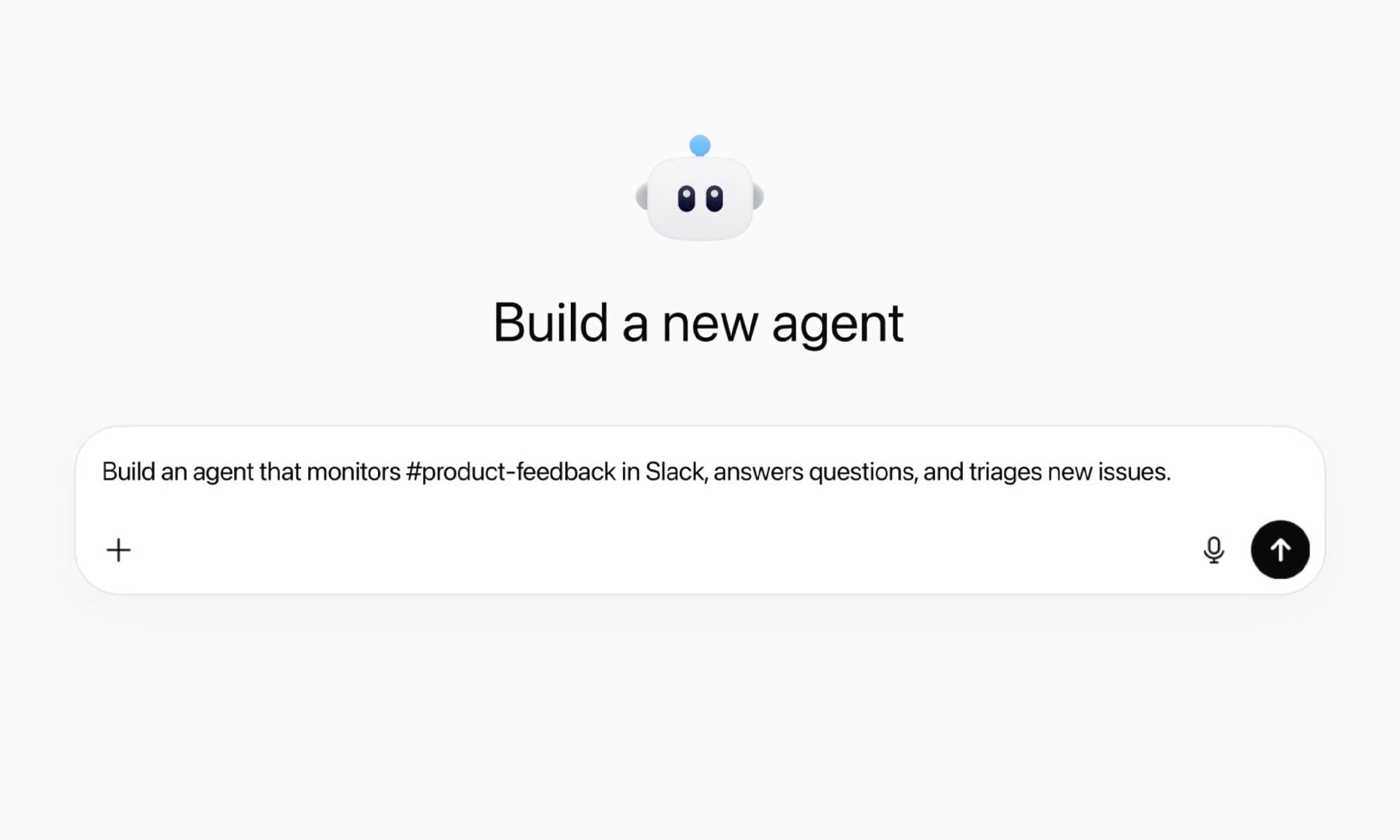
For instance, a customer support team could deploy an agent to monitor feedback channels, categorize sentiment, escalate urgent issues to a human, and generate a daily digest. This transforms AI from a reactive tool into a proactive workflow engine that operates 24/7.

The Impact on Team Dynamics and Productivity

Consequently, the implications for organizational efficiency are significant. These agents are built to be shared assets. A team can develop, refine, and reuse a single agent for similar projects, accumulating institutional knowledge within the AI’s workflow instead of restarting from zero each time. This creates a compounding effect on productivity.

On the other hand, it’s crucial to understand the current boundaries. Agents operate within strict permissions and require thoughtful setup. They are engineered to augment human decision-making, not replace it. Their role is to handle the predictable, allowing team members to focus on strategy, creativity, and complex judgment calls.

In addition, this development signals a broader trend in enterprise software. The future of work tools is not just about better interfaces, but about embedding intelligent, persistent automation directly into the fabric of collaboration. As these agents evolve, we may see them managing cross-departmental projects or even orchestrating resources based on real-time data.

Looking Ahead: The Evolving AI Colleague

Ultimately, the introduction of workspace agents marks a pivotal moment. ChatGPT is shedding its identity as a mere thinking aid. It is gradually becoming a working entity—a digital team member that plans, acts, and follows through. This transition promises to reshape not only how tasks are completed but also how teams are structured and how value is created in the modern workplace. For those looking to stay ahead, understanding and experimenting with these collaborative AI tools will be essential.

Continue Reading
Click to comment

Leave a Reply

Your email address will not be published. Required fields are marked *

Artificial Intelligence

Google Meet’s AI Note-Taking Feature Now Works in In-Person Meetings as Well

Published

on

Google Meet’s AI Note-Taking Feature Now Works in In-Person Meetings as Well

Have you ever walked out of a meeting with only a blurry recollection of what was said, clutching a notebook filled with scribbles that barely make sense? Google Meet AI note-taking is about to change that. At Google Cloud Next 2026 in Las Vegas, the tech giant unveiled a major upgrade to its “Take Notes for Me” feature. The most exciting part? It now functions seamlessly in physical meetings, not just virtual ones.

This means you can use the tool whether you are huddled around a conference table, chatting at a coffee shop, or sitting in a boardroom. The feature leverages Gemini, Google’s advanced AI model, to listen, transcribe, and summarize conversations in real time.

How Does Google Meet’s AI Note-Taking Work in Real Life?

The process is refreshingly straightforward. You simply open Google Meet on your smartphone or desktop, tap the “Take Notes for Me” button before or during a discussion, and let the AI do the heavy lifting. There’s no need for a pre-scheduled meeting or a specific setup—it works on the fly.

Once activated, Gemini starts listening to the conversation. It transcribes everything and then extracts key decisions, action items, and important points. Within moments, all that information is automatically compiled into a Google Doc. This makes the feature incredibly accessible, as the notes are instantly available for review or sharing.

Building on this simplicity, the tool is designed for any setting. Whether you are in a quiet office or a noisy café, the AI adapts to capture the essence of the discussion without manual effort.

Cross-Platform Capability: It Works Beyond Google Meet

One of the most compelling aspects of this update is its platform-agnostic nature. Google Meet AI note-taking now functions during Zoom and Microsoft Teams meetings as well. This positions Gemini as a universal note-taker that does not care which software you prefer for your workplace conversations.

As a result, the feature directly competes with paid transcription services like Otter.ai and Fireflies.ai. For now, it is available on select Google One, Google Workspace Business, and Workspace Enterprise plans. The full rollout is expected over the next few weeks, making it widely accessible to users.

However, this move feels less about note-taking and more about positioning Gemini as an omnipresent AI layer for all workplace conversations. It is not just a tool for Google’s ecosystem; it is a cross-platform assistant that can integrate into your daily workflow.

Why This Matters for Professionals and Teams

For professionals who juggle multiple meetings across different platforms, this feature is a game-changer. It eliminates the need to switch between apps or rely on separate transcription services. Instead, you have a single AI assistant that works everywhere.

Furthermore, the automatic generation of Google Docs means your notes are always organized and searchable. This can save hours of manual note-taking and reduce the risk of missing critical details. For teams, it fosters better collaboration by ensuring everyone has access to the same accurate record of discussions.

On the other hand, some users may have privacy concerns. The AI listens to conversations, which could raise questions about data security. Google has stated that the feature complies with its privacy policies, but it is wise to review these before using it in sensitive meetings.

How to Get Started with Google Meet’s AI Note-Taking

To use the feature, ensure you have a compatible Google Workspace plan. Open Google Meet on your device, start or join a meeting, and click the “Take Notes for Me” button. The AI will begin processing immediately. You can also activate it before a meeting to capture the entire conversation.

It is worth noting that the feature works without a pre-scheduled meeting, making it ideal for impromptu discussions. Whether you are brainstorming with colleagues or meeting a client at a café, the tool adapts to your needs.

For those who want to maximize productivity, consider exploring other Google Workspace features that integrate with Gemini, such as Smart Compose and automated summaries. These tools can further streamline your workflow and reduce administrative tasks.

In conclusion, Google Meet AI note-taking represents a significant step toward frictionless meeting documentation. By working across platforms and in physical settings, it aims to become an indispensable tool for modern professionals.

Continue Reading

Artificial Intelligence

Google Workspace Intelligence: How Gemini Becomes Your All-Knowing Work Assistant

Published

on

Google Workspace Intelligence: How Gemini Becomes Your All-Knowing Work Assistant

Imagine an assistant that knows your projects, your writing style, and your company’s brand guidelines without needing a briefing. This is the promise of Google‘s latest evolution: Workspace Intelligence. Building on the concept of Personal Intelligence for Gmail and Photos, Google is now applying a similar, context-aware AI layer across its entire professional suite. The core idea is simple yet profound: Gemini, Google’s AI, can now tap into the vast reservoir of information you store across Docs, Sheets, Slides, and Drive to act with unprecedented personalization.

What Exactly Is Workspace Intelligence?

At its heart, Workspace Intelligence is a connective framework. It removes the traditional barriers between your AI assistant and your actual work data. Instead of treating each document or spreadsheet as an isolated island, it allows Gemini to understand the relationships and content across your entire Workspace ecosystem. Consequently, when you ask a question or give a command, the AI can pull relevant context from emails, previous drafts, project plans, and company templates stored in Google Drive. This means less time spent searching for files and explaining background, and more time focused on the task itself.

The End of Context Switching

Google positions this feature as a solution to the constant, productivity-sapping need to switch between apps and dig through folders. For instance, if you’re writing a project report in Docs and need data from a quarterly review in Sheets, you no longer have to manually find and reference it. You can simply ask Gemini to incorporate the relevant figures, and Workspace Intelligence provides the necessary bridge. This seamless integration is designed to make the AI feel less like a tool and more like a knowledgeable colleague who’s been on the project from the start.

Transforming Ideas into Polished Work

So, how does this manifest in daily use? The applications are extensive. According to Google, Workspace Intelligence enables Gemini to “retrieve your relevant emails, chats, files, and information from the web to transform ideas into professionally formatted drafts.” More importantly, these drafts are designed to mimic your specific voice, adhere to your brand’s style, and utilize approved company templates automatically. This moves AI assistance beyond generic text generation into the realm of personalized, brand-safe content creation.

Building on this, the implications for efficiency are significant. In Google Docs, Gemini can now handle complex edits based on your historical preferences. Ask it to format an image, and it will apply edits consistent with your past choices. Need to address a batch of comments in a document? Gemini can autonomously make the suggested revisions based on your instructions, learning from the context Workspace Intelligence provides.

From Documents to Dynamic Presentations

The capability extends powerfully into visual and presentation work. Google highlights the ability to “one-shot” slide decks. You can ask Gemini to create a presentation on a specific topic, and it will use Workspace Intelligence to gather context, structure the narrative, and—critically—build the deck using your company’s official templates and visual styles. The result is a ready-to-present slide deck that looks like it came from your communications department, not an AI generator. This eliminates a huge amount of manual formatting and branding work.

Smart Inbox and Email Summaries

Furthermore, Workspace Intelligence integrates with your communication tools. The AI Inbox feature in Gmail, part of this package, reorganizes your email into a task-based workflow, helping you quickly identify action items and ongoing conversations. Similarly, AI Overviews for Gmail creates concise summaries of lengthy email threads, much like the AI Overviews in Google Search. This means you can catch up on a week-long project discussion in seconds, with all key decisions and action points extracted for you.

A Competitive Landscape for AI Assistants

This development places Google in direct competition with other advanced AI agents in the workspace. The functionality is reminiscent of what Anthropic‘s Claude can achieve, particularly through extensions in environments like Microsoft PowerPoint. The race is no longer just about which AI can write the best paragraph, but which can most deeply and usefully integrate into a user’s existing digital environment, understanding their unique history and needs. Workspace Intelligence is Google’s ambitious answer to that challenge.

In addition, this shift represents a broader trend in enterprise software: the move from passive tools to active, intelligent agents. The software isn’t just waiting for commands; it’s anticipating needs based on a deep understanding of your content. For businesses, the potential for consistency, speed, and reduced manual labor is enormous. For individual users, it promises a workday with fewer tedious tasks and more strategic thinking.

Ultimately, Workspace Intelligence is more than a feature update; it’s a reimagining of how we interact with our core productivity software. By giving Gemini a memory and a deep understanding of our work context, Google is betting that the future of work is not just assisted by AI, but profoundly partnered with it. As this technology rolls out, the measure of success will be how seamlessly it fades into the background, making complex, personalized work feel simple and intuitive.

Continue Reading

Artificial Intelligence

Google Integrates Gemini AI Directly Into Chat, Turning Conversations Into a Productivity Hub

Published

on

Google Integrates Gemini AI Directly Into Chat, Turning Conversations Into a Productivity Hub

Google is fundamentally reshaping how work gets done within its ecosystem. The company is embedding its Gemini AI assistant directly into Google Chat, transforming the messaging platform from a simple communication tool into a dynamic command center for creating documents, building presentations, and managing tasks. This move signals a major shift towards unified, AI-powered workflows.

Therefore, the days of constantly switching between apps to complete a simple task may be numbered. With the new “Ask Gemini in Chat” feature, users can now type a request in plain English—or any supported language—and watch as the AI handles the heavy lifting in the background, delivering results directly into the chat thread.

How Gemini in Google Chat Transforms Your Workflow

Imagine you’re in a team chat discussing a new project. Instead of saying “I’ll create a doc for that and share it,” you can now simply type, “Gemini, create a project brief Google Doc based on this conversation.” The AI will interpret the request, generate the document, and post a link to the newly created file right there in the chat. This seamless integration eliminates the disruptive context-switching that plagues modern digital work.

Building on this, the capabilities extend far beyond document creation. Users can instruct Gemini to build a slide deck for an upcoming review, schedule a team meeting by finding a common time on everyone’s calendar, or even locate a specific file buried in Google Drive based on a vague description. The goal is clear: keep the work flowing within the conversation where it originates.

The New Daily Briefing Feature

In addition to on-demand task execution, Gemini introduces a proactive daily briefing. This feature surfaces a personalized digest of important items directly in Chat, highlighting urgent tasks, unread conversations requiring attention, and upcoming deadlines. Consequently, users can start their day with a consolidated overview, reducing the need to manually check multiple apps for status updates.

Expanding Beyond Google’s Walls: Third-Party Integrations

Perhaps one of the most significant aspects of this update is Gemini’s newfound ability to connect with external tools. This is not just a closed Google system. The AI can now interface with popular third-party platforms like Asana, Jira, and Salesforce.

This means a user in Chat could ask, “Gemini, what are my top-priority tickets in Jira this week?” or “Add this action item to the Q3 project in Asana.” By bridging these ecosystems, Google is positioning Chat as a universal work interface, significantly expanding its utility and making it a viable central hub for complex, cross-platform workflows.

Why This AI Integration Matters for Teams

The strategic integration of Gemini in Google Chat reflects a broader industry trend: the move from AI as a standalone novelty to AI as an embedded, invisible partner within core applications. The friction of moving from talking about work to actually doing it is dramatically reduced.

For teams, the implications for collaboration are substantial. Work outputs—documents, slides, task lists—are generated and shared instantly within the context of the relevant discussion. Team members can then review, comment, and iterate on that content without ever breaking stride or leaving the shared conversation space. This could potentially accelerate project cycles and improve alignment.

However, the success of this ambitious vision hinges on two critical factors: the accuracy of Gemini’s natural language understanding and the reliability of its integrations. The system must correctly interpret nuanced user requests and execute them flawlessly across different connected apps to build trust and become indispensable. For more on how AI is shaping collaboration, see our article on the future of work software.

The Future of AI-Powered Productivity

Google is expected to rapidly expand Gemini’s capabilities within the Workspace suite. We can anticipate more third-party integrations, support for increasingly complex and multi-step tasks, and refinements to the AI’s contextual awareness. The long-term trajectory points toward a world where the line between communication and execution is blurred entirely.

In essence, everyday work conversations become actionable workflows. Mentioning a goal in chat can automatically trigger the creation of a plan. Discussing a blocker can summon relevant data from a CRM. This evolution turns Chat from a passive record of discussion into an active participant in driving work forward. To understand the foundation of these tools, explore our guide on getting started with Google Workspace.

Ultimately, this update is more than a feature drop; it’s a statement of intent. Google is aggressively competing in the high-stakes arena of AI productivity, aiming to make its ecosystem the most intuitive and powerful place to work by ensuring the AI is always right there, in the flow of the conversation, ready to help.

Continue Reading

Trending