Connect with us

How To

How to Change WhatsApp Phone Number Without Losing Chats: Best Easy Tricks

Published

on

How to Change WhatsApp Phone Number Without Losing Chats: Best Easy Tricks

Switching to a new phone number doesn’t have to mean losing your precious WhatsApp conversations. Many users worry that changing their number will wipe out their chat history, but that’s not the case. WhatsApp offers a built-in feature that lets you change WhatsApp phone number seamlessly while preserving all your messages, media, and group chats.

In this guide, we’ll walk you through the entire process step by step. You’ll learn the best tricks to ensure nothing gets lost, from backing up your data to notifying your contacts automatically.

Why Would You Need to Change Your WhatsApp Number?

There are plenty of reasons why someone might want to update their number on WhatsApp. Perhaps you’ve got a new SIM card for personal use, or you’re switching to a business line. Moving to a different country is another common scenario where a local number becomes necessary.

Whatever the reason, the good news is that WhatsApp has made this transition smooth. The app automatically informs your contacts about the change, so you don’t have to send individual messages. Plus, your chat history remains intact, which is a huge relief for anyone who relies on WhatsApp for important conversations.

What You Need Before You Start

Before diving into the steps, there are a couple of prerequisites you must fulfill. First, insert your new SIM card into your phone. Ensure it can receive SMS messages and phone calls, because WhatsApp will send a verification code to this number.

Second, verify that your old number is still active on WhatsApp. Open the app, go to Settings, and check that your current number appears correctly. If everything looks good, you’re ready to proceed.

Step-by-Step Guide to Change WhatsApp Phone Number Without Losing Chats

Back Up Your Chats First

Although WhatsApp’s change-number feature preserves your chats, it’s always smart to create a backup. Open WhatsApp, tap the three dots in the top-right corner, and go to Settings > Chats > Chat backup. Hit the backup button to save your conversations to Google Drive or iCloud.

This extra step ensures that even if something goes wrong, you can restore your messages later. It’s a simple precaution that takes just a minute.

Access the Change Number Option

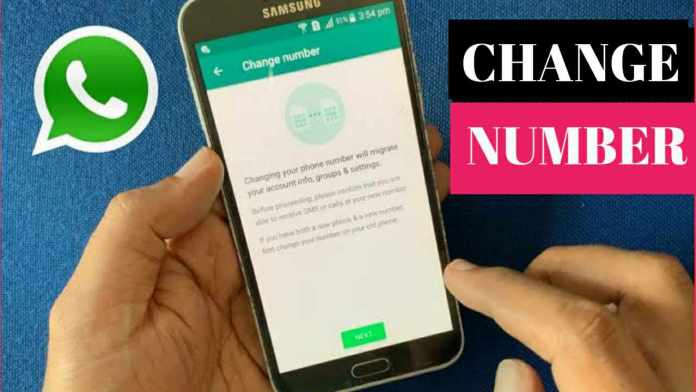
Now, open WhatsApp and navigate to Settings. Tap on Account, then select Change Number. This is the official feature designed specifically for updating your phone number.

You’ll see a screen explaining what happens next: your data transfers to the new number, and your contacts get notified. Tap Next to continue.

Enter Your Old and New Numbers

You’ll be prompted to enter both your old and new phone numbers. Make sure to use international format, including the country code. For example, if you’re in the US, enter +1 followed by your number.

Double-check the digits carefully. A typo here could cause complications, so take your time.

Choose Who to Notify

WhatsApp gives you the option to inform your contacts about the number change. You can choose to notify all contacts, only those you have active chats with, or no one at all. Pick the option that feels right for you.

If you’re changing numbers for privacy reasons, you might prefer to skip the notification. Otherwise, telling your contacts helps them update their address books automatically.

Verify Your New Number

After tapping Done, WhatsApp will send a six-digit verification code to your new number via SMS. Enter this code in the app to confirm the change. Once verified, your account will be linked to the new number, and all your chats will remain accessible.

That’s it! You’ve successfully completed the process. Your old number will no longer be associated with WhatsApp, but your conversation history stays right where it is.

Common Questions About Changing Your WhatsApp Number

Will I Lose My Group Chats?

No, you won’t. Group chats remain intact because they’re tied to your account, not your phone number. After the change, you’ll still be a member of all your groups, and your message history within them will be preserved.

What Happens to My Profile Picture and Status?

Your profile picture, status updates, and about section all carry over to the new number. Nothing changes except the phone number associated with your account.

Can I Change My Number Without Notifying Contacts?

Yes, you can. When you reach the notification step, simply select “No One” from the options. Your contacts won’t receive any alerts, but they might notice your new number if they check your profile.

Additional Tips for a Smooth Transition

To make the switch even easier, consider updating your number on other platforms that use WhatsApp verification, like banking apps or social media. Also, let close friends and family know directly about your new number.

If you’re interested in other WhatsApp tricks, check out our guide on how to read deleted WhatsApp messages or explore the latest WhatsApp features you might be missing.

Changing your WhatsApp number doesn’t have to be a headache. With the built-in tools and a little preparation, you can update your number quickly and keep all your chats safe. Follow these steps, and you’ll be back to messaging in no time.

Continue Reading
Click to comment

Leave a Reply

Your email address will not be published. Required fields are marked *

How To

Discovering The Best Music Player Android App of All Times!

Published

on

Discovering The Best Music Player Android App of All Times!

Music is more than just sound—it is a lifeline for millions of people around the world. Whether you are commuting, working out, or simply relaxing, the right playlist can transform your mood. But what if your music player could do more than just play songs? Imagine an app that turns your screen into a live, pulsating light show that reacts to every beat. That is exactly what the best music player Android app offers today.

In this article, we dive deep into an innovative application called Muviz Edge Music Visualizer, AOD Edge Lighting. This app redefines how you experience music on your Android device. Instead of a static interface, it brings dynamic edge lighting and real-time visualizers that dance around your screen. Let us explore why this tool stands out from the crowd.

What Makes Muviz Edge the Best Music Player Android App?

Traditional music players often feel outdated. You open them, select a song, and stare at a plain album cover. Muviz Edge changes that entirely. It is the first app of its kind to display a live music visualizer around the edges of your screen while you listen. This creates an immersive experience that blends audio with visual art.

The app supports a wide variety of music genres. From Bollywood and Hollywood hits to Tollywood, Bhojpuri, and even training music, there is something for everyone. This versatility makes it a strong contender for the title of best music player Android app for diverse audiences.

Key Features That Set It Apart

Live Music Visualizer: The core feature is a real-time visualizer that pulses and shifts along with the rhythm of your music. It wraps around the edges of your screen, creating a mesmerizing effect.

Edge Lighting Effect: The app uses your device’s screen edges to display colorful lights. This edge lighting effect is both attractive and functional, giving your phone a futuristic look while you play songs.

Wide Genre Support: You can enjoy everything from upbeat Bollywood tracks to calming training music. The app categorizes music neatly, making it easy to find what you love.

If you are tired of boring interfaces, this app offers a fresh perspective. It is not just a music player; it is an experience. Many users have called it the best music player Android app for its unique approach to audio visualization.

How to Download and Install Muviz Edge

Getting started with this app is straightforward. Follow these simple steps to bring the visual magic to your device.

  1. Visit Google Play Store: Open the Google Play Store on your Android phone.
  2. Search for the App: Type “Muviz Edge Music Visualizer” into the search bar.
  3. Download and Install: Tap on the app from the results, then press “Install.” The download will begin automatically.
  4. Alternative Method: You can also use a direct download link if available on the developer’s site.

Once installed, you need to grant a few permissions for the app to display the edge lighting correctly. This includes access to your music library and overlay permission for the visualizer. Do not worry—the app is safe and respects your privacy.

Step-by-Step Guide to Using the App

After installation, using Muviz Edge is a breeze. Here is how you can start enjoying your music in a whole new way.

  1. Launch the App: Open Muviz Edge from your app drawer.
  2. Grant Permissions: Allow the necessary permissions, such as storage and overlay access. These are required for the visualizer to work.
  3. Select Your Music: Choose a song from your library or use a third-party music player. The visualizer works with most popular music apps.
  4. Enjoy the Show: As the music plays, watch the edges of your screen light up and dance to the rhythm.

This app integrates seamlessly with your existing music collection. You do not need to change your listening habits—just add a layer of visual excitement. For more tips on optimizing your Android experience, check out our guide on how to turn off your Android phone efficiently.

Why This App Deserves the Spotlight

There are hundreds of music players on the Play Store. So why does Muviz Edge claim to be the best music player Android app? The answer lies in its originality. While other apps focus on equalizers or playlist management, Muviz Edge prioritizes the visual experience. It transforms your phone into a mini concert stage.

Building on this, the app does not compromise on performance. It runs smoothly on most Android devices, even those with modest hardware. The battery impact is minimal, so you can enjoy long listening sessions without worry.

Moreover, the edge lighting effect is not just for music. Some users have reported using it for notifications and alarms, adding a layer of customization to their daily routine. This versatility further cements its status as a top-tier app.

Final Thoughts: Is It Worth Your Time?

If you are a music lover looking for something different, this app is a must-try. It breaks away from the monotony of standard music players and offers a visually engaging alternative. The combination of live visualizers and edge lighting creates an atmosphere that makes every song feel special.

However, no app is perfect. Some users may find the permissions slightly intrusive, but they are standard for this type of functionality. Additionally, the app works best with locally stored music rather than streaming services. Nevertheless, for its price point (often free with optional in-app purchases), it delivers exceptional value.

I hope this article helps you discover a new way to enjoy your favorite tracks. If you have any questions or feedback, feel free to leave a comment below. Do not forget to share this post on social media to help other music enthusiasts find the best music player Android app of all times. For more app reviews and tech tips, explore our article on what is Pink WhatsApp and stay informed about digital trends.

Continue Reading

How To

Best Processor for Mobile Phone: Ranking the Top 5 Chipsets in 2025

Published

on

Best Processor for Mobile Phone: Ranking the Top 5 Chipsets in 2025

Choosing the right smartphone often comes down to one critical component: the processor. With new chipsets launching every year, finding the best processor for mobile phone can feel overwhelming. Whether you are a gamer, a photographer, or a casual user, the System-on-Chip (SoC) inside your device dictates everything from speed to battery life. In this guide, we break down the top five mobile processors dominating the market today, explain what makes them stand out, and help you match a chipset to your needs.

What Is a Mobile Processor and Why Does It Matter?

A mobile processor, often called an SoC, is the brain of your smartphone. It integrates the CPU, GPU, AI engine, image signal processor, and modem into a single chip. This tiny circuit handles all instructions—from launching apps to rendering graphics and processing photos. Modern processors include dedicated neural processing units (NPUs) for AI tasks, which enhance camera performance and voice recognition.

Therefore, the processor directly impacts your daily experience. A powerful chipset ensures smooth multitasking, faster load times, and better gaming. On the other hand, a weaker processor may struggle with heavy apps or overheat during extended use. This is why understanding the best processor for mobile phone options is essential before making a purchase.

How Benchmarking Measures Processor Performance

Benchmarking is the industry standard for evaluating SoC performance. Tests like Geekbench and AnTuTu measure CPU speed, GPU efficiency, and battery handling. The scores help compare chipsets objectively. For instance, a higher score means better computational power. However, real-world performance also depends on software optimization and thermal management.

Top 5 Best Processors for Mobile Phones in 2025

After analyzing current benchmarks and user feedback, here are the five leading chipsets that define the best processor for mobile phone category today. Each excels in different areas, so consider your usage pattern.

1. Apple A16 Bionic

The Apple A16 Bionic powers the iPhone 14 Pro and Pro Max. Built on a 4nm process, it features a 6-core CPU (2 performance cores at 3.46 GHz and 4 efficiency cores) and a 5-core Apple GPU. It leads in single-core performance and excels in AI tasks thanks to its 16-core Neural Engine. For iOS users, this is the undisputed champion.

2. Qualcomm Snapdragon 8 Gen 2

Qualcomm’s Snapdragon 8 Gen 2 is the go-to choice for flagship Android devices. Its 8-core CPU (1 prime core at 3.20 GHz, 4 performance cores, and 3 efficiency cores) paired with the Adreno 740 GPU delivers exceptional gaming and multitasking. It also supports ray tracing for console-quality graphics. Many top-tier phones like the Samsung Galaxy S23 Ultra rely on this chip.

3. MediaTek Dimensity 9200

MediaTek has risen rapidly with the Dimensity 9200. This 4nm chip offers an 8-core CPU (1 Cortex-X3 at 3.05 GHz) and an Immortalis-G715 GPU. It competes directly with Snapdragon in raw power and 5G connectivity. Moreover, it includes advanced AI capabilities for camera enhancements. It is a strong contender for the best processor for mobile phone under the $1000 segment.

4. Google Tensor G2

Google’s Tensor G2 powers the Pixel 7 series. It focuses on AI and machine learning rather than brute CPU speed. With an 8-core configuration (2 Cortex-X1 at 2.85 GHz) and a Mali-G710 MP7 GPU, it excels in computational photography and voice recognition. While not the fastest in benchmarks, its software integration makes it unique.

5. Samsung Exynos 2200

Samsung’s Exynos 2200, used in select Galaxy S22 models, features an 8-core CPU (1 Cortex-X2 at 2.8 GHz) and an AMD RDNA 2-based Xclipse 920 GPU. This GPU supports ray tracing and variable rate shading for immersive gaming. However, it trails behind Snapdragon in sustained performance due to thermal throttling.

How to Choose the Right Processor for Your Needs

Selecting the best processor for mobile phone depends on how you use your device. For heavy gaming and video editing, prioritize chipsets with high clock speeds and powerful GPUs like the Snapdragon 8 Gen 2 or Apple A16 Bionic. If you are a casual user focused on browsing, social media, and photography, mid-range options like the MediaTek Dimensity 7200 or Snapdragon 7 Gen 1 offer excellent value.

Additionally, consider the ecosystem. iOS users are locked into Apple’s A-series chips, while Android users have a wider choice. Battery life also varies: efficient chips like the A16 Bionic and Tensor G2 manage power well, while high-performance SoCs may drain faster under load.

Final Thoughts: Making an Informed Decision

In the end, the best processor for mobile phone is the one that aligns with your priorities. The Apple A16 Bionic dominates benchmarks, but the Snapdragon 8 Gen 2 offers unmatched Android gaming. Meanwhile, Google Tensor G2 shines in AI-driven features. Always check real-world reviews and consider factors like display, camera, and battery alongside the chipset.

Ready to upgrade? Explore our guides on best smartphones under $500 and how to check phone specs to match your processor choice with the perfect device.

Continue Reading

How To

Discover The Best Stranger Online Chat App of All Times!

Published

on

Discover The Best Stranger Online Chat App of All Times!

Are you looking for a way to meet new people and have fun conversations without revealing your identity? The stranger online chat app market is flooded with options, but not all of them deliver a smooth, safe, and truly free experience. In this article, we’ll introduce you to a top-rated app that stands out from the crowd. Whether you want to make new friends, practice a language, or simply pass the time, this app has you covered.

What Makes a Great Stranger Online Chat App?

Before we dive into the details, let’s talk about what sets the best apps apart. First and foremost, a great stranger online chat app should be easy to use. The registration process must be quick, and the interface should be intuitive. Additionally, privacy features are crucial. You need to feel safe when chatting with people you don’t know.

Another key factor is the variety of communication options. The best apps offer text chat, voice calls, and video calls. Some even include fun features like fake video calls or filters. Finally, the app should be accessible on multiple platforms, including Android and iOS, without any hidden costs.

Top Features of the Best Stranger Online Chat App

This particular stranger online chat app has gained popularity for several reasons. Let’s explore its standout features:

Free Text, Voice, and Video Calls

Unlike many apps that charge for premium features, this one is completely free. You can send unlimited messages, make voice calls, and even start video chats without paying a single penny. This makes it a fantastic choice for budget-conscious users who still want high-quality communication.

Fake Video Call Feature

A unique addition to this app is the fake video call option. This feature allows you to simulate a video call with a contact, which can be useful for pranks or testing the app’s interface. While not essential, it adds a layer of fun to the experience.

Meet People Nearby

Building on the idea of connecting with strangers, the app includes a location-based feature. You can discover and chat with people who are physically close to you. This is perfect for those who want to turn online friendships into real-life meetups.

How to Use the Stranger Online Chat App

Getting started with this stranger online chat app is incredibly simple. Follow these steps:

  1. Download the app: Click the download button below to get the APK or app from the official store. The app is available for both Android and iOS devices.
  2. Install and configure: Open the app and grant the necessary permissions. This typically includes access to your microphone and camera for voice and video calls.
  3. Create an account: Log in using your preferred method. Some apps allow you to sign in with a social media account, while others require a phone number or email.
  4. Start chatting: Once logged in, you can browse profiles, send friend requests, or jump into a random chat with a stranger. The app’s interface is designed to make connecting effortless.

Safety Tips for Using Anonymous Chat Apps

While the stranger online chat app we’re reviewing is user-friendly, it’s important to stay safe online. Here are a few tips:

  • Never share personal information: Avoid giving out your real name, address, phone number, or financial details to strangers.
  • Use the block and report features: If someone makes you uncomfortable, don’t hesitate to block them and report the profile to the app’s support team.
  • Be cautious with video calls: While video chatting is fun, remember that the other person can record the call. Use the fake video call feature if you want to test the waters without showing your face.

Why This App Stands Out Among Competitors

There are dozens of anonymous chat apps available on the Google Play Store and Apple App Store. However, this particular app distinguishes itself with its 100% free model. Many competitors lock essential features behind a paywall. Here, you get everything — from text messaging to HD video calls — without any subscription fees.

Moreover, the app is optimized for low-end devices. It runs smoothly on older Android phones and doesn’t consume excessive battery or data. This makes it accessible to a wider audience, especially in regions where high-end smartphones are not common.

For more insights on similar tools, check out our guide on best dating apps for Android and our review of top free video call apps.

Final Verdict: Is This the Best Stranger Online Chat App?

After testing the app thoroughly, we can confidently say that it is one of the best free options available. The combination of unlimited free calls, a user-friendly interface, and safety features makes it a strong contender for the title of the best stranger online chat app of all times.

If you enjoy meeting new people and want a hassle-free experience, download the app today. Share this article with your friends on social media if you found it helpful. And if you have any questions about using the app, leave a comment below — we’d love to help!

Continue Reading

Trending