How to Check Suspicious Links Before Clicking and Stay Safe Online
Every day, millions of people receive messages containing unknown links. Cybercriminals hide behind these URLs, waiting to steal passwords, bank details, or infect devices with malware. Learning to check suspicious links before clicking is one of the most important online safety habits you can adopt. This guide covers warning signs, security tools, and smart browsing practices to keep you protected.
Recognizing Common Warning Signs in Suspicious Links
Before you click any unknown URL, pause and look for red flags. Hackers rely on urgency, deception, and carelessness. By spotting these signs, you can avoid phishing attacks and malware infections.
URL Shorteners Can Hide Dangerous Destinations
Shortened links from services like Bitly or TinyURL are convenient for marketing, but they also mask the final website address. Cybercriminals frequently use them to trick users. If you receive a shortened link without context, treat it with suspicion. Use a tool like CheckShortURL to expand the link safely before clicking.
Misspelled Domains Signal Fake Websites
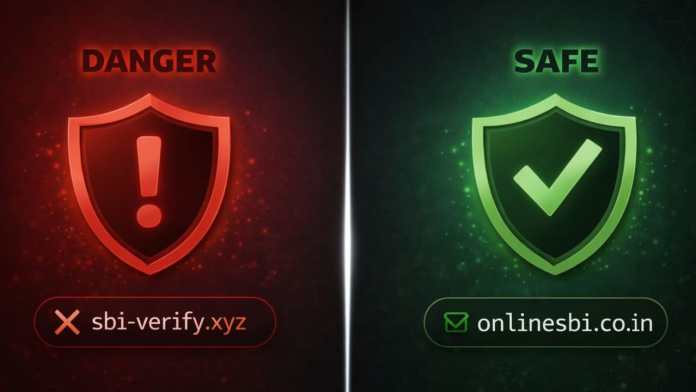
Hackers create lookalike domains by swapping letters or adding extra characters. For example, “amaz0n.com” instead of “amazon.com.” These tiny differences are easy to miss, especially on mobile screens. Always double-check the domain name before entering any personal information.
Unsecured Websites (HTTP vs. HTTPS)
Safe websites use HTTPS encryption, indicated by a padlock icon in the browser bar. If a site lacks this protection, avoid entering passwords or payment details. Cybercriminals often set up unsecured pages to harvest user data.
Strange URL Structures and Excessive Subdomains
Legitimate websites maintain clean, logical URLs. Suspicious links often contain random characters, long tracking codes, or multiple subdomains like “secure.bank.login.example.com.” Such complexity is a common tactic to confuse users and hide malicious intent.
How Scammers Manipulate Your Emotions
Phishing attacks work because they trigger fear, greed, or urgency. Recognizing these emotional hooks helps you stay rational and avoid dangerous clicks.
Urgent Messages Push You to Act Without Thinking
Emails threatening account suspension, unpaid invoices, or immediate KYC updates are classic phishing tactics. The goal is to make you panic and click without verifying. Legitimate organizations give you time to respond. If a message demands instant action, pause and verify through official channels.
Too-Good-to-Be-True Offers Hide Scams
Messages promising free prizes, huge discounts, or lottery wins are almost always scams. Hackers use these lures to collect personal information or request small “processing fees.” Delete such messages immediately.
Use Trusted Tools to Check Suspicious Links Safely
Several free online scanners let you check suspicious links without exposing your device to harm. These tools analyze URLs for malware, phishing, and other threats.
Bitdefender Link Checker
Bitdefender offers a free URL scanner. Paste the link, click “Check URL,” and receive a safety report within seconds. It’s ideal for quick verification before clicking unknown links.
NordVPN Link Checker
NordVPN provides a link checker that detects phishing pages and malware. It also scans messages and files, making it a comprehensive safety tool for browsing and email.
VirusTotal
VirusTotal analyzes URLs and files using multiple antivirus engines. Paste a suspicious link, and the platform displays detailed reports, including community ratings that flag dangerous sites.
F-Secure Link Checker
F-Secure offers a straightforward link checker. Enter a URL, and the tool instantly tells you if the site is safe or a known phishing threat. It’s updated regularly to counter new cyber attacks.
Google Safe Browsing
Google Safe Browsing protects billions of users by flagging unsafe websites. You can manually check if a site is dangerous by pasting its URL into the tool. Avoid opening any site marked as unsafe.
urlscan.io
urlscan.io lets you preview a website’s content without visiting it directly. It captures screenshots and shows redirects, helping you understand a site’s behavior before you risk your security.
EasyDMARC Phishing URL Checker
EasyDMARC offers a phishing URL checker designed for email security. It scans multiple links at once and classifies them as clean or suspicious. Businesses can integrate its API into existing security systems.
Developing Smart Online Safety Habits
Tools are helpful, but your daily habits make the biggest difference. Adopt these practices to reduce your risk of falling for malicious links.
Hover Before You Click
Hover your mouse over any link before clicking. Most browsers display the actual URL in the status bar or near the cursor. This simple habit reveals mismatches between the displayed text and the real destination.
Verify the Sender’s Identity
Hackers often spoof company names and email addresses. Check the sender’s full email address, not just the display name. If it doesn’t match the official domain, treat the message as suspicious.
Install Antivirus Software with Real-Time Protection
Modern antivirus programs automatically scan links and block dangerous pages before they load. Keep your software updated to defend against the latest threats. For more tips, read our guide on avoiding phishing emails.
Avoid Sharing Private Links in Public Scanners
Some online scanners store submitted URLs and scan results. Never paste confidential links—such as login pages or internal company resources—into public tools. Instead, contact your IT team or use a private verification method.
Think Before You Click
Cybercriminals depend on impulsive clicks. Take a few seconds to evaluate the message, the sender, and the link. This pause can prevent a serious security breach. For more cybersecurity advice, explore our beginner’s guide to online safety.
Final Thoughts
Staying safe online starts with a simple habit: always check suspicious links before clicking. By recognizing warning signs, using free security tools, and practicing mindful browsing, you can protect your personal data and devices from cyber threats. Don’t let urgency or greed cloud your judgment—verify first, click later. For additional resources, visit our online safety tools page.








 CyberSecurity7 months ago
 How To6 months ago
 How To4 months ago
 How To6 months ago
 How To5 months ago
 How To7 months ago

 How To6 months ago