Connect with us

How To

How to Lock Specific Chats on WhatsApp for Android and iOS Users

Published

on

How to Lock Specific Chats on WhatsApp for Android and iOS Users

In today’s digital landscape, privacy concerns are paramount. WhatsApp, the popular messaging platform owned by Meta, has responded by introducing a powerful feature designed to give users more control over their private conversations. The ability to lock specific chats adds an essential layer of security, ensuring sensitive discussions remain confidential even if someone gains physical access to your device. This guide provides a comprehensive walkthrough for both Android and iOS users.

Understanding WhatsApp’s Chat Lock Feature

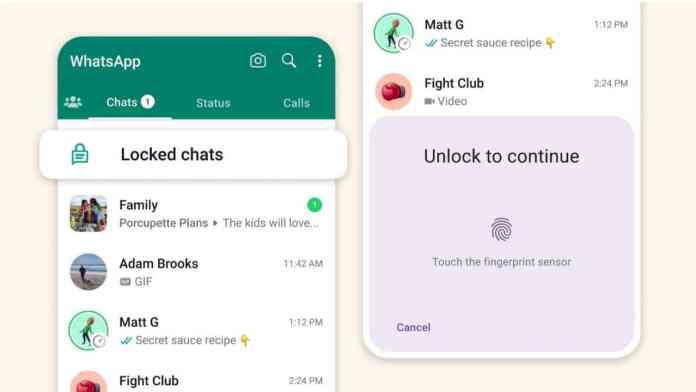
While WhatsApp has long offered app-level security through device passwords or biometrics, the chat lock function represents a significant evolution. This feature allows you to protect individual conversations with an additional authentication step. Consequently, even if someone unlocks your phone and opens WhatsApp, these selected chats remain hidden behind a separate lock. Building on this, the feature also conceals message previews and sender names in notifications, creating a comprehensive privacy shield.

Why You Should Use Chat Lock

Consider the common scenarios where this feature proves invaluable. Perhaps you share your device occasionally with family members, or maybe your work requires colleagues to sometimes use your phone. In such situations, having the option to lock WhatsApp chats ensures personal or sensitive business discussions stay private. This granular control means you don’t have to hide your entire WhatsApp experience—just the conversations that demand extra discretion.

Step-by-Step Guide to Locking Chats on WhatsApp

The process to enable chat lock is remarkably straightforward and consistent across both major mobile platforms. First, ensure your WhatsApp application is updated to the latest version from the Google Play Store or Apple App Store. This guarantees access to the newest privacy tools.

To begin, open the specific conversation you wish to secure. Tap on the contact’s or group’s name at the top of the screen to access the chat info page. Scroll down through the menu options until you locate “Chat Lock.” Selecting this will present you with the option to “Lock this chat with fingerprint” (on Android) or “Lock this chat with Face ID/Touch ID” (on iOS). After enabling the toggle, confirm your biometric authentication when prompted. A notification will appear, reminding you that the chat will not be locked on any linked devices, such as WhatsApp Web. Tap “OK” to finalize the process.

Accessing Your Locked WhatsApp Chats

Once you lock WhatsApp chats, they vanish from your main chat list. So, how do you find them again? The platform creates a dedicated, hidden folder for all your secured conversations. To access it, simply pull down on your main chat screen. You will see a new “Locked Chats” section appear above your archived chats. Tap this folder and authenticate with your fingerprint or face scan. This reveals all your protected conversations in one place. Importantly, when you exit this folder or return to the main chat list, the chats automatically re-lock themselves, maintaining continuous security.

Managing Notifications for Locked Chats

A key aspect of this privacy feature is its handling of notifications. To prevent information leaks, WhatsApp suppresses message previews and contact names for locked chats in your notification panel. You will only see a generic alert stating “WhatsApp: 1 new message” without revealing the sender or content. This ensures privacy is maintained even when your phone is locked and notifications are visible on the screen.

Important Considerations and Limitations

While the chat lock feature is powerful, it’s crucial to understand its scope. First, the lock only applies to the primary device where you enabled it. Conversations in locked chats will still appear normally on any linked devices, such as WhatsApp Desktop or WhatsApp Web. Therefore, for complete privacy, you should also manage your linked device sessions. Second, the feature relies on your device’s native biometric security. If you haven’t set up a fingerprint or face unlock on your phone, you won’t be able to use chat lock.

Furthermore, remember that this is a client-side security measure. It protects against someone physically using your phone, but it does not change how WhatsApp handles message encryption or data storage on its servers. For broader privacy settings, explore our guide on managing your WhatsApp privacy.

Enhancing Your Overall WhatsApp Security

Using chat lock is just one part of a robust privacy strategy. To build a more secure messaging environment, consider implementing other features WhatsApp offers. Enable two-step verification for your account to add a PIN that’s required periodically. Regularly review which devices are linked to your account and log out from unfamiliar ones. You can also control who sees your profile photo, “last seen” status, and “about” information through the app’s Privacy settings. For a deeper dive into these options, check out our article on advanced WhatsApp tips and tricks.

In conclusion, the ability to lock WhatsApp chats is a thoughtfully designed tool that puts privacy control directly in the user’s hands. By following the simple steps outlined above, you can selectively shield your most sensitive conversations from prying eyes, adding a vital layer of personal security to your daily communications. As messaging apps continue to evolve, features like this underscore the importance of user-centric privacy in the digital age.

Continue Reading
Click to comment

Leave a Reply

Your email address will not be published. Required fields are marked *

How To

App Lock: The Ultimate Tool to Safeguard Your Private Data, Videos & Images

Published

on

App Lock: The Ultimate Tool to Safeguard Your Private Data, Videos & Images

In an era where smartphones hold the keys to our personal lives, protecting sensitive information has never been more critical. Whether it’s private photos, confidential documents, or personal videos, a single unauthorized glance can compromise your privacy. Fortunately, a reliable app lock provides a simple yet powerful solution. This article explores how you can use an app lock to safeguard your private data, videos, and images effectively.

Why You Need an App Lock for Your Android Device

Most modern smartphones come with built-in screen locks, such as PIN codes, patterns, or fingerprint scanners. However, these only protect your phone at the entry level. Once someone unlocks your device, they can access every app and file inside. That’s where a dedicated app lock becomes essential.

By adding an extra layer of security to individual apps, you ensure that even if your phone is unlocked, your most sensitive content remains hidden. This is especially useful when lending your phone to a friend or colleague. Additionally, an app lock prevents accidental openings of private apps by children or others.

Therefore, investing in a good app lock is a proactive step toward Android privacy. It gives you peace of mind, knowing that your personal data is always under your control.

Key Features of a Top-Rated App Lock

Secure Private Videos, Photos, and Data

One of the primary functions of an app lock is to protect your media files. With features like a hidden vault, you can move sensitive videos and images into a secure folder that only you can access. This ensures that your private moments stay private.

Free Download and Easy to Use

Most app lock applications are free to download from the Google Play Store. They are designed with user-friendly interfaces, making them accessible even for non-tech-savvy individuals. Setup typically takes less than a minute.

100% Secure with No Login Required

Unlike some security tools that demand account creation, many app locks operate entirely offline. This means your data never leaves your device, enhancing private data protection. There is no risk of your credentials being leaked or misused.

Multiple Lock Methods: PIN, Pattern, and Fingerprint

To cater to different preferences, a good app lock offers various locking mechanisms. You can choose a traditional PIN, a pattern, or use your device’s fingerprint sensor for quick access. This flexibility makes it convenient to lock apps without compromising on speed.

Hide Videos in a Video Vault

Some advanced app locks include a dedicated video vault. This feature not only hides your videos but also encrypts them, adding an extra layer of security. It prevents anyone from viewing your media, even if they manage to bypass the lock screen.

How to Download and Set Up an App Lock

Getting started with an app lock is straightforward. Follow these simple steps:

  1. Open the Google Play Store on your Android device.
  2. Search for a trusted app lock application. Look for high ratings and positive reviews.
  3. Tap “Install” and wait for the download to finish.
  4. Open the app and grant the required permissions, such as access to usage data.
  5. Set your preferred lock method—PIN, pattern, or fingerprint.
  6. Select the apps you want to protect, such as gallery, messaging, or social media.

Once configured, the app lock will automatically secure your chosen apps. You can also customize settings like lock timing or stealth mode for added privacy.

For more tips on digital security, check out our guide on how to hide WhatsApp chats. Additionally, learn about best Android privacy tools to further protect your data.

Final Thoughts: Take Control of Your Privacy Today

In conclusion, an app lock is a must-have tool for anyone who values their digital privacy. It goes beyond basic screen locks to offer targeted protection for your most sensitive files. From hiding videos to locking social media accounts, the benefits are immense.

As a result, you can share your phone without worry and keep your personal life separate from public access. Remember, in the digital age, privacy is not a luxury—it is a necessity. Download an app lock today and take the first step toward comprehensive secure photos and data management.

Disclaimer: This app is intended for educational purposes only. Always use privacy tools responsibly and respect others’ privacy.

Continue Reading

How To

WhatsApp Business Status Archive Feature: How to Manage and Extend Your Updates

Published

on

WhatsApp Business Status Archive Feature: How to Manage and Extend Your Updates

Managing customer communication effectively is crucial for any business. WhatsApp Business, the dedicated platform for companies, has introduced a powerful tool: the WhatsApp Business status archive feature. This update allows businesses to preserve their status updates beyond the standard 24-hour window, offering greater control over their messaging strategy. In this guide, we will walk you through everything you need to know about this feature, its benefits, and how to use it to strengthen your brand’s presence.

What Is the WhatsApp Business Status Archive Feature?

Traditionally, WhatsApp statuses disappear after 24 hours. However, the WhatsApp Business status archive changes that. It lets you save specific statuses in a separate section instead of letting them vanish. Think of it as a storage folder for your important updates, announcements, or promotions. This feature is especially useful for businesses that want to keep key messages accessible for longer periods without cluttering their active status feed.

Unlike the standard WhatsApp app, the business version gives you more flexibility. You can now curate your content and decide which updates deserve extended visibility. This is not just about saving a photo or video; it is about strategically managing your brand’s narrative.

How Does the Archive Feature Work?

Using the WhatsApp Business status archive is straightforward. After you post a status, it will still disappear from the public view after 24 hours. But instead of losing it forever, you can manually archive it. The archived statuses are stored in a dedicated folder within the Status tab. You can revisit them anytime, unarchive them to make them active again, or delete them permanently.

This process is similar to archiving chats in WhatsApp. It keeps your workspace clean while ensuring nothing important is lost. For businesses running multiple campaigns or seasonal offers, this is a game-changer in terms of organization.

Step-by-Step Guide to Archive Your Status

To get started with the WhatsApp Business status archive, follow these simple steps:

  • Open WhatsApp Business and go to the Status tab.
  • Post your update as usual with images, text, or videos.
  • After 24 hours, tap the Archive option next to the status you want to save.
  • Access your archived statuses by tapping the Archive icon within the Status tab.
  • To restore a status, long-press it and select Unarchive. It will then appear in your active status list again.

This simple workflow gives you total control over your content lifecycle.

Key Benefits for Your Business

Why should you care about the WhatsApp Business status archive? Here are the main advantages:

Extended Visibility for Promotions

One of the biggest challenges with status updates is their short lifespan. With this feature, you can keep important announcements—like a flash sale or a product launch—accessible for days or weeks. Customers who missed the original post can still see it when you unarchive it. This boosts engagement and ensures your message reaches a wider audience.

Consistent Brand Messaging

Archiving allows you to maintain a cohesive brand story. You can save your best-performing statuses and reuse them during relevant campaigns. For example, a testimonial or a how-to video can be archived and reposted later. This consistency strengthens your brand identity and builds trust with your audience.

Efficient Content Management

Running a business means juggling multiple tasks. The archive feature helps you organize your statuses without deleting them. You can categorize archived content by theme, campaign, or date. This makes it easy to find specific updates when you need them for reference or repurposing.

For more tips on managing your business communications, check out our guide on how to block WhatsApp spam calls.

Best Practices for Using the Archive Feature

To get the most out of the WhatsApp Business status archive, consider these strategies:

  • Archive strategically: Not every status needs to be saved. Focus on high-value content like promotions, announcements, or customer success stories.
  • Review regularly: Set a weekly reminder to go through your archived statuses. Delete outdated ones and unarchive relevant updates for reposting.
  • Combine with other tools: Use the archive alongside WhatsApp Business catalogs and quick replies to create a seamless customer experience.

Additionally, you can learn about how to lock specific chats on WhatsApp to enhance your privacy settings.

Conclusion

The WhatsApp Business status archive feature is a simple yet powerful addition for any business looking to improve its communication strategy. It offers extended visibility, better organization, and consistent brand messaging—all within the app you already use daily. By archiving your important updates, you can ensure that your customers never miss a key message. Start using this feature today and see how it transforms your promotional efforts.

For more insights on WhatsApp updates, explore our article on WhatsApp rolling out chat lock.

Continue Reading

How To

Unlock the Full Potential of the Facebook Gaming App for Android: Instant Play & Live Streaming

Published

on

Unlock the Full Potential of the Facebook Gaming App for Android: Instant Play & Live Streaming

Mobile gaming has evolved far beyond simple puzzle apps. Today, players want instant access, social interaction, and the ability to watch their favorite streamers—all from one place. The Facebook Gaming app delivers exactly that. It allows you to play games without downloading them and watch live streams simultaneously. If you have not tried it yet, here is everything you need to know to get the most out of this powerful platform.

What Makes the Facebook Gaming App Unique?

Unlike traditional gaming platforms, the Facebook Gaming app focuses on instant play and community. You can jump into a game directly from the app without waiting for a lengthy installation. This feature saves both storage space and time. Moreover, the app integrates live streaming, so you can watch top creators or broadcast your own gameplay.

Play Games Without Downloading Anything

One of the standout features is the ability to play games instantly. The app hosts a library of lightweight titles that run directly in the interface. Whether you are on a commute or taking a short break, you can start playing within seconds. This means no more deleting old apps to make room for new ones.

Connect with a Global Gaming Community

Building on this, the app lets you interact with other players. You can join groups dedicated to specific games, chat with friends, and even form teams. This social layer makes every session feel more engaging. Instead of playing alone, you become part of a larger community.

Key Features You Should Start Using

To truly master the Facebook Gaming app, explore these essential features. They are designed to enhance both your playing and viewing experience.

Personalized Content Feed

The app curates a feed of live streams and game recommendations based on your interests. The more you interact, the better the suggestions become. This helps you discover new games and creators without endless searching.

Go Live and Build Your Audience

If you enjoy streaming, the app makes it easy to go live. You can broadcast your mobile gameplay directly to your followers. The interface includes chat, reactions, and donation tools. This is a great way to share your skills and grow a dedicated audience.

Instant Game Launcher

The instant play feature is the heart of the app. Tap any supported game, and it loads in a matter of seconds. You do not need to visit the Google Play Store or manage downloads. This seamless experience keeps you focused on fun.

How to Download and Set Up the App

Getting started is straightforward. The Facebook Gaming app is available for free on the Google Play Store. Simply search for it and tap install. Once installed, log in with your Facebook account. After that, you can immediately browse games and live streams.

Tip: Make sure your device runs Android 6.0 or higher for the best performance. Also, keep the app updated to access new features and games.

Tips for Getting the Most Out of the App

Here are a few practical suggestions to enhance your experience.

  • Follow your favorite creators: This ensures you never miss their live streams.
  • Join gaming groups: These communities often share tips, events, and multiplayer sessions.
  • Use the watch party feature: You can watch streams with friends and chat in real time.
  • Explore different genres: The app offers everything from casual puzzles to competitive action games.

For more insights on mobile gaming, check out our guide on top Android games for instant play. You might also enjoy our article on how to start live streaming on mobile.

Final Thoughts

The Facebook Gaming app is more than just a streaming platform. It is a complete ecosystem for playing, watching, and connecting. By leveraging its instant play feature and community tools, you can enjoy a richer gaming experience without cluttering your phone. Download it today and see how it transforms your mobile gaming routine.

Continue Reading

Trending