Connect with us

How To

I ditched CAD software and let Claude AI design my 3D parts instead

Published

on

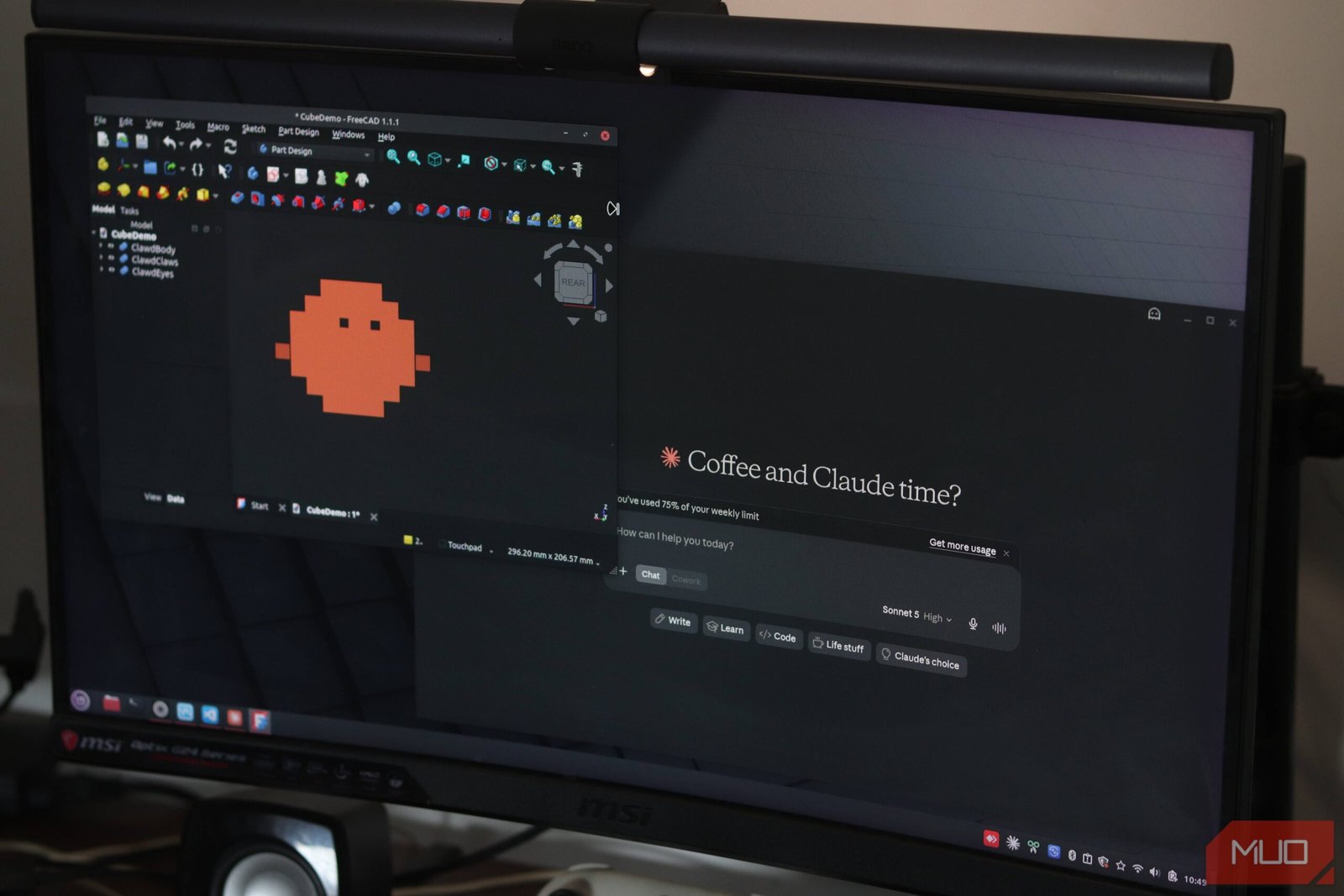
Claude AI 3D design

I asked an AI to design a 3D part — and it worked

I’ve spent years wrestling with Autodesk Fusion 360, SketchUp, and a dozen other CAD tools. They’re powerful, sure. But they’re also tedious. Every fillet, every extrusion, every dimension requires clicking, dragging, and second-guessing. So when Anthropic’s Claude started generating code for 3D models, I had to try it.

Could a large language model really replace the precision of parametric modeling? I put it to the test: design a simple bracket, a gear housing, and a custom phone stand — all without opening a single CAD window.

The short answer: yes, but not in the way you’d expect.

How I got Claude to generate 3D models

Claude doesn’t output STL or STEP files directly. Instead, it writes OpenSCAD code — a script-based CAD language that compiles into a 3D model. You give Claude a description, it spits out the .scad script, and you render it in OpenSCAD (free, open-source).

My workflow was simple:

  • Describe the part in plain English: “A wall-mounted bracket with two screw holes, 100mm wide, 50mm tall, with a 45-degree chamfer on the top edge.”
  • Claude returns OpenSCAD code.
  • Paste the code into OpenSCAD, hit render, and export as STL.

That’s it. No learning curve. No palette of tools. Just text.

The bracket test: first try, almost perfect

My first request was straightforward: a simple L-bracket with rounded corners and two countersunk holes. Claude generated the code in about 15 seconds. I pasted it into OpenSCAD, and the preview looked almost right — except the holes were through-holes, not countersunk.

I typed back: “Make the holes countersunk for M4 screws.” Claude revised the code. This time, the countersink was there but a little shallow. Third iteration? Nailed it.

The whole process took maybe 10 minutes. In Fusion 360, I’d have spent at least 20 just sketching the profile. Was it production-grade? Close. For a 3D-printed prototype, it was more than good enough.

Where Claude struggled: complex geometry and assemblies

Next, I asked for a gear housing with bearing pockets and mounting flanges. Claude got the basic shape right but made a few critical errors: the bearing pocket was too deep, and the flange holes didn’t align properly.

Fixing it required back-and-forth. “Move the flange holes 5mm outward.” “Reduce pocket depth to 8mm.” Each revision took a few seconds, but the cumulative time added up. After six iterations, I had a working model — but I’d spent nearly 30 minutes debugging dimensions.

For complex assemblies with tight tolerances, Claude still struggles. It doesn’t “see” the model the way a human does. It guesses dimensions based on context, and sometimes those guesses are off by a millimeter or two. That matters when parts need to fit together.

What Claude gets right: iteration speed and accessibility

Here’s where Claude shines: you can iterate faster than in any GUI-based CAD tool. Typing “make the wall thickness 3mm instead of 2mm” is instant. In CAD, you’d edit a sketch, update an extrusion, maybe fix a broken constraint.

For beginners, this is huge. AI 3D modeling tools lower the barrier to entry. You don’t need to understand lofts, sweeps, or boolean operations. You just describe what you want.

It’s also great for parametric families. Need a bracket in 10 different sizes? Ask Claude to generate them all at once, varying one parameter. That would take forever manually.

Should you replace your CAD software with Claude?

Not entirely — not yet. For precise engineering work, especially with moving parts or tight tolerances, traditional CAD is still the safer bet. But for prototyping, hobby projects, and one-off prints, Claude plus OpenSCAD is genuinely useful.

I’ve started using it as a first draft tool. I describe the part, get the code, tweak it in OpenSCAD, and only jump into Fusion 360 if I need advanced features like simulation or CAM toolpaths. It saves me about 40% of my design time on simple parts.

The tech isn’t perfect. But it’s improving fast. And for makers who hate CAD’s learning curve, Claude offers a different path: just say what you need.

How to try this yourself

You’ll need two things: a Claude account (free tier works) and OpenSCAD (free).

  1. Open Claude and describe your part in detail. Include dimensions, material thickness, hole sizes, and any specific features.
  2. Ask Claude to “write OpenSCAD code for this part.”
  3. Copy the code, paste it into OpenSCAD, and hit Preview.
  4. If it looks wrong, tell Claude what to fix. Be specific: “Move the holes 10mm from the edge” works better than “the holes are in the wrong place.”
  5. Once satisfied, render and export as STL for 3D printing.

It won’t replace a mechanical engineer’s workflow. But for quick prototypes, it’s surprisingly effective. And honestly? It’s more fun than clicking through menus.

Continue Reading
Click to comment

Leave a Reply

Your email address will not be published. Required fields are marked *

How To

The 5 Best Christopher Nolan Movies of All Time, Ranked

Published

on

best Christopher Nolan movies

The filmmaker who bends time, space, and expectations

Few directors working today command the kind of attention Christopher Nolan does. Every release feels like an event. His films aren’t just blockbusters — they’re puzzles, philosophical arguments, and technical marvels rolled into one. But with a catalog that stretches from Christopher Nolan‘s early indie noir to a three-hour biopic that won seven Oscars, picking the best is no small task. Here’s our definitive ranking of the five best Christopher Nolan movies of all time.

We considered ambition, emotional impact, cultural footprint, and rewatchability. Some of these choices might surprise you. One thing is certain: every film on this list earns its place.

5. Inception (2010)

Let’s get the obvious one out of the way early. Inception is the movie that made Nolan a household name beyond the Batman universe. It’s a heist film set inside dream layers, where a team of extractors tries to plant an idea in a target’s subconscious. The script is a marvel of nested storytelling — a dream within a dream within a dream — yet it never loses the audience.

What elevates Inception beyond a clever gimmick is its emotional core. Dom Cobb’s (Leonardo DiCaprio) grief over his wife Mal (Marion Cotillard) gives the high-concept plot real stakes. The zero-gravity hallway fight remains one of the most iconic action sequences ever filmed. And that spinning top? It’s still the subject of heated debate, 16 years later.

Why it’s here: Inception is pure cinematic ambition. It asks big questions about reality and guilt while delivering a blockbuster spectacle. It lands at number five only because Nolan has made films that hit even harder emotionally.

4. Memento (2000)

Before Nolan was trusted with a nine-figure budget, he made Memento for $9 million. It remains his most structurally audacious film. The story of Leonard Shelby (Guy Pearce), a man with anterograde amnesia hunting his wife’s killer, is told in reverse chronological order. Each scene begins where the previous one ended — which is to say, the movie ends at its beginning.

This isn’t a gimmick. The backwards structure forces the audience into Leonard’s disorienting experience. We remember what he forgets. We distrust what he trusts. The final reveal — that Leonard has been lying to himself the whole time — lands like a punch to the gut. It’s a perfect marriage of form and content.

Why it’s here: Memento is a masterclass in unreliable narration. It’s lean, mean, and more intellectually rigorous than most films made today. It set the template for everything Nolan would do later.

3. The Dark Knight (2008)

You could argue this is the most influential superhero movie ever made. The Dark Knight took a comic book property and turned it into a gripping crime saga about chaos, morality, and the limits of heroism. Heath Ledger’s Joker is the defining villain of the 21st century — anarchic, unpredictable, and terrifyingly human.

But the film works because of its tragic arc. Bruce Wayne (Christian Bale) believes in a world where good can win without compromising. The Joker proves him wrong. The final act — the ferry scene, the interrogation, the choice between Harvey Dent and Rachel Dawes — is relentless. And the ending, with Batman taking the blame for Dent’s crimes, is genuinely heartbreaking.

Why it’s here: The Dark Knight transcends its genre. It’s a crime epic that happens to feature a man in a cape. Ledger’s performance alone makes it essential viewing.

2. Oppenheimer (2023)

Nolan’s most recent film is also his most mature. Oppenheimer is a biographical drama about J. Robert Oppenheimer, the father of the atomic bomb. It’s three hours of people talking in rooms — and it’s utterly gripping. Cillian Murphy gives a career-best performance as a man haunted by his creation. The Trinity test sequence is a masterwork of tension and dread.

What makes Oppenheimer remarkable is how it handles guilt. The film doesn’t preach. It shows a brilliant physicist who believed he could control the fire he unleashed. The final line — “I believe we did” — hangs in the air like fallout. It’s a quiet, devastating ending from a director known for explosions.

Why it’s here: Oppenheimer won seven Oscars, including Best Picture and Best Director. It’s Nolan’s most emotionally resonant and thematically complex work. It nearly took the top spot.

1. Interstellar (2014)

Yes, Interstellar is number one. Say what you will about the third-act twist or the bookshelf scene. This is Nolan’s most personal film, and it’s the one that stays with you longest.

The story follows Cooper (Matthew McConaughey), a pilot turned farmer who must leave his children behind to save humanity from a dying Earth. The mission takes him through a wormhole near Saturn, to a planet where every hour equals seven years on Earth. That time dilation — 23 years lost in a few hours — is the emotional center of the film. Cooper watches messages from his daughter, now older than he was when he left, and you feel every second of that loss.

Interstellar is about love as a force that transcends dimensions. It’s about the impossible choice between saving your family and saving the species. The scene where Cooper cries “Don’t let me leave, Murph!” is the most vulnerable moment in any Nolan film. Hans Zimmer’s organ-heavy score pushes the emotion over the edge.

Why it’s number one: Interstellar is ambitious, flawed, and deeply human. It reaches for the stars and lands on the heart. It’s the film that best captures what makes Nolan great: big ideas, big emotions, and the courage to be sincere.

Honorable mentions

We couldn’t fit every great Nolan film on this list. The Prestige (2006) is a brilliant puzzle box about obsession and sacrifice. Dunkirk (2017) is a sensory masterpiece that tells its war story through time itself. And Batman Begins (2005) reinvented the superhero genre for a darker age. Any of these could make a top ten on another day.

But for now, the five films above represent the very best of Christopher Nolan. They’re the ones you’ll rewatch, debate, and remember. And that’s the mark of true greatness.

Continue Reading

Social Media

Instagram Finally Lets You Swap the Music in Your Old Posts Without Killing Engagement

Published

on

Instagram Replace Audio

No more deleting and re-uploading just to change a song

Instagram announced Tuesday that users can finally swap out the music on published feed posts and carousels. Until now, the only way to change a track was to delete the entire post and start from scratch — losing every like, comment, and share in the process.

The new Replace Audio tool lets you update the soundtrack on any eligible post at any time. Your existing engagement stays intact. That means the likes, comments, shares, and reach all survive the swap. For creators and brands who obsess over metrics, that’s a big deal.

Instagram, owned by Meta, says the feature is part of a broader push to give creators more creative control over their content. It’s a small but meaningful update — and one that actually addresses a real pain point.

Why this matters for creators and brands

Music trends move fast on Instagram. A track that feels fresh in June can feel stale by August. Before this update, creators faced an ugly trade-off: keep the post’s hard-won engagement, or swap the song and lose everything. Brands running paid campaigns were especially vulnerable — deleting a post with thousands of dollars in ad spend behind it was simply not an option.

Now, you can keep the post alive and simply swap the audio. That means old content can be refreshed to match current trends. It also means you can correct a mistake — say, picking a track with licensing issues — without nuking the post’s performance.

For everyday users, the appeal is simpler: music taste evolves. That song you loved in 2022 might make you cringe today. Now you can quietly fix it.

How to use the Replace Audio tool

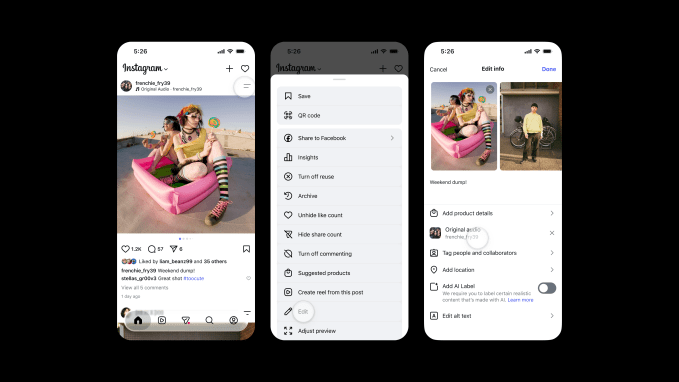
The process is straightforward. Here’s how it works:

  1. Navigate to the feed post or carousel where you want to change the audio.
  2. Tap the two-line menu (the three-dot or hamburger icon) in the top-right corner of the post.
  3. Scroll down to find Edit.
  4. Inside the edit screen, you’ll see the option to swap out the audio. Tap it and choose a new track from Instagram’s music library.

That’s it. The new audio replaces the old one. The post’s visual content, caption, tags, and location remain untouched. The feature works on both single-image posts and multi-image carousels.

One thing to note: the feature only applies to posts that already have music attached. You can’t add music to a post that was originally published without it — at least not yet.

A rare win after a string of missteps

Instagram has taken plenty of heat lately for features nobody asked for. Last month, the company killed an AI-powered tool that let users modify photos from public Instagram accounts. The company admitted the feature missed the mark and pulled it.

In May, Instagram launched Instants, a feature meant to share real-time moments. It backfired badly. Many users accidentally sent images to their entire Friends list, sparking widespread frustration online.

Replace Audio feels different. It solves a genuine problem without forcing a new behavior on users. No AI drama. No accidental oversharing. Just a practical tool that makes an existing workflow less painful.

It’s also worth remembering that Instagram’s relationship with music has been complicated. Licensing deals with major labels come and go. Some tracks disappear from the library without warning. The ability to swap audio after the fact gives users a safety net when a song gets pulled.

What’s next for Instagram’s audio tools

The Replace Audio feature is rolling out now globally. It’s available on both iOS and Android. There’s no word yet on whether Instagram plans to extend the feature to Reels — the platform’s most music-heavy format — but it seems like a logical next step.

For now, the update is a quiet but welcome improvement. It won’t make headlines the way a new algorithmic change or a TikTok clone would. But for the millions of people who post music-backed content every day, it’s the kind of fix that makes the platform feel a little less frustrating to use.

Sometimes the best features aren’t flashy. They’re just the ones that remove a pointless barrier. Instagram’s Replace Audio tool does exactly that.

Continue Reading

Social Media

How to Turn What You Know Into AI Tools People Will Pay For

Published

on

AI tools expertise

Why Your Knowledge Is Worth More Than You Think

You’ve spent years mastering a craft, building frameworks, and solving problems that others find baffling. That know-how is a goldmine — but only if you can package it into something people can buy and use on autopilot.

AI has changed the game. Not in the hype sense, but in a very practical way: it lets you turn your hard-won expertise into a digital tool that works 24/7. No more trading hours for dollars. No more repeating the same advice in endless coaching calls.

Think of it as building a robot that thinks like you — but never gets tired, never forgets a detail, and never charges by the hour.

What Makes an AI Tool Worth Paying For?

Not every piece of advice translates into a sellable AI product. The key is to identify what your audience already pays for — and then automate the delivery.

Here are the telltale signs that your expertise is ripe for productization:

  • You answer the same questions repeatedly. If clients or readers keep asking the same thing, that’s a pattern you can encode into a tool.
  • You use a specific framework or checklist. Step-by-step processes are easy to turn into AI workflows.
  • People pay you for analysis or recommendations. An AI tool can replicate a chunk of that analysis, freeing you for higher-value work.
  • Your advice has clear inputs and outputs. The more structured your expertise, the better AI can handle it.

For example, a marketing consultant who helps clients choose the right ad platform could build an AI tool that asks a few questions about budget, audience, and goals — then spits out a recommendation. Simple, useful, and scalable.

How to Structure Your First AI-Powered Tool

Step 1: Map Your Expertise to a Decision Tree

Start by writing down the questions you ask yourself when solving a problem for a client. What data do you gather? What rules do you apply? What trade-offs do you consider?

That’s your logic. Now turn it into a flowchart or decision tree. You don’t need to be a programmer for this — a simple diagram in a tool like Miro or even pen and paper works fine.

Step 2: Choose the Right AI Platform

You don’t have to build from scratch. Platforms like ChatGPT, Google Bard, and Claude let you create custom GPTs or assistants that follow your instructions. Alternatively, no-code tools like Bubble or Voiceflow can help you build a standalone web app without writing code.

For most experts, a custom GPT is the fastest path to market. You can train it on your frameworks, your tone, and your typical responses — then share a link with clients.

Step 3: Test, Iterate, and Validate

Before you start charging, run the tool with a few trusted clients or colleagues. Ask them: Does this give you the same quality advice I would? What’s missing? What’s confusing?

Refine the prompts and rules until the output feels like a reasonable facsimile of your best thinking. Then, and only then, put a price tag on it.

Pricing Models That Work for AI Tools

You have several options for monetizing your AI tool. The most common and sustainable is a subscription — monthly or annual access to the tool. This creates the recurring revenue you’re after.

  • Tiered subscriptions: Offer a basic version with limited queries and a premium version with unlimited access plus occasional human check-ins.
  • One-time purchase: Works for simpler tools, but limits your upside.
  • Freemium with upsells: Give away a stripped-down version for free; charge for advanced features or deeper analysis.
  • Bundled with services: Include the tool as a bonus for existing consulting clients, then sell it separately to new customers.

Pricing should reflect the value the tool delivers — not the cost to build it. If your AI tool saves a client 10 hours a month, charging $50–100/month is a no-brainer for them.

Marketing Your AI Tool Without Being Sleazy

You don’t need a big launch or a slick ad campaign. Start with your existing audience. Email your list. Post in your LinkedIn feed. Offer a free trial to a handful of people in exchange for honest feedback.

Case studies are powerful: show a before-and-after of someone using your tool versus going it alone. Let the results speak for themselves.

And don’t forget to optimize your landing page for search. Use phrases like AI tools expertise and productize expertise in your headings and copy. That way, people searching for solutions find you organically.

Common Pitfalls to Avoid

Building an AI tool is exciting, but it’s easy to overcomplicate things. Here are the mistakes that trip up most creators:

  • Trying to automate everything. Start with one specific use case. You can always expand later.
  • Ignoring the user experience. If the tool is clunky or confusing, people won’t use it — no matter how smart it is.
  • Underpricing. Your expertise is valuable. Don’t charge less than what it’s worth just because it’s automated.
  • Forgetting to update. AI models change, and your knowledge evolves. Plan to revisit your tool every few months.

The biggest mistake? Waiting until everything is perfect before launching. Ship a version that works, then improve it based on real feedback.

Real-World Examples to Inspire You

Consider a career coach who built an AI resume reviewer. Clients upload their CV, answer a few questions about their target industry, and the tool spits out specific improvement suggestions. The coach charges $29/month for unlimited reviews.

Or a nutritionist who created a meal-plan generator. Users input their dietary restrictions, goals, and food preferences — the AI outputs a week of recipes. That tool sells for $15/month and runs mostly on autopilot.

These aren’t massive tech companies. They’re solo experts who saw an opportunity to package their knowledge into something scalable.

Your Next Move

You don’t need a PhD in AI or a big budget to start. You just need a clear idea of what you know that others are willing to pay for — and the willingness to test a simple version of it.

Pick one problem you solve regularly. Map out the steps. Build a rough prototype using a custom GPT or no-code tool. Share it with a few people. Iterate. Then launch.

The market for AI-powered expertise is wide open. The question isn’t whether you can do it — it’s whether you’ll start before your competitors do.

Continue Reading

Trending