Connect with us

How To

I Turned Microsoft’s Most-Hated Audio Feature Back On — and It Actually Fixed My Sound

Published

on

Microsoft audio enhancement

The Feature Everyone Told Me to Turn Off

For years, the conventional wisdom among PC enthusiasts has been simple: disable Microsoft’s built-in audio enhancement immediately. It’s bloated. It muddies the sound. It’s a gimmick that only cheap laptop speakers need. I believed that — right up until I decided to test it again on a whim.

I re-enabled the feature on my daily driver, a mid-range Dell laptop running Windows 11, and braced for the worst. What I heard instead made me question everything I thought I knew about Windows sound.

The improvement wasn’t subtle. It was immediate, and it was good.

What Exactly Is Microsoft’s Audio Enhancement?

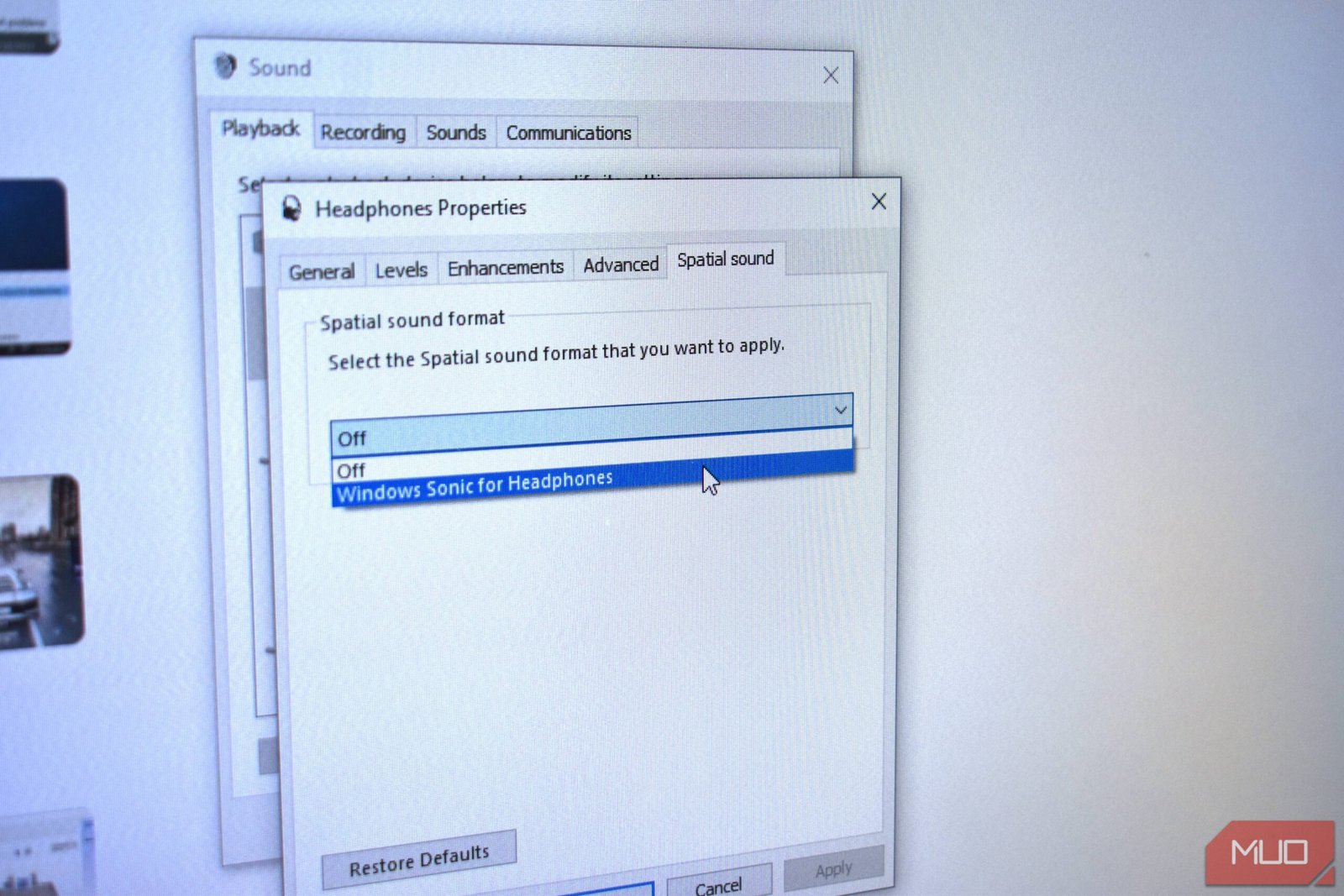
Buried deep in the Windows sound settings, the audio enhancement toggle has been part of the operating system for years. It’s a software-based signal processor that attempts to clean up, equalize, and sometimes virtualize your audio output in real time.

Microsoft has quietly updated the underlying algorithms across several Windows 11 feature updates. The version I tested — available on the 2025 Update (24H2) — is noticeably more refined than the crude bass-boost of earlier iterations.

The enhancement applies a dynamic equalizer, attempts to reduce background noise, and can simulate a wider soundstage. On paper, it sounds like the kind of thing audiophiles would mock. In practice, on mediocre laptop speakers, it does something genuinely useful.

What It Actually Did to My Music and Video

I ran a quick A/B test. First, a track I know intimately — Radiohead’s Everything in Its Right Place. With enhancement off, the laptop’s tiny down-firing speakers sounded thin and hollow, as expected. The bass was barely a suggestion. The mid-range felt scooped out.

I flipped the enhancement on. The difference was dramatic. The low end gained weight without becoming boomy. The vocals pushed forward with more clarity. The whole mix felt fuller, like someone had draped a decent pair of headphones over the laptop.

I tried dialogue-heavy video next — a scene from a quiet drama. The enhancement reduced the slight tinny echo that plagues most laptop audio. Voices sounded more natural, less like they were speaking through a tin can. It wasn’t magic, but it was a clear upgrade.

Why I Had Written It Off for So Long

My skepticism wasn’t baseless. Earlier versions of this feature were genuinely bad. On Windows 10, enabling audio enhancement often introduced a slight processing delay, a faint hiss, or a weird phase effect that made everything sound underwater. It was the first thing I turned off on any new PC.

But Microsoft has been iterating. The company now uses machine-learning models to adjust the enhancement in real time based on the content you’re playing. It’s not just a static EQ curve anymore. It adapts.

That’s the key change. The old enhancement treated all audio the same — a podcast got the same bass boost as an action movie. The new version recognizes speech, music, and ambient noise differently and processes each accordingly.

How to Try It Yourself (and When to Keep It Off)

If you want to test Microsoft’s audio enhancement on your own machine, here’s how:

  • Right-click the speaker icon in your system tray and select Sound settings.
  • Under Output, click your active device (usually “Speakers” or “Headphones”).
  • Scroll down to Audio enhancements and toggle it On.
  • Play some music or video. Listen for 30 seconds. Toggle it off. Listen again.

But this feature isn’t for everyone. If you’re using high-quality external speakers or studio headphones, the enhancement will likely degrade the sound. It adds processing that can muddy a clean signal. Audiophiles should keep it off.

It’s also worth noting that some apps — particularly games with their own spatial audio engines — can conflict with the enhancement. If you hear crackling, distortion, or weird echoes, disable it per-app or entirely.

For laptop users, built-in webcam viewers, and anyone listening through cheap earbuds, though, this feature is worth a second look. It won’t turn your laptop into a hi-fi system, but it might make it listenable again.

The Verdict: A Feature That Finally Earned Its Place

Microsoft’s audio enhancement has gone from a buggy afterthought to a genuinely useful tool for the majority of PC users. It’s not a Windows sound settings option you should blindly disable anymore.

I’ve left it on. My laptop sounds better. My podcasts are clearer. My music has some life back. And for the first time in a decade, I don’t feel the need to plug in external speakers just to watch a YouTube video.

Sometimes the worst feature just needs to grow up.

Continue Reading
Click to comment

Leave a Reply

Your email address will not be published. Required fields are marked *

Social Media

How to Turn What You Know Into AI Tools People Will Pay For

Published

on

AI tools expertise

Why Your Knowledge Is Worth More Than You Think

You’ve spent years mastering a craft, building frameworks, and solving problems that others find baffling. That know-how is a goldmine — but only if you can package it into something people can buy and use on autopilot.

AI has changed the game. Not in the hype sense, but in a very practical way: it lets you turn your hard-won expertise into a digital tool that works 24/7. No more trading hours for dollars. No more repeating the same advice in endless coaching calls.

Think of it as building a robot that thinks like you — but never gets tired, never forgets a detail, and never charges by the hour.

What Makes an AI Tool Worth Paying For?

Not every piece of advice translates into a sellable AI product. The key is to identify what your audience already pays for — and then automate the delivery.

Here are the telltale signs that your expertise is ripe for productization:

  • You answer the same questions repeatedly. If clients or readers keep asking the same thing, that’s a pattern you can encode into a tool.
  • You use a specific framework or checklist. Step-by-step processes are easy to turn into AI workflows.
  • People pay you for analysis or recommendations. An AI tool can replicate a chunk of that analysis, freeing you for higher-value work.
  • Your advice has clear inputs and outputs. The more structured your expertise, the better AI can handle it.

For example, a marketing consultant who helps clients choose the right ad platform could build an AI tool that asks a few questions about budget, audience, and goals — then spits out a recommendation. Simple, useful, and scalable.

How to Structure Your First AI-Powered Tool

Step 1: Map Your Expertise to a Decision Tree

Start by writing down the questions you ask yourself when solving a problem for a client. What data do you gather? What rules do you apply? What trade-offs do you consider?

That’s your logic. Now turn it into a flowchart or decision tree. You don’t need to be a programmer for this — a simple diagram in a tool like Miro or even pen and paper works fine.

Step 2: Choose the Right AI Platform

You don’t have to build from scratch. Platforms like ChatGPT, Google Bard, and Claude let you create custom GPTs or assistants that follow your instructions. Alternatively, no-code tools like Bubble or Voiceflow can help you build a standalone web app without writing code.

For most experts, a custom GPT is the fastest path to market. You can train it on your frameworks, your tone, and your typical responses — then share a link with clients.

Step 3: Test, Iterate, and Validate

Before you start charging, run the tool with a few trusted clients or colleagues. Ask them: Does this give you the same quality advice I would? What’s missing? What’s confusing?

Refine the prompts and rules until the output feels like a reasonable facsimile of your best thinking. Then, and only then, put a price tag on it.

Pricing Models That Work for AI Tools

You have several options for monetizing your AI tool. The most common and sustainable is a subscription — monthly or annual access to the tool. This creates the recurring revenue you’re after.

  • Tiered subscriptions: Offer a basic version with limited queries and a premium version with unlimited access plus occasional human check-ins.
  • One-time purchase: Works for simpler tools, but limits your upside.
  • Freemium with upsells: Give away a stripped-down version for free; charge for advanced features or deeper analysis.
  • Bundled with services: Include the tool as a bonus for existing consulting clients, then sell it separately to new customers.

Pricing should reflect the value the tool delivers — not the cost to build it. If your AI tool saves a client 10 hours a month, charging $50–100/month is a no-brainer for them.

Marketing Your AI Tool Without Being Sleazy

You don’t need a big launch or a slick ad campaign. Start with your existing audience. Email your list. Post in your LinkedIn feed. Offer a free trial to a handful of people in exchange for honest feedback.

Case studies are powerful: show a before-and-after of someone using your tool versus going it alone. Let the results speak for themselves.

And don’t forget to optimize your landing page for search. Use phrases like AI tools expertise and productize expertise in your headings and copy. That way, people searching for solutions find you organically.

Common Pitfalls to Avoid

Building an AI tool is exciting, but it’s easy to overcomplicate things. Here are the mistakes that trip up most creators:

  • Trying to automate everything. Start with one specific use case. You can always expand later.
  • Ignoring the user experience. If the tool is clunky or confusing, people won’t use it — no matter how smart it is.
  • Underpricing. Your expertise is valuable. Don’t charge less than what it’s worth just because it’s automated.
  • Forgetting to update. AI models change, and your knowledge evolves. Plan to revisit your tool every few months.

The biggest mistake? Waiting until everything is perfect before launching. Ship a version that works, then improve it based on real feedback.

Real-World Examples to Inspire You

Consider a career coach who built an AI resume reviewer. Clients upload their CV, answer a few questions about their target industry, and the tool spits out specific improvement suggestions. The coach charges $29/month for unlimited reviews.

Or a nutritionist who created a meal-plan generator. Users input their dietary restrictions, goals, and food preferences — the AI outputs a week of recipes. That tool sells for $15/month and runs mostly on autopilot.

These aren’t massive tech companies. They’re solo experts who saw an opportunity to package their knowledge into something scalable.

Your Next Move

You don’t need a PhD in AI or a big budget to start. You just need a clear idea of what you know that others are willing to pay for — and the willingness to test a simple version of it.

Pick one problem you solve regularly. Map out the steps. Build a rough prototype using a custom GPT or no-code tool. Share it with a few people. Iterate. Then launch.

The market for AI-powered expertise is wide open. The question isn’t whether you can do it — it’s whether you’ll start before your competitors do.

Continue Reading

Social Media

YouTube Gets Specific: New Rules Target AI Slop, Upsetting Videos, and Fake Personas

Published

on

YouTube AI slop

Three strikes against low-quality AI content

YouTube is drawing harder lines around what kind of AI-generated material qualifies for ad revenue. The platform updated its monetization policies on July 16, breaking down what it calls “inauthentic content” into three distinct categories. Any channel leaning too heavily into these types of videos risks losing access to the YouTube Partner Program (YPP).

The move isn’t a total ban on AI content. Far from it. YouTube’s trust and safety chief Matt Halprin made that clear in a recent Creator Insider video. “AI can actually allow people to make a lot of videos,” he said. “Sometimes those videos are great, and it really enhances creativity.”

The problem, he explained, is when creators use the same tools to churn out lookalike videos with no real narrative or original thought. That’s the stuff YouTube wants out of its revenue-sharing program.

Category one: cookie-cutter content and template traps

The first bucket covers generic, repetitive, or template-based videos. Think material cranked out with AI, CGI, or pre-made templates where each video is barely distinguishable from the last. Halprin specifically called out tutorial channels that simply reproduce information already flooding the platform, offering nothing new.

This is the classic definition of content farming — pumping out volume over value. YouTube’s policy now explicitly states that channels built around this approach won’t be monetized.

Category two: upsetting videos designed to manipulate

The second category targets what YouTube calls “off-putting” content. These are videos deliberately designed to distress or emotionally manipulate viewers for clicks. Halprin gave a concrete example: footage of an animal in distress, followed by a staged rescue.

“We’ve heard from our viewers that that’s not something that they like. They find it off-putting. They don’t want to come back to that channel, or maybe even the platform,” Halprin said.

Importantly, this rule applies regardless of whether the video is AI-generated or shot with a phone. If a channel is dedicated to this kind of material, it’s out of YPP.

Category three: AI personas giving advice on sensitive topics

The third bucket is the most directly aimed at generative AI. YouTube is cracking down on channels that use AI personas — digital stand-ins for real people — to discuss sensitive subjects like finance, legal matters, healthcare, and medical issues.

The logic is straightforward: YouTube doesn’t want to incentivize creators who use fake faces to dispense advice that could harm viewers if it’s wrong or misleading. An AI-generated doctor talking about prescription drugs? That’s exactly the kind of content this policy targets.

Why YouTube is tightening the rules now

This isn’t YouTube’s first rodeo with AI policy. The company announced rules around inauthentic content last year. What changed in July was the level of detail. The new guidelines add nuance, giving creators and moderators clearer benchmarks for what crosses the line.

The stakes are high. YouTube now generates more ad revenue than rival streaming platforms and has overtaken Netflix in average daily views worldwide. That puts it in direct competition with TV networks for premium advertising dollars. Allowing the platform to fill up with AI slop would undermine that position.

“The same technology really enables great stuff, but it also enables stuff that’s kind of content farming, and that’s the stuff that we don’t want to have in YPP,” Halprin said.

For creators, the message is clear: AI tools are welcome, but only if they serve genuine creativity. Mass-producing emotionally manipulative or cookie-cutter videos? That path now leads straight out of the Partner Program.

Continue Reading

How To

Your smart speaker is getting worse on purpose — but this open-source rival keeps getting better

Published

on

open-source smart speaker

Remember when asking your smart speaker a question actually worked? When it didn’t try to sell you something first, or misunderstand your request, or just say “Sorry, I can’t help with that yet”? Those days are fading fast.

Google‘s Nest Audio and Amazon‘s Echo speakers have quietly been getting worse. Not by accident — by design. Features disappear. Ads creep in. Accuracy drops. It’s a pattern familiar to anyone who’s watched Big Tech slowly enshittify its own products.

But there’s a countertrend. A small, open-source voice assistant called Mycroft — now reborn as Neon AI — keeps improving. No ads. No data mining. No forced updates that break what worked yesterday. And it runs on hardware you can actually control.

What’s going wrong with Google and Amazon smart speakers

Let’s be specific. In 2023, Google removed several features from its smart displays, including the ability to set a default music service on the Nest Hub Max. Amazon, meanwhile, has been pushing more advertising into Alexa — from sponsored answers to audible ads before your weather report.

Both companies have also quietly cut back on third-party integrations. The “Skills” ecosystem on Alexa is littered with broken or abandoned apps. Google Assistant’s once-impressive natural language understanding has, by many users’ accounts, regressed. Simple queries like “What’s the capital of France?” sometimes trigger a web search instead of a direct answer.

Why? Because neither company makes money selling speakers. They make money collecting your data and serving you ads. Once you’ve bought the hardware, the incentive is to extract more value from you — not to make the device better for you.

Meet the open-source alternative that’s actually improving

Enter Neon AI, the successor to the Mycroft project. It’s a fully open-source voice assistant that runs on a Raspberry Pi or a dedicated device like the Mark II. And unlike its corporate cousins, it’s getting better with each update.

Recent improvements include:

  • Better wake word detection — it actually hears you from across the room now
  • Offline speech recognition for basic commands (no cloud required)
  • Integration with home automation platforms like Home Assistant and openHAB
  • Customizable skills that anyone can write, not just approved developers
  • No ads, no data collection, no lock-in

It’s not perfect. The voice still sounds a bit robotic. It can’t answer every random trivia question. But for core tasks — controlling lights, setting timers, playing music from your own library — it works. And it respects your privacy.

Why open source matters for smart speakers

The fundamental problem with Google and Amazon speakers is that you don’t own them. You’re renting a listening device that happens to be shaped like a speaker. The companies can change the terms anytime. And they do.

With an open-source voice assistant, you control the software. If the community doesn’t like a change, it can fork the code. If a feature disappears, someone can rebuild it. The device serves you, not a corporate bottom line.

This isn’t just idealism. It’s practical. When Amazon announced in 2023 that it would lay off thousands of employees, including many working on Alexa, the writing was on the wall. The platform’s future is uncertain. Open-source projects, by contrast, don’t depend on quarterly earnings reports.

What you need to get started

If you’re curious, the barrier to entry is low. You need:

  • A Raspberry Pi 4 or 5 (about $35–$75)
  • A USB microphone array (around $20–$50)
  • A speaker with a 3.5mm input
  • An SD card with the Neon AI image flashed onto it

Total cost: roughly $100–$150. That’s comparable to a single Echo Studio. And you can build multiple units for different rooms.

Is it ready for everyone?

Let’s be honest: no. The open-source smart speaker is still a project for tinkerers. Setting it up requires basic Linux knowledge. You won’t find it at Best Buy. And it won’t order pizza for you (yet).

But for people who care about privacy, who are tired of ads in their kitchen, or who just want a device that doesn’t get worse every year, it’s a genuine alternative. And it’s only getting better — which is more than you can say for the big-brand options.

The real question is: how much longer are you willing to put up with a smart speaker that works for its manufacturer, not for you?

Continue Reading

Trending