Connect with us

Social Media

Instagram Plus: A New Subscription to Unlock Exclusive Features and Deeper Connections

Published

on

Instagram Plus: A New Subscription to Unlock Exclusive Features and Deeper Connections

Instagram has officially unveiled a new subscription tier called Instagram Plus, designed to give users more control over their experience. This paid plan introduces exclusive tools for self-expression, deeper interactions with friends, and personalized customization options. But what exactly does this mean for the average user? Let’s break it down.

What Is Instagram Plus and How Does It Work?

Instagram Plus is a premium subscription that unlocks a set of features not available in the free version. It aims to enhance how you express yourself, connect with your inner circle, and tailor your app to your preferences. Instagram Plus is currently rolling out to select markets, with a broader launch expected soon. Users can subscribe monthly or annually, depending on their region.

This move aligns with Meta’s broader strategy to diversify revenue streams through subscriptions, similar to what we’ve seen with Facebook and its premium offerings. However, Instagram is positioning this as a way to enrich the user experience rather than just removing ads.

Exclusive Features of Instagram Plus

Enhanced Self-Expression Tools

One of the standout aspects of Instagram Plus is the expanded creative toolkit. Subscribers gain access to exclusive filters, augmented reality (AR) effects, and advanced editing capabilities within Stories and Reels. This means you can craft more unique and polished content without relying on third-party apps. Additionally, a new “Focus Mode” for Stories lets you highlight specific elements with professional-grade blur effects.

Deeper Connections with Friends

Instagram Plus also introduces features to strengthen bonds with your closest friends. A new “Close Friends Plus” tier allows you to create multiple private groups with shared content, such as collaborative playlists or exclusive photo albums. You can also see when friends are actively engaging with your posts in real-time, fostering more immediate interactions. This builds on the existing Instagram ecosystem but adds a layer of exclusivity.

Customization and Control

Customization is a major selling point. With Instagram Plus, you can change the app icon, choose from different color themes, and even rearrange the navigation bar. This level of personalization extends to the feed: subscribers can prioritize posts from specific friends or mute suggested content for longer periods. In addition, a new “Smart Archive” feature automatically organizes your past posts into curated collections based on themes or dates.

How Instagram Plus Compares to Other Social Subscriptions

Instagram is not the first platform to introduce a paid tier. Twitter (now X) offers X Premium, while Snapchat has Snapchat+. However, Instagram Plus differentiates itself by focusing on creative expression and social intimacy rather than just verification or ad-free browsing. For instance, while X Premium emphasizes blue checkmarks and longer posts, Instagram Plus prioritizes visual tools and community features.

This means that if you’re a content creator or someone who values deep connections, Instagram Plus might offer more tangible benefits. On the other hand, casual users may find the free version sufficient for their needs.

Should You Subscribe to Instagram Plus?

Deciding whether to subscribe depends on your usage habits. If you frequently create Stories, engage with close friends through DMs, or want more control over your interface, Instagram Plus could be a worthwhile investment. However, for those who primarily scroll through the feed and post occasionally, the free features may already meet your needs.

Ultimately, Instagram Plus represents a shift toward a more personalized and premium social media experience. As the platform continues to evolve, we can expect even more exclusive features to roll out. For now, it’s an intriguing option for power users looking to get more out of their Instagram journey.

To stay updated on the latest developments, check out our guide on how to maximize Instagram Plus features and explore how Instagram Plus compares to Snapchat+.

Social Media

Your YouTube Videos Look Different on a 65-Inch Screen. Here’s What to Do About It.

Published

on

YouTube on TV

The Living Room Is YouTube’s New Frontier

YouTube isn’t just for phones anymore. The platform is making a serious play for the biggest screen in the house — your TV. And the numbers back it up: YouTube reports that viewers now watch over 1 billion hours of content daily on TV screens. That’s not a niche. That’s a shift in how people consume video.

For marketers, this changes the game. Not in the cliché sense — literally. The way someone watches a video on a phone, hunched over during a commute, is completely different from how they experience it on a 65-inch OLED while lounging on a couch. Lean back vs. lean forward. Distracted vs. immersed.

If you’re still creating content with only mobile in mind, you’re leaving a massive audience segment on the table. Here’s how to fix that.

Why Connected TV Viewers Are Different

Think about the last time you watched YouTube on a TV. You probably weren’t scrolling. You weren’t multitasking. You were sitting back, maybe with a remote in hand, expecting a polished, high-production experience.

Connected TV (CTV) viewers behave differently. They watch longer sessions — often 20 minutes or more. They’re less likely to click away after five seconds. But they’re also more critical of poor audio, shaky camera work, and text that’s too small to read from across the room.

This audience isn’t hunting for quick how-tos. They want documentaries, deep dives, vlogs with a narrative arc, and content that feels like it belongs on a premium screen. If your video looks like it was shot on a webcam in 2010, they’ll bounce.

Optimize Your Channel for TV Discovery

YouTube on TV doesn’t work the same way as the mobile app. The interface is simplified. There’s no endless sidebar of suggested videos. Instead, the home screen features large thumbnails, bold titles, and a heavy emphasis on your channel’s brand identity.

Thumbnails Need to Pop on a Big Screen

That thumbnail you carefully designed for a phone screen? On a TV, it might look washed out or cluttered. Test your thumbnails at full size on a monitor. Use high contrast colors. Make faces large and expressive. Text should be minimal — three words max, and only if it’s readable from six feet away.

Channel Branding Matters More Than Ever

TV viewers are more likely to browse by channel rather than by individual video. That means your channel banner, logo, and series playlists become critical. If your branding is inconsistent or amateurish, it signals low quality. Invest in a clean, professional channel identity that looks good on a 4K display.

Five Technical Tweaks for TV-Friendly Video

You don’t need a Hollywood budget, but you do need to hit some basic technical thresholds. Here’s a quick checklist:

  • Resolution: Upload in 4K if possible. At minimum, 1080p at a high bitrate. TV screens magnify every compression artifact.
  • Aspect ratio: Stick to 16:9. Vertical or square videos look terrible on a TV — they get pillarboxed into tiny strips.
  • Audio: Use a decent microphone. TV speakers (or soundbars) reveal background noise and echo. Clear, balanced audio is non-negotiable.
  • Text and graphics: Don’t put critical information in the bottom third of the frame. TV screens often crop that area. Keep text centered and large.
  • Length: Aim for 10–20 minutes. CTV viewers settle in for longer content. Short clips feel like a tease.

New YouTube Features Built for TV

YouTube has rolled out several features specifically for the TV experience, and smart marketers are using them.

YouTube Shorts on TV — Yes, Really

In 2024, YouTube brought Shorts to the TV app. But here’s the twist: they appear in a vertical feed on the side of the screen, not full-screen. That means your Shorts need to work both as standalone vertical clips and as part of a larger TV interface. Keep the first two seconds punchy — that’s your hook on any screen.

QR Codes for Engagement

TV viewers can’t click a link. YouTube solved this with QR codes that appear on screen, letting viewers scan with their phone to subscribe, visit a website, or watch a related video. Add a QR code to your video’s end screen or description. Make it large enough to scan from a couch.

YouTube Select for TV

Brands can now buy ads specifically within YouTube’s TV app inventory. This is premium placement — full-screen, unskippable ads that run before or during long-form content. If your ad creative is built for mobile, it won’t work here. Produce TV-native ads with cinematic pacing and clear calls to action that don’t require a click.

Measuring Success on the Big Screen

Standard YouTube analytics won’t tell you how many viewers are on TV. You need to dig into the device report. Go to YouTube Studio → Analytics → Audience → Device type. Look for the “TV” category. If it’s growing, your strategy is working.

Pay attention to watch time from TV users. It’s usually higher per session than mobile. Also check the “Top videos on TV” report — it shows which of your videos resonate most with this audience. Double down on that format.

One more metric: engagement rate. TV viewers comment less (typing with a remote is painful), but they subscribe more. A spike in subscribers after a video goes live could mean it performed well on TV.

The Bottom Line for Marketers

YouTube on TV isn’t a future trend. It’s happening now. The platform is actively redesigning its interface, ad products, and content formats for the living room. If you’re not optimizing for it, you’re invisible to a growing, high-value audience.

Start small. Update your thumbnails. Check your aspect ratio. Look at your device analytics. Then produce one video specifically for the TV experience — longer, cleaner, more narrative. See what happens.

The couch is the new commute. Make sure your content looks good on it.

Continue Reading

Social Media

Meta finally brings parental supervision to Threads — here’s what parents can control

Published

on

Threads parental supervision

The wait is over: Threads gets parental controls

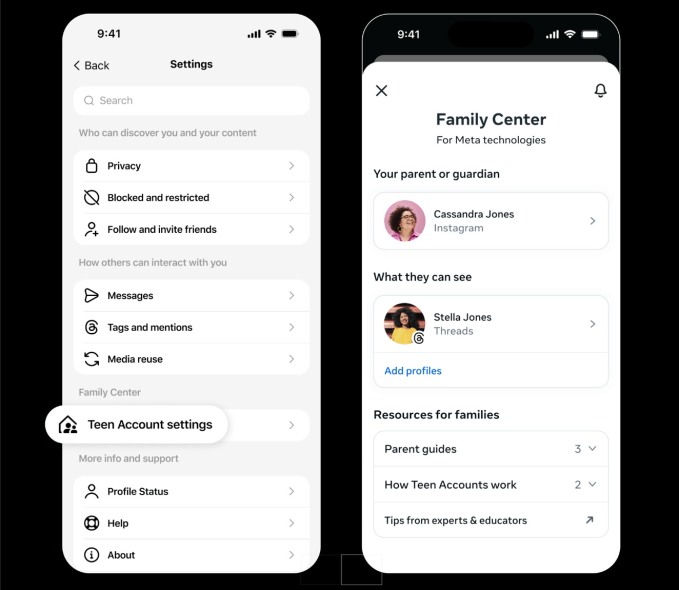
Nearly three years after Threads launched in July 2023, Meta is finally rolling out parental supervision tools for the platform. Starting next week in the U.S., parents and guardians will be able to monitor and manage their teen’s activity on the app through Meta’s Family Center — the same hub that already controls settings across Instagram and Facebook.

The move comes as Meta faces mounting pressure from regulators and lawmakers over teen safety. The company has been expanding parental controls across its apps for years, and Threads — now boasting 500 million monthly users — was a glaring gap. Lawsuits from multiple states and child safety advocates have only sharpened the spotlight.

So what can parents actually do? Quite a bit, it turns out.

Screen time tracking and daily limits

Parents will see exactly how much time their teen spends on Threads each day for the past week, including a weekly average. They can then set a daily time limit — and crucially, that limit applies across all devices. If a teen switches from phone to laptop, the clock keeps ticking.

Here’s what the new Threads parental supervision dashboard offers:

  • Daily time limit: Set a maximum number of minutes per day. Total time across devices is counted.
  • Sleep mode: Block or limit access during specific hours, especially at night. Meta already mutes notifications and turns on auto-replies for all teens from 10 p.m. to 7 a.m., but parents can tighten this further.
  • Privacy controls: Manage who can tag the teen in posts. Parents can also decide whether teens under 16 are allowed to change their default privacy settings — like private accounts — to something less restrictive.

Meta says teens on Threads already have built-in protections: private accounts by default, and limits on the content they see. But now parents have the final say on whether those settings can be loosened.

Why now? The pressure on Meta is real

It’s no secret that social media companies are under fire. Meta, along with TikTok, Snap, and others, faces a wave of lawsuits from states and school districts alleging that their platforms harm teens’ mental health. The U.S. Senate has held multiple hearings, and the Kids Online Safety Act (KOSA) is moving through Congress.

Threads was an obvious weak spot. While Instagram and Facebook have had parental controls for years, the text-based platform — which Meta positioned as a Twitter alternative — had none. For a company that says it prioritizes teen safety, that was a hard gap to explain.

Now, with these tools, Meta can argue that Threads is no longer the Wild West for teens. But critics note that supervision tools only work if parents actually use them — and many don’t.

What about the rest of the world?

The rollout starts in the U.S. next week. Meta told TechCrunch it plans to bring Threads parental supervision globally by the end of 2025. No specific countries or dates have been announced yet.

For parents outside the U.S., that means waiting — but not forever. And for teens? Well, the days of unlimited late-night scrolling on Threads may be numbered.

The bigger picture: Are parental controls enough?

Parental supervision tools are a step forward, but they’re not a silver bullet. A time limit doesn’t stop a teen from seeing harmful content during the minutes they are online. And Meta’s own research has shown that teens often find ways around parental controls — using friends’ phones, for example.

Still, the Threads parental supervision rollout is a meaningful addition. It gives parents a window into their teen’s digital habits, and a way to set boundaries without confiscating the phone entirely. For a platform that grew to half a billion users in less than three years, that kind of oversight was long overdue.

Whether it will satisfy regulators — or the parents filing lawsuits — is another question entirely.

Continue Reading

Social Media

Yope raises $12.3M to build a private social network without algorithms or ads

Published

on

Yope raises $12.3M

The pitch: social media without the noise

Yope, a social app that’s been quietly gaining traction, just announced a $12.3 million seed round. The money comes from investors who believe there’s room for a different kind of social experience—one built around private groups of friends and family, not algorithmic feeds or influencer content.

“We’re not trying to compete with TikTok or Instagram for attention,” a company spokesperson said. “We want to help people stay close to the people who actually matter.”

The app is already live and growing. Early users describe it as a cross between a group chat and a photo-sharing album, with a focus on spontaneity and intimacy. No ads. No recommendation engine. No public profiles.

What Yope actually does

At its core, Yope lets users create small, invite-only groups—typically for close friends, family, or a sports team. Inside those groups, members can share photos, send messages, and even use AI-powered features to enhance their interactions.

The AI tools aren’t about generating content for the masses. Instead, they’re designed to strengthen real-world relationships. For example, the app can suggest conversation starters based on shared memories, or automatically create photo albums from a weekend trip.

The company says it has no plans to introduce an algorithmic feed. “We don’t want to optimize for engagement,” the spokesperson added. “We want to optimize for connection.”

No algorithms, no ads—how do they make money?

That’s the obvious question. Yope’s answer: for now, they don’t need to. The $12.3 million seed round gives them runway to focus on product development and user growth. Eventually, they may introduce premium features or a subscription model, but the core experience will remain ad-free and algorithm-free.

It’s a bet that enough people are willing to pay for a private, peaceful social space. Early signals suggest they might be right. The app has seen steady organic growth, especially among users tired of the noise on larger platforms.

Why investors are betting on private social networks

The seed round was led by a group of venture capital firms that have been watching the backlash against public, algorithm-driven social media. Investors see an opportunity in the growing demand for private social networks that prioritize real relationships over viral content.

“People are exhausted by the performative nature of mainstream social platforms,” one investor told reporters. “Yope offers a quiet alternative.”

The trend is real. Apps like Dispo and VSCO have also tried to carve out spaces that feel less like a broadcast channel and more like a living room. Yope’s twist is its emphasis on messaging and AI features that serve small groups, not individual creators.

How Yope compares to WhatsApp and Signal

You might be thinking: isn’t this just a group chat? In some ways, yes. But Yope is designed specifically for sharing life updates in a visual, lightweight way—closer to a private Instagram than a messaging app.

Unlike WhatsApp or Signal, which are primarily text-based, Yope puts photos and videos at the center. And unlike Instagram, there’s no pressure to curate a perfect feed. Posts disappear after a set time, encouraging candid sharing.

The AI features are another differentiator. While Signal and WhatsApp have added some smart functionality, Yope is building tools specifically for group bonding—like automatically stitching together everyone’s photos from an event, or suggesting when to check in on a friend who’s been quiet.

What’s next for Yope

With the new funding, Yope plans to expand its team, improve the AI features, and scale the app to more users. The company is also exploring partnerships with family-focused apps and services that value privacy and real-world connection.

The goal is clear: become the default private space for the people you actually care about. Whether that’s a group of college friends sharing memes, a family sharing holiday photos, or a book club discussing the latest read.

“We’re building for the moments that don’t need to be public,” the spokesperson said. “The ones that are just for you and your people.”

In a world where every social platform is fighting for your attention, Yope is making a quiet bet that sometimes, less really is more.

Continue Reading

Trending