Connect with us

Artificial Intelligence

iOS 27 Is Packed: Here Are the Small but Useful Updates You Might Have Overlooked

Published

on

iOS 27 Is Packed: Here Are the Small but Useful Updates You Might Have Overlooked

Every fall, Apple rolls out a major iOS update packed with headline features like Siri AI and Apple Intelligence. But the real magic often lies in the iOS 27 hidden features—the quiet tweaks that smooth out daily frustrations. While the keynote highlights grab attention, it’s the smaller changes that make your iPhone feel more intuitive and less needy over time.

From smarter Mail search to seamless network switching and shared album upgrades, iOS 27 delivers a host of practical improvements. Let’s dive into the updates that didn’t make the main stage but could transform your everyday experience.

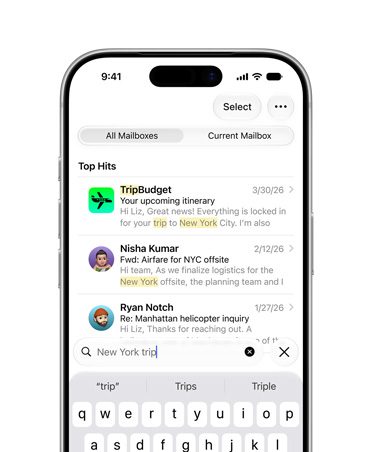
Mail Search Gets a Brain Boost

Search in Mail has long been a pain point. Digging for a specific receipt, boarding pass, or appointment confirmation often feels like sifting through years of digital clutter. iOS 27 addresses this with a new ranking system that pushes more relevant results to the top.

This isn’t a flashy feature, but it’s one of those iOS 27 small updates that saves time and frustration. Instead of scrolling endlessly, you’ll find what you need faster. For anyone who relies on email for travel, shopping, or work, this is a quiet win.

Network Switching and Connectivity Tweaks

One of the most annoying moments with a smartphone is when it fails to switch smoothly between Wi-Fi and cellular. You leave home with Maps running, and suddenly the connection drops. iOS 27 fixes this with smarter network switching, ensuring your iPhone chooses the best connection seamlessly.

AirDrop and AirPlay also receive speed boosts. Transfers are faster, and nearby-device discovery is quicker. These iOS 27 hidden features eliminate those tiny failures that make an expensive phone feel sluggish. Whether you’re sharing a file or streaming to a speaker, the experience feels more fluid.

Shared Albums Become Cross-Platform Friendly

iCloud Shared Albums have always been a convenient way to share photos with family and friends. But until now, they were heavily tied to Apple’s ecosystem. iOS 27 changes that by making it easier for Android and Windows users to join and contribute through iCloud.com.

This is a game-changer for mixed-device groups. Imagine a family trip where everyone uses different phones—now everyone can add their photos without hassle. Additionally, iOS 27 introduces full-resolution sharing, filtering, reactions, more invite options, and expiring albums. It’s overdue housekeeping for a feature that often leaves users asking, “Where did the photos go?”

Save Stills from Video Frames

The Photos app also gains a handy trick: you can now save a still image from a video frame. This is perfect for capturing that perfect moment from a clip without needing a separate app. It’s a small addition, but one that adds convenience.

Accessibility Upgrades That Matter

Accessibility often gets overlooked in major updates, but iOS 27 brings some of its strongest improvements here. VoiceOver can now provide richer image descriptions, making it easier for visually impaired users to understand photos. A new captioning feature generates synchronized subtitles for videos and can even translate existing captions.

These iOS 27 small updates make saved clips and shared videos more accessible without requiring third-party tools. For anyone who relies on captions, this is a significant boost.

Quiet Utility Tweaks: Alarms, Notes, and More

The tiny utility pile keeps growing. iOS 27 now lets you separate alarm, timer, alert, and system sounds from ringtone volume. This means one setting doesn’t have to govern every noise your iPhone makes. You can keep your ringer loud while having alarms at a lower volume—a small but welcome change.

Notes also gets a niche but useful upgrade: copy and paste Markdown support. For writers, bloggers, and anyone who works with text online, this is basically a tiny holiday. It simplifies formatting and makes note-taking more efficient.

These iOS 27 hidden features aren’t the loudest changes, but they’re the kind that make your phone feel less needy every day. For more on what’s new, check out our guide on iOS 27 new features or explore Apple Intelligence updates. If you’re considering an upgrade, see our iPhone 17 Pro review.

Continue Reading
Click to comment

Leave a Reply

Your email address will not be published. Required fields are marked *

Artificial Intelligence

Apple’s AI Push Exposes a RAM Crisis: Your Devices Are Aging Fast

Published

on

Apple’s AI Push Exposes a RAM Crisis: Your Devices Are Aging Fast

Apple has long prided itself on delivering software updates that keep older devices feeling fresh. However, the company’s aggressive push into artificial intelligence is rewriting the rules. The Apple AI RAM requirement is now a critical factor, with iOS 27 demanding at least 12GB of RAM for the most powerful on-device AI models. This shift means that even devices built for Apple Intelligence may soon feel outdated.

For years, consumers focused on processor speed and storage. Now, memory is emerging as the silent bottleneck. The iPhone 17 Pro and iPhone Air are set to lead the pack, but older Apple Intelligence-ready hardware with 8GB of RAM could struggle to keep up. This article explores why RAM is suddenly the dividing line and what it means for your next upgrade.

Why RAM Is Suddenly the Dividing Line for Apple AI

The key detail is memory. Apple’s strongest on-device AI model for iOS 27 requires at least 12GB of RAM on supported iPads and Macs. The iPhone 17 Pro and iPhone Air are specifically named for iPhone support, leaving many current devices in an awkward middle ground. An 8GB device may still receive plenty of AI features, but the heaviest local model could sit outside its reach.

As a result, the upgrade math changes fast. Processor speed still counts, but RAM is becoming the quieter spec that helps decide whether a device feels ready for Apple’s next AI wave. This means that if you recently bought an iPhone 16 with 8GB of RAM, you might miss out on the most advanced on-device capabilities.

What Happens When AI Moves Local

A device can support Apple Intelligence and still miss the best on-device model. That gap shapes the experience, since local processing is tied to the speed, privacy, and hardware-first feel Apple has emphasized around AI. Apple‘s Private Cloud Compute gives the company a way to support more devices without putting every task on the device itself.

However, this creates a practical split between what runs on your gadget and what needs help from Apple’s servers. That’s where 8GB devices start to feel older than their age. They won’t suddenly become useless, but they may stop feeling like the safest bet for whatever Apple adds next. Learn more about device compatibility.

Why Your Next Upgrade Should Depend on Memory

The practical takeaway is straightforward. If Apple’s AI roadmap matters to you, RAM deserves more attention than it used to. You’ll want to treat memory as a long-term AI spec, not just a multitasking spec. That means checking RAM alongside chip generation, especially on iPad and Mac, and watching whether more iPhones move beyond 8GB by default.

Building on this, the next devices Apple ships with more memory will say a lot about where iPhone, iPad, and Mac AI is headed. For now, Apple Intelligence support alone doesn’t tell you the whole story. Explore future AI upgrades to stay ahead.

What Does 12GB RAM Mean for Your Current Device?

If you own an iPhone 15 Pro with 8GB of RAM, you might still enjoy many AI features, but the most demanding models will be off-limits. This is a significant shift from the era when Apple devices felt future-proof for five years or more. Now, the Apple AI RAM requirement is forcing users to reconsider upgrade cycles.

For example, the iPad Pro with M4 chip and 8GB RAM will support Apple Intelligence but not the top-tier iOS 27 AI model. Similarly, MacBook Air users with 8GB may need to upgrade sooner than expected. Check our RAM upgrade guide for personalized advice.

The Bottom Line: RAM Is the New Spec to Watch

In conclusion, Apple’s AI features are no longer just a software story. The Apple AI RAM requirement is reshaping device lifespans and upgrade priorities. Whether you’re eyeing the iPhone 17 Pro or sticking with an older model, memory now plays a starring role. Stay informed, and don’t let your gadgets feel old before their time.

Continue Reading

Artificial Intelligence

Safari Finally Fixes Its Extensions Problem: Apple Lets You Create Custom AI-Powered Add-Ons, Unlike Chrome

Published

on

Safari Finally Fixes Its Extensions Problem: Apple Lets You Build Custom AI-Powered Add-Ons

For years, Safari AI extensions have been an afterthought in the browser world. While Chrome boasted a massive library of add-ons, Apple’s browser focused on speed, privacy, and seamless device integration. Now, Apple is rewriting that narrative with a bold new approach: letting users create their own extensions using artificial intelligence.

Announced at Apple WWDC, Safari will soon allow users to describe the extension they need in plain language. Apple Intelligence will then generate the custom add-on, turning the browser into a personal toolkit. This move directly challenges Chrome’s dominance in the extension space, offering a more intuitive and secure alternative.

How Safari AI Extensions Work: Describe and Build

The core of this innovation is a feature called “Describe an Extension.” Instead of hunting through a store for a specific tool, users can simply type or speak what they want. For example, you could say, “Create a button that highlights all prices on a shopping page and shows the total,” and Safari will build it.

This approach solves a common frustration: finding a niche extension that someone else maintains. With Safari AI extensions, you are no longer dependent on third-party developers for small, personalized tweaks. A recipe shortcut, a cleaner reading layout, or a quick rating button can now exist as a private browser fix.

What Makes This Different from Chrome

Chrome’s extension ecosystem is vast but often overwhelming. Users must search, compare, install, and trust each add-on. Moreover, many extensions request broad permissions, raising privacy concerns. In contrast, Apple’s method keeps everything within its walled garden, with AI-generated code that is inherently more transparent.

Apple emphasizes that the AI processes your request on-device, meaning sensitive browsing data never leaves your machine. This is a significant advantage over Chrome, where extensions can potentially access all your web activity. For users who prioritize privacy, this feature could be a major draw.

Beyond Extensions: Smarter Tab Management and Notifications

The custom extension builder is just one part of Safari’s broader AI overhaul. Two other features aim to reduce browser clutter: Intelligent Tab Management and Notify Me.

Intelligent Tab Management

This feature automatically analyzes your open tabs, identifying related pages and grouping them into topics. For instance, if you have multiple tabs open for a research project or shopping spree, Safari will cluster them together. You can then close the group or save it as a Tab Group for later. It is a practical way to tame the chaos of dozens of open tabs.

Notify Me: Stop Babysitting Pages

How often do you keep a tab open just to check for a price drop, a restock, or a form opening? Notify Me eliminates this habit. You tell Safari what to watch for on a specific page, close the tab, and receive a notification when the change occurs. It is a simple but powerful time-saver.

Privacy and Security: What Safari Needs to Prove

While the promise of Safari AI extensions is exciting, questions remain about control and transparency. Apple claims the generated extensions are designed to be secure, but users need clear visibility into what each add-on can access.

Apple states that the AI avoids sharing sensitive browsing data with anyone, including Apple itself. However, this claim must translate into a user-friendly interface where you can see permissions, monitor activity, and instantly disable any extension that behaves unexpectedly. For the feature to succeed, trust must be built through clear, on-device management tools.

For anyone who has ever searched for a browser extension and immediately regretted the internet, this could be the more interesting fix. Safari does not need a mountain of add-ons if the small ones feel safe enough to create. With this AI-powered approach, Apple is betting that personal, private, and easy-to-build tools will win over a bloated extension store.

Looking for more ways to optimize your browsing? Check out our guide on how to manage browser extensions for better performance and top privacy tools for 2025.

Continue Reading

Artificial Intelligence

Which iPhones Are Ready for iOS 27? Here Is the Complete Compatibility List

Published

on

Which iPhones Are Ready for iOS 27? Here Is the Complete Compatibility List

Apple officially unveiled iOS 27 at WWDC 2026, and the big news is that the update supports an impressive 29 iPhone models. Contrary to earlier speculation that the iPhone 11 series would be dropped, Apple kept those devices on the list. This decision marks a first for the company, as no models were cut from the previous iOS 26 support roster.

iOS 27 Compatible iPhones: The Full Roster

Here is every iPhone that will receive the iOS 27 update:

  • iPhone SE (2nd generation and later)
  • iPhone 11
  • iPhone 11 Pro
  • iPhone 11 Pro Max
  • iPhone 12 mini
  • iPhone 12
  • iPhone 12 Pro
  • iPhone 12 Pro Max
  • iPhone 13 mini
  • iPhone 13
  • iPhone 13 Pro
  • iPhone 13 Pro Max
  • iPhone 14
  • iPhone 14 Plus
  • iPhone 14 Pro
  • iPhone 14 Pro Max
  • iPhone 15
  • iPhone 15 Plus
  • iPhone 15 Pro
  • iPhone 15 Pro Max
  • iPhone 16e
  • iPhone 16
  • iPhone 16 Pro
  • iPhone 16 Pro Max
  • iPhone 17e
  • iPhone 17
  • iPhone Air
  • iPhone 17 Pro
  • iPhone 17 Pro Max

As you can see, the list spans from the iPhone 11 to the latest iPhone 17 Pro Max. This means that even users with older devices like the iPhone 11 will get the new software features, though not all of them.

Which iPhones Support Siri AI and Apple Intelligence?

Getting iOS 27 does not guarantee you can use every feature. Apple confirmed that older models will miss out on AI capabilities because many processes require advanced chips. For example, Apple Intelligence tools like Clean Up and Live Translation need an iPhone 15 Pro or newer. Siri AI, the revamped voice assistant, has an even shorter list of compatible devices:

  • iPhone 15 Pro
  • iPhone 15 Pro Max
  • iPhone 16e
  • iPhone 16
  • iPhone 16 Pro
  • iPhone 16 Pro Max
  • iPhone 17e
  • iPhone 17
  • iPhone 17 Pro
  • iPhone 17 Pro Max
  • iPhone Air

Interestingly, Siri AI will not launch in the European Union or China due to regulatory hurdles. Apple plans to roll out iOS 27 to all compatible models in September 2026. For more details, check out our guide on how to prepare your iPhone for an iOS update.

What Does iOS 27 Mean for Older iPhones?

For owners of older iPhones like the iPhone 11 or iPhone 12, the update brings essential security patches and performance improvements. However, you will not get the AI-driven features that define this release. This is a common trend: Apple extends software support but reserves cutting-edge capabilities for newer hardware.

On the other hand, if you own an iPhone 15 Pro or later, you will experience the full power of iOS 27, including on-device AI processing. This makes upgrading worthwhile for those who want the latest innovations.

How to Check Your iPhone’s Compatibility

Wondering if your device is on the list? Go to Settings > General > About and check your model number. Alternatively, you can visit Apple’s official website for the complete compatibility chart. Remember, even if your iPhone is supported, you might need to free up storage space for the update. Learn more in our article on freeing up storage for iOS updates.

Final Thoughts on iOS 27 Compatibility

Apple’s decision to include the iPhone 11 series in iOS 27 is a pleasant surprise, extending the lifespan of these devices. While AI features remain exclusive to newer models, the broad support ensures that millions of users can enjoy the latest software. Keep an eye out for the September release and plan your upgrade accordingly.

Continue Reading

Trending