Social Media
Is AI Making It So Anyone Can Run Effective TikTok Ads?
Published
50 minutes agoon

The Learning Curve That Used to Stop Everyone
Let’s be honest: TikTok Ads Manager has never been friendly to newcomers. Between campaign structures, ad groups, bidding strategies, and pixel setup, the platform’s backend feels like a control panel for a spaceship you never learned to fly. For small business owners and solo marketers, that steep learning curve has been a silent killer of ad budgets — and of ambition.
But something shifted recently. TikTok has been quietly rolling out AI-powered tools that promise to flatten that curve. The question is no longer whether AI can help you run ads. It’s whether the help is good enough to trust with real money.
What Exactly Is TikTok’s AI Ad Stack?
TikTok’s push into artificial intelligence isn’t one tool — it’s a suite. Three pieces stand out for marketers: Agentic Hub, Symphony Creative Studio, and the increasingly automated optimization features inside Ads Manager itself.
Agentic Hub: Your New Campaign Manager
Agentic Hub is TikTok’s attempt at an AI campaign manager. Instead of manually configuring every setting, you describe your goal — say, “drive app installs for a fitness tracker under $2 per install” — and the system assembles the campaign structure for you. It picks targeting, sets budgets, and even suggests creative angles.
For a beginner, that’s a massive time-saver. For an experienced marketer, it’s a starting point that still needs human judgment. The AI doesn’t know your brand voice or your seasonal promotions. It knows patterns.
Symphony Creative Studio: AI That Makes the Video
Then there’s Symphony Creative Studio. This tool generates video ads from text prompts, product URLs, or even existing assets. You can feed it a product page, and it spits out multiple ad variations — different hooks, different music, different pacing.
The output isn’t always perfect. Sometimes the AI misses cultural nuance or produces something oddly generic. But for testing purposes, it’s a goldmine. You can throw five AI-generated creatives against one professionally produced video and let the data decide.
Does AI Actually Make Ads More Effective?
Here’s where things get interesting. Running an ad is one thing. Running an effective ad is another. The source material points to a crucial distinction: AI tools lower the barrier to entry, but they don’t guarantee results.
TikTok’s algorithm has always rewarded engagement signals — watch time, shares, comments. AI can optimize for those signals, but it can’t manufacture a product people don’t want. In other words, AI handles the mechanics. You still handle the meaning.
What AI does do well is remove the friction that stops beginners from even trying. Instead of spending three days learning how to set up a conversion pixel, you can launch a campaign in an afternoon. That speed lets you iterate faster, and iteration is where real learning happens.
Practical Tips for Using AI in Your TikTok Ads
If you’re ready to test these tools, here’s a practical approach that balances automation with human oversight:
- Start with a small budget. Give the AI room to experiment without risking your whole monthly ad spend. $50–$100 per day is enough to gather meaningful data.
- Use Symphony for creative testing. Generate 5–10 variations of your core message. Let the platform’s algorithm find the winner.
- Review Agentic Hub’s targeting choices. The AI might default to broad audiences. That’s fine for awareness, but if you’re selling something niche, tighten it manually.
- Check your pixel and events. AI optimization depends on accurate conversion data. If your tracking is broken, the AI is flying blind.
- Keep a human in the loop. Set aside time weekly to review performance. AI can tell you what’s working, but it won’t tell you why your Friday promo outperformed your Tuesday one.
What This Means for Small Businesses and Freelancers
For years, running effective TikTok ads was a job skill. Agencies charged thousands for campaign management because the knowledge barrier was real. AI is eroding that moat.
Now, a local bakery owner can describe their goal in plain English and have a campaign live within the hour. A freelance social media manager can serve five clients with ad accounts they’d previously have outsourced. That’s not hype — that’s the direction the platform is heading.
Still, effectiveness isn’t guaranteed. The source material wisely notes that AI tools are “not a magic wand.” They work best when paired with clear objectives, decent creative input, and someone who checks the numbers.
The Bottom Line on AI TikTok Ads
So, can anyone run effective TikTok ads now? Almost. The tools are there. The learning curve has been substantially lowered. But the word “effective” still depends on a few things AI can’t do for you: knowing your audience, crafting a message that resonates, and having a product worth buying.
If you’re a beginner, start small. Use TikTok AI ad tools to get your first campaign off the ground, but don’t expect to set it and forget it. The marketers who win with AI will be the ones who treat it as an accelerator, not a replacement for thinking.
And if you’re already running ads, the smartest move might be to let AI handle the busywork while you focus on the creative strategy that no algorithm can replicate.
You may like
Social Media
TikTok’s comment sections just got a whole lot more interactive
Published
6 hours agoon
September 5, 2026
Sound was always the point. Now it’s in the comments too.
For years, TikTok’s comment section was a place to drop a quick thought or a meme. It did the job — but it never felt like part of the show. That’s changing now.
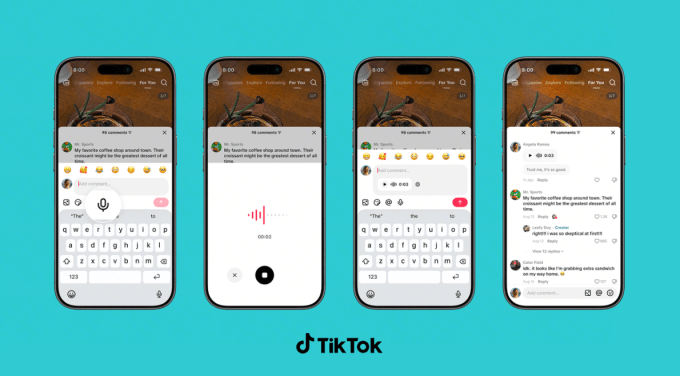
The platform announced a wave of new comment tools on Thursday, and the headline act is TikTok voice comments. Instead of typing, you can record a message up to a minute long and pin it under any video. Tap the microphone icon in the comment box, talk, and post. Anyone who scrolls by can tap to listen.
“Sound and music have shaped TikTok from the very beginning, turning songs into trends and audio clips into jokes shared across the app,” the company wrote in a blog post. “Now, we’re bringing that same energy to the comment section.”
It’s a logical move. TikTok already runs on audio — viral sounds, voiceovers, and those oddly satisfying whisper videos. Extending that into the comments makes the whole feed feel more alive, less like a message board and more like a conversation.
What’s actually new in the comment box
Voice is the big one, but it’s not the only trick TikTok is adding. Here’s the full rundown:
- Voice comments — record up to 60 seconds of audio under any video. Rolling out globally over the next month, but only to users 18 and older.
- Comment polls — creators can attach a poll to their own videos, with up to five options and a set voting window. Previously limited to some accounts, now it’s worldwide.
- Photo carousel comments — you can now drop up to nine images in a single comment, where before it was one at a time. Global rollout over the next month.
- Live Photo comments — upload a moving image that plays a quick burst of motion before settling into the full photo. Available globally now.
Why TikTok is turning comments into a messaging app
Look at these features side by side and you’ll notice something: they look a lot like the tools you’d find in a chat app. Voice notes, polls, photo sharing — that’s the vocabulary of WhatsApp and iMessage, not your typical social feed.
That’s not an accident. TikTok wants people to stay longer, comment more, and come back to check replies. A voice note feels more personal than a typed reply. A poll invites participation instead of passive scrolling. Photo carousels give commenters a reason to show off, not just speak.
The company is betting that if comments feel like a conversation with friends, users will treat the app less like a broadcast channel and more like a place to hang out.
Moderation: voice comments aren’t a free-for-all
Audio comments raise an obvious question: what stops someone from recording something hateful or harassing? TikTok says it’s on that.
A spokesperson told TechCrunch that voice comments fall under the same Community Guidelines as everything else on the platform. The moderation system combines human reviewers with automated tools, including speech-to-text transcription, to catch and remove policy violations. So yes, they’re listening — or at least, their software is.
Who gets access first
Voice comments aren’t hitting everyone at once. The rollout spans the next month, and it’s restricted to users 18 and up. That age gate is a clear nod to safety concerns — minors are more vulnerable to audio-based harassment or inappropriate content, and moderating voice at scale is harder than filtering text.
Photo carousel comments are also rolling out gradually. Live Photo comments, meanwhile, are already available everywhere.
What creators should do with polls and voice notes
If you’re a creator, these tools are worth experimenting with. Polls are the most obvious win — ask viewers to vote on your next video idea, pick an outfit, or decide what you should cook. The results show up right in the comment section, which turns a passive audience into active participants.
Voice comments, on the other hand, are a chance to add personality. A quick vocal reaction to a comment can feel more genuine than a typed reply. Think of it as a mini-podcast tucked into your comment thread.
For everyday users, the takeaway is simpler: your comments no longer have to be text. You can react with your voice, share a burst of photos, or start a poll of your own — well, if you’re the video’s creator, anyway.
The bigger picture: engagement is the currency
TikTok’s algorithm rewards interaction. More comments, more replies, more time spent — all of it feeds the recommendation engine. By making comments richer and more interactive, TikTok is essentially giving users more reasons to engage, and giving itself more signals to work with.
It’s a smart cycle. The more tools people have to talk, the more they talk. The more they talk, the longer they stay. And the longer they stay, the more ads TikTok can serve. That’s the business model, and it’s working.
So next time you’re scrolling and see a microphone icon in the comment box, don’t be shy. Record something. Start a poll. Drop a Live Photo. The comment section just became a stage of its own.
For more on how to get the most out of your feed, check out our guide to TikTok engagement strategies and the latest on TikTok algorithm updates.
Social Media
Turn Old LinkedIn Newsletters Into a Discovery Engine (Plus Video Series Tips & Industry News)
Published
1 day agoon
September 4, 2026
Why Your Old LinkedIn Newsletters Are Still Gold
Most marketers treat a newsletter like a one-and-done campaign. You write it, hit publish, and move on. That’s a mistake.
Your past LinkedIn newsletters are packed with insights your audience already engaged with. They’re proven content. So why not turn them into a discovery engine?
Here’s the idea: instead of letting older editions gather digital dust, repurpose them strategically to attract new followers and re-engage lapsed ones. It’s about working smarter, not harder.
How to Repurpose Past Newsletters for Discovery
Start by auditing your last few months of newsletters. Look for themes that performed well — high engagement, thoughtful comments, or topics that sparked conversation.
- Create a “Best Of” edition: Curate your top insights into a single newsletter and promote it as a starting point for new subscribers.
- Turn insights into carousel posts: Pull key stats or tips from past newsletters and turn them into a visual carousel for your feed.
- Link back strategically: In new posts, reference older newsletters as “deep dives” — this sends engaged readers down a rabbit hole of your best content.
- Update and refresh: If a topic is still relevant, update it with new data and republish. LinkedIn’s algorithm often gives refreshed content a second chance.
This approach turns your newsletter archive into a lead-generation tool. It’s a smart LinkedIn marketing strategy that requires zero new content creation — just smart curation.
How to Structure a Video Series for Marketing
Video is dominating social feeds, but posting random videos won’t cut it. A structured video series builds anticipation and keeps viewers coming back.
Think of it like a TV show. You need a hook, a consistent format, and a reason for people to tune in next week.
Steps to Launch a Winning Video Series
- Define your series theme: Pick one narrow topic you can explore deeply. For example, “Instagram Reels tips for local businesses” — not just “social media tips.”
- Decide on a format: Will it be a weekly Q&A, a tutorial, or a behind-the-scenes vlog? Consistency in format helps viewers know what to expect.
- Plan a season: Map out 4–8 episodes in advance. Each episode should stand alone but also build on the last.
- Promote the series: Create a trailer or announcement post. Use a consistent hashtag and posting schedule.
- Repurpose episodes: Turn each video into clips for TikTok, YouTube Shorts, or LinkedIn. One episode can feed multiple platforms.
A structured series also helps with audience retention. When viewers know episode 3 is coming next Tuesday, they’re more likely to follow you.
Industry News: Meta and TikTok Updates You Need to Know
The social media landscape never sleeps. Here’s what’s happening at the big platforms.
Meta’s Latest Moves
Meta continues to double down on AI-powered advertising tools. Recent updates suggest a push toward more automated campaign management, which could change how advertisers allocate budgets.
Also notable: Instagram is testing new features that blur the line between Reels and Stories. Keep an eye on your analytics — if engagement shifts, your content strategy may need to adapt.
TikTok’s Expanding Features
TikTok is rolling out more e-commerce integrations, making it easier for creators to tag products directly in videos. This is a big deal for affiliate marketers and small business owners.
Additionally, TikTok’s search functionality is improving, which means optimizing your video captions and descriptions for search is more important than ever. Think of TikTok as a search engine, not just a discovery feed.
Key Takeaways for Your Marketing Strategy
So what should you do with all this? Start by repurposing your best LinkedIn content. It’s low-hanging fruit.
Then, consider launching a video series with a clear structure. It doesn’t have to be perfect — just consistent.
Finally, stay agile with platform changes. Meta and TikTok are constantly evolving, and the marketers who adapt quickly will win.
For more on making the most of your content, check out our guide on repurposing content across platforms or our tips for building a content calendar.
Now get out there and turn your old content into new opportunities.
Social Media
X drops Stripe for US creator payouts, moves everything to X Money
Published
1 day agoon
September 4, 2026
X creator payouts just changed — and not everyone gets a say
If you make money on X through subscriptions or the platform’s content rewards, your next check isn’t coming from Stripe anymore. As of Wednesday, all U.S. creator payouts are being routed through X Money, the company’s in-app payments service.
The shift was announced in a post from the official @XCreators account, which confirmed that both the Original Content Rewards Program and creator subscriptions now pay out exclusively via X Money for U.S.-based users.
Instant payouts sound great — but there’s a catch
The upside is speed. X says creators get their money the moment it’s sent. No more waiting for a two-week billing cycle to close. No minimum threshold blocking access to your earnings. Previously, X’s own documentation noted payouts ran every two weeks with a $30 minimum.
But here’s the thing: the announcement doesn’t frame X Money as an option. It’s the only way U.S. creators get paid now. If you preferred the old Stripe-powered system, that preference doesn’t matter anymore.
A representative for X confirmed the change is mandatory for U.S. creators. Those outside the U.S. will stay on Stripe for now.
What’s happening to X’s other creator programs?
This payout change lands right as X reshuffles its broader creator economy. On September 7, the platform will retire its Creator Revenue Sharing Program — the one that stopped taking new members last month. Creators are being pushed toward the Original Content Rewards Program instead, which leans harder into original posts rather than engagement-based revenue sharing.
It’s a meaningful pivot. The old program rewarded virality. The new one rewards originality, at least according to X’s framing. Whether that translates into better paydays for creators remains to be seen.
X Money is bigger than creator payouts
X Money is part of Elon Musk’s long-touted “everything app” vision. The service includes a bank card with 3% cash back, instant payments, and free ATM withdrawals. But it’s worth clarifying: X Money is not a bank. Accounts sit with FDIC-insured Cross River Bank.
Here’s what creators should know about the new setup:
- Payouts are instant once sent — no waiting period.
- Direct deposit through X Money could boost your APY. X Premium users get a 6% rate; standard users get 4%.
- Individuals receiving creator payouts will get a 1099-NEC form.
- LLCs must provide W-9 information so X can issue accurate 1099s.
Tax implications and fine print
That tax bit matters. If you’re an individual creator, expect a 1099-NEC from X. If you operate as an LLC, X will collect your organization’s W-9 details to keep the paperwork straight. It’s the kind of administrative detail that’s easy to overlook until tax season rolls around.
The move also means creator payouts count toward X Money’s direct deposit requirements for that better APY rate. So if you were already banking with X Money, your creator earnings just became more valuable.
What creators should do next
If you’re already using X Money, you don’t need to do anything. Your next payout will land there automatically. If you haven’t set up an X Money account yet, you’ll need to open one to keep receiving payments in the U.S.
The bigger question is whether this signals more consolidation to come. X has been steadily folding its creator tools into its payments ecosystem. For those watching Musk’s everything-app ambitions, this is another brick in the wall. For creators, it’s a reminder that platform changes come fast — and you don’t always get to vote.

Cisco Nexus 9000 Critical Flaw Lets Unauthenticated Remote Attackers Run Code as Root

Is AI Making It So Anyone Can Run Effective TikTok Ads?

ThreatsDay: CEO Phishing Kits, 5K Dropbox Hacks, OAuth Traps, and 17 More Threats You Can’t Ignore

LeakBase Data Breach Forum Seized in Major Europol Operation

The Truth About Fast Charging Apps for Android: Can They Speed Up Your Battery?
Zero-Day Attacks Hit Record High as Enterprise Software Becomes Prime Target

One UI 9.0 Beta Hits Galaxy S24 Ultra: 8 Game-Changing Features You Need to See

The #1 Claude AI Side Hustle for People Over 50 (No One Is Talking About It)

DEFCON Is Not What You Think: A First-Timer’s Walkthrough of the World’s Wildest Hacking Conference
Trending
CyberSecurity6 months agoLeakBase Data Breach Forum Seized in Major Europol Operation
How To5 months agoThe Truth About Fast Charging Apps for Android: Can They Speed Up Your Battery?
CyberSecurity6 months agoZero-Day Attacks Hit Record High as Enterprise Software Becomes Prime Target
CyberSecurity6 months agoRussian Hackers Target WhatsApp and Signal in Global Espionage Campaign
Social Media6 months agoYouTube Live Streaming API: A Developer’s Guide to Managing Live Broadcasts
Video4 months agoSamsung One UI 8.5 Official Update Is Here: Release Timeline, Eligible Devices & Key Features
Infosecurity6 months agoCybersecurity Communication: Why Fear-Based Messaging Fails and What Works
CyberSecurity6 months agoContextCrush Vulnerability: How a Trusted AI Tool Became an Attack Vector