Connect with us

How To

Massive Discount: iPhone 13 at 26% Off on Amazon – Grab Yours Now

Published

on

Massive Discount: iPhone 13 at 26% Off on Amazon – Grab Yours Now

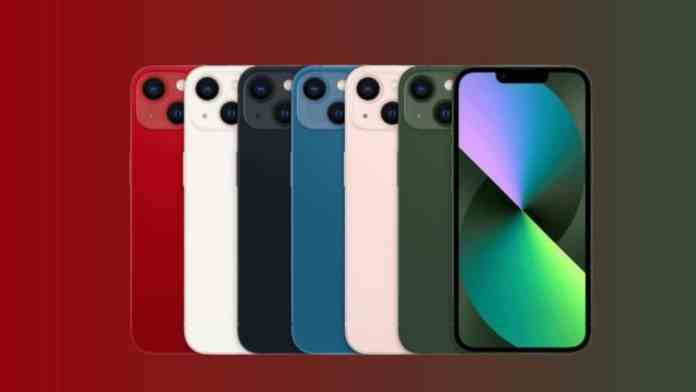
The iPhone 13 discount is turning heads this season. Amazon is offering the Apple iPhone 13 (128GB, Midnight) at a jaw-dropping 26% off, slashing the price from Rs. 59,900 to just Rs. 44,499. For anyone eyeing a premium smartphone without breaking the bank, this deal is hard to ignore.

Why do older iPhone models remain popular? Simple: after a new model launches, prices drop significantly. The iPhone 13, despite being a previous-generation device, still delivers top-tier performance, a stunning display, and a reliable camera system. With this iPhone 13 discount, it becomes an even more attractive option for budget-conscious buyers.

iPhone 13 Discount: What’s the Offer?

Amazon is currently running a limited-time promotion on the iPhone 13 (Midnight, 128GB). The original price of Rs. 59,900 has been reduced by 26%, bringing it down to Rs. 44,499. That’s a saving of over Rs. 15,000.

But the savings don’t stop there. HDFC Bank credit and debit cardholders can claim an additional Rs. 1,250 off. On top of that, Amazon’s exchange program lets you save up to Rs. 22,800 by trading in your old device. If the upfront cost still feels steep, no worries — you can opt for easy EMIs starting at just Rs. 2,157 per month.

iPhone 13 Specs: Why It’s Still a Great Buy

The iPhone 13 may not be the newest kid on the block, but it packs plenty of punch. Here’s a closer look at what makes it stand out.

Display and Performance

The device features a 6.1-inch Super Retina XDR display, delivering bright, sharp visuals perfect for streaming or gaming. Under the hood, the A15 Bionic chip ensures smooth multitasking and fast app launches. This combination makes the iPhone 13 a reliable daily driver.

Camera and Battery Life

Photography enthusiasts will appreciate the dual 12MP rear camera system, which captures detailed photos and 4K videos. The 12MP front-facing selfie camera is equally impressive for video calls and social media. Battery life is solid too, with a 3240mAh unit supporting 15W fast charging. You can juice up quickly and get back to using your phone.

Additional Perks and Payment Options

Beyond the iPhone 13 discount, Amazon sweetens the deal with flexible payment methods. The no-cost EMI option makes it easier to spread the cost over several months. Plus, the exchange offer can significantly reduce the final price if you have an older smartphone to trade in.

Remember to check the terms and conditions for the exchange and bank offers. These promotions often have specific eligibility criteria, so read the fine print before checking out.

Is the iPhone 13 Worth It in 2025?

Absolutely. The iPhone 13 remains a capable device with a premium build, excellent camera, and strong performance. With this iPhone 13 discount, it competes directly with many mid-range Android phones, offering better long-term value and iOS ecosystem benefits.

If you’ve been waiting for the right moment to buy an iPhone, this is it. Head over to Amazon now and grab the deal before it expires. For more tech deals and updates, check out our latest deals page or explore iPhone buying guides.

Continue Reading
Click to comment

Leave a Reply

Your email address will not be published. Required fields are marked *

How To

Vivo T3 5G Price Drop: Now More Affordable Than Ever at Just ₹18,500

Published

on

Vivo T3 5G Price Drop: Now More Affordable Than Ever at Just ₹18,500

The Vivo T3 5G price has just become significantly more attractive. Originally launched at around ₹20,000, this budget-friendly 5G smartphone is now available on Amazon for just ₹18,500. This price reduction makes it one of the most compelling options in the sub-₹20,000 segment. But what exactly does this device offer at this new price point? Let’s break down the key features, performance, and deals that make this a smart purchase.

Why the Vivo T3 5G Price Drop Matters

This price cut isn’t just a random discount. It’s a strategic move that positions the Vivo T3 5G against stiff competition from brands like Realme and Xiaomi. At ₹18,500, the phone undercuts many rivals while offering a solid set of specifications. For buyers looking for a reliable 5G experience without breaking the bank, this deal is hard to ignore. The Vivo T3 5G price now directly competes with devices that often compromise on battery or camera quality.

Key Specifications and Performance

Battery and Charging Capabilities

One of the standout features of the Vivo T3 5G is its massive 5,000 mAh battery. This ensures all-day usage, whether you’re streaming videos, playing games, or browsing social media. When it’s time to recharge, the 44W Flash Fast Charging technology comes to the rescue. It can take the battery from 20% to 100% in just over an hour. While wireless charging is absent, the wired speed is more than adequate for most users. This means less downtime and more productivity.

Processor and Performance

Under the hood, the Vivo T3 5G is powered by the MediaTek Dimensity 7200 chipset. Built on a 4nm architecture, this processor balances raw performance with energy efficiency. Paired with 8GB of RAM, the phone handles multitasking with ease. Switching between apps, editing documents, or playing graphics-intensive games feels smooth and lag-free. This combination ensures the phone remains future-ready for the next few years.

Camera System

Photography enthusiasts will appreciate the dual-camera setup on the rear. It features a 50MP primary sensor alongside a 2MP depth sensor. The camera software includes Auto Focus, Face Detection, and HDR modes, which help capture detailed and vibrant images even in challenging lighting conditions. On the front, a 16MP selfie camera delivers bright and clear self-portraits, ideal for video calls and social media posts. The overall camera performance is a strong selling point at this Vivo T3 5G price.

Pricing, Offers, and Variants

The Vivo T3 5G comes in two storage configurations. The 8GB RAM + 128GB storage variant is priced at ₹19,499 on Amazon. Meanwhile, the 8GB RAM + 256GB storage model is available on Flipkart for ₹20,499. However, the current deal brings the base model down to ₹18,500.

Additionally, several bank offers sweeten the deal. HDFC Bank credit card EMI transactions of six or nine months come with a ₹1,250 discount. Furthermore, IDFC FIRST Bank credit card users can get a 7.5% instant discount up to ₹750 on EMI purchases above ₹5,000. These offers make the Vivo T3 5G price even more attractive.

Final Verdict: Should You Buy?

Considering the Vivo T3 5G price drop to ₹18,500, this smartphone presents excellent value. Its robust battery, capable processor, and decent camera system make it a well-rounded choice for everyday use. The additional bank offers only enhance its appeal. If you’re in the market for an affordable 5G phone that doesn’t skimp on essentials, this deal is worth grabbing before it ends. For more budget phone options, check out our guide to the best budget 5G phones in India or other Vivo phones under ₹20,000.

Continue Reading

How To

Fabby Selfie Art Camera App: A Complete Guide to Transforming Your Selfies

Published

on

Fabby Selfie Art Camera App: A Complete Guide to Transforming Your Selfies

Are you tired of taking selfies that lack that professional touch? Many smartphone users struggle with built-in cameras that don’t deliver the quality they desire. Fortunately, the Fabby Selfie Art Camera app offers a practical solution. This powerful tool can elevate your mobile photography, making ordinary selfies look like they were shot with a high-end DSLR. In this comprehensive guide, we will explore everything you need to know about this app, from its standout features to step-by-step usage instructions.

What Makes the Fabby Selfie Art Camera App Special?

The Fabby Selfie Art Camera app is not just another filter app; it’s a versatile photo editing suite designed for creativity and ease of use. Its core appeal lies in its ability to transform the background of your selfies. Instead of settling for a cluttered or dull backdrop, you can replace it with anything from a serene beach scene to a vibrant abstract pattern. This feature alone opens up endless possibilities for artistic expression.

Another standout capability is the background blur effect. By softening the area behind your subject, the app creates a depth-of-field effect that mimics professional portrait photography. This technique helps draw attention to your face, making your selfies look more polished and engaging. The app also includes a variety of color themes and filters, allowing you to adjust the mood and tone of your photos. Whether you prefer warm, golden hues or cool, monochromatic tones, you can find a preset that matches your vision.

Key Features at a Glance

  • Background Replacement: Swap out any background with a library of images or your own photos.
  • Background Blur: Create a professional bokeh effect to highlight your subject.
  • Color Themes & Filters: Apply artistic presets to change the overall look and feel.
  • User-Friendly Interface: Simple controls make editing accessible for beginners.

How to Download the Fabby Selfie Art Camera App

Getting started with the Fabby Selfie Art Camera app is straightforward. The app is available on the Google Play Store for Android devices. Simply open the Play Store on your smartphone, type “Fabby Selfie Art Camera” into the search bar, and you will see the app appear in the results. Tap on the install button, and within moments, the app will be ready to use. For your convenience, you can also use the direct link provided below to jump straight to the download page.

Once installed, the app will request certain permissions, such as access to your camera and photo gallery. These permissions are essential for the app to capture new selfies and edit existing images from your library. Granting these permissions is safe and standard for photo-editing applications.

Step-by-Step Guide: How to Use the App

Using the Fabby Selfie Art Camera app is intuitive, even for those who are not tech-savvy. Follow these simple steps to start creating stunning selfies:

  1. Open the App: After installation, launch the app from your app drawer.
  2. Grant Permissions: Allow the app to access your camera and storage when prompted. This is necessary for taking new photos and editing existing ones.
  3. Take or Select a Photo: You can either take a fresh selfie using the in-app camera or choose an existing photo from your gallery.
  4. Apply Background Effects: Once your photo is loaded, use the toolbar to select the background option. You can blur the background or replace it entirely with a new image.
  5. Adjust Color Themes: Experiment with the various color themes and filters available. Slide through the options to see how each one changes the mood of your photo.
  6. Save and Share: When you are satisfied with the result, tap the save button. The edited photo will be stored in your gallery, ready to be shared on social media or with friends.

This process is quick and efficient, allowing you to produce professional-looking selfies in just a few taps. The app’s interface is designed to minimize clutter, so you can focus on your creativity rather than navigating complex menus.

Why This App Stands Out Among Photo Editors

In a crowded market of photo editing apps, the Fabby Selfie Art Camera app distinguishes itself through its specialization in selfie enhancement. While other apps offer a broad range of editing tools, this app focuses specifically on the elements that matter most for selfies: background control and color grading. This targeted approach makes it incredibly efficient for users who primarily want to improve their portrait photos.

Moreover, the app’s performance is optimized for mobile devices, ensuring that editing is smooth and lag-free. It does not require a high-end smartphone to function well, making it accessible to a wide audience. For those looking to elevate their social media presence or simply capture better memories, this app is a valuable addition to their digital toolkit. You can also explore other useful tools like the Voice Lock app for added smartphone security.

Final Thoughts: Is It Worth Your Time?

To sum up, the Fabby Selfie Art Camera app is a fantastic option for anyone who wants to improve their selfie game without investing in expensive equipment or learning complex software. Its combination of background replacement, blur effects, and color themes provides a complete package for creative mobile photography. The app is easy to download, simple to use, and delivers impressive results that can make your photos stand out.

Building on this, if you enjoy experimenting with different apps, you might also find value in our review of the Transparent Wallpaper app for customizing your home screen. Ultimately, the Fabby Selfie Art Camera app empowers you to take control of your selfies and express your unique style. Give it a try, and you might be surprised at the professional-quality photos you can create with just your phone.

Continue Reading

How To

Black Wallpapers 4K: Transform Your Screen with Stunning Dark Backgrounds – Full App Guide

Published

on

Black Wallpapers 4K: Transform Your Screen with Stunning Dark Backgrounds – Full App Guide

Are you tired of dull, generic wallpapers that make your phone look ordinary? Many users struggle to find high-quality dark backgrounds that truly enhance their device’s display. Fortunately, the Black Wallpapers 4K app offers a solution. This comprehensive review explores how this app can revolutionize your screen with crisp, dark imagery perfect for AMOLED panels.

What Is the Black Wallpapers 4K App?

This application is a dedicated platform for downloading premium black-themed wallpapers in 4K resolution. It caters specifically to users who prefer dark backgrounds for a sleek, modern look. The app is lightweight, easy to use, and regularly updated with fresh content.

Unlike generic wallpaper apps, this one focuses on deep blacks and high contrast. This makes it an excellent choice for AMOLED screens, where true blacks save battery and make colors pop. The app is available for free on the Google Play Store.

Key Features of the Black Wallpapers 4K App

This app stands out due to its curated collection and user-friendly design. Below are the main features that users appreciate.

Diverse Wallpaper Categories

The app includes several categories to suit different tastes. You’ll find 3D abstract designs, animal wallpapers, black bike images, and car wallpapers. This variety ensures there’s something for everyone, whether you prefer minimalist patterns or bold automotive shots.

4K Resolution and AMOLED Optimization

All images are rendered in 4K quality, delivering sharp details and vibrant colors. The black backgrounds are particularly optimized for AMOLED displays. This means deeper blacks, reduced power consumption, and a longer battery life for compatible devices.

User-Friendly Interface

The app is designed with simplicity in mind. Even first-time users can navigate through categories effortlessly. Wallpapers are sorted logically, making it easy to find exactly what you’re looking for without confusion.

Regular Updates and Customization

The collection is updated frequently, so you never run out of options. Additionally, you can save your favorite wallpapers to a personal collection. This allows you to quickly switch between backgrounds without searching again.

How to Download and Use the Black Wallpapers 4K App

Getting started is straightforward. Follow these steps to install and enjoy the app on your Android device.

  1. Open the Google Play Store on your phone. Search for “Black Wallpapers 4K” or use the direct download link provided in the app’s official page.
  2. Install the app and launch it. You may need to grant basic permissions like storage access to save wallpapers.
  3. Browse categories such as abstract, animals, bikes, or cars. Tap any wallpaper to preview it in full screen.
  4. Set or download your chosen image. Use the “Set as Wallpaper” button to apply it directly, or save it to your gallery for later use.

Building on this, the app also allows you to share wallpapers with friends through social media or messaging apps. This makes it a social tool as well.

Why Choose This App for Dark Backgrounds?

There are several reasons why this app is a top pick for dark theme enthusiasts.

Enhanced Visual Appeal

Black wallpapers create a striking contrast against app icons and widgets. This makes your home screen look more organized and visually appealing. The 4K resolution ensures every detail is crisp, even on large screens.

Battery Savings on AMOLED Screens

For devices with AMOLED displays, black pixels are turned off entirely. This means that using black wallpapers can significantly reduce battery drain. The app’s focus on true black backgrounds maximizes this benefit.

Lightweight and Fast Performance

The app is optimized to run smoothly without consuming excessive storage or memory. It loads quickly and doesn’t lag, even on older devices. This ensures a seamless user experience.

Final Verdict: Should You Download It?

In conclusion, the Black Wallpapers 4K app is a solid choice for anyone seeking high-quality dark backgrounds. Its diverse categories, 4K resolution, and AMOLED optimization make it stand out from competitors. The user-friendly interface and regular updates further enhance its value.

However, the app could benefit from more customization options, such as wallpaper scheduling or blur effects. Despite this, it remains a reliable tool for refreshing your phone’s look. For more app recommendations, check out our review of the Rose Wallpaper app or explore Glitter Live Wallpaper for Android.

So, if you’re ready to upgrade your screen with stunning dark aesthetics, download the app today. Your phone will thank you.

Continue Reading

Trending