Connect with us

How To

Master Do Not Disturb on Android: Your Ultimate Guide to Silencing Distractions

Published

on

Master Do Not Disturb on Android: Your Ultimate Guide to Silencing Distractions

Is your phone constantly buzzing with alerts you don’t need? You are not alone. The Do Not Disturb on Android feature is a powerful tool designed to give you back control over your attention. It goes far beyond simply muting your device, offering a smart way to filter out the noise while letting through what truly matters. This guide will walk you through everything from the basics to advanced customization, helping you create a quieter, more productive digital life.

Understanding Do Not Disturb vs. Silent Mode

Many people confuse Do Not Disturb with the traditional silent mode. While both reduce sound, they work in fundamentally different ways. Silent mode simply mutes all ringtones and notification sounds, but your screen still lights up with every incoming alert. The distraction remains visual.

Do Not Disturb on Android, however, is far more intelligent. It can completely suppress both sound and visual interruptions. Crucially, it allows you to create exceptions. You can let calls from your family ring through, allow alarms to sound, or permit notifications from a specific work app. This level of granular control makes it a superior choice for focused work, restful sleep, or uninterrupted travel.

How to Activate Do Not Disturb on Android

Getting started with Do Not Disturb on Android is simple, with a few different paths to activation. Whether you own a Samsung, Google Pixel, or another brand, the core steps are similar.

Using Quick Settings (Fastest Method)

The quickest way to enable the feature is through the Quick Settings panel. Simply swipe down from the top of your screen once or twice (depending on your device) to reveal the full tile menu. Look for the Do Not Disturb icon, which often looks like a circle with a line through it or a minus sign inside a circle. Tap it once to activate the feature immediately. Tap it again to turn it off.

Activating Through the Settings App

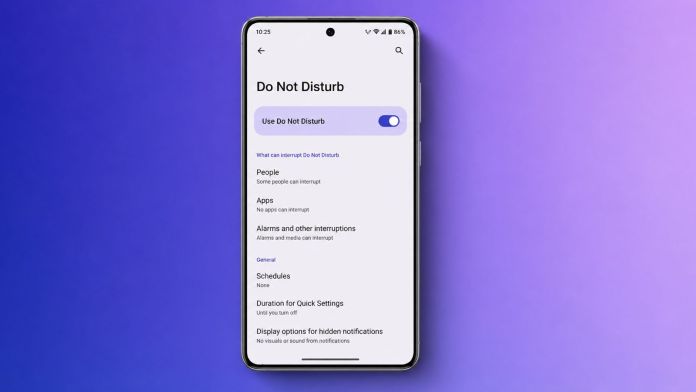
For those who prefer a more detailed approach, the Settings app offers full control. Navigate to Settings > Sound & vibration > Do Not Disturb. Here, you will find a “Turn on now” button at the top of the screen. This method is also your gateway to deeper customization.

Samsung and Google Pixel Specifics

On Samsung devices, the feature is tightly integrated with Modes and Routines. You can find the toggle in Quick Settings or within the main Settings menu under “Modes and Routines.” This allows for powerful automation based on your activity, like a “Work” or “Sleep” mode. On Google Pixel phones, the standard Android controls apply, but they also integrate with Focus Mode and Bedtime Mode found within the Digital Wellbeing settings. These offer preset configurations for specific scenarios.

Customizing Your Do Not Disturb Settings

The true power of Do Not Disturb on Android lies in its customization. You can tailor it to fit your exact needs, ensuring you never miss a critical alert while blocking everything else.

Managing Calls, Messages, and App Exceptions

Within the Do Not Disturb settings, you will find options to control who can reach you. Under the “People” section, you can allow calls and messages from anyone, only your starred contacts, or a specific list of contacts. You can also choose to block everyone entirely. A particularly useful feature is “Allow repeat callers.” If the same person calls twice within 15 minutes, their second call will break through, which is invaluable for emergencies.

For apps, navigate to the “Apps” section within Do Not Disturb settings. You can add individual applications, like your messaging or calendar app, and configure the types of notifications they can show. This ensures that while most apps are silenced, critical ones—like a work email client or a family group chat—can still get your attention.

Setting Up Automatic Schedules

Manually toggling Do Not Disturb on Android can become tedious. This is where scheduling shines. You can create time-based rules that activate automatically. For example, you can set a schedule for every night from 11 PM to 7 AM. The phone will enter DND mode without you lifting a finger.

Building on this, Android also allows you to schedule DND during calendar events. If you have a meeting in your Google Calendar, your phone can automatically silence itself for its duration. To set this up, go to Settings > Sound & vibration > Do Not Disturb > Schedules > Add more > Event. Choose your preferred calendar and let the phone handle the rest. This is a game-changer for maintaining professionalism during important appointments.

Troubleshooting Common Do Not Disturb Issues

Sometimes, things don’t work as expected. If your phone is still buzzing despite DND being active, a few quick checks can help. First, review your exceptions list. You may have accidentally allowed a contact or app to bypass the silence. Second, restart your phone to clear any temporary software glitches. Third, ensure your Android software is up to date, as updates often fix bugs related to system features. If the problem persists, booting into Safe Mode can help identify if a third-party app is interfering.

As a final step, you can reset your app preferences. Go to Settings > System > Reset options > Reset app preferences. This will not delete your data but will restore default permissions for all apps, which can resolve conflicts.

Frequently Asked Questions

Will my alarm still ring with Do Not Disturb on?

Yes, by default, alarms are allowed to sound even when Do Not Disturb is active. You can disable this in the “Alarms & other interruptions” section of the DND settings if needed.

Can I schedule Do Not Disturb for specific days?

Absolutely. When creating a time-based schedule, you can select which days of the week the schedule should be active. This is perfect for setting a work schedule from Monday to Friday.

Does Do Not Disturb block vibrations?

Yes, DND can block all vibrations, not just sounds. You can customize this in the settings to either allow or block vibrations for different types of interruptions.

Mastering Do Not Disturb on Android is about reclaiming your time and focus. By setting up the right schedules and exceptions, you can enjoy a phone that works for you, not against you. For more tips on managing your digital wellbeing, check out our guide on hiding WhatsApp blue ticks or learn how to stay safe from online scams.

Continue Reading
Click to comment

Leave a Reply

Your email address will not be published. Required fields are marked *

How To

YouTube Introduces Unique Handle Channel Identifier: What Creators Need to Know

Published

on

YouTube Introduces Unique Handle Channel Identifier: What Creators Need to Know

YouTube is developing a fresh way for users to identify and connect with channels: a YouTube handle channel identifier. This upcoming feature, signaled by the familiar @ symbol, promises to make searching for content and interacting with creators far more straightforward. As the world’s second most-visited website, YouTube continuously refines its platform, and this update is poised to simplify how audiences find their favorite channels.

Instead of relying solely on channel names or cumbersome URLs, each channel will soon have a distinct handle. This change is designed to eliminate confusion and ensure that when you mention a creator, you are linking to the right person. The rollout is expected to enhance the overall user experience across comments, community posts, and video descriptions.

How the YouTube Handle Channel Identifier Works

The core idea behind the YouTube handle channel identifier is to give every channel a unique, searchable tag. Handles, which start with the @ symbol, are already common on other social platforms. YouTube is now adopting this system to streamline its own ecosystem. If you already have a personalized URL for your channel, the platform will reserve that as your handle by default. However, you retain the flexibility to change it if you prefer something different.

Once the feature is fully active, each handle will be one of a kind. This uniqueness means that when you see a handle on a Short, a channel page, or in a comment, you can be certain you are interacting with the correct creator. For subscribers and followers, this makes finding and engaging with your content much easier. The handle will appear prominently across YouTube, making your channel instantly recognizable.

In addition to boosting visibility, the handle system accelerates interactions. Creators and viewers will be able to mention each other quickly in comments, community posts, and video descriptions. This ease of use is expected to foster more engagement and help creators reach new audiences. Previously, customized URLs required a channel to have at least 100 subscribers. Now, any YouTube account holder can choose a handle, lowering the barrier for new creators.

When Will the Handle Feature Roll Out?

According to available reports, the YouTube handle channel identifier will become available to users in the coming months. The feature will be usable across the comment section, mentions, and YouTube Shorts. However, YouTube is considering several factors during the rollout, including subscriber count, overall channel presence, and whether a channel is active or inactive.

For those who do not select a handle before the deadline, YouTube will automatically assign one. The good news is that you can change this auto-assigned handle later through YouTube Studio. The platform will notify eligible users via email and an in-app notification in YouTube Studio when it is time to choose their handle. This process ensures that everyone gets a chance to claim their preferred identifier.

What This Means for Creators and Viewers

This new system represents a significant shift in how channels are identified and discovered. For creators, the YouTube handle channel identifier offers a simple, memorable way to build a brand. It eliminates the need for complex URLs and makes cross-platform promotion easier. Viewers, on the other hand, benefit from a cleaner search experience. Instead of wading through similar names, they can directly search for or type an @handle to land on the exact channel they want.

Another advantage is the increased potential for collaboration. With handles, mentioning another creator in a video description or community post becomes a direct link, driving traffic and fostering community. This feature aligns with YouTube’s broader goal of improving user engagement and discoverability. As the platform continues to evolve, tools like this help maintain its position as a leader in video sharing.

To stay updated on this and other YouTube changes, check out our guide on how to play YouTube in the background. For more insights into platform updates, explore our article on WhatsApp’s latest features.

Building on this, the handle system is just one of many improvements designed to streamline the user experience. As YouTube rolls out this feature, creators should prepare by brainstorming potential handles that align with their channel’s identity. The shift from subscriber-gated URLs to open handle selection democratizes access, giving every creator a fair chance to establish a unique presence.

In conclusion, the YouTube handle channel identifier is a welcome addition that simplifies navigation and enhances interaction. Whether you are a seasoned creator or just starting out, this feature will make your channel more accessible and recognizable. Keep an eye on your YouTube Studio notifications to claim your handle as soon as it becomes available.

Continue Reading

How To

5 Key PUBG Advantages Every Player Should Know: More Than Just a Battle Royale

Published

on

5 Key PUBG Advantages Every Player Should Know: More Than Just a Battle Royale

PlayerUnknown’s Battlegrounds, commonly known as PUBG, took the gaming world by storm. While many see it as just another battle royale shooter, there are several PUBG advantages that players often overlook. This article explores five distinct benefits that make this game more than just a pastime. Whether you play solo or with friends, understanding these PUBG advantages can change how you view your gaming sessions.

1. A Powerful Tool for Stress Relief and Escapism

One of the most immediate PUBG advantages is its ability to provide a temporary escape from daily pressures. When you drop onto the island, your focus shifts entirely to survival. This intense concentration can help you forget about work, bills, or personal worries for a while. Many players find that a 30-minute match serves as a mental reset button.

However, it is important to remember that this relief is short-term. The game should complement a healthy lifestyle, not replace real-world problem-solving. Used wisely, it can be a valuable tool for managing everyday stress.

2. Building Social Connections and Teamwork Skills

PUBG is fundamentally a team-based game. You need a squad of up to four players to compete effectively. This structure naturally encourages social interaction. Many players form lasting friendships with people they meet online. These connections can extend beyond the game, creating a genuine sense of community.

Furthermore, playing with a team teaches real-world collaboration. You learn to communicate clearly, coordinate strategies, and support your teammates under pressure. These PUBG advantages translate into better teamwork skills in academic or professional settings. For more on building online communities, check out our guide on how to find reliable gaming squads.

How Multiplayer Enhances Communication

The in-game voice chat forces players to give concise, actionable information. Calling out enemy positions, sharing loot, and planning rotations all require effective communication. This practice can sharpen your ability to convey information quickly in real-life situations.

3. Cognitive Benefits: Sharper Reflexes and Better Problem-Solving

Regular players often report noticeable improvements in their cognitive abilities. Studies suggest that action games like PUBG can enhance visual attention and reaction times. Players become better at spotting subtle changes in their peripheral vision. This is one of the most scientifically backed PUBG advantages.

In addition, the game constantly presents small puzzles. You must decide where to land, which loot to prioritize, and when to engage or hide. Solving these micro-decisions quickly trains your brain to process information faster. People who play for 1–2 hours daily often show improved pattern recognition and faster problem-solving skills.

4. Fostering a Sense of Unity and Shared Achievement

There is a unique feeling of accomplishment when your squad secures a “Chicken Dinner.” This shared victory creates a strong bond between teammates. Working together to survive against dozens of other players builds trust and camaraderie. You celebrate wins together and learn from losses as a group.

This sense of unity is a powerful motivator. It teaches players to rely on others and to be reliable in return. These PUBG advantages help build emotional intelligence and empathy. For tips on improving your squad coordination, read our article on top strategies for team play.

5. A Fun Way to Pass Time and Enjoy Quality Entertainment

At its core, PUBG is an entertaining game. It offers a compelling mix of tension, strategy, and action. When you are bored or have free time, a match provides an engaging way to spend 20–30 minutes. Unlike passive entertainment like watching TV, gaming keeps your mind active and involved.

Moreover, the game’s variety keeps it fresh. Different maps, weapon loadouts, and playstyles mean no two matches are exactly the same. This replayability ensures that the entertainment value remains high over long periods. It is a hobby that can fit into busy schedules while still delivering genuine enjoyment.

Final Thoughts on PUBG Advantages

PUBG offers far more than just shooting and looting. From stress relief and social bonding to cognitive sharpening and team building, the PUBG advantages are diverse. Of course, moderation is key. Like any activity, excessive play can have downsides. But when enjoyed responsibly, this game provides real, tangible benefits that extend beyond the screen.

We hope this article has given you a new perspective on your gaming time. If you found these insights useful, please share this with fellow gamers. For more gaming tips and tech insights, explore our other articles on gaming strategies and digital wellness.

Continue Reading

How To

Top Free Video Calling Apps in India: Connect Instantly with Anyone Online

Published

on

Top Free Video Calling Apps in India: Connect Instantly with Anyone Online

Do you enjoy chatting with people online and making new connections? If so, you are not alone. Millions of users across India are turning to digital platforms to socialise, date, and build relationships. Finding the best video calling app in India can transform how you interact, whether you want to talk to friends or meet strangers. This guide explores the leading free video calling apps that make it easy to connect without spending a single rupee.

Why Video Calling Apps Are Booming in India

India has witnessed a massive shift in communication habits. High-speed internet and affordable smartphones have fuelled the demand for real-time video chats. In the past, online dating and socialising were limited to foreign markets. Today, Indian users actively seek platforms that offer seamless video calling features.

As a result, developers have launched numerous apps tailored to local preferences. These tools allow you to chat with strangers, find potential partners, or simply have fun conversations. The video calling apps India market now offers diverse options, from casual chat rooms to serious dating platforms.

Key Features of the Best Video Calling Apps

When selecting a free video calling app, certain features stand out. Look for apps that provide high-quality video, low latency, and user-friendly interfaces. Privacy controls are equally important, especially when connecting with unknown persons.

Free and Unlimited Video Calls

Most top-rated apps let you make unlimited video calls without hidden charges. This makes them ideal for users who want to explore without financial commitment. For instance, Woo App and similar platforms offer free messaging and calling features.

Easy Registration and Login

A great app simplifies the onboarding process. You can log in using your Facebook account or create a new profile quickly. This saves time and reduces friction, encouraging more people to join.

Matching Based on Interests

Many apps now use algorithms to match users with similar interests. Before you start a video call, you can review profiles and see if your hobbies align. This increases the chances of meaningful conversations.

Top 5 Free Video Calling and Dating Apps in India

If you are searching for the best video calling app in India, consider these popular choices. Each offers unique benefits for online dating and socialising.

1. Woo App

Woo App is a free platform designed for Indian users. It allows you to chat and call directly from the app. You can match with people who share your interests before initiating a video call. Despite not being as mainstream as Tinder, Woo has already been downloaded by over 10 lakh users. Its focus on interest-based matching helps build stronger bonds.

2. Tinder

Tinder remains a global leader in online dating. Its video chat feature, introduced during the pandemic, lets you connect face-to-face after matching. The app is free to use, with premium upgrades available.

3. Bumble

Bumble puts women in control. It offers voice and video calling within the app, making it a safe space for meaningful interactions. The platform is popular among Indian millennials.

4. Azar

Azar is a random video chat app that connects you with strangers worldwide. It supports real-time translation, breaking language barriers. This makes it a fun option for casual conversations.

5. Omegle Alternatives

While Omegle has shut down, several alternatives like Chatroulette and Camsurf remain active. These platforms offer anonymous video chats, ideal for those who want to meet new people without sharing personal details.

How to Download and Use These Apps

Ready to start? Downloading a video calling app is straightforward. Follow these steps:

  • Open the Google Play Store or Apple App Store on your phone.
  • Search for the app name, such as Woo or Azar.
  • Tap Install and wait for the download to complete.
  • Open the app and register using your Facebook account or email.
  • Complete your profile, add interests, and start calling.

Once logged in, you can browse profiles or enter a random chat room. Many apps also let you send text messages before initiating a video call. This helps break the ice and ensures comfort.

Safety Tips for Video Calling with Strangers

While video calling is exciting, safety should remain a priority. Always protect your personal information, such as your address or bank details. Use apps that offer reporting and blocking features. If you feel uncomfortable during a call, end it immediately.

Additionally, avoid sharing explicit content. Stick to platforms that have strict community guidelines. For more tips on staying safe online, check out our guide to safe online dating.

Conclusion: Start Your Video Calling Journey Today

Finding the best video calling app in India does not have to be complicated. With options like Woo, Tinder, and Azar, you can enjoy free, high-quality video chats anytime. Whether you want to make friends, find a date, or simply pass the time, these apps deliver excellent experiences.

If you found this article helpful, share it with your friends on WhatsApp and Facebook. For more app reviews and tech tips, explore our Android apps section. Have questions? Drop a comment below, and we will respond promptly.

Continue Reading

Trending