Connect with us

Artificial Intelligence

Microsoft Teams to Solve Embarrassing Meeting Problems with Two Major Updates

Published

on

Microsoft Teams to Solve Embarrassing Meeting Problems with Two Major Updates

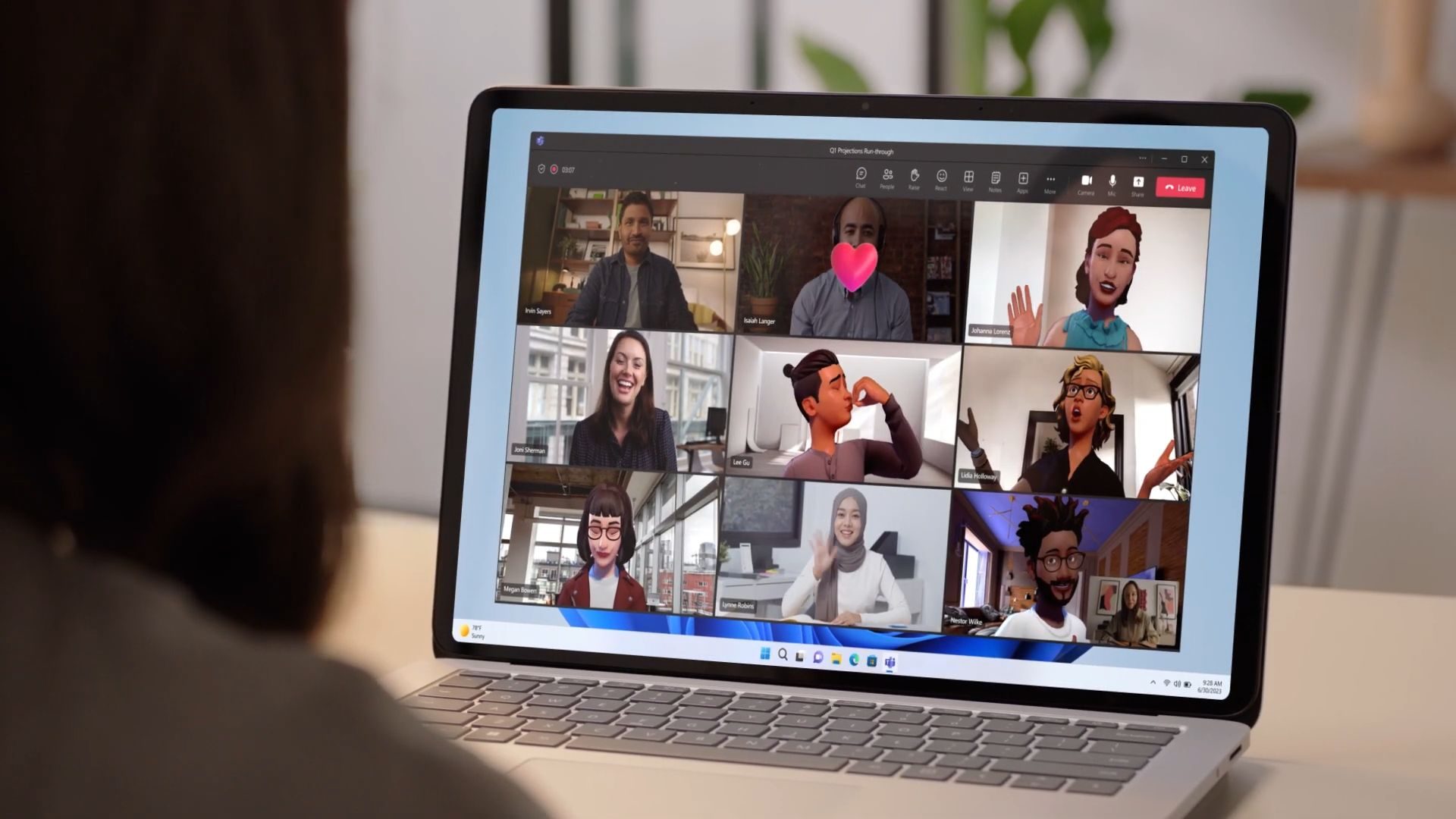
For anyone who has ever joined a video call only to discover their microphone is muted or their speakers aren’t working, relief is finally on the way. Microsoft is preparing two significant updates for its collaboration platform, Microsoft Teams, designed to tackle some of the most common and frustrating meeting experiences. These upcoming Microsoft Teams updates promise to smooth out the beginning and end of your virtual gatherings.

Fixing the Awkward Start: A Pre-Join Audio Check

Let’s face it: the frantic “Can you hear me now?” ritual has become a universal meeting cliché. Therefore, Microsoft’s first planned change directly addresses this daily annoyance. Before you even join a call, a new feature will allow you to test both your microphone and speakers. You’ll be able to record a short audio sample and play it back instantly, confirming everything is working correctly.

This simple tool aims to eliminate those awkward first minutes spent troubleshooting. It will help users catch issues like selecting the wrong audio input device, having hardware accidentally muted, or routing sound to the wrong output. Building on this, the feature is slated for a broad rollout starting in May 2026 for both desktop and Mac users, making it the more immediately impactful change for the average professional.

How the Mic Test Changes the Game

The implications are straightforward but powerful. Instead of realizing your mic is off only after you’ve started speaking, you can proactively verify your setup. This means meetings can begin on time and with confidence, reducing technical friction and preserving professional momentum. According to Microsoft’s roadmap, this functionality will be available across standard worldwide deployments, including specialized government clouds like GCC High and DoD.

Redefining the Meeting’s End: Privacy-First AI Summaries

While the audio test fixes the start of a meeting, the second major update rethinks what happens after it concludes. Microsoft is introducing privacy-first Copilot recaps. This feature allows organizations to generate AI-powered meeting summaries without the system storing any audio recordings or full transcripts.

This update is crucial for sectors with stringent data compliance, retention policies, or security concerns. In other words, companies can leverage AI for productivity without creating a permanent record of sensitive conversations. The rollout for this feature is set to begin sooner, with a limited launch next month and broader availability expected by June 2026.

Understanding the Controls and Limits

It’s important to note the structure of this new capability. Recordings and transcripts will remain the default setting in Teams. However, administrators will have the power to disable them at the tenant level for their entire organization. Furthermore, individual meeting organizers can turn recording off during the scheduling process or in real-time during a live meeting using AI Mode controls.

There is, however, a significant prerequisite. To access these privacy-focused recaps, an organization must have a commercial Microsoft 365 Copilot license, which carries an additional cost of $30 per user per month. This clearly positions the feature as an enterprise-grade tool for customers already invested in Microsoft’s AI ecosystem.

Which Update Will Users Notice More?

The answer likely depends on who you are. For the vast majority of daily users, the pre-join microphone and speaker test will be the instantly recognizable quality-of-life improvement. It solves a visible, tangible problem that disrupts nearly every type of call, from quick check-ins to major client presentations. You can learn more about optimizing your daily workflow with other Microsoft 365 tips here.

Conversely, for IT departments and enterprise decision-makers, the Copilot recap feature sends a stronger strategic signal. It demonstrates Microsoft’s responsiveness to the complex legal and security landscapes its largest customers navigate. By offering a way to use AI without retaining sensitive data, Microsoft addresses a major pain point for regulated industries. For insights on enterprise collaboration tools, explore our guide on choosing the right enterprise communication platform.

A More Polished Beginning and a More Secure End

Together, these two planned Microsoft Teams updates represent a thoughtful enhancement of the meeting lifecycle. One innovation focuses on user experience, eliminating a mundane but pervasive technical hurdle. The other focuses on governance, providing tools that align with modern data privacy expectations.

If both features launch as scheduled, Microsoft Teams will have meaningfully improved the critical moments when a meeting starts and when it wraps up. This dual approach shows a platform maturing to handle not just the communication itself, but the practical and compliance-related friction that surrounds it. The result should be fewer embarrassing audio glitches and greater control over your digital footprint.

Continue Reading
Click to comment

Leave a Reply

Your email address will not be published. Required fields are marked *

Artificial Intelligence

How User Fury Over ‘Microslop’ Forced Microsoft’s AI Recalibration

Published

on

How User Fury Over ‘Microslop’ Forced Microsoft’s AI Recalibration

For a time, using Microsoft Windows felt less like operating a computer and more like navigating a persistent AI showcase. Every action, from opening a simple text file to browsing the web, was met with an eager digital assistant offering to summarize, generate, or enhance. This initial excitement, however, swiftly curdled into widespread irritation. Consequently, a significant Microsoft AI backlash was born, not from the technology’s failure, but from its overwhelming and intrusive presence.

The Birth of “Microslop”: When the Internet Fights Back

As frustration mounted, the online community distilled its discontent into a single, biting term: Microslop. Evolving from the broader critique of “AI slop”—referring to low-quality, automated content—this new label pinpointed a specific grievance. It wasn’t merely about poorly executed artificial intelligence; it was a revolt against AI that felt presumptuous, noisy, and utterly unwanted. This meme captured a universal sentiment: software was becoming heavier and less predictable, prioritizing AI prompts over user peace.

Building on this, the backlash reached a crescendo when even CEO Satya Nadella felt compelled to publicly address the term, an act that only fueled its viral spread. By early 2026, “Microslop” had transcended meme status to become legitimate user feedback, loud enough to be censored in some official forums. This was the clear signal that the company could no longer ignore.

The Pivot: Microsoft’s Public Commitment to Quality

In a pivotal March 2026 blog post titled “Our commitment to Windows quality,” Microsoft officially acknowledged the growing discontent. The company pledged to enhance reliability, reduce friction, and restore a sense of smooth dependability to the Windows experience. Crucially, this included a promise to scale back the omnipresence of its Copilot AI assistant across the operating system.

This was not mere lip service. Observers noted tangible changes: announced features like deeper Copilot integrations into system notifications were shelved. Visible AI hooks vanished from core apps like Notepad, Photos, and the Snipping Tool. On the surface, it appeared to be a direct concession to the Microsoft AI backlash, a narrative of a tech giant humbled by its user base. However, the reality was far more nuanced.

Why a Full Retreat Was Never an Option

Despite the rollback, walking away from artificial intelligence was never a feasible strategy for Microsoft. To understand the company’s position, consider the monumental investments already made. Billions of dollars have flowed into OpenAI, with its ChatGPT technology deeply woven into Microsoft’s ecosystem. Simultaneously, the company integrated rival models like Anthropic’s Claude and developed its own in-house AI architectures.

This foundation has reshaped entire product lines, from Azure cloud infrastructure to the Microsoft 365 suite and the very concept of the Windows PC, exemplified by the Copilot+ laptop brand. Therefore, the visible pullback was not a retreat but a strategic recalibration. AI remains the core of Microsoft’s future; it is simply being repositioned.

Entering Stealth Mode: AI That’s Felt, Not Seen

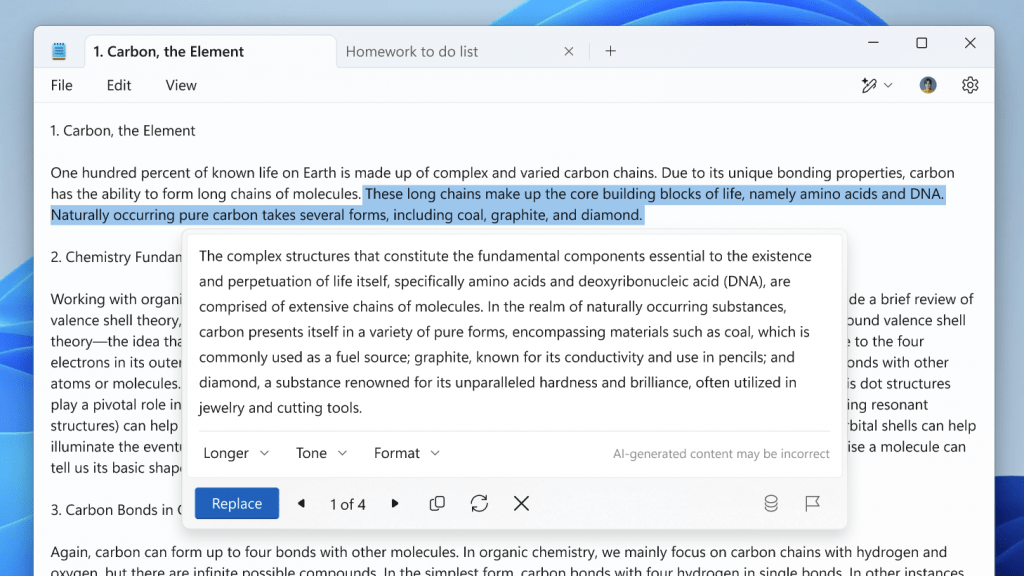
The most telling evidence of this shift is in the subtle details of the user interface. Take the example of Notepad. Previously, a prominent Copilot button dominated the toolbar. In recent builds, that overt branding has been replaced by a generic “Writing Tools” icon. The AI-powered capabilities—rewrite, summarize, adjust tone—remain fully intact, but the loud, in-your-face promotion is gone.

This pattern repeats across the system. The settings menu once labeled “AI Features” has been quietly renamed to “Advanced Features.” This widespread de-branding effort has been dubbed “Stealth-Slop” by some observers: the underlying artificial intelligence hasn’t vanished; it has simply learned to be less obtrusive. The company’s focus has pivoted from proving AI’s availability to demonstrating its genuine utility.

The Lasting Lesson: Helpful, Not Heralded

Ultimately, Microsoft’s journey through the Microsoft AI backlash highlights a critical lesson for the entire tech industry. The core issue was never the quality of the AI itself, but its delivery. Users rejected a future where computing felt like a constant AI demo. The real shift, now underway, is in the user experience. The goal is to make AI feel like a natural, integrated part of the workflow—helpful without being obvious, and valuable without being vocal.

This means the fundamental strategy remains unchanged. Microsoft continues to develop frontier AI models intended to compete directly with ChatGPT and Gemini, and AI is still the bedrock of its long-term vision. The difference is one of philosophy. For AI to succeed at scale and become truly indispensable, it cannot feel like a bulky add-on. It must feel like it was always meant to be there, working quietly in the background to empower rather than interrupt. The era of loud AI is over; the age of subtle, integrated intelligence has begun.

Continue Reading

Artificial Intelligence

France’s Historic Shift: Government Embraces Linux to Reclaim Digital Sovereignty

Published

on

France’s Historic Shift: Government Embraces Linux to Reclaim Digital Sovereignty

In a landmark decision for European technology policy, the French government has declared its intention to phase out Microsoft Windows across its administrative infrastructure. This France Linux transition represents a profound strategic pivot, aiming to replace the ubiquitous American operating system with open-source Linux alternatives. The move is far more than a simple software swap; it is a calculated effort to assert national control over the very foundations of the state’s digital architecture.

The Core Driver: A Quest for Digital Sovereignty

What is compelling a major European power to undertake such a complex technological overhaul? The answer lies in a single, powerful concept: digital sovereignty. French officials have consistently framed the need to reclaim authority over national data, critical infrastructure, and core decision-making systems. Consequently, dependence on foreign technology providers is increasingly viewed as a strategic vulnerability. This France Linux transition is the most tangible manifestation yet of a policy designed to insulate the state from external commercial pressures and geopolitical shifts.

Why Linux is the Chosen Path

Building on this, the choice of Linux is deliberate. As an open-source platform, it offers unparalleled transparency and flexibility. Government IT teams can inspect, customize, and secure the code without requiring permission from or being bound to a single corporate entity. Therefore, this fosters an environment where the state, not a vendor, dictates the roadmap for its essential digital tools. The initiative extends beyond the desktop, with France already substituting other U.S.-based services, including video conferencing and cloud platforms, with homegrown solutions.

A Ripple Effect Across Europe

France’s decisive action does not exist in a vacuum. It mirrors a growing continental unease regarding over-reliance on non-European technology giants. Rising geopolitical tensions and persistent concerns about data privacy and security are accelerating a continent-wide introspection. In fact, the European Union itself has been actively exploring frameworks to encourage technological autonomy. As a result, a successful migration in France could provide a vital blueprint for other nations contemplating a similar journey toward digital self-determination.

For policymakers, the calculus transcends traditional IT metrics like cost or raw performance. Ultimately, the paramount issue is one of control—ensuring that the systems underpinning public administration, healthcare, and security are not subject to the shifting terms, update cycles, or potential restrictions of a foreign corporation or government. This strategic lens reframes technology from a mere productivity tool into a core asset of national sovereignty.

Implications for Users and the Tech Ecosystem

Initially, the direct impact on French citizens and businesses may be minimal, as the transition will focus first on internal government workstations, particularly within key digital agencies. However, the long-term implications are potentially vast. A smooth and successful France Linux transition could act as a powerful catalyst, accelerating the adoption of open-source software across the broader public sector and even into private enterprise. Simultaneously, it is poised to stimulate the domestic tech industry, creating significant opportunities for European software developers, security auditors, and support firms focused on open-source solutions.

The Inevitable Challenges Ahead

Nevertheless, the path forward is fraught with complexity. Migrating tens of thousands of workstations from a deeply entrenched ecosystem like Microsoft Windows to Linux demands immense planning. Significant hurdles include retraining a vast civil service workforce, ensuring compatibility with thousands of legacy and specialized applications, and establishing robust, state-managed security and support protocols. The scale of this operational challenge cannot be understated.

What the Future Holds

While a detailed, nationwide timeline has not been publicly released, the shift is expected to be gradual and methodical. Government ministries have reportedly been instructed to formulate concrete plans to reduce foreign technology dependencies, with a phased rollout beginning in specific agencies and expanding over the coming years. The world will be watching closely. If France navigates this transition effectively, it will not only secure its own digital destiny but also offer a compelling, real-world model for other nations. To explore more about open-source strategies, consider reading our analysis on open-source government policy.

In the final analysis, France’s move signals a fundamental evolution in how nation-states perceive technology. It is no longer just a utility to be purchased off the shelf. Instead, it is now a strategic domain—akin to energy or defense—where autonomy is essential for security, resilience, and long-term independence. This precedent may well redefine the relationship between governments and global tech giants for decades to come. For further insights into building a local tech ecosystem, see our guide on European tech independence.

Continue Reading

Artificial Intelligence

Microsoft Reins In Copilot: Windows 11 Quietly Removes AI Branding from Core Apps

Published

on

Microsoft Reins In Copilot: Windows 11 Quietly Removes AI Branding from Core Apps

In a significant strategic pivot, Microsoft has begun a quiet but deliberate cleanup of its Windows 11 operating system. The focus of this effort? The once-ubiquitous Windows 11 Copilot branding. After months of aggressive promotion, the company is now scaling back its AI assistant’s visible presence in fundamental applications like Notepad and Snipping Tool, signaling a move from marketing spectacle to practical utility.

A Subtler Approach to AI in Windows 11

This shift is most evident in the latest Windows Insider builds. Where a prominent Copilot icon once demanded attention in the corner of Notepad, users now find a simple pen icon labeled “Writing tools.” The change is more than cosmetic. Consequently, the underlying AI-powered features—text rewriting, summarization, and drafting assistance—remain fully functional. They are simply no longer wrapped in the flashy neon branding of Copilot. This means that the utility survives, but the aggressive sales pitch has been muted.

Notepad’s Quiet Transformation

Notepad’s journey has been remarkable. For decades, it was a static, simple text editor. Then, it was suddenly rebranded as an AI-powered creative hub. Now, it appears to be settling into a middle ground. The settings have followed suit. Previously clear AI controls are now discreetly housed under a neutral “Advanced Features” section. This redesign suggests Microsoft believes the tools should speak for themselves, without requiring a constant reminder of their AI pedigree.

The Disappearing Act in Snipping Tool

The removal is even more absolute in the Snipping Tool. Previously, after capturing and marking up a screenshot, a Copilot button would appear, suggesting AI enhancements like visual search. That button has now vanished entirely. Unlike Notepad, there is no toggle to bring it back; it has been excised completely. For a feature Microsoft once embedded so visibly, its silent departure speaks volumes about the company’s changing priorities for Windows 11 Copilot integration.

Building on this, the scope of the removal is broad. This isn’t a minor tweak but part of a coordinated strategy. Microsoft has openly admitted in a Windows Insider blog post that its initial push may have been too forceful. The company stated it would “reduce unnecessary Copilot entry points” across several apps, including Photos and Widgets. Therefore, what we are witnessing is a deliberate, company-wide rollback, not a random bug or isolated change.

From Overlay to Undercurrent: The New AI Philosophy

Not long ago, Copilot felt inescapable within Windows 11. It was embedded in system apps, UI elements, and basic utilities, acting like a pervasive personality layer over the entire operating system. Today, that strategy is being reconsidered. The new focus seems to be on background functionality—AI that works quietly without demanding recognition. This is a crucial distinction. Microsoft isn’t abandoning AI capabilities; it is abandoning the loud, sometimes intrusive, branding that accompanied them.

In addition, this cleanup push reflects a broader maturation of AI in consumer software. The initial phase required demonstration and education, hence the prominent placement. Now that users are familiar with the concept, the value must come from seamless integration, not constant advertisement. This evolution is similar to how other platform features, once novel, eventually fade into the background of a polished experience. For more on how Microsoft is integrating AI across its ecosystem, you can read about AI in Microsoft 365.

What This Means for Windows Users

For the average user, this cleanup will likely result in a less cluttered, more intuitive interface. The constant nudges toward AI actions may have felt helpful to some but were distracting to others seeking to complete simple tasks. By removing the overt Windows 11 Copilot prompts, Microsoft is arguably showing more respect for user intent and workflow. The tools are there if you need them, but they won’t persistently suggest you might.

This move also hints at a future where AI is an embedded, almost invisible, layer of assistance. Imagine an operating system that subtly helps you write, edit, and organize without ever naming the technology behind it. That appears to be the direction. As a result, the success of Copilot will no longer be measured by how often its icon is seen, but by how often its assistance is seamlessly and usefully employed. To understand the foundation of this technology, explore our guide on machine learning basics.

Ultimately, Microsoft’s cleanup is a sign of confidence, not retreat. The company is moving past the need to prove AI is present and is focusing on making it genuinely useful. The era of the overenthusiastic AI guest is giving way to the era of the capable, silent assistant—a change many Windows 11 users will probably welcome.

Continue Reading

Trending