Connect with us

Artificial Intelligence

Ollama just raised $65M. The open source AI tool is now used by 9 million developers

Published

on

Ollama raises $65M

Ollama raises $65M in Series B led by Theory Ventures

Ollama, the open source AI tool that lets developers run models on their own machines, has closed a $65 million Series B. Theory Ventures led the round, founder and CEO Jeff Morgan confirmed to TechCrunch. The company has now raised $88 million total, following a $15 million Series A led by Benchmark’s Peter Fenton.

That’s a serious vote of confidence for a startup with just 14 employees. Ollama launched in 2023 with a simple pitch: make open-weight AI models actually usable on a developer’s PC, with setup measured in minutes, not days.

The numbers back up the hype. Ollama now counts over 8.9 million developers using the tool every month. Morgan says it’s sitting inside 85% of the Fortune 500. On GitHub, the project has racked up 176,000 stars and nearly 17,000 forks.

From Docker to AI: the founders’ playbook

If the story feels familiar, it should. Morgan and co-founder Michael Chiang previously built Docker Desktop. They landed at Docker after the company acquired their earlier startup, Kitematic. Docker’s containers made cloud apps portable, abstracting away hardware headaches.

Ollama essentially did for AI what Docker did for cloud. The timing mattered. “Open models started coming out in 2023 but they were really hard to use,” Morgan said. They were built for researchers, not programmers. “As a result, it was really hard to get them up and running.”

That experience is exactly what drew Benchmark’s Peter Fenton to lead the earlier round and join the board. “What Jeff and Michael built with Docker is being used by 10 million-plus developers every day,” Fenton told TechCrunch. “The creative powers to create a product that goes to ubiquity for developers is extremely rare.”

What developers get from Ollama

Ollama isn’t just a local runtime. The company also hosts larger, more complex models on its neocloud, with subscription tiers ranging from free to $100 per month. Notably, it tracks usage by GPU time rather than token limits — a deliberate choice that sets it apart from API-based competitors.

Developers can use Ollama to:

  • Discover and pull open-weight models directly from their terminal
  • Run models locally on their own hardware
  • Access bigger models via Ollama’s hosted neocloud
  • Switch between models without reconfiguring their environment

The open model moment arrived in January

Morgan says the real inflection point for Ollama as a business came around January, when OpenClaw went hot. Suddenly, larger open models “became able to do these agentic tasks, like coding,” he said. “Obviously, we saw the explosion of the assistants like OpenClaw, and this idea that open models can get real work done.”

That shift has fueled industry-wide speculation that enterprises and AI application startups will move away from closed models like Anthropic’s toward cheaper open alternatives. Fenton pushes back on the framing. “I still think that this is the part that most of the debate gets wrong. It’s not an either/or,” he says. Both ecosystems will thrive, he contends. But every company with heavy inference expenses faces a “vital existential project” pushing them toward open-weight models.

That dynamic bodes well for Ollama’s cloud business, which monetizes exactly those enterprise workloads.

Ollama is part of a bigger open source wave

Ollama isn’t alone. AI is spawning a new crop of open source projects turning into VC-backed companies. There are inference providers like Inferact (maker of vLLM) and RadixArk (maker of SGLang). There’s OpenClaw and its alternatives like NanoClaw. Even tiny startups like Arcee are building open models from scratch.

But not every Ollama fan has cheered the company’s commercial push. About a year ago, a wave of blog posts and social media complaints accused the cloud business of distracting from the beloved free project. Critics cited Ollama as an example of the so-called “enshittification” of dev tools.

Morgan sees it differently. The cloud service is an evolution of the open source mission, he argues. Those state-of-the-art open models are often “too big to run on your own computer. So we said, ‘Hey, let’s help find the compute for that.'”

Fenton echoes that. “Nothing has changed for the core product that’s free on the desktop. There’s zero change to the premise that this is the place you can discover and run local models.”

For developers watching the open source AI space, Ollama’s trajectory is worth tracking. The tool that started as a convenience for running models locally is now a serious business — and one of the clearest signals yet that open-weight AI has moved from hobbyist territory to enterprise infrastructure.

Continue Reading
Click to comment

Leave a Reply

Your email address will not be published. Required fields are marked *

Artificial Intelligence

Google Vids Gets Smarter: Gemini Omni Editing and AI Avatars That Look Like You

Published

on

Google Vids Gemini Omni

Google Vids just became a lot more conversational

Google is rolling out two big upgrades to its AI video creation app, Google Vids: Gemini Omni for editing clips through natural language, and personal avatars that look and sound like you. The features are aimed squarely at paid subscribers — Google AI Pro and Ultra users, plus eligible Workspace business customers.

The announcement landed on July 16, 2026, via Google’s official X account. A short demo showed a user generating a clip, then chatting with the AI to tweak it step by step. No timeline, no timeline scrubbing, no export settings. Just words.

That’s the whole pitch: Google Vids Gemini Omni turns video editing into a conversation.

What Gemini Omni actually does inside Vids

Gemini Omni was first teased at Google I/O 2026 as a multi-modal model that can work with text, images, sketches, voice recordings, and existing footage. Inside Vids, it builds on the app’s existing toolkit — which already included Veo-powered generation, AI presenters, screen recording, and Slides-to-video conversion.

The difference is depth. Instead of generating a one-off clip and starting over when you want changes, Omni lets you keep refining. Start by describing what you want, add a reference image if you have one, and the model produces a first cut. Then you keep chatting.

  • Change the background
  • Improve lighting
  • Add effects
  • Adjust specific parts of the scene

It works on clips generated from scratch and on footage you shot with your phone. Each instruction builds on the last, so the look, setting, and subjects stay consistent across edits. That’s a significant step beyond the one-shot generators we’ve seen elsewhere.

Why this beats traditional editing software

For anyone who’s opened Premiere Pro, DaVinci Resolve, or Final Cut Pro, the appeal is obvious. Those tools are powerful, but they come with a steep learning curve. Omni removes most of the technical friction. You’re not adjusting keyframes or color wheels; you’re typing “make the lighting warmer” and watching it happen.

It’s not going to replace professional editors anytime soon. But for quick social clips, internal updates, or client drafts, it could be enough.

Personal avatars: your digital twin for the camera-shy

The second headline feature is personal avatars. Upload a selfie and a short voice recording, type your script, and Google creates a digital version of you to deliver it on screen. The avatar mimics your appearance and voice, so you can produce a polished video without ever turning on your camera.

Use cases are easy to imagine: training videos, product demos, company announcements, or presentations when you’re short on time or equipment. Instead of rescheduling a recording session, you just type and let your avatar handle the rest.

There are limits. Personal avatars are restricted to adults in select regions, and they’re tied to the account holder’s likeness. That’s a deliberate guardrail, but it also means you can’t create avatars of other people — a sensible privacy measure.

Watermarking and safety built in

Every clip generated with Gemini Omni or personal avatars carries an invisible SynthID watermark. That’s Google’s way of tagging AI-generated content so it can be identified later, even if someone tries to strip it. It’s not a perfect solution, but it’s a meaningful step toward transparency in AI media.

Google hasn’t said whether the watermark will be visible to viewers or only detectable by automated tools. Either way, it’s a reminder that this content is synthetic — and that’s probably a good thing.

Who gets access and when

Gemini Omni and personal avatars are rolling out now to Google AI Pro and Ultra subscribers, as well as eligible Workspace business customers. If you’re on a free Google account, you’ll have to wait — or pay up.

Google hasn’t detailed exactly which regions are covered for avatars, so if you’re outside the US, check your account settings for availability. The features are appearing gradually, so don’t panic if you don’t see them on day one.

For more on how AI is reshaping creative tools, check out our guide to AI video generation tools and the latest on Google’s AI subscription plans. If you’re weighing Vids against other options, our comparison of AI video editors breaks down the key differences.

Bottom line: Google Vids is no longer just a generator. With Gemini Omni, it’s becoming an editor you can talk to — and with avatars, it’s becoming a studio where you don’t even need to show up.

Continue Reading

Artificial Intelligence

No More Digging: ChatGPT’s New Search Finds Old Chats, Files, and Images in Seconds

Published

on

ChatGPT search upgrade

The End of the Endless Scroll

We’ve all been there. You remember a brilliant answer ChatGPT gave you weeks ago — maybe a recipe, a code snippet, or a key insight for work. Then you spend ten minutes scrolling through an endless chat history, only to give up in frustration.

That headache is officially over. OpenAI has quietly rolled out a major upgrade to ChatGPT’s search function, and it’s a big deal for anyone who uses the tool regularly.

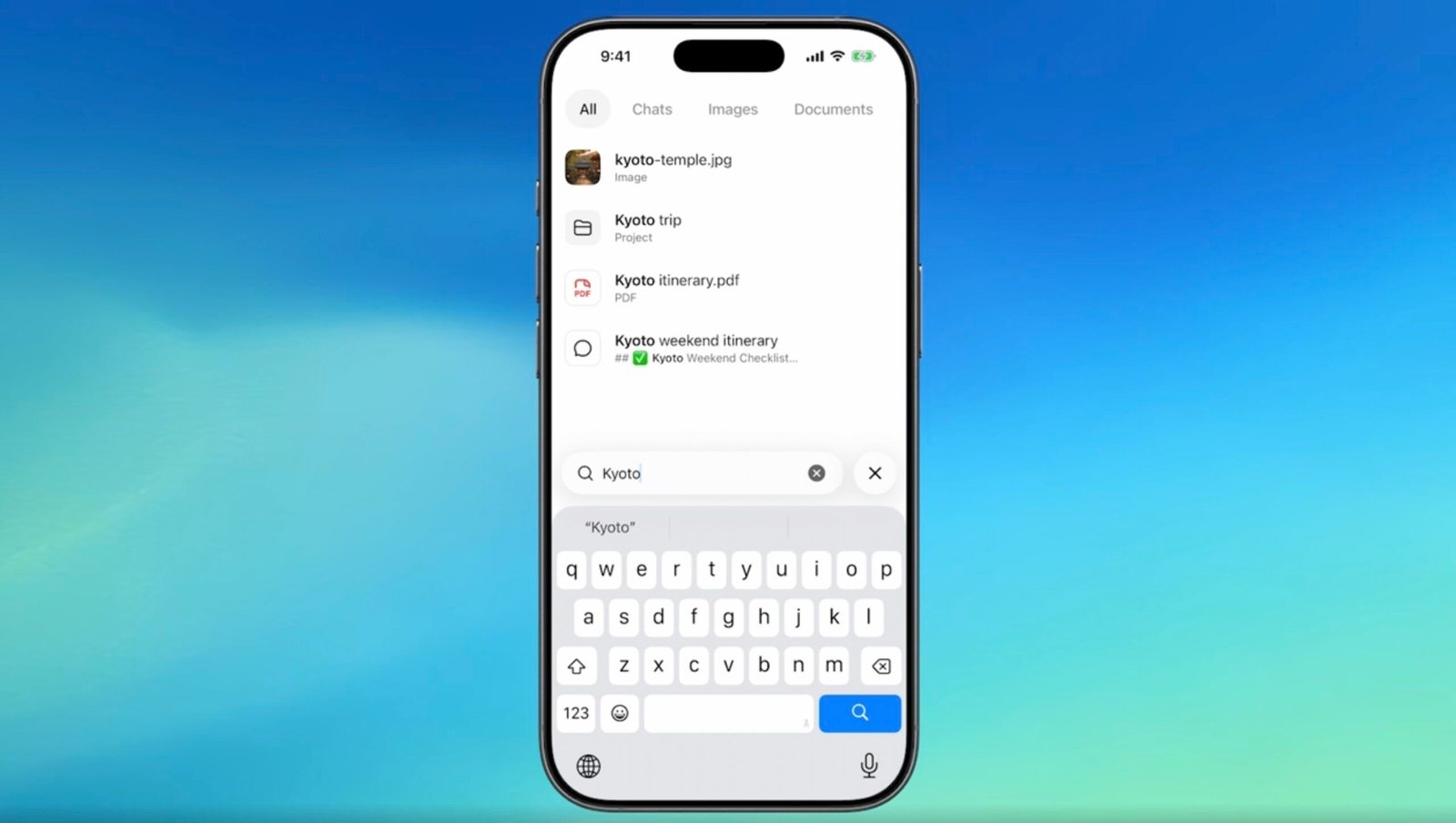
The new ChatGPT search upgrade lets you find old conversations, projects, uploaded documents, and even generated images — all from a single search bar in the sidebar. No more guessing which chat held that perfect answer.

What’s New in the ChatGPT Search Tool?

Before this update, the sidebar search only pulled up past conversations. Your uploaded files, project folders, and DALL-E creations were effectively invisible to search. You’d have to remember exactly where you saved something or scroll through dozens of chats to find it.

Now, everything is searchable in one place. The feature is rolling out across web, iOS, and Android, and it’s available on every ChatGPT plan — including free accounts. That’s right, you don’t need a Plus or Pro subscription to use it.

How to Use the New Search

Using it is simple:

  • Click the search bar in the ChatGPT sidebar
  • Type what you’re looking for
  • Use the new filters to narrow results by type — chats, projects, images, or documents
  • Click any result to open it directly in ChatGPT

That’s it. The filters are the real game-changer here. If you know you’re looking for an image you generated for a specific project, you can filter by “images” and then by project name. It cuts the search time from minutes to seconds.

Why This ChatGPT Search Update Matters

This isn’t just a convenience tweak. For people who use ChatGPT for ongoing projects, research, or document analysis, this is a massive quality-of-life improvement.

Think about it. If you’re a writer researching a book, you might have dozens of chats about different chapters, plus uploaded PDFs, plus reference images. Before, finding the right one meant clicking through each chat to see what was inside. Now, one search brings everything up together.

The timing is also notable. This rollout lines up closely with OpenAI’s recent GPT-5.6 launch, which introduced a new AI agent called ChatGPT Work. That agent can take on entire projects, connect to your apps and files, and work through multi-step tasks in the background. With that kind of long-running work, being able to find what the agent did — and where it saved things — becomes critical.

What This Means for Your Workflow

The new ChatGPT search doesn’t change what ChatGPT stores. It simply makes everything you’ve already saved much easier to surface. That’s a subtle but important distinction. Your data is still there; you just couldn’t find it before.

For regular users, this means:

  • Faster access to past research and analysis
  • Easier project management when juggling multiple threads
  • No more recreating answers you already have
  • A cleaner way to pull up generated images for reuse

It also makes ChatGPT feel more like a real workspace. When you can search across all your content the way you would in Google Drive or Notion, the tool becomes less of a chat box and more of a knowledge base.

The Bottom Line

OpenAI keeps iterating on ChatGPT, and this search upgrade is one of those quiet improvements that makes a real difference. It’s not flashy, but it solves a genuine pain point that every heavy user has felt.

So next time you’re hunting for that perfect response from three weeks ago, just use the search bar. The answer is probably right there — and now you’ll actually find it.

Continue Reading

Artificial Intelligence

Google AI Overviews are now everywhere. Here’s what that means for search

Published

on

Google AI Overviews

Google AI Overviews are becoming the default search experience

Google’s AI-generated summaries are no longer a novelty. They now appear in 43% of US searches, according to a new report from market intelligence firm Similarweb. A year ago, that figure was just 15%. The jump signals a fundamental shift in how the world’s most popular search engine presents information.

The data comes from Similarweb’s 2026 Generative AI Landscape report, which tracks the rise of AI across search and standalone platforms. It’s a staggering number, but it’s only part of the story.

What exactly are AI Overviews and AI Mode?

AI Overviews are the generated summaries that appear directly within conventional Google results. They sit above the traditional blue links, offering a direct answer to a query. Then there’s AI Mode, a more conversational interface designed for longer questions and follow-up prompts. Users can move seamlessly from an AI Overview into AI Mode, carrying the context of their original search with them.

Google says AI Mode relies on a technique called query fan-out. The system breaks a question into related subtopics and runs multiple searches in parallel. It then synthesizes the results into a single, coherent response with supporting links. It’s a clever approach, but it raises a big question: what happens to the websites that used to get that traffic?

The numbers behind the AI search boom

Similarweb’s estimates show that visits to Google’s AI Mode web experience nearly doubled, jumping from 126 million in June 2025 to 279 million in May 2026. Google itself reported in May that AI Mode had surpassed one billion monthly users. That figure counts users, not visits, so it’s not directly comparable. Still, the trajectory is unmistakable.

The 43% figure and the AI Mode numbers measure different things. The former tracks the share of US searches displaying AI Overviews. The latter reflects activity within Google’s conversational service. Both point to the same conclusion: AI is now central to the search experience.

There’s another telling metric. Similarweb recorded a 5.4% increase in the average length of Google searches after AI Mode launched. People are typing longer, more natural-language queries. They’re searching the way they’d talk to an assistant, not the way they’d keyword-stuff a query in 2015.

“People are now adopting a new, more natural way to search and discover,” said Ethan Smith, chief executive of digital marketing firm Graphite, in the report.

How Similarweb gets its numbers

It’s worth being clear about the methodology. Similarweb’s figures are estimates, not direct counts from Google or OpenAI. They draw on first-party analytics, anonymized device information, external data partnerships, and publicly available web data. The company models those inputs to estimate traffic and user behavior. It’s solid data, but it’s not the whole picture.

The broader generative AI market is booming too. Generative AI websites received an average of 9.5 billion monthly visits between June 2025 and May 2026, up 70% year-over-year. Monthly unique visitors rose 57% to 655 million, and mobile app downloads climbed 58% to 4.4 billion. Those figures cover standalone services like ChatGPT, Gemini, Claude, and Perplexity.

Publishers worry about disappearing referral traffic

Here’s the tension. Publishers have long raised concerns about referral traffic when their content gets absorbed into an AI-generated answer without producing a click. If a user gets their answer directly in the search results, why would they visit the source?

Google has responded by tweaking how external sources appear. In May, the company announced direct links within responses, article suggestions, website previews, and more prominent references to original material. The stated goal: give users more context about linked pages and make relevant websites easier to spot. Google didn’t release traffic data showing whether these changes actually helped publishers.

Similarweb has previously identified news publishers among the sectors hit hardest by traffic changes from AI-based search tools. The concern is real, and the data backs it up.

Citations don’t always mean clicks

Here’s a fascinating wrinkle. Similarweb found that the share of ChatGPT responses containing web citations increased more than fivefold over the past year. It rose from about 1.3% in June 2025 to 6.8% in May 2026, based on US desktop activity. But a citation is not a click. The measurement covers responses that display source references, not whether users actually opened them.

Citation rates also vary wildly by sector. Travel, retail, and sports responses show higher rates, likely because prices, availability, and results change so frequently. AI needs fresh data for those queries, and it needs to show its sources.

There’s a deeper mismatch at play. About 65% of URLs cited by ChatGPT were located two or three folders below the main domain. That means articles, product pages, and other detailed content. Folder-depth two alone accounted for 41.7% of cited URLs. Yet 58.8% of AI referral traffic landed on homepages.

In plain English: the pages that inform an AI answer are often not the pages users visit. Detailed content feeds the response, but the link people click takes them to a company’s main site. That’s a crucial distinction for anyone tracking the value of their content.

ChatGPT’s search update changed the game

ChatGPT’s May 7 search update gave brand links greater prominence within generated responses. The effect was immediate. Similarweb recorded a 157.7% week-over-week increase in referral traffic following the update. Homepage referrals jumped 354.7%. Before the update, about 26% to 32% of ChatGPT referral visits landed on homepages. After May 7, that proportion rose to roughly 60%, based on desktop activity measured between April 30 and May 20, 2026.

The firm observed the increases after the interface change but didn’t establish causation. Still, the correlation is hard to ignore. When AI platforms make brand links more visible, users click them more often.

Cloudflare’s answer: pay per crawl

As AI services scrape the web at scale, publishers are looking for new ways to control access. Cloudflare is testing a Pay per Crawl service that lets website operators permit, charge, or block individual AI crawlers. The private-beta program allows publishers to set a fee that an authenticated crawler must pay before accessing content.

The system can return an HTTP 402 “Payment Required” response when paid access applies. Cloudflare records completed paid requests, charges the crawler operator, and distributes the proceeds to the website owner. It’s a bold experiment in turning content access into a commercial transaction.

Cloudflare has also made configurable HTTP 402 responses available to paying customers through its AI Crawl Control service. Website operators can use the response to provide licensing terms or contact details to crawlers. Automated payments through Pay per Crawl remain in beta, but the infrastructure is taking shape.

The measures give publishers another lever to pull as AI-generated answers become more common across search and standalone AI platforms. Whether they’ll be enough to offset lost referral traffic remains an open question.

For now, the numbers tell a clear story. AI is not a side feature of search anymore. It’s the main event. And everyone from publishers to marketers to everyday users is still figuring out what that means.

Continue Reading

Trending