Connect with us

How To

Redmi Note 14 Pro & Pro+ Launched: A New Benchmark for Mid-Range Smartphones

Published

on

Redmi Note 14 Pro & Pro+ Launched: A New Benchmark for Mid-Range Smartphones

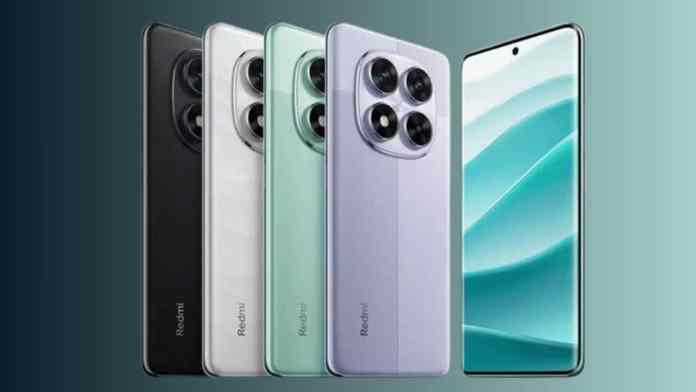
The mid-range smartphone segment just got a major shakeup. Xiaomi has officially introduced the Redmi Note 14 Pro and the more advanced Redmi Note 14 Pro+ to the Indian market. This launch isn’t just about new models; it’s a statement that premium features are no longer confined to flagship price tags. The Redmi Note 14 Pro series aims to deliver elegance and high performance without breaking the bank, directly challenging established players in this fiercely competitive space.

A Display That Steals the Show

First impressions are everything, and both phones make a stunning one. They share a magnificent 6.67-inch curved OLED display that operates at a silky-smooth 120Hz refresh rate. This means scrolling through social media, playing games, and watching videos feels incredibly fluid. What truly sets it apart, however, is the eye-searing peak brightness of 3000 nits. Consequently, viewing content under direct sunlight is no longer a struggle. Furthermore, with support for a 12-bit color depth, the panel can reproduce over 68 billion colors, making visuals exceptionally vibrant and lifelike. Protection is handled by the resilient Corning Gorilla Glass Victus 2, guarding against the inevitable scratches and minor drops of daily life.

Performance Tailored for Power Users

Under the hood, the two models diverge to cater to different user needs. The Redmi Note 14 Pro+ is equipped with the Qualcomm Snapdragon 7s Gen 3 system-on-chip. This processor is designed for seamless multitasking and offers a significant boost in gaming performance, handling graphic-intensive titles with greater ease. On the other hand, the standard Redmi Note 14 Pro utilizes the MediaTek Dimensity 7300-Ultra chipset. This chip is renowned for its efficiency, providing more than enough power for everyday tasks, demanding apps, and even some casual gaming. Both devices can be configured with up to 12GB of RAM, ensuring that switching between apps remains instantaneous and lag-free.

Software support is a critical factor for long-term value. Thankfully, Xiaomi has committed to providing three major Android OS updates and four years of security patches for this series. This policy effectively future-proofs your investment, a promise not all manufacturers make in the mid-range category. The phones run the company’s latest HyperOS interface based on Android 14, which promises a cleaner, more interconnected user experience.

Camera Capabilities: More Than Just Megapixels

For photography enthusiasts, the camera systems offer compelling reasons to choose one model over the other. The Redmi Note 14 Pro+ boasts a versatile triple-camera array led by a 50MP Light Fusion 800 primary sensor with Optical Image Stabilization (OIS). This is joined by an 8MP ultra-wide lens for capturing expansive landscapes and a dedicated 50MP telephoto camera with 2.5x optical zoom. This combination makes the Pro+ a genuine tool for creative photography, allowing for clear, detailed shots even from a distance.

In contrast, the Redmi Note 14 Pro takes a slightly different approach. It features a 50MP primary camera using a Sony LYT-600 sensor, paired with an 8MP ultra-wide shooter and a 2MP macro lens for close-up details. While it forgoes the telephoto lens, its primary sensor is highly capable of capturing detailed and color-rich images in various lighting conditions. Both models share a high-resolution 20MP front-facing camera, ensuring your selfies and video calls look sharp and clear.

Battery Life That Lasts the Distance

Battery anxiety is a thing of the past with this series. The Redmi Note 14 Pro+ packs a massive 6200mAh silicon-carbon battery, a technology known for improved energy density and longevity. When you do need to recharge, 90W wired fast charging gets you back to full power in a remarkably short time. The standard Pro model is no slouch either, featuring a robust 5500mAh battery supported by 45W fast charging. This means both phones are built to easily last a full day, even for the most demanding users, and can be quickly topped up during a short break.

Pricing and Final Verdict

So, what does this premium experience cost? The Redmi Note 14 Pro starts at an attractive price of ₹24,999 for the 8GB RAM with 128GB storage variant. The 256GB model is priced at ₹26,999. Stepping up to the Redmi Note 14 Pro+, the entry-level 8GB+128GB version starts at ₹30,999. The top-tier model with 12GB of RAM and a massive 512GB of storage comes in at ₹35,999.

Ultimately, the launch of the Redmi Note 14 Pro and Pro+ reaffirms Xiaomi’s dominance in the value-for-money segment. They offer a compelling blend of stunning displays, capable performance, versatile cameras, and exceptional battery life. Whether you prioritize the telephoto camera and ultra-fast charging of the Pro+ or the excellent balance and slightly lower price of the Pro, this series delivers elegance and power where it matters most. For more insights on how these phones compare to other models in our lineup, check out our guide on the best mid-range smartphones or our latest Xiaomi news and updates.

Continue Reading
Click to comment

Leave a Reply

Your email address will not be published. Required fields are marked *

How To

Border Light LED Wallpaper: Transform Your Android Screen with Vibrant Live Wallpaper Effects

Published

on

Border Light LED Wallpaper: Transform Your Android Screen with Vibrant Live Wallpaper Effects

Are you tired of a static, boring phone screen? The Border Light LED Wallpaper app offers a refreshing solution. This live wallpaper application brings dynamic, colorful light effects to the edges of your Android device. It is a simple yet powerful tool to make your phone stand out, especially in low-light settings.

What is the Border Light LED Wallpaper App?

This live wallpaper creates a glowing border around your screen. It displays revolving lights that dance along the edges, adding a lively touch to your device. The app works seamlessly on various phone models, both in lock and unlock mode. You can choose from multiple light styles to match your mood.

Key Features of the Border Light LED Wallpaper

The application offers several customization options. You can adjust the animation speed of the border light. A color picker lets you select any shade you prefer. The app also allows you to set a custom image as your wallpaper while keeping the border effect active. Furthermore, you can add your personal name in shining, colorful text.

Another useful feature is the ability to customize rounded corners. This ensures the border fits your device’s screen perfectly. Whether you have a notch display or a standard screen, the app adapts accordingly. TechNewzTop highlights that this app is designed for easy, single-click setup.

How to Download and Install the App

Downloading the border light app is straightforward. A direct download link is typically provided on the app’s official page or a trusted tech blog. Once downloaded, install the APK file on your Android device. After installation, open the app and select it as your live wallpaper from the settings menu.

Many users find the entire process takes less than a minute. The app is lightweight and does not consume excessive battery power. For a visual guide, you can watch the embedded video tutorial on the developer’s site. This step-by-step walkthrough ensures you get the most out of the edge lighting wallpaper.

Why Choose Border Light LED Wallpaper?

This application transforms an ordinary screen into an eye-catching display. The colorful lights make your phone look beautiful from all edges. At night, the effect resembles a bright star, shining vividly in the dark. It is an excellent way to personalize your device without installing complex software.

Moreover, the app works with both lock and unlock modes. This means the border light is always active, providing a consistent visual experience. Check out more Android apps for additional customization options. The developer, Md Guddu, has designed this app for users who want a quick and impactful screen upgrade.

In conclusion, the Border Light LED Wallpaper is a fantastic choice for anyone seeking a vibrant, customizable live wallpaper. Its ease of use and diverse features make it a standout option in the Android wallpaper market. Download it today and give your phone a fresh, illuminated look.

Continue Reading

How To

Amazing Water Live Wallpaper: Transform Your Android Screen with Flowing Beauty

Published

on

Amazing Water Live Wallpaper: Transform Your Android Screen with Flowing Beauty

Are you tired of static, boring backgrounds on your smartphone? Do you crave a screen that feels alive, refreshing, and visually captivating? If so, you’re in the right place. Today, we’re diving into the water live wallpaper experience offered by the Amazing Water Live Wallpaper app, a top-tier choice for Android users seeking a dynamic and splendid display.

This app isn’t just another wallpaper tool; it’s a gateway to a serene digital environment. By bringing the gentle flow of water, cascading waterfalls, and mesmerizing 3D effects directly to your home screen, it completely changes how you interact with your device. Android customization apps have evolved, and this one stands out for its simplicity and beauty.

Why Choose Amazing Water Live Wallpaper for Your Android?

Many apps promise stunning visuals, but few deliver such a seamless and free experience. The water live wallpaper from this developer is designed to make your phone look elegant without draining your battery or cluttering your interface with ads.

Stunning Visuals and Realistic Effects

The app specializes in high-definition, realistic water animations. You can choose from a variety of scenes, including a peaceful flowing stream, a powerful waterfall wallpaper, or a gentle rain effect. Each animation is rendered in smooth 3D, giving your screen a sense of depth and motion that static images simply cannot match.

Completely Free to Use and Download

One of the most appealing aspects of this app is its pricing model. You can download and use the entire collection of water live wallpaper options absolutely free. There are no hidden fees, no premium subscriptions, and no in-app purchases required to unlock the best content. This makes it accessible to everyone.

In a market where many apps charge for basic features, this is a refreshing change. You can enjoy a premium look without spending a single penny.

How to Install and Use the App

Getting started with this beautiful app is straightforward. Whether you are a tech enthusiast or a casual user, the setup process is designed to be hassle-free.

Step-by-Step Setup Guide

  1. Visit the Google Play Store: Open the Play Store on your Android device and search for “Amazing Water Live Wallpaper.” The app is officially listed and safe to download.
  2. Install the App: Tap the install button and wait for the download to complete. The app size is around 80 MB, so ensure you have sufficient storage space.
  3. Open and Set Permissions: Once installed, open the app. You will be prompted to allow certain permissions, such as access to your home screen settings. Accept these to enable the live wallpaper functionality.
  4. Select Your Wallpaper: Browse through the gallery of water scenes. Tap on any wallpaper you like, then select “Set Wallpaper” or “Apply.”

That’s it! Your phone will now display a stunning, moving water scene. You can easily switch between different wallpapers anytime you want a new look.

App Details and Performance Overview

Before downloading, it’s helpful to know the key specifications. The Amazing Water Live Wallpaper app has received positive feedback from the community.

  • App Name: Amazing Water Live Wallpaper
  • Size: 80 MB
  • Rating: 3.9 out of 5 stars
  • Price: Free
  • Total Downloads: Over 100,000+

The app is optimized to run smoothly on most modern Android devices. While it offers rich 3D graphics, it is designed to minimize battery consumption, making it a practical choice for daily use.

Final Verdict: Is It Worth the Download?

Absolutely. If you are looking for a water live wallpaper that combines beauty, ease of use, and a zero-cost entry, this app is a perfect match. It transforms your phone into a window to a tranquil natural scene, offering a moment of calm every time you glance at your screen.

Building on its simple interface and high-quality graphics, it is an excellent addition to any Android user’s toolkit. For more tips on customizing your device, check out our guide on best free wallpaper apps. Don’t settle for a dull screen when you can have a flowing masterpiece.

Continue Reading

How To

Meet Now App Review: Your Gateway to Effortless Dating and Genuine Friendship

Published

on

Meet Now App Review: Your Gateway to Effortless Dating and Genuine Friendship

Are you tired of swiping endlessly on dating platforms without finding a real connection? The Meet Now app offers a refreshing alternative for those seeking both romance and companionship. Designed for Android users, this free dating app combines simplicity with powerful features like video calling and instant messaging. In this guide, we’ll explore how Meet Now works, why it stands out, and how you can get started today.

What Is the Meet Now App and How Does It Work?

Meet Now is a social discovery platform that focuses on building meaningful relationships, whether you’re looking for a life partner or just a new friend. Unlike many dating apps that rely on complex algorithms, Meet Now keeps things straightforward. You create a profile, browse other users, and start conversations instantly.

One of its standout features is free video calling. You can make face-to-face calls with other members without paying a dime. This makes it easier to gauge chemistry before meeting in person. The app is available on all Android devices and requires no special permissions to run.

Key Features of the Meet Now App

  • Free video calls: Connect with people in real time through high-quality video chat.
  • Global user base: Meet singles and friends from different countries and cultures.
  • Simple interface: Navigate the app with ease, even if you’re not tech-savvy.
  • No hidden fees: All core features, including messaging and calling, are completely free.

Building on this, the app also allows you to filter profiles by location, age, and interests. This ensures you connect with people who share your values. For more tips on online dating, check out our guide on best online dating sites.

Why Choose Meet Now Over Other Dating Apps?

There are countless dating apps in the Google Play Store, but Meet Now distinguishes itself through its emphasis on genuine interaction. Many apps bombard users with paid subscriptions and ads, but Meet Now remains free for everyone.

Furthermore, the app’s video calling feature reduces the risk of catfishing. You can see and hear the person you’re talking to, building trust from the start. This is especially valuable for singles who have been disappointed by fake profiles on other platforms.

In addition, Meet Now has a strong community of active users. Whether you’re in a bustling city or a remote area, you’ll likely find someone nearby. The app’s popularity spans across continents, making it a truly global online dating app.

How to Download and Install Meet Now on Your Android Phone

Getting started with Meet Now is quick and hassle-free. Follow these steps to install the app on your device:

  1. Open the Google Play Store on your Android phone.
  2. Search for “Meet Now” in the search bar.
  3. Tap “Install” and wait for the download to complete.
  4. Open the app, create your profile, and start exploring.

As an alternative, you can download the APK file from trusted sources if the app isn’t available in your region. However, always ensure you’re using a safe source to avoid malware. Once installed, you can immediately browse profiles and send messages. For a similar experience, read our review of the Meet Me app.

Tips for Success on Meet Now

To make the most of this friendship app, keep a few best practices in mind. First, complete your profile with a clear photo and a brief bio. This increases your chances of getting matches. Second, use the video call feature early in your conversations—it helps confirm compatibility.

On the other hand, be cautious about sharing personal information. While Meet Now is generally safe, it’s wise to follow standard online dating safety tips. Meet in public places for initial meetings and trust your instincts.

Finally, engage with the community. The app encourages users to be respectful and open-minded. Whether you’re seeking a serious relationship or casual friendships, your attitude will shape your experience.

Final Verdict: Is Meet Now Worth It?

Absolutely. The Meet Now app delivers on its promise of effortless dating and friendship. Its free video calling, global reach, and user-friendly design make it a top choice for Android users. While no app can guarantee a perfect match, Meet Now provides the tools to find one.

So, if you’re ready to move beyond superficial swipes, download Meet Now today. Join millions of users who have already discovered a better way to connect. Share this article with friends who might also benefit from this fantastic Android dating app.

Continue Reading

Trending