Connect with us

How To

Samsung Galaxy M16 5G: Fresh Leaks Reveal New Design and Upgraded Specs Ahead of Launch

Published

on

Samsung Galaxy M16 5G: Fresh Leaks Reveal New Design and Upgraded Specs Ahead of Launch

The Samsung Galaxy M16 5G is shaping up to be one of the most anticipated budget smartphones of early 2025. Following the success of the Galaxy M15 5G, which launched in March 2024, Samsung is reportedly preparing a successor that brings both visual and performance enhancements. Recent leaks have given us a clear look at the phone’s design and key specifications, and the news is exciting for fans of affordable 5G devices.

What’s New in the Samsung Galaxy M16 5G Design?

The leaked renders of the Samsung Galaxy M16 5G showcase a refined aesthetic that sets it apart from its predecessor. While it retains the budget-friendly DNA of the M series, several design elements have been updated.

Color Options and Finish

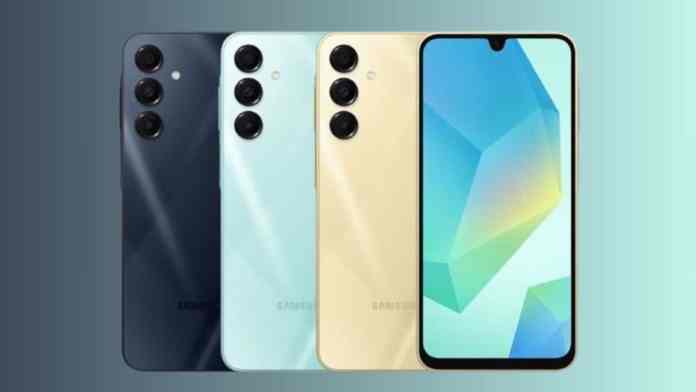
The phone is expected to launch in three vibrant colors: dark grey, mint green, and a peachy tone. These options cater to a wide range of tastes, from classic to trendy. A standout feature is the light-ray effect on the back panel, which adds a subtle three-dimensional look. This is a clear departure from the micro-grid texture found on the Galaxy M15 5G.

Camera Module and Front Design

The camera layout has also been tweaked. Unlike the M15, which borrowed a design language similar to the Samsung Galaxy S24, the M16 5G separates the bottom sensor from the other two, creating a more distinct arrangement. On the front, the phone features an Infinity-U notch for the selfie camera, a hallmark of budget devices. The chin at the bottom is slightly thicker, which helps keep costs down, but the overall look remains modern with flat metallic sides and rounded edges.

Performance Upgrades: Dimensity 6300 and 8GB RAM

Under the hood, the Samsung Galaxy M16 5G is expected to pack a MediaTek Dimensity 6300 processor. This chip features two Cortex A76 cores clocked at 2.4 GHz and six Cortex A55 cores at 2 GHz, paired with an Arm Mali-G57 MC2 GPU. According to leaked benchmarks, the phone scored 552 in single-core and 1,611 in multi-core CPU tests, showing a noticeable improvement over the Dimensity 6100+ in the M15 5G.

In addition, the device is rumored to come with 8GB of RAM, ensuring smooth multitasking for everyday apps and light gaming. It will likely run on Android 14 out of the box, providing access to the latest features and security updates.

Launch Timeline and Market Focus

The Samsung Galaxy M16 5G has already appeared on India’s BIS certification website, strongly suggesting that India will be one of the first markets to receive the device. Based on the launch pattern of the Galaxy M15 5G, we can expect an official announcement in early 2025. Samsung is likely to position this phone as a strong contender in the sub-$200 segment, competing with other budget 5G offerings from Xiaomi and Realme.

For those looking to upgrade from an older M-series phone, the Galaxy M16 5G promises a meaningful leap in both design and performance. Check out our guide to the best budget 5G phones of 2025 for more comparisons.

Final Thoughts on the Galaxy M16 5G Leaks

While Samsung has yet to confirm these details, the leaks paint a promising picture. The Samsung Galaxy M16 5G appears to be a well-rounded budget device that doesn’t cut corners on design or performance. The new light-ray finish and upgraded chipset should appeal to users who want a modern-looking phone without breaking the bank.

As we wait for the official launch, it’s worth noting that Samsung has been consistent in delivering value through its M series. If the leaks hold true, the Galaxy M16 5G could be one of the best options for 5G connectivity on a budget. Stay tuned for more updates, and don’t forget to read our comparison of the entire Galaxy M series to see how the new model stacks up.

Continue Reading
Click to comment

Leave a Reply

Your email address will not be published. Required fields are marked *

How To

How to Download YouTube Videos on Android: A Complete Guide for 2025

Published

on

How to Download YouTube Videos on Android: A Complete Guide for 2025

YouTube has become an essential part of modern entertainment and learning. Whether you are commuting, traveling, or simply want to save data, having the ability to download YouTube videos on Android can be incredibly useful. This guide covers four reliable methods to save videos directly to your device for offline watching.

Method 1: Use YouTube Premium for Official Offline Downloads

The most straightforward way to download videos is through a YouTube Premium subscription. This official method ensures you stay within YouTube’s terms of service while enjoying ad-free viewing and background playback.

Steps to Download with YouTube Premium

Open the YouTube app and locate the video you want to save. Tap the “Download” button located below the video player. Select your preferred video quality — options typically range from 144p to 1080p depending on your subscription. The video will be saved to your Downloads library, accessible from your profile icon.

However, there are limitations. Without a Premium subscription, free downloads are capped at 360p quality and are only available in select regions like India. Additionally, downloaded videos can only be played within the YouTube app and cannot be shared or transferred to other devices.

Method 2: Download Videos with the Seal App

If you need more flexibility and higher quality, the Seal app is an excellent open-source alternative. It allows you to download YouTube videos on Android in resolutions up to 4K and save them directly to your device storage.

How to Use Seal

First, download the Seal APK from a trusted source and install it on your device. Open YouTube, find your desired video, and tap the Share button to copy its link. Launch the Seal app, paste the link into the “Video link” field, and tap the download icon. Choose your preferred format — such as MP4 or WebM — and resolution, then tap “Download.” The file will be saved in the app’s designated folder and can be shared freely.

This method is ideal for users who want to keep permanent copies of videos for offline viewing or sharing with friends.

Method 3: Install NewPipe for a Feature-Rich Experience

NewPipe is a lightweight YouTube client that offers premium features for free. It not only lets you download YouTube videos on Android but also provides background playback and blocks ads entirely.

Setting Up NewPipe

Download the NewPipe APK from its official website and install it. Open the app and search for the video you want. Tap the “Download” button below the video player, select the desired quality — up to 1080p — and confirm the download. Choose a folder for saving the file, and the video will be stored directly on your device.

NewPipe does not require a Google account or any subscriptions, making it a popular choice among users who value privacy and control. The interface is clean and intuitive, resembling the standard YouTube app but without ads or tracking.

Method 4: Use SSYouTube Online Tool

For those who prefer not to install any apps, SSYouTube offers a simple web-based solution. This free online tool allows you to download YouTube videos on Android directly through your mobile browser.

How to Use SSYouTube

Open your browser and visit the SSYouTube website. Copy the link of the YouTube video you want to download and paste it into the input field. Tap the red arrow button, choose your desired resolution from the list, and tap “Download.” The video will be saved to your browser’s Downloads folder.

This method is quick and requires no installation, but it may display ads on the website. It works best for occasional downloads when you need a fast solution without committing to a new app.

Important Considerations Before Downloading

Before you start downloading, remember to respect YouTube’s copyright and fair use policies. Avoid downloading copyrighted content such as movies, music videos, or TV shows without permission. The methods described here are intended for personal use only, such as saving tutorials, vlogs, or creative commons content.

Additionally, always download APK files from trusted sources to avoid malware. Stick to official websites or well-known repositories like GitHub for apps like Seal and NewPipe.

Final Thoughts

Choosing the right method to download YouTube videos on Android depends on your priorities. If you want simplicity and legality, YouTube Premium is the best choice. For maximum flexibility and high-resolution downloads, the Seal app or NewPipe are excellent free alternatives. And if you need a no-installation solution, SSYouTube works perfectly for quick jobs.

By following these steps, you can enjoy your favorite YouTube content offline anytime, anywhere. For more tech tips, check out our guide on how to troubleshoot a slow iPad or learn how to hide WhatsApp blue ticks.

Continue Reading

How To

The Ultimate Free Online Dating App for 2024: Modern, Simple, and Effective

Published

on

The Ultimate Free Online Dating App for 2024: Modern, Simple, and Effective

Looking for a free online dating app that actually works in 2024? You are not alone. The world of digital romance has exploded, especially in India. More people than ever are turning to their smartphones to meet new friends, chat, and even find love. But with so many options, finding a truly modern and cost-free solution can feel overwhelming. This article cuts through the noise to introduce you to a standout choice.

Online dating is no longer a niche activity. It has become a mainstream way to connect. In India, the trend has seen remarkable growth. Reports suggest that a significant majority of young adults are now using dating platforms. This shift reflects a broader change in how we socialize. Building on this momentum, the app we are about to discuss offers a fresh approach without any hidden fees.

Why Choose a Free Online Dating App in 2024?

Many dating platforms promise free access but quickly push users toward premium subscriptions. This can be frustrating. A genuinely free online dating app removes that barrier. It allows you to explore, chat, and connect without worrying about your wallet. For singles in India, where affordability matters, this is a game-changer in the best sense.

Moreover, modern dating apps are designed with user experience in mind. They prioritize safety, ease of use, and meaningful interactions. Instead of endless swiping, some apps now focus on helping you build real connections. This is exactly what many users are looking for in 2024.

Key Features of a Modern Dating Platform

What makes a dating app stand out today? It is not just about being free. A top-tier platform should offer:

  • Video calling: Allows you to see and talk to matches before meeting in person.
  • User-friendly interface: Simple navigation that anyone can master quickly.
  • Large user base: More people mean more potential matches, especially in regions like India.
  • Privacy controls: Essential for feeling safe while dating online.

This particular app checks all these boxes. It has around 50,000 active users and continues to grow. Whether you are a shy beginner or a seasoned dater, it provides a comfortable space to start.

How to Download and Start Using This Free Dating App

Getting started is straightforward. You do not need any technical skills. Simply follow these steps:

  1. Find the download link on the official website or trusted app store.
  2. Click the install button. The app is lightweight and downloads quickly.
  3. Create a profile with a few basic details. Add a photo to attract more interest.
  4. Start browsing profiles. You can send messages or initiate a live video call instantly.

This process takes less than five minutes. Once set up, you can explore a community of like-minded singles. For those who feel lonely or want to expand their social circle, this app offers a direct solution.

Who Can Benefit from This App?

This platform is designed for everyone. Single men looking for a girlfriend, women seeking a boyfriend, or anyone wanting new friends will find value here. The app is particularly popular among Indian users. It bridges the gap between traditional social circles and modern digital networking.

As a result, it has become a go-to tool for those who are shy or busy. Instead of waiting for chance encounters, you can proactively meet people from the comfort of your home. For more tips on safe online dating, check out our guide on staying secure while dating online.

Tips for Making the Most of Your Experience

To succeed on any dating platform, keep these pointers in mind:

  • Be honest in your profile. Authenticity attracts genuine connections.
  • Use video calling early. It helps confirm chemistry and builds trust.
  • Stay patient. Not every match will lead to a conversation, but persistence pays off.

Remember, the goal is to have fun and meet new people. Do not put too much pressure on yourself. The app is a tool, not a magic wand.

Final Thoughts on the Best Free Online Dating App 2024

To sum up, this free online dating app represents a modern, accessible way to connect in 2024. It is free to download, easy to use, and packed with features like video calling. For anyone in India or beyond who wants to explore online dating without spending money, this is an excellent choice.

So, why wait? Download the app today and start your journey. If you found this article helpful, share it with friends who might also be looking for love. For more app reviews and tech tips, visit our latest app reviews page.

Have you tried this app yet? Let us know in the comments below. Your feedback helps others make informed decisions.

Continue Reading

How To

WhatsApp Privacy Settings Update: Beta Android Users See a New Layout for Avatar and Privacy Options

Published

on

WhatsApp Privacy Settings Update: Beta Android Users See a New Layout for Avatar and Privacy Options

WhatsApp is rolling out a WhatsApp privacy settings update for beta Android users. This change rearranges the entry points for privacy and Avatar settings within the app’s menu. The instant messaging platform is swapping the positions of these two features to reflect a new priority.

According to reports from WABetaInfo, the Meta-owned company is introducing this update in the settings section. The goal is to make the privacy entry point more accessible. In the previous interface, the Avatar section sat above the privacy section. Now, the privacy settings have moved to a more prominent position.

What Is Changing in WhatsApp Settings?

The core of this WhatsApp privacy settings update is a simple swap. The privacy entry point now appears above the Avatar entry point. This change is currently rolling out to select beta testers on Android. The update is available through the Google Play Beta Program in version 2.23.1.5.

This means that users will see the privacy option first when they open the settings menu. The Avatar option will be placed directly below it. For those who have not received the update yet, it will arrive in a future beta release.

Why Is WhatsApp Making This Change?

WhatsApp’s decision to prioritize the WhatsApp privacy settings entry point underscores the company’s commitment to user privacy. By placing it higher in the settings hierarchy, the platform makes it easier for users to access privacy controls quickly. This is a strategic move that aligns with broader industry trends.

As a result, users can now manage their privacy options without scrolling past other settings. This small but meaningful adjustment reflects a shift in design philosophy. It puts user control front and center.

How Does This Affect Avatar Settings?

The Avatar settings, which allow users to create a digital representation of themselves, are still fully accessible. They have simply moved to a lower position in the menu. This change does not affect the functionality of Avatars. It only changes where you find them in the settings list.

For iOS users, the Avatar entry point does not separate account and privacy settings. However, this Android-specific update focuses solely on the rearrangement.

How to Access the New WhatsApp Privacy Settings Layout

To see the new layout, you need to update your WhatsApp app to the latest beta version. Here are the steps:

  • Open the Google Play Store on your Android device.
  • Search for WhatsApp and join the beta program if you haven’t already.
  • Update the app to version 2.23.1.5.
  • Open WhatsApp and navigate to Settings to see the new arrangement.

Once updated, you will immediately notice the privacy section is now at the top. This is a simple change, but it makes a significant difference in user experience.

Staying Informed About Future Updates

For users who want to stay ahead of the curve, following tech news sources like TechNewzTop is recommended. These sources provide timely updates on new features and changes. Keeping your app updated ensures you always have the latest improvements.

If you have any questions about this post, feel free to leave a comment below. Share this article with your friends on social media if you found it helpful. For more insights, check out our guide on How to Use Meta AI on WhatsApp and our article on WhatsApp New Privacy Settings for Desktop Beta Users.

Continue Reading

Trending