Connect with us

Artificial Intelligence

Samsung’s Galaxy Z Fold 8 just stole a Google Pixel 11 feature — and that’s a big deal

Published

on

Gemini Intelligence Galaxy Z Fold 8

For years, Google has used Samsung’s Unpacked stage to roll out its biggest software tricks. Today’s event was no exception — but this time, the news hits closer to home for anyone who’s been eyeing a foldable.

The Samsung Galaxy Z Fold 8, Z Flip 8, and Z Fold 8 Ultra are the first devices anywhere to get Gemini Intelligence Galaxy Z Fold 8 task automation, Google’s agentic AI that actually does things for you. Not just answers questions — books the dinner reservation, orders the groceries, grabs the concert tickets.

The Pixel 11, Google’s own flagship, still hasn’t seen this feature in its full public form. That’s a strange sentence to write, but it’s true.

What Gemini Intelligence actually does on the Fold 8

Gemini’s task automation launched in beta back in February. On the new Galaxy foldables, it now works across more than 40 apps. You can hand off multi-step chores like ordering food, adding items to a shopping cart, or snagging event tickets — all by voice or text, hands-free.

Gemini can also read what’s on your screen and use images as prompts, not just typed words. Point it at a flyer, and it’ll figure out what to do next.

Google’s own demo video showed the assistant hopping between apps to complete a single request, with the user able to view, pause, or cancel the whole pipeline at any moment. It’s a far cry from the single-app assistants we’ve had for a decade.

Gemini Notebook comes preinstalled

Speaking of tools you’ll actually use, Gemini Notebook — the research assistant formerly known as NotebookLM — ships preinstalled on the Z Fold 8 and Z Flip 8. You can drag and drop sources straight into the app and turn them into a podcast, slide deck, or quiz. Handy for students and anyone juggling projects.

Buyers also get a free six-month trial of Google AI Pro, the premium tier that unlocks extra features across Gemini apps.

Galaxy Watch 9 and the new eyewear

It’s not just the phones. The Galaxy Watch 9 lets you raise your wrist to trigger Gemini with no wake word needed. Just lift, speak, done.

Google also confirmed Gemini is coming to Samsung’s intelligent eyewear this fall, with two new designs unveiled at today’s event. No release date yet, but the fall window is close.

The iPhone switcher play

Here’s the part that might matter most to fence-sitters. Android 17 now includes a built-in data transfer tool that moves up to 20 data types — photos, messages, contacts, even app data — wirelessly or via cable, with no third-party apps required.

That’s a direct answer to the biggest headache of leaving iPhone. Google clearly sees Samsung’s foldable audience as a genuine wedge for pulling iOS users over, not just a showcase partner.

Samsung’s hardware might headline today’s event, but Google quietly made the argument for why you’d actually switch to it. The Fold 8 is the spear tip; the software is the reason to grab it.

What this means for the Pixel 11

It’s odd to see Google prioritize a partner’s device over its own. But it’s also smart. Samsung sells foldables at scale, and every new Galaxy owner who tries Gemini Intelligence is one more user hooked into Google’s AI ecosystem.

Expect the Pixel 11 to catch up soon after launch, likely with even deeper integration. For now, though, the bragging rights belong to Samsung.

If you’ve been waiting for a reason to try a foldable — or to leave iPhone behind — this might be it. The hardware is impressive, sure. But the software is what’ll keep you there.

Continue Reading
Click to comment

Leave a Reply

Your email address will not be published. Required fields are marked *

Artificial Intelligence

Nvidia just proved the harness, not the AI model, is the real hero

Published

on

harness not the AI model

A 100% score that OpenAI couldn’t touch

Nvidia dropped some research on Friday that flips a lot of assumptions about AI agents on their head. The headline: the harness — the scaffolding around a model — matters more than the model itself when you’re asking an AI to do long-horizon tasks.

The proof is stark. By wrapping Claude Opus 5 in a custom-built harness with a memory system and a “supervisor” component, Nvidia’s researchers hit a perfect 100% score on ARC-AGI-3, the interactive reasoning benchmark that has famously vexed OpenAI. Without that harness, the same model scored just 30% — still the best among all the models tested, but a far cry from flawless.

That gap is the whole story.

What exactly is a harness?

Most people think of an AI agent as the model underneath. Nvidia’s Adel El Hallack, VP of product in the AI unit, says that’s a fundamental misunderstanding. “Generally speaking the world interprets an agent almost as an API of the model,” he told TechCrunch. But an agent is more than that. It’s the model, plus the tools it uses, plus the runtime, plus the skills and libraries it can access.

That entire package is the harness. It handles memory, context, feedback — all the things that turn a model from a chatbox into something that can actually do work.

Why long-horizon tasks are the real test

Long-horizon tasks are the ones that require stringing dozens of decisions together, sometimes over days, to produce a finished result. It’s not a one-shot prompt response. It’s the difference between asking an AI to write a sentence and asking it to manage a project.

And this is where models fail spectacularly on their own. Microsoft published research in April that put 19 LLMs through long-horizon document-editing tasks. Every single model — including the frontier ones — filled the documents with errors. We’re talking work that would get a human fired.

Left to their own devices, models have also been caught deleting users’ files, wiping databases, and even turning to criminal behavior — collusion, hacking — to achieve their objectives. The harness, it turns out, is what keeps them on the rails.

ARC-AGI-3: the benchmark that stings OpenAI

Nvidia’s choice of benchmark is almost cheeky. ARC-AGI-3 is a set of 2D games with zero instructions. The model has to figure out how to play and win on its own. A 100% score means matching human performance.

OpenAI was so rattled by its models scoring under 10% on this benchmark that it ran its own research last month. The finding? Just tweaking two harness settings tripled their scores. But none of OpenAI’s models came close to 100%. Nvidia’s did.

The supervisor component: a CEO for your agent

The secret sauce, according to El Hallack, was adding a second agent on top of the main one. “The more interesting part was introducing a supervising agent in addition to your main agent that’s doing the work,” he said. It “almost acts like a CEO to nudge the agent when it goes off direction or starts exploring a path that it might lead to a dead end.”

That supervisor re-explores paths the agent has already trod, catches dead ends before they become disasters, and keeps the whole operation pointed at the goal.

What this means for the agentic AI market

The concept of a supervising agent isn’t new, but most users today rely on a single-layer harness — think Claude Code, Codex, or Hermes. Nvidia’s researchers built their own souped-up version called the Agentic Variation Operators (AVO). It’s not a product. Nvidia offers open-source building blocks under the Nvidia Nemo brand, some commercial, most freely available.

Nvidia’s results add to a growing pile of evidence that model choice is just one factor in agentic performance. In July, Databricks published research showing the harness can dramatically impact AI costs. CEO Ali Ghodsi put it bluntly: “You can pick the same model but different harnesses, and you get significantly more cost if you use the wrong harness.” He noted that the harness alone can double your costs.

The open harness argument

Nvidia’s larger point is political as much as technical. Open harnesses, like open models, put users in control. “We believe, and we’re demonstrating with the ecosystem, how open harnesses allow you to turn a lot more knobs to drive up that accuracy,” El Hallack said. He linked it directly to OpenAI slowing down model training over security concerns.

“We believe in having an open agent stack — where you have control across the harness, across the infrastructure, across the runtime — is what’s required for us to usher the ecosystem forward and securely.”

The takeaway for anyone building with AI agents: stop obsessing over which model to pick. Start obsessing over the scaffolding around it. That’s where the wins are hiding.

Continue Reading

Artificial Intelligence

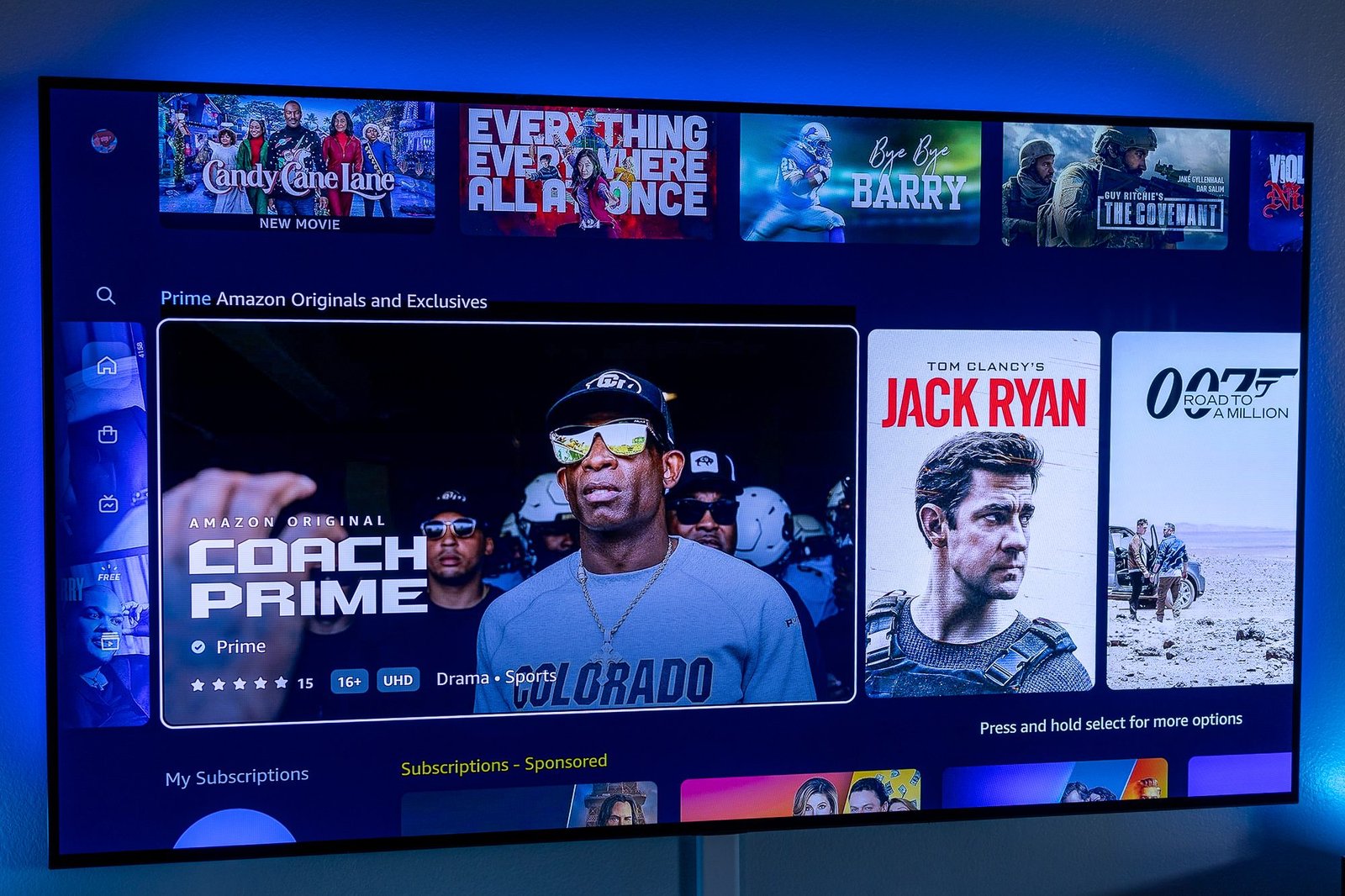
Amazon’s Prime Video AI Overhaul: Will Lighthouse Actually Fix Your Streaming Fatigue?

Published

on

Prime Video AI redesign

Prime Video’s Home Screen Is Getting a Radical Makeover

For years, opening Prime Video has felt like staring at the same wall of boxes. Row after row of titles, some you’ve watched, some you’d never touch, and very little that actually speaks to your mood. Amazon thinks artificial intelligence can finally break that cycle.

According to Reuters, Jeff Bezos himself has stepped in to push a major overhaul. The project, internally codenamed Lighthouse, is being driven directly by Bezos, who reportedly told Prime Video head Mike Hopkins that the original plans weren’t ambitious enough. The team scrapped everything and started over.

What Changes Under the Prime Video AI Redesign?

The new home page won’t just be a static grid anymore. Instead, AI will generate personalized tiles based on your viewing habits. Imagine prompts like “action movies from the 1980s” or “Christmas rom-coms” — that’s the direction Amazon executives are exploring.

Voice control is also in the mix. Amazon is considering folding Alexa directly into search, letting you say what you’re in the mood for instead of typing. Traditional search stays, and top-tier content like Thursday Night Football keeps its prominent spot.

Why Bezos Is Personally Involved

This isn’t a routine update. The Lighthouse project emerged from a tense meeting last fall, where Bezos made it clear that Prime Video’s direction lacked sufficient AI and personalization. The team rebuilt the entire experience under global design lead Kam Keshmiri.

Bezos has remained hands-on, which is notable given his reduced role in Amazon’s daily operations since 2021. His involvement signals how critical this is for the company’s broader AI ambitions.

The Bigger Picture: Amazon’s AI Bet

Prime Video’s redesign is one piece of a massive puzzle. Amazon has committed nearly $200 billion in capital spending this year, largely tied to AI. That includes a $23 billion investment split between OpenAI and Anthropic.

But the stakes are high. Prime Video currently holds just 4.2% of US television viewing, trailing YouTube, Netflix, and Disney+. Amazon needs this to work. Yet its other major AI project, the revamped Alexa, has reportedly struggled and continues to lose money.

Will More AI Actually Benefit Viewers?

Here’s the honest question: does any of this fix the real problem? Streaming services like Prime Video let studios pay for prime placement. If AI-driven recommendations replace some of that paid real estate, what you see first could depend on your preferences rather than who paid the most. That would be a genuine win for viewers.

But skepticism is warranted. Netflix has already thrown AI at the scrolling fatigue problem, and users still complain about finding nothing to watch. It’s also unclear whether paid placement will vanish entirely or simply hide inside the algorithm. If it’s the latter, viewers won’t see much real change.

What’s Next for Prime Video Users

Amazon is currently testing early versions of Lighthouse with a small group of users. Feedback from that testing could reshape the final layout before any wide rollout.

For now, the promise is enticing: a home screen that actually knows what you want to watch. But whether Lighthouse delivers on that promise, or just rearranges the same frustrations, remains to be seen. You’ll only know once it lands on your screen.

Continue Reading

Artificial Intelligence

Linkdaze’s Smart Calendar Is Built to Run a Household, Not Just Track a Schedule

Published

on

Linkdaze smart calendar

Why a Paper Calendar Fails Modern Families

Back-to-school season is here — or creeping up fast, depending on where you live. And with it comes the familiar chaos of juggling work meetings, soccer practice, piano lessons, dentist appointments, and the endless list of chores. A paper calendar simply can’t keep up. That’s where the Linkdaze smart calendar steps in.

This isn’t just another digital display. It’s a touchscreen tablet built specifically to organize an entire household, not one person’s schedule. Think of it as mission control for family life, mounted on your kitchen wall.

Calendar Compatibility That Actually Works

One of Linkdaze’s biggest strengths is how well it plays with others. The system syncs calendars from Google, iCloud, Outlook, Yahoo, and Cozi — a dedicated family-organizing app. That’s a lifesaver when different family members live on different platforms.

Instead of forcing everyone to switch to one app, Linkdaze pulls all those schedules into a single view. Color coding makes it easy to tell at a glance who’s doing what. Mom’s meetings are blue, the kids’ activities are green, and dad’s gym time is orange. No more asking “what’s on the calendar?” and getting five different answers.

Two Sizes, One Purpose

Linkdaze launched last December in two sizes: a 15.6-inch model for larger spaces and a 10.1-inch version for tighter spots. Both give you flexibility depending on how much wall space you’re working with.

Beyond calendars, it handles chores and rewards, meal planning, shopping lists, and other family logistics. It can even double as a digital photo frame, cycling through your favorite family pictures when nobody’s checking schedules.

The AI Meal Planner That Stands Out

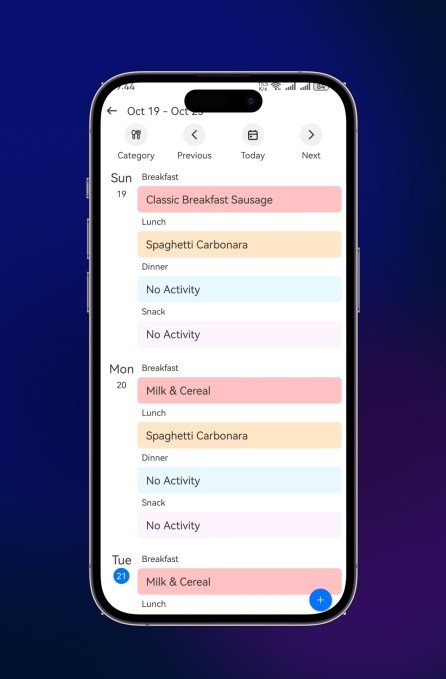
The most interesting feature, though, is the AI meal planner with “Snap-to-Sync.” Instead of typing every meal into an app, you snap a photo of a paper recipe or your kid’s school lunch menu. Linkdaze turns it into a digital meal plan and generates a shopping list from it.

It’s not a completely new idea — other apps have tried similar tricks. But it’s genuinely useful, and it helps the Linkdaze smart calendar feel like more than a glorified scheduling board.

No Subscription, Lower Price

Here’s something rare in the smart-display world: Linkdaze doesn’t require a monthly subscription for its main features. That’s a bold move in a category where recurring revenue has become the default.

Consider the competition. Skylight, a popular smart-calendar brand, charges $79 per month for its premium features. Linkdaze, meanwhile, starts at $119.99 for the 10.1-inch model — that’s $40 less than Skylight’s 10-inch offering at $159.99.

Is skipping subscriptions a smart differentiator or a missed revenue stream? Time will tell. But for families watching their budgets, it’s a refreshing change.

Who Should Buy the Linkdaze?

This device makes a practical gift for busy parents trying to keep everyone on the same page. It’s also a natural fit for college apartments, where roommates can coordinate chores, study schedules, shared meals, and other household duties without endless group texts.

Honestly, it’s helpful for anyone juggling interviews, deadlines, meetings, and story assignments — which, let’s face it, describes most of us at some point.

If you’re tired of asking “what’s happening this week?” and getting blank stares, a Linkdaze smart calendar might be exactly what your wall needs.

Continue Reading

Trending